Lock Screen, Widgets - YoLock
- 243.00
- 4.0
- Installs
- 5.00M
- Price
- Free
Screenshots
Analysis by Reviewed
I judge a lock-screen personalizer by whether it makes everyday checks quicker, not just whether it looks different. Lock Screen, Widgets - YoLock aims to put useful glanceable information and controls on the screen you see first. That idea is appealing if you often check your phone for small bits of information, though a replacement lock screen also needs to feel dependable and fit naturally into your routine.
YoLock is a free personalization app from Digital Dreamworks Studio, with optional in-app purchases priced from $1.49 to $38.99 per item. It is rated for Everyone and supports Android 5.0 and later. The app has a 4.0 average from around 36,000 ratings and has been installed over 5 million times, which suggests plenty of people are interested in changing how their lock screen works. Those figures are useful context, but the right question is still whether its approach suits your phone habits.
Why YoLock Stands Out
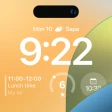
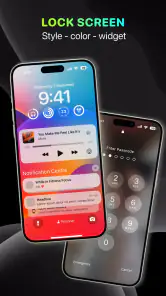
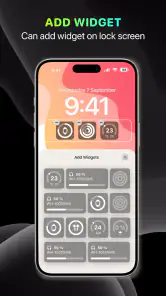
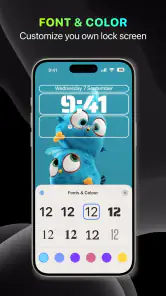
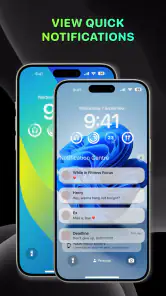
First off, the sheer customization options in Lock Screen, Widgets - YoLock are mind-blowing. You can add all sorts of widgets, from weather updates to calendar events and even music controls. It’s like having a mini control center without unlocking your phone. The app’s interface is intuitive, making it super easy to drag and drop widgets wherever you fancy. Plus, the sleek design ensures your lock screen looks classy, not cluttered.
Widget Wonderland
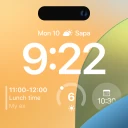
Widgets are the heart and soul of YoLock. Whether you’re a fitness fanatic who needs to keep track of steps, or someone who loves staying on top of news updates, there’s a widget for you. The app supports a plethora of widgets, and the best part? You can customize their size and style. It’s like having a tech-savvy friend who knows exactly what you need at a glance.
Make the screen useful, not busy
The most convincing way to use a widget lock screen is to pick only the information you genuinely check. For instance, a calendar view paired with music controls can help when I am getting ready: I can glance at the day’s plans, then manage playback without turning the lock screen into a wall of tiny panels. A weather widget is more helpful when it answers a quick decision—whether to take a jacket—than when it simply adds another item to scan.
I would set up the layout in stages rather than filling every available space on the first try. Start with one or two essentials, use the phone normally for a day, and notice what you actually look at. If a widget is hard to read at a glance, its presence is not saving time. This small trial-and-edit routine is a practical strength of a customizable screen, but it also reveals the trade-off: more choices mean more tweaking before the layout feels settled.
Security Meets Style
Now, if you’re worried about security, YoLock has got your back. It allows you to set up multiple layers of security, ensuring that your personal information stays personal. You can mix and match between PINs, patterns, and even face recognition. It’s all about giving you peace of mind without compromising on style.
More From Our News Desk

Clash of Clans Is Won Between the Battles

Android Auto Makes the Case for Quieter Car Software

MobiOffice: Transforming Mobile Productivity with Seamless Integration

EA SPORTS FC™ Mobile Soccer: Redefining Mobile Sports Gaming

How Microsoft OneDrive Became a Mobile Productivity Giant

How Google Translate Breaks Language Barriers Effortlessly
What to consider before switching
A lock screen sits between you and the rest of your phone, so convenience has to be weighed against familiarity. If you already unlock quickly with your usual phone setup, an extra layer of customization may feel like friction rather than an upgrade. I would test the everyday sequence that matters most—waking the screen, checking a notification, then unlocking—before committing to a busy layout. Keep sensitive details off any screen you may show to other people, and choose the simplest security arrangement that feels comfortable for your routine.
YoLock is most appealing to someone who enjoys shaping a phone’s appearance and wants quick access to a few recurring bits of information. If your priority is the cleanest possible interface, or you prefer to rely on the lock screen already built into your phone, sticking with that default is a perfectly sensible choice. Compared with a wallpaper-only personalization tool, YoLock’s draw is the combination of visual changes and glanceable widgets; compared with a basic lock screen, that flexibility can be useful, but it asks you to spend time deciding what belongs there.
Simplicity and Speed
One thing that really impressed me is how light and fast the app is. Unlike other heavy customization apps that bog down your phone’s performance, YoLock runs smoothly without those annoying lags. It’s all about simplicity and speed here. The developers have clearly put a lot of thought into optimizing the app so it doesn’t drain your battery or slow down your system.
My practical advice is to judge performance over your normal day rather than after a quick setup. Pay attention to whether the screen remains comfortable to use and whether the information you added earns its place. If anything feels distracting or awkward, remove it; a restrained arrangement is often more useful than a packed one. The current version is 25.6.9, and the app has been available since February 9, 2018, giving it a longer history than a brand-new personalization experiment.
A morning routine that puts the widgets to work
Picture a weekday morning when I am packing a bag and heading out. I wake the phone to check the day’s plans, glance at the weather, and adjust music while getting ready. That is the kind of repeated, brief interaction where a thoughtfully arranged lock screen can earn its place: the benefit is not dramatic, but it may save me from opening several apps for information I only need for a moment.
The useful test is whether those glances replace actions rather than add new ones. If I still have to unlock the phone to read a crowded calendar panel, or if the controls are too small to use comfortably, the layout has failed its main purpose. I would treat each widget as a shortcut with a job, not as decoration that deserves space simply because it is available. Removing one that I routinely ignore is a better customization decision than adding another.
Choosing what belongs on a shared screen
A lock screen is visible in public in a way that an app page usually is not. That makes widget selection a privacy decision as well as a design choice. A schedule may be helpful when I am alone, but it could reveal more than I want if a phone is left on a desk or viewed by someone nearby. I would favor information that is useful at a glance without exposing details, and keep anything personal for after unlocking.
This is also a reason to avoid treating every notification or widget as equally urgent. A screen crowded with competing items can make important information harder to spot and invite unnecessary checking. A small set of essentials gives the layout a clearer visual hierarchy: I know where to look, and the phone feels less like a dashboard demanding attention. That restraint matters more to me than fitting the maximum possible amount onto the display.
What setup demands in practice
People often ask whether a custom lock screen is a set-and-forget change. I would not approach YoLock that way. A new arrangement needs a little real-world testing because what looks tidy while editing may feel cramped when the phone is in one hand or when I am in a hurry. I would make one change at a time, use the screen for a normal day, then keep or remove the change based on whether it actually helped.
Another practical question is whether it replaces the phone’s own security and lock-screen behavior. Since this is an app that changes the lock-screen experience, I would check how it behaves on my particular device before relying on it for a routine that must be seamless. Android phones can differ in their built-in interface, so the experience that feels natural on one device may not fit another. The sensible approach is to test waking, viewing information, and unlocking—not merely judge the customization screen.
Where it fits among personalization choices
For someone deciding between YoLock and a wallpaper app, the difference is purpose: a new image changes the phone’s appearance, while a widget-focused lock screen aims to change what I can see or do before unlocking. If I only want a fresh look, a wallpaper is simpler and avoids rearranging a familiar interaction. If I repeatedly check the same small set of details, YoLock has a more practical reason to be installed.
The built-in lock screen is the stronger alternative for people who value consistency, minimal setup, or the feel of the phone exactly as its maker arranged it. A general home-screen widget setup may suit someone who wants information after unlocking but does not want to alter the first screen they see. YoLock sits between those choices: more functional than a visual-only change, but more involved than leaving the default alone. Its value depends on whether that in-between role matches a habit you already have.
Who will enjoy the trade-off
I would recommend giving it a try if you like personalizing Android and can identify a few recurring checks—perhaps plans, weather, or playback—that would be more convenient at the lock screen. It is also a reasonable fit for someone who enjoys refining a layout rather than expecting the first arrangement to be perfect. The free starting point makes it approachable, while the optional purchases mean it is worth checking what is included before deciding to spend.
I would skip it if a stock interface already feels quick, if you prefer not to see personal information before unlocking, or if any extra visual layer makes your phone feel less straightforward. It is not automatically a productivity upgrade just because it offers widgets; convenience comes from choosing the right ones and being willing to simplify. For a person who wants a calm, unchanged lock screen, the built-in option is likely the better choice.
So there you have it, folks. If you're itching to give your lock screen a makeover, YoLock is definitely worth a shot. It’s more than just a lock screen app; it’s a lifestyle upgrade. Whether you’re all about aesthetics or functionality, this app strikes the perfect balance. Don’t just take my word for it, give it a try and see the magic unfold!
My recommendation is more measured: try YoLock if you like experimenting with your phone and can name a few things you want to see without unlocking it. Keep the layout selective, then decide whether the convenience is real in your daily routine. If you mainly want a new background, or if any extra step between waking and using your phone bothers you, a simpler wallpaper choice or the built-in lock screen is likely a better fit. For people who enjoy a personal touch with practical at-a-glance information, it is a worthwhile free option to explore, with paid items available if they choose to buy them.
Lock Screen, Widgets - YoLock Frequently Asked Questions
What does YoLock change on my phone’s lock screen?
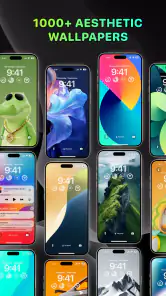
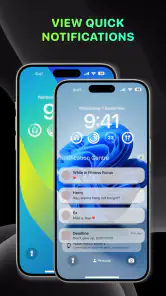
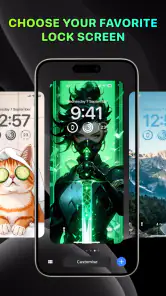
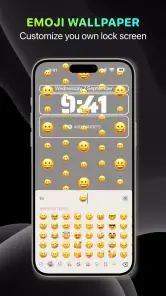
YoLock is designed to personalize your lock screen with wallpapers, widgets, custom quick settings, and notifications. It brings several lock-screen elements together, so you can make the screen more useful as well as adjust its appearance. If you mainly want to change your wallpaper or see information at a glance, its mix of visual and practical options may be worth exploring.
Who develops YoLock, and what should I know about its general profile before downloading?
YoLock is a personalization app from Digital Dreamworks Studio, built around changing how your phone’s lock screen looks and what it displays. It has an average rating of 4.0 from around 36,000 ratings, and more than 5 million installs. Its content rating is Everyone, so it is presented as suitable for a broad audience. These details can help you decide whether the app fits your preferences.
Is Lock Screen, Widgets - YoLock free to download?
Yes, YoLock is free to download, so you can try its lock-screen customization without paying upfront. The app also includes in-app purchases, with items priced from $1.49 to $38.99. That means some features or customization options may involve an additional cost. If you prefer not to spend money, review any purchase prompt carefully and avoid confirming an optional transaction.
What is Lock Screen, Widgets - YoLock and how does it work?
Lock Screen, Widgets - YoLock is an app designed to enhance your smartphone's lock screen by adding customizable widgets. These widgets can display various information such as weather updates, calendar events, and quick app shortcuts, allowing users to access important information without unlocking their phones. The app offers a user-friendly interface to personalize the lock screen to suit individual preferences.
Is Lock Screen, Widgets - YoLock compatible with all Android and iOS devices?
YoLock is an Android app that requires Android 5.0 or later. It is not an iOS app, so iPhone users should not expect to install this version on their devices. Before downloading, check your Android phone’s operating system version to make sure it meets the minimum requirement. Compatibility can also depend on the specific device and how its system handles lock-screen customization.
Pros
- Customizable widgets enhance user experience.
- Sleek design with intuitive navigation.
- Fast and responsive performance.
- Supports multiple widget formats.
- Battery-efficient usage.
Cons
- Limited free version options.
- Occasional widget update delays.
- Requires frequent permissions.
- Ads in the free version can be intrusive.
- Not all features are intuitive to use.
- Category
- Personalization
- Version
- 25.6.9











