

Local Obituary Search
- 24.00
- 3.4
- Installs
- 10.00K
- Price
- Free

Screenshots
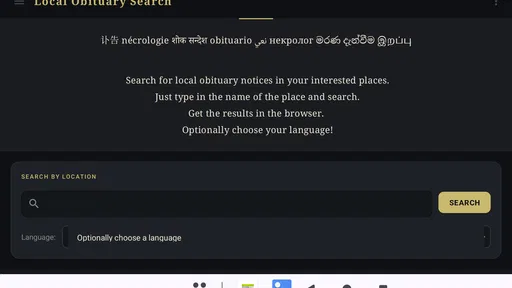
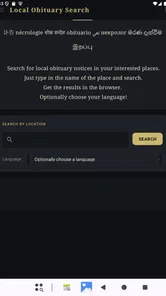
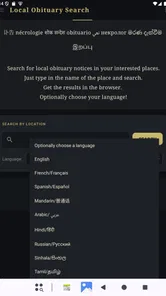
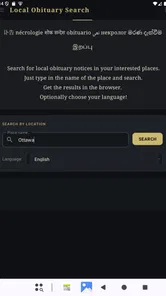
Analysis by Reviewed
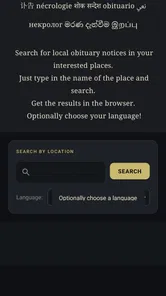
When someone asks me to find a local obituary quickly, I usually want a focused tool rather than a broad web search filled with unrelated results. Local Obituary Search, an Events app from Jey Apps, is built around that narrower need. Its purpose is simple: help you search for obituary notices connected with a local area. That makes it more practical for a very specific situation than a general news app, social network, or ordinary search engine.
I approached it as a first-time user would: install it, work out what information to enter, try a realistic search, and then decide whether it deserves a regular place on my phone. The experience is best understood as a utility for starting a local obituary search, not as a complete memorial service or a replacement for every newspaper archive. Its value depends heavily on how clearly you know the person, place, or wording you are looking for.
What to expect before you begin
The app is free, carries an Everyone content rating, and runs on Android devices using version 7.0 or later. Its current version is 12, so it is aimed at a fairly broad range of Android phones rather than only recent hardware. I found that reassuring for anyone using an older family device, although the quality of the search outcome will naturally depend more on the available local notices than on the phone itself.
Jey Apps keeps the concept tightly focused. You are not opening a general events calendar, a social feed, or a place to write a memorial. The app belongs to the local-information side of the Events category, with obituary notices as its central subject. That narrow focus is helpful when your reason for opening it is already clear, but it also means the app is not something I would install for casual browsing.
The public response is mixed rather than overwhelming: it has an average rating of 3.4 from around 72 ratings, with around 24 written reviews and over 10 thousand installs. I read that as a useful warning to keep expectations sensible. The app has found an audience, but it is not the sort of universally polished service where every search is guaranteed to lead to a result.
Before searching, I would gather the details you already have. A full name is more useful than a nickname, and a town or region can make a major difference when several people share the same name. If you know an approximate period, keep that in mind too, even if the app does not turn every detail into a separate filter. The goal is to avoid treating the first search as a vague question.
This matters especially in an emotional situation. If you are trying to confirm news about someone you knew, you may be tempted to enter a partial name and assume that an empty or broad result settles the matter. I would not do that. A local obituary search is a starting point for checking notices, not proof that a person is or is not represented online.
More From Our News Desk

 Gmail
GmailGmail in a Busy Inbox: Who Benefits Most?
From first account to crowded workday, Gmail earns its place through dependable search and flexible sorting—but its best fit depends on how much inbox maintenance you can tolerate.

 Prime Video
Switching to Prime Video: What Changes in Your Viewing Routine
Prime Video can make a compelling second home for streaming, but switching means learning a different catalog, rental layer, and route from browsing to playback.

 Universal TV Remote Control
Universal TV Remote Control Works Best as a Reliable Backup
A phone remote earns its place through quick setup and reliable habits. Here is how to get more from Universal TV Remote Control—and where its limits show.

 Weather - By Xiaomi
Weather by Xiaomi Review: Clear at a Glance, Less Clear Up Close
Xiaomi’s weather app makes everyday forecasts quick to scan, but its calm surface can leave useful details and recovery paths harder to find than they should be.

 X
XX Under Pressure: Can It Recover When Posting Goes Wrong?
A resilience-focused review of X, examining setup, mistaken posts, interruptions, weak connections, and the gaps that matter when recovery needs to be dependable.

 Clash of Clans
Clash of Clans Is Won Between the Battles
Its raids are quick; its community is a long-term project of coordination, teaching, rivalry, and shared responsibility—with all the friction that entails.
Latest News



Installing it without overthinking the choice
Because the app is free, there is little financial risk in trying it. I would still install it with a specific purpose in mind: checking a recent local notice, researching a family connection, or looking for information before contacting a funeral home or newspaper. That simple decision keeps the experience focused and prevents disappointment if the app does not behave like a complete archive.
The Everyone rating also makes it suitable for a family member who may not be comfortable with complicated software. That does not mean every search result will be easy emotionally, but the intended subject is not presented as an age-restricted entertainment feature. For a shared family task, a straightforward search tool can be less intimidating than asking someone to navigate several newspaper websites.
On an older Android phone, I would leave a little patience for the first launch and avoid judging the app solely by how quickly the opening screen appears. The important test is whether the search path is understandable and whether the results lead you toward relevant local notices. If your phone uses Android 7.0 or newer, the listed compatibility makes it a reasonable candidate to try.
From the opening screen to the first useful search
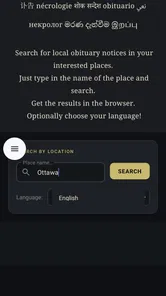
My recommended first move is not to search immediately with the least information possible. Start with the person’s name as accurately as you can remember it. Then add the local context the app is designed to work with: a town, city, county, or other area connected to the notice. This gives the search a better chance of separating a local result from similarly named people elsewhere.
Use ordinary spelling first. If the person had a formal name and a familiar nickname, try the formal version before experimenting with alternatives. Obituary notices may use the name chosen by a family or publication, so a second search with a middle name, shortened name, or different spelling can be worthwhile when the first attempt is too broad.
A realistic example would be searching for a former neighbor after hearing that a notice may have appeared in the local area. I would enter the person’s known name and location, review what comes back, and then compare the details rather than stopping at the first matching name. The meaningful success is not merely seeing a result; it is finding a notice whose location and identity make sense together.
If the first search produces nothing, change one element at a time. Try the town without an abbreviation, remove a middle name, or use a wider local area. Changing everything at once makes it impossible to understand what helped. This step-by-step method is one of the most useful habits with a focused search app because it turns a disappointing result into a controlled follow-up rather than a guess.
If the first search produces too many possibilities, do the opposite. Add the middle name, use the more precise location, or search again with the exact spelling shown in any letter, message, or family record you have. I would also check the dates and places inside a notice before sharing it with relatives. Similar names are common, and an obituary is sensitive information that deserves careful identification.
How to read the result without jumping to conclusions
The app’s job is to help locate notices, but the responsibility for interpreting a notice remains with you. I would look for several matching details: the person’s name, local connection, family references, and any other identifying information visible in the notice. One matching name is not enough when the search concerns a common surname.
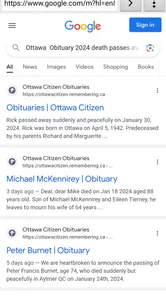
This is also where Local Obituary Search differs from asking a general search engine the same question. A broad engine may return social posts, advertisements, old pages, or unrelated news. A focused app can make the first step less distracting, especially when you are searching under pressure. On the other hand, a general search engine may expose a wider range of sources when the local notice is difficult to find.
For that reason, I see the app as a front door rather than the entire building. It can help you begin with the right subject and local angle. If you need legal confirmation, a complete family history, a death certificate, or a notice from a particular publication, you may need to continue with an official or archival source. The app is most useful when it saves you from starting with a blank browser search.
Common confusion during a local obituary search
The biggest confusion is assuming that “local” means every obituary from every nearby source will appear in one complete collection. I would not make that assumption. Local notices can be published through different newspapers, funeral homes, community organizations, or family-selected services. A focused search may help you reach relevant information, but coverage can vary with the source and location.
Another common mistake is using a very broad query. Searching only a surname can create an overwhelming set of possibilities, while searching only a first name may be too imprecise to identify anyone reliably. The better balance is a full name plus a location, followed by small adjustments when needed.
Users may also wonder whether an empty result means the notice does not exist. In my view, it means only that the current search did not surface a useful match. The wording may differ, the location may be listed differently, or the notice may be hosted somewhere outside the app’s practical reach. I would retry with alternate spellings and then check a relevant local publication or funeral-home source if the matter is important.
A further point of confusion is timing. A notice may not be available at the moment you first hear news, or an older notice may be harder to locate than a recent one. I would avoid repeated identical searches and instead broaden the location or adjust the name wording. That approach is more productive than tapping the same search again and expecting a different result.
Privacy is another reason to search thoughtfully. Even when the information is publicly posted, names and family details are personal. I would avoid forwarding an uncertain match to a large group chat. First verify that the notice concerns the right person, then share only what is appropriate. The app can assist with discovery, but it does not remove the need for discretion.
Three practical habits that make the app more useful
My first useful habit is to keep a small search trail outside the app. Write down which spelling and location combination you tried, especially if you are helping another family member. That prevents repeated guesses and makes it easier to explain how you reached a particular notice. It is a modest workflow improvement, but it matters when several relatives are searching at the same time.
Second, separate discovery from confirmation. Use the app to find a promising notice, then read the full item carefully and compare its identifying details with what you already know. If the situation has legal, financial, or administrative consequences, treat the notice as a lead and seek the appropriate official documentation. This distinction prevents a convenient search result from being used for a purpose it was never designed to handle.
Third, search by geography in stages. Begin with the most likely town or community, then widen to the surrounding area only if necessary. Starting too broadly can make a local search feel unsuccessful because you are looking at noise. Starting narrowly keeps the results easier to inspect and gives you a clearer idea of whether the local connection is correct.
These habits reveal the app’s main trade-off. Its focused subject can reduce distraction, but it cannot compensate for incomplete information or inconsistent publication practices. A user who knows the name and area may get real value from the narrow approach. Someone trying to identify an unknown person from a vague clue may be better served by a broader research process.
Who should use it, and who should choose another route
I would recommend Local Obituary Search to someone who needs a simple Android tool for checking local obituary notices without building a search from scratch. It is especially suitable for a first attempt when you know the person’s name and have a reasonable idea of the relevant community. It can also be useful for family research, reconnecting with a former community, or checking whether a local notice has been published before making a sensitive call.
I would be more cautious about recommending it to someone who needs an exhaustive archive, advanced historical research, or guaranteed access to one specific newspaper’s records. In those cases, going directly to the publication, funeral home, library archive, or official records service may be more effective. A general search engine can also be the better choice when you need to search across many types of sources rather than concentrate on obituary notices.
It is not the right first choice if you expect social features, memorial pages, messaging, genealogy tools, or a place to manage funeral arrangements. Its usefulness comes from the search task itself. Installing it with expectations from a different kind of app would make the experience seem limited, even though that limitation is part of its identity.
What I would do after finding a relevant notice
Once I found a likely match, I would read it slowly and record the publication or source details for later reference. If I needed to contact relatives, I would use the notice to confirm the connection rather than copy every personal detail into a message. For family research, I would note names and places separately so that future searches could be more precise.
If the result was close but not conclusive, I would run one carefully adjusted search and then move to a second source. Endless searching inside one app is not always the best use of time. The app works well as an efficient first checkpoint; it works less well as the only authority in a complicated or urgent situation.
That is the practical next step for a new user: search with a full name and local context, inspect the result for identity clues, and then confirm important information elsewhere. This workflow is reassuring because it gives the app a clear role without asking it to solve every part of the problem.
My final view after using it as a first-time searcher
Local Obituary Search is a modest, purpose-built Events app that makes sense when your need is equally specific. I like that the idea is easy to understand and that the free price removes a barrier to trying it. Its support for Android 7.0 or later also gives it practical reach for people using older phones. The 3.4 average suggests that the experience will not satisfy everyone, and I think that is fair given how dependent obituary searches are on names, locations, and source coverage.
My honest recommendation is to install it when you have a concrete local obituary search to make, not simply because you want a general information app. Prepare the name and area first, try a precise search, adjust one detail at a time, and verify any sensitive result before sharing it. For a focused first step, it is worth trying; for complete records or official confirmation, pair it with the relevant local or formal source.
That balance is what makes the app useful in everyday life. It may save time when a local notice is the information you are trying to locate, while its limits remind you to use judgment. If that is exactly the task in front of you, Jey Apps’ focused approach is more convenient than beginning with an unstructured search. If your goal is broader, older, or legally important research, another source should take the lead.
Local Obituary Search Frequently Asked Questions
Can I use Local Obituary Search on my Android device?
Local Obituary Search is an Android app that requires Android 7.0 or later. Check your device’s operating system before downloading so you can confirm it meets that requirement. The app is free to download and is intended for searching local obituary notices, making it a practical option for people who want to look up notices from their phone.
Who develops Local Obituary Search, and what should I consider before installing it?
Local Obituary Search is developed by Jey Apps and is listed in the Events category. It is rated for Everyone, so its content rating is suitable for a broad audience. As with any app, consider whether its purpose matches what you need: it focuses on searching for local obituary notices rather than serving as a general news or social networking app.
What is Local Obituary Search, and what can I use it for?
Local Obituary Search is designed to help users find obituary notices, memorial announcements, and death notices published by newspapers, funeral homes, and other local sources. After testing its search experience, we found it most useful for locating information by name, city, date, or publication. It can help families, friends, researchers, and genealogy enthusiasts discover funeral details or preserve important family history.
How do I search for an obituary in Local Obituary Search?
To search effectively, enter as much information as you know, such as the person’s full name, approximate location, or date of death. Searching with a surname and city can be more successful than using a broad name alone. If no result appears, try alternative spellings, remove middle names, or adjust the date range. Results depend on whether the relevant newspaper or funeral home has made the notice available online.
Does Local Obituary Search include every obituary published in my area?
No, the app cannot guarantee complete coverage of every obituary. Availability depends on the newspapers, funeral homes, cemeteries, and public databases included in its sources. Some notices may be missing because they were published only in print, placed behind a subscription, removed from a website, or never posted online. Treat the search results as a helpful starting point and verify important details with the original publisher or funeral home.
Pros
- Searches obituary notices from multiple local sources in one place.
- Simple interface makes finding recent memorial announcements quick.
- Useful for locating service dates
- funeral homes
- and visitation details.
- Can help reconnect families with notices missed in local newspapers.
- Lightweight design should work well on most modern Android devices.
Cons
- Coverage may vary significantly depending on your city or region.
- Some obituary listings may be delayed or missing important details.
- Search results can include duplicate or outdated announcements.
- The app may rely on internet access for nearly all features.
- Privacy policies should be checked before submitting personal search information.











