

Live Wallpaper - Wallpapers 4K
- 268.00
- 4.6
- Installs
- 10.00M
- Price
- Free

Screenshots






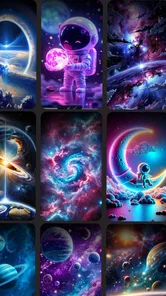
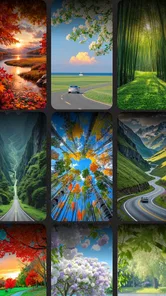
Analysis by Reviewed
I approach wallpaper apps a little differently from most customization tools: the image is the point, but the choices behind it matter too. Live Wallpaper - Wallpapers 4K is a free personalization app from Easy to use apps, and its appeal is straightforward: it gives your home screen a more individual look through still and animated backgrounds. Its average rating is 4.3 from around 25,000 ratings, and it has over 5 million installs, so it has clearly found an audience. Those figures tell me it is widely tried, not that every phone or taste will be a perfect match.
Who will get the most from a wallpaper app
I think this app makes the most sense for someone who enjoys changing the look of a phone but does not want to rebuild the home screen around a new launcher. A background can make a familiar device feel more personal without changing how its apps work. If you already have a layout you like, a carefully chosen image can add character while leaving your icons, widgets, and habits in place.
It is less compelling if you prefer a screen that never changes, or if you mainly want a plain image that disappears behind your icons. In that case, the wallpaper picker already built into a phone is often the quickest route: choose a picture, crop it, and move on. I would also skip animated backgrounds if motion on the screen distracts you, or if you want the fewest possible visual effects running as part of your everyday setup.
What I would check before choosing a moving background
A live wallpaper is more noticeable than a static image, but it also becomes part of the everyday interface you see repeatedly. I would preview a design on both the home screen and lock screen, if the phone offers that choice, before committing. Fine details that look impressive in a sample can compete with app icons or make widgets harder to read once they sit behind them. A darker or less busy scene is often the more practical choice if you rely on a crowded home screen.
A useful test is to look at the screen in the conditions where you actually use it, rather than judging only the wallpaper’s full-screen preview. Open the home screen with your usual icons and widgets in place, then check whether the design still feels clear. If the subject sits behind a clock or a row of shortcuts, try another crop or another scene before deciding that the image itself is unsuitable. This small check can prevent a beautiful preview from becoming a busy daily background.
The app is rated for Everyone and is currently version 2.7, with Android 7.0 as the minimum operating system. It is free to install, while optional in-app purchases range from $0.99 to $4.99 per item. I would treat those purchases as a reason to look carefully at any price prompt before confirming, especially if I only want to try a few backgrounds. The app was released on January 17, 2025, but I would judge it by how its available wallpapers look and behave on my own device rather than by its release date.
Trust, privacy, and control in everyday use
I can’t responsibly make claims about permissions or data handling without verified details, so I would inspect the permission prompts and the privacy information shown in the app and its store page before going further. For a wallpaper tool, I would expect to consider whether a requested permission makes sense for the task at hand, and I would avoid granting access that does not feel necessary. That is a sensible check for any personalization app, not a claim that this one asks for a particular permission.
More From Our News Desk

 Gmail
GmailGmail in a Busy Inbox: Who Benefits Most?
From first account to crowded workday, Gmail earns its place through dependable search and flexible sorting—but its best fit depends on how much inbox maintenance you can tolerate.

 Prime Video
Switching to Prime Video: What Changes in Your Viewing Routine
Prime Video can make a compelling second home for streaming, but switching means learning a different catalog, rental layer, and route from browsing to playback.

 Universal TV Remote Control
Universal TV Remote Control Works Best as a Reliable Backup
A phone remote earns its place through quick setup and reliable habits. Here is how to get more from Universal TV Remote Control—and where its limits show.

 Weather - By Xiaomi
Weather by Xiaomi Review: Clear at a Glance, Less Clear Up Close
Xiaomi’s weather app makes everyday forecasts quick to scan, but its calm surface can leave useful details and recovery paths harder to find than they should be.

 X
XX Under Pressure: Can It Recover When Posting Goes Wrong?
A resilience-focused review of X, examining setup, mistaken posts, interruptions, weak connections, and the gaps that matter when recovery needs to be dependable.

 Clash of Clans
Clash of Clans Is Won Between the Battles
Its raids are quick; its community is a long-term project of coordination, teaching, rivalry, and shared responsibility—with all the friction that entails.
Latest News



Wallpaper apps sit close to personal routines: the background is visible whenever I check the time, open a message, or return to the home screen. That makes it worth taking a moment with any visible choice rather than treating installation as an automatic commitment. I would read permission requests when they appear, consider whether they fit the action I am taking, and use the phone’s own settings to review or change permissions if I later want to. Those are practical habits, not assumptions about what this app collects.
One useful habit is to make a note of the current wallpaper before testing a new one. That gives you an easy way back if an animated image feels distracting or clashes with your icons. I would also check what controls are visible before downloading or applying a design, and review purchase prompts at my own pace. Those small steps keep the choice with you and make it easier to decide whether a live background genuinely improves your routine.
A low-risk way to try a new look
For a cautious first session, I would browse without rushing to apply the first striking result. I would choose one image that suits the way I use the phone, inspect the preview, and then live with it for a normal day before deciding whether it works. That gives me a better sense of whether motion is pleasant during quick checks or becomes something I notice too often. If I prefer the old look, restoring it is easier when I have already made a note of what was there.
I would also separate the decision to try a wallpaper from the decision to pay for anything. The app is free to install, but its optional purchases make it sensible to pause at a checkout prompt and check the amount and item before confirming. Someone who only wants to experiment can begin with whatever is available without payment, then decide whether any paid choice is worth it for their own use. I would not buy an item just because a preview looks good before checking how it sits behind my actual home screen.
Unleashing a World of Visual Delights
When I first stumbled upon Live Wallpaper - Wallpapers 4K, I was skeptical. I mean, how much difference can a wallpaper really make? But the moment I installed it, my screen was transformed into something out of a sci-fi movie. The variety of wallpapers available is simply mind-boggling. From serene nature scenes that calm your senses to vibrant abstract designs that energize your day, there's something for everyone.
Easy Navigation and User-Friendly Interface
Navigating through the app is a breeze. The interface is intuitive and user-friendly, making it easy even for those who aren't tech-savvy. You can quickly browse through categories and find the perfect wallpaper to match your mood. And if you're feeling adventurous, there’s a shuffle option that randomizes your wallpapers, giving you a fresh look every time you unlock your phone.
Even when browsing feels straightforward, I would choose a wallpaper with a specific screen in mind rather than relying only on a category or mood. A scene that looks lively in a full-screen preview may be too detailed behind a calendar or several app rows. I find it useful to think of the home screen as a workspace as well as a display: the best background is not necessarily the most dramatic one, but the one that makes the phone pleasant to look at without making everyday tasks harder.
Quality That Speaks Volumes
Now, let's talk about quality. The wallpapers are in 4K resolution, ensuring that every detail is crisp and clear. Whether you're using a high-end device or something more modest, the wallpapers adjust beautifully to your screen size. This attention to detail really sets Live Wallpaper - Wallpapers 4K apart from other apps in the market.
High resolution is most useful when a wallpaper contains details you actually want to see, but it does not guarantee that every image will suit every display or layout. I would check how the composition is cropped on my own phone, especially if the image has a central subject near the edge. A wide scene can look impressive in a preview and still lose its focal point when fitted to a narrower screen. Choosing an image with some visual space around its subject gives the phone more flexibility when it is framed.
Battery Efficiency Concerns?
One of my initial worries was how these live wallpapers would impact battery life. After all, having an animated scene running constantly could drain your battery, right? Surprisingly, the app is designed to be battery efficient. The wallpapers pause when your screen is off or when you're using other apps, so you don't have to worry about your phone dying on you.
Even so, I would treat battery comfort as something to judge on my own device and with my own habits. If I am travelling, away from a charger, or trying to keep a phone running through a long day, a static wallpaper is the more conservative choice. If I usually charge regularly and enjoy the movement, a live background may be a reasonable trade-off. The important point is not to assume that one experience applies to every phone: try the effect during ordinary use and switch back if it does not suit your routine.
Making the wallpaper work for your routine
I would use the shuffle option with a little restraint: a changing background can keep the phone feeling fresh, but frequent visual changes may make a carefully arranged home screen feel less settled. For a workday, I’d pick one calm image that leaves icons legible; for a weekend, I might switch to a brighter scene. That simple contrast is a practical way to enjoy variety without letting the wallpaper become another source of distraction.
A realistic example is a busy weekday when I check my phone in short bursts between tasks. A quiet background keeps the screen from demanding attention when I only need to find a calendar or message app. Later, when I have time to browse, I can explore a more animated design and decide whether it feels relaxing or distracting over repeated checks. This is where a live wallpaper app can be enjoyable: it lets me change the atmosphere without turning every phone interaction into a customization project.
This is best suited to someone who enjoys visual customization and is happy to spend a few minutes browsing and testing. If you want a completely static, predictable screen, your phone’s built-in wallpaper picker may be simpler. Likewise, if animated backgrounds bother you or you are particularly protective of battery life, a still image is the safer choice. The key trade-off is motion and personality versus a quieter, more conventional home screen.
How it compares with simpler alternatives
Compared with using a photo from the phone’s gallery, a dedicated wallpaper app can make browsing and trying different looks feel more focused. The built-in picker, on the other hand, usually has the advantage when I already know exactly which picture I want and prefer not to explore another app. A static wallpaper collection is also a better fit for someone who wants a dependable background with no movement. I see this app’s appeal in the combination of visual browsing and animated options, rather than as a replacement for every other way of personalizing a phone.
It is also worth remembering that a wallpaper does not need to be changed often to justify trying one. A good still image can be more comfortable than a rotating set if I rely on the same icon layout all day. I would use shuffle only if the variation feels welcome, and keep a settled choice if the screen’s appearance helps me find things quickly. That distinction matters more than choosing the most elaborate design: customization should fit around the way I use the phone, not make the home screen harder to scan.
Questions worth settling on your own phone
Before settling on a design, I’d check whether it fits the screen without cropping an important subject, whether icons remain easy to spot, and whether the motion feels comfortable after repeated use. These are more useful tests than judging a wallpaper only by its preview. If you switch phones or rearrange your home screen, it is worth checking the framing again rather than assuming the same image will look equally good.
I would also decide whether I want a single background for both screens or different looks, using whatever choices the device and app present. If an option is unclear, I would pause rather than tap through a purchase or permission prompt automatically. That approach is especially sensible for a free app with optional paid items: try the no-cost experience first, then spend only if the available choices are genuinely useful to you.
Another practical question is whether the wallpaper remains comfortable after the novelty wears off. I would check it at different times of day and while using the apps I open most often, because a design that looks striking in a quiet moment may compete with text or widgets during a busy one. If it is distracting, there is no need to force it; switching to a still or simpler background is a sensible outcome, not a failure to use the app well.
Final Thoughts
In essence, if you're looking to add a bit of flair to your device without compromising on performance, Live Wallpaper - Wallpapers 4K is a fantastic choice. It's a simple yet powerful way to express yourself and keep your screen looking fresh and exciting. So why not give it a try? Trust me, your phone will thank you for it!
My more cautious recommendation is to try it if visual customization is something you genuinely enjoy, then keep only the backgrounds that work with your screen and routine. The app has a broad audience, but popularity alone cannot tell me whether a particular animated design will suit my phone, my battery priorities, or my appetite for motion. Start with a no-cost choice, check the result behind your icons, and take your time with permission and purchase prompts. If the result makes the phone feel more like yours without getting in the way, it has earned its place; if not, a static background is an entirely reasonable alternative.
Live Wallpaper - Wallpapers 4K Frequently Asked Questions
Can I preview a wallpaper before setting it?
Previewing a wallpaper before applying it is a useful way to decide whether its colors, composition, and motion suit your phone’s screen. Live Wallpaper - Wallpapers 4K is centered on browsing and selecting backgrounds, including dynamic live wallpaper, so take time to explore the available options and choose a look you will enjoy seeing regularly.
Will live wallpapers work on both my lock screen and home screen?
Where a live wallpaper can be applied depends on the device’s operating system and the options it offers when you set a background. Live Wallpaper - Wallpapers 4K focuses on 4K and dynamic wallpapers, but the final placement choices are handled by your phone. Check the available wallpaper settings on your device before deciding how you want the background to appear.
Do I need an internet connection to browse or apply wallpapers?
Whether you need a connection can depend on how the app makes its wallpaper collection available and whether a particular background has already been downloaded. If you plan to browse while away from Wi-Fi, check the app’s behavior beforehand and consider saving any backgrounds you want to use while connected. This helps avoid surprises when you want to personalize your phone offline.
Can I use my own photos as wallpapers in the app?
Live Wallpaper - Wallpapers 4K is presented as an app for browsing and applying 4K and dynamic wallpaper, so it is best suited to people looking for backgrounds from its collection. If using a personal photo is important to you, check the app’s available selection and your phone’s built-in wallpaper options. Your device may let you set a photo directly without using a wallpaper app.
Is Live Wallpaper - Wallpapers 4K suitable for my phone?
Live Wallpaper - Wallpapers 4K is a personalization app for people who want to give their phone a more distinctive background. Its focus is 4K wallpapers and dynamic live wallpaper, so you can explore a visual style beyond a plain, static home screen. The app is rated for Everyone, and its current version is 2.7.
Pros
- Stunning 4K resolution wallpapers
- Wide variety of categories
- Easy-to-use interface
- Low battery consumption
- Regular updates with new wallpapers
Cons
- Contains ads that can be intrusive
- Some wallpapers require in-app purchases
- May slow down older devices
- Limited customization options
- Requires internet for some features











