Live Launcher
- 1.02K
- 4.3
- Installs
- 1.00M
- Price
- Free

Screenshots
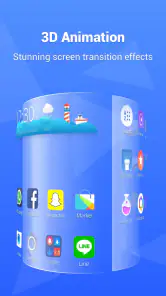
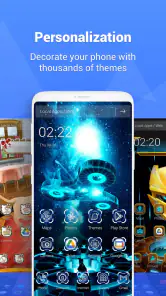

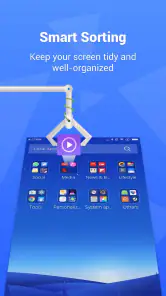
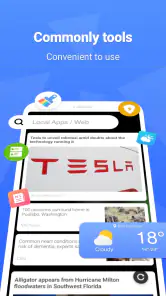
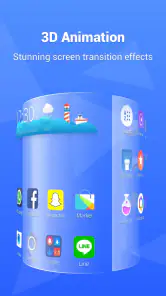
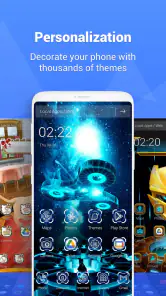

Analysis by Reviewed
I like a launcher most when it changes how my phone feels without turning everyday tasks into a project. Live Launcher aims for that balance: it gives the home screen a more personal look, while offering controls for arranging the details. It is a free personalization app from LiveLauncher, and its appeal is easy to understand if the default layout has started to feel stale. Still, I would treat it as a visual refresh first, not as a guaranteed fix for a slow phone.
Why a home-screen refresh can matter
A launcher is part of a routine: I see it whenever I unlock my phone, check an app, or return to the home screen. That makes small choices such as icon style, widget placement, and screen movement more noticeable than they might seem. Live Launcher’s themes and customization options let you shape that first impression, whether you prefer a restrained arrangement or brighter colors. The useful question is not how many choices there are, but whether you can settle on a layout that remains comfortable after the novelty wears off.
For a practical setup, I would start by changing one thing at a time. Pick a theme, arrange the icons you reach for most, and then add only the widgets that genuinely save you a step. This makes it easier to tell whether the new home screen works for your habits rather than just looking striking in a preview. Transition effects are another detail worth adjusting carefully: a subtle effect can make navigation feel polished, while a more elaborate one may become distracting when you are opening apps repeatedly.
Making the layout useful, not just attractive
Picture checking your phone between errands: you want to find a map, message someone, and get back to what you were doing without hunting through a crowded screen. A thoughtfully arranged launcher can help by keeping frequent apps visible and less-used ones out of the way. I would use Live Launcher to organize around those repeated tasks, not to fill every space with decorative elements. Its widgets can make information easier to scan, but the best layout is the one that stays readable and quick to use.
Compared with leaving the phone’s standard home screen untouched, this app gives you more room to adjust the overall look and feel. Compared with choosing a launcher mainly for granular control, Live Launcher’s stated appeal is its approachable visual makeover. That distinction matters: if you enjoy experimenting with themes and screen layouts, it is a natural fit; if you want a highly technical setup with precise behavior controls, you may prefer to compare other launchers before switching.
Who is likely to enjoy it?
I can see Live Launcher suiting someone who likes refreshing their phone’s appearance, wants icons and widgets to feel coordinated, and is happy to spend a little time arranging a home screen. It may also appeal if you want a more personal look without replacing the phone itself. On the other hand, if you are completely satisfied with your current layout or prefer a plain, familiar interface, the extra choices may not add much. A launcher changes the everyday surface of the phone, so the adjustment can feel like friction if you value consistency above customization.
One sensible tip is to keep your current layout in mind before making broad changes: note where your most-used apps sit, then rebuild around the same habits rather than chasing a theme at the expense of convenience. If you try a widget and find yourself ignoring it, remove it; unused items make a home screen busier without making it more helpful. This small, selective approach is more likely to produce a setup you keep using than changing everything at once.
More From Our News Desk

Clash of Clans Is Won Between the Battles

Android Auto Makes the Case for Quieter Car Software

MobiOffice: Transforming Mobile Productivity with Seamless Integration

EA SPORTS FC™ Mobile Soccer: Redefining Mobile Sports Gaming

How Microsoft OneDrive Became a Mobile Productivity Giant

How Google Translate Breaks Language Barriers Effortlessly
Live Launcher is free to download, with optional in-app purchases ranging from $5.99 to $34.99 per item. It is rated for Everyone, has a 4.3 average from around 3,700 ratings, and has passed one million installs. The app was released on September 20, 2022, and version 5.23.3 supports Android 7.0 and later. Those details make it accessible to many Android users, though the presence of purchases is worth keeping in mind if you prefer to avoid paid extras.
If performance is your main reason for looking at a launcher, I would be cautious about expecting a speed boost. A new home screen can change the experience of navigating, but that is different from improving the phone’s underlying performance. Likewise, a cleaning tool should not be the deciding reason to install a launcher; I would judge this app primarily by whether its layout and visual options suit you. That keeps expectations realistic and helps separate a cosmetic refresh from device maintenance.
Making the home screen your own
The moment I installed Live Launcher, I was greeted with a sleek and intuitive interface. It was like stepping into a whole new world of customization. The setup was a breeze, and within minutes, my phone felt brand new. The range of themes available is impressive, each more vibrant and unique than the last. Whether you're into minimalistic designs or bold, colorful layouts, there's something for everyone.
Customization at its Best
One of the standout features of Live Launcher is its customization options. You can personalize every little detail, from the icons to the widgets and everything in between. The app offers a variety of icon packs, allowing you to choose the perfect style to match your mood. Plus, the widget options are both functional and visually appealing, making it easy to access information at a glance.
Another cool feature is the transition effects. You can switch up how your screens move from one to the next, adding a touch of flair to your everyday scrolling. It's these little touches that make using Live Launcher so enjoyable and addictive.
Performance Boost
What really surprised me was how Live Launcher didn't just make my phone look good, but it also enhanced its performance. The app is designed to be lightweight, ensuring it doesn't slow down your device. In fact, it seemed to make my phone run smoother and faster, which is always a win in my book.
Additionally, the app includes a handy cleaning tool that helps clear out junk files and free up memory. It's like having a personal phone assistant keeping things tidy and efficient. Who wouldn't want that?
Final Thoughts
All in all, Live Launcher is a fantastic app for anyone looking to breathe new life into their smartphone. With its extensive customization options, performance-enhancing features, and vibrant themes, it's hard not to fall in love with it. If you're ready to give your phone a makeover and boost its functionality, I'd highly recommend giving Live Launcher a try. It's a game-changer, and I'm sure you'll enjoy it as much as I did.
A more deliberate way to personalize
There is a useful distinction between a home screen that looks themed and one that is genuinely easier to use. When I try a visual setup, I treat the first screen as a small dashboard: the apps I use in a hurry belong there, while occasional tools can sit elsewhere. That keeps a colorful theme from turning into a wall of competing icons. For Live Launcher, the payoff is strongest when the visual choices support a clear arrangement instead of becoming the whole point.
I would also give a new layout a few ordinary days before deciding whether it works. A screen that feels exciting while setting it up can prove awkward when you are tired, carrying something, or trying to open an app quickly. Keep the essentials in familiar positions during the first pass, then move them only if you notice a real reason. This is a practical way to make customization reversible in spirit: you can experiment without losing the muscle memory that makes a phone feel dependable.
Small workflow choices that pay off
A useful test is to ask what you want to accomplish with each widget before adding it. If it lets you see something you routinely check, it may earn its space; if it merely fills a gap or matches a theme, it may be visual clutter. I would keep the first screen especially restrained and use other home-screen space for less frequent shortcuts. This makes the design easier to scan and gives you a clearer sense of whether the app’s personalization is helping or simply adding decoration.
Theme and icon choices can also create a trade-off. A coordinated set may make the screen feel intentional, but an unfamiliar icon can slow you down if its appearance no longer gives you a quick clue to the app behind it. When that happens, I would prioritize recognition over perfect color matching. A launcher should make the phone feel like yours, but it should not make ordinary tasks feel like a guessing game.
For someone who shares a device with family or often hands it to another person, I would be especially conservative about moving the most familiar shortcuts. A distinctive design can be enjoyable for the primary user yet confusing to someone who expects the usual arrangement. Keeping common apps in predictable places is a simple compromise: the screen still has a personal style, but another person can find the basics without needing a tour.
How it fits beside other launcher choices
The default launcher remains the sensible option if you already like its appearance and do not want another layer of setup. It is familiar, and there is little value in changing a routine that works. Live Launcher makes more sense when the visual character of that default feels limiting and you want themes, icon choices, widgets, and screen effects to play a larger role in the experience.
At the other end, some people choose launchers for extensive technical control and carefully tuned behavior. I would not pick Live Launcher on the assumption that it is the most configurable option available; its strongest case is a more personal, visually expressive home screen. If exact control over every interaction is your priority, compare alternatives with that specific need in mind. If you mainly want a fresh look without turning setup into a hobby, this app is a more natural candidate.
There is also a difference between installing a launcher and applying a wallpaper or icon theme alone. A wallpaper changes the backdrop, while a launcher can shape the broader arrangement of screens and widgets. That broader reach is useful, but it also means the change affects more of your daily interaction. I would start with the smallest adjustment that solves the problem you have, then move to a launcher-level makeover only if a background or icon change is not enough.
Questions worth considering before switching
If you are wondering whether it costs money to begin, the app is free to download, while optional purchases are available. I would explore the basic experience first and only consider a purchase if a specific extra is clearly useful to you. The listed purchase range runs from $5.99 to $34.99 per item, so it is worth treating paid options as a choice rather than assuming every customization requires payment.
Compatibility is another straightforward consideration: version 5.23.3 is listed for Android 7.0 and later. If your phone meets that requirement, the next question is not just whether it can run the app, but whether you are comfortable changing the home screen you use every day. I would avoid switching right before a busy stretch when familiar shortcuts matter most; trying a new setup when you have time to adjust makes the transition less annoying.
Its audience figures suggest that this is not an obscure experiment: Live Launcher has more than a million installs and around 3,700 ratings, with an average of 4.3. I take that as context rather than a promise that it will suit every phone or taste. The 1,000 reviews also indicate a substantial body of user feedback, but my own decision would still come down to the fit between its look and the way I use my device.
Where I would draw the line
I would skip this app if I have no interest in changing my home screen, if a familiar layout is important for accessibility or routine, or if I am seeking a guaranteed remedy for lag. Those are different problems from wanting a more distinctive appearance. A launcher can make frequent actions feel more organized, but it is not a substitute for diagnosing a device issue, and a more decorated screen is not automatically a more efficient one.
I would also pause before choosing any launcher when I rely on a carefully established setup and do not want to spend time checking that everything still feels natural. The adjustment may be modest, but the home screen is visited so often that even a small mismatch can become irritating. A good rule is to judge the app by repeated use rather than by the excitement of the first session: if the layout keeps helping after the novelty fades, the customization has earned its place.
A measured recommendation
My recommendation is for Android users who want their phone to look less generic and are willing to make a few considered choices about icons, widgets, and movement. The free starting point makes it approachable, while the optional purchases mean I would keep an eye on what I choose to unlock. LiveLauncher’s focus on personalization is the reason to try it; I would not install it expecting a technical control suite or a reliable performance cure.
For me, the best result would be a screen that feels visibly more personal but still lets me find the things I need without thinking. Start with a theme, preserve the shortcuts you depend on, and add only the widgets that earn their space. If that balance is what you want, Live Launcher is worth a look. If your current setup already feels comfortable, there is no need to change it just for the sake of change.
Live Launcher Frequently Asked Questions
What Android version do I need to use Live Launcher?
Live Launcher is a personalization app for Android, and it requires Android 7.0 or later. Before downloading, check your device’s software version in its settings to make sure it meets that requirement. If it does, you can try the launcher and explore how its home-screen tools fit your everyday use.
Is Live Launcher free to download, and are there optional purchases?
Live Launcher is free to download, so you can try it without paying upfront. It also offers in-app purchases, with items priced from about six to thirty-five dollars. Consider whether you want any paid extras before making a purchase, and check the purchase details in the app so you know what each option includes.
What is Live Launcher and what makes it unique?
Live Launcher is a dynamic and customizable launcher app designed to enhance the user interface of your Android device. It stands out due to its real-time theme updates, smooth animations, and a vast collection of widgets and wallpapers. The app also features smart organization tools, allowing users to manage their apps efficiently while offering a sleek and modern look.
Does Live Launcher affect the performance of my device?
Live Launcher is optimized to provide a smooth and fast user experience without significantly affecting device performance. However, like any launcher, it may consume some resources. Users with older devices should check compatibility and be mindful of potential impacts on battery life and processing speed, though the app is designed to minimize such effects.
Is Live Launcher safe to use and does it protect my data?
Yes, Live Launcher is safe to use. It adheres to strict privacy standards, ensuring that your data is not compromised. The app does not collect or share personal information without user consent. However, users should always download it from official stores like Google Play to avoid any security risks associated with third-party sources.
Pros
- Highly customizable interface
- Fast and responsive performance
- Battery-friendly design
- Abundant themes available
- Efficient app drawer organization
Cons
- Contains ads in free version
- Limited features without premium
- Occasional glitches observed
- Not suitable for older devices
- Requires internet for updates
- Category
- Personalization
- Version
- 5.23.3













