Live Launcher Lite-3Dwallpaper
- 1.10K
- 4.0
- Installs
- 1.00M
- Price
- Free

Screenshots
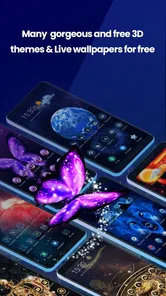
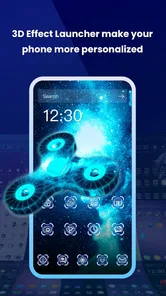
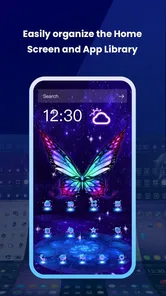
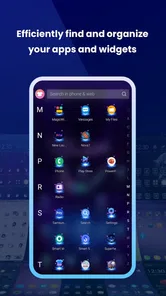
Analysis by Reviewed
I judge a launcher by a practical question: does it make the screen I look at all day feel more personal without making ordinary tasks harder? Live Launcher Lite-3Dwallpaper is aimed at people who want a more colorful home screen and enjoy changing its appearance. It is a free personalization app from LiveLauncher, rated for Everyone, and its current version is 3.6.2. The average rating is 4.2 from around 6,500 ratings, with over a million installs, so it has found an audience among people looking to refresh their phones.
Decide what you want to change first
Before installing any home-screen tool, I find it helps to separate three goals: changing the background, changing how apps are arranged, and changing how the phone feels to use. They overlap, but they are not the same thing. Live Launcher Lite-3Dwallpaper is most interesting if the visual atmosphere is your main concern. If your real frustration is finding apps, reducing clutter, or building a very specific layout, a different kind of launcher may solve the problem more directly.
A useful test is to think about the screen you see most often: the first home screen you open in the morning, the one you glance at while waiting for a message, or the page you reach for when starting a familiar task. If you mostly want that first glance to feel less ordinary, a visual refresh can be enough. If you need a more efficient way to reach work tools or organize a large collection of apps, prioritize navigation and layout controls instead of choosing by appearance alone.
Choose it for visual change, not a full phone makeover
A launcher can affect the feel of the whole home screen, while a wallpaper app may change only the background. That distinction matters: if your main goal is a livelier backdrop, this app is worth considering; if you want precise control over every layout detail, a more configurable launcher may suit you better. I’d start by deciding whether the wallpaper itself is the attraction or whether you want to reorganize how you use the phone.
There is also a useful middle ground for people who like variety but do not want to spend an evening rebuilding their home screen. Try a new look when you have a few spare minutes, then use it through a normal day: check whether app names remain easy to read, whether your favorite shortcuts still feel convenient, and whether the visual movement is pleasant rather than distracting. A design that looks exciting in a preview may feel busy beside everyday notifications.
Transform Your Screen
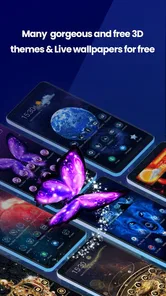
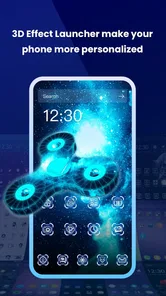
When I first downloaded Live Launcher Lite-3Dwallpaper, I was instantly drawn to its vibrant display of 3D wallpapers. Imagine your screen coming to life with swirling colors and dynamic backgrounds. It’s not just an app; it’s like a breath of fresh air for your phone. Whether you’re into nature scenes, abstract art, or futuristic vibes, there’s something here to tickle your fancy.
What the 3D look is good for
The strongest case for a moving or dimensional background is not that it makes a phone more productive; it gives a familiar device a different mood. That can be a nice change if you have kept the same wallpaper for a long time, or if a phone you use for personal time feels too much like the one you use for chores and messages. I’d treat the visual effect as a small daily pleasure rather than a reason to expect a different phone experience altogether.
More From Our News Desk

Weather by Xiaomi Review: Clear at a Glance, Less Clear Up Close

X Under Pressure: Can It Recover When Posting Goes Wrong?

Clash of Clans Is Won Between the Battles

Android Auto Makes the Case for Quieter Car Software

MobiOffice: Transforming Mobile Productivity with Seamless Integration

EA SPORTS FC™ Mobile Soccer: Redefining Mobile Sports Gaming
There is a practical way to choose a background, too. I’d look for one with a calmer area behind the clock and frequently used icons, then check it with the screen brightness you normally use. A detailed image can be attractive by itself yet make labels harder to scan. If that happens, the answer is not necessarily to abandon the app; a less visually crowded choice may work better for everyday use than the most dramatic option.
Performance and Features
Now, I know what you’re thinking – all these graphics must slow down my phone, right? Surprisingly, that’s not the case. I’ve been using it for a week now, and it’s as smooth as butter. The app is lightweight, so it doesn’t hog your RAM or battery life, which is a massive win in my book.
One of the features I adore is the customization. You can tweak and tinker with the settings to suit your style. Want a wallpaper that changes with the weather or your mood? Done. Fancy a quick change with a shake of your phone? Easy-peasy. It’s these little touches that make your phone feel uniquely yours.
My advice is to explore the controls gradually instead of turning on every effect at once. Start with the background you like, live with it during ordinary use, and then try an extra adjustment only if you still want more change. That order makes it easier to tell whether a setting genuinely improves the experience or simply adds another thing competing for attention. It also gives you a clearer sense of which look you actually want to keep.
For a realistic example, imagine checking a message in a queue, setting an alarm before bed, then using the same home screen to open a map the next morning. A lively background can make those small moments feel less repetitive, but it should not make the time, labels, or familiar shortcuts harder to spot. I’d judge the design in those quick, imperfect glances—not only while admiring it with the phone open and undisturbed.
User Experience
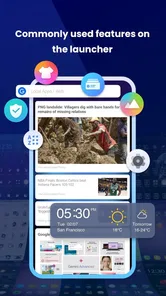
Getting started with the app is a breeze. The intuitive interface guides you through setting up your wallpapers and widgets. I didn’t have to spend hours figuring out how to make things work, which is always a plus. Plus, it supports a plethora of themes and icon packs, so you can really dive deep into customization.
That range makes it tempting to treat the home screen as one big makeover, but I’d resist that urge at first. Change the background, then use the phone as usual before deciding whether to adjust icons or widgets. This is more than a matter of taste: changing several visual cues together can make it harder to notice what has become less legible or less convenient. A staged setup is easier to evaluate and easier to undo.
If you share a phone with someone who sometimes borrows it, or if you rely on muscle memory to open the same apps quickly, keeping the layout familiar is especially useful. A new visual layer can still make the screen feel personal without forcing you to relearn where everything is. I’d consider that a smart compromise for anyone who wants novelty but depends on a predictable home screen during busy parts of the day.
For an everyday trial, I’d make one change at a time rather than swapping the wallpaper, icons, and widgets together. That makes it easier to tell which choices improve readability and which are only attractive at first glance. If you use a busy home screen for work or navigation, keeping the most-used icons in familiar positions can preserve the speed you already rely on while you experiment with the look.
When another kind of personalization fits better
The main trade-off is that a visually expressive screen is not automatically a more useful one. If you prefer a quiet background, consistent icons, and minimal movement, your phone’s built-in wallpaper choices may be the simpler answer. Likewise, people who want extensive control over grids, gestures, or app organization should compare it with full-featured launcher alternatives rather than assume a wallpaper-focused experience will cover every preference.
Compared with a basic wallpaper changer, this app is more appealing to someone who wants the home screen to feel like a coordinated visual experience rather than a background swap alone. Compared with a highly configurable launcher, the attraction is the lighter decision: focus on how the screen looks, without making a detailed layout project the point of the exercise. Those are different priorities, so I would not call one approach universally better.
There are good reasons to choose the simpler alternative. Built-in wallpaper settings make sense if you want a restrained image and do not want another layer of customization to manage. A more advanced launcher is the better direction if you enjoy shaping app grids and navigation to your own habits. And if movement itself bothers you, a static background is likely to be more comfortable than trying to persuade yourself that visual activity is a benefit.
For someone who enjoys a fresh look but does not want to manage a complicated setup, the appeal is straightforward. A student could change the screen before a new term; someone who takes frequent short breaks could use a different visual style to make the phone feel less monotonous. I’d avoid changing everything at once, though: keeping a familiar layout makes it easier to judge whether the new appearance is genuinely comfortable.
Make the switch easy to judge
Before settling on a new setup, take note of where your everyday shortcuts live and test the screen in the situations that matter: outdoors, at a glance, and while handling notifications. That simple check can reveal whether a vivid background competes with text or whether the arrangement still feels natural. If the result is distracting, switching back to a plain background is a sensible choice, not a failed experiment.
I’d also give the screen more than a quick preview before deciding whether it suits you. Use it while moving between your regular apps, and notice whether the look still feels pleasant after the novelty wears off. If you often rely on the phone in bright daylight, check readability there as well as indoors. These small checks help separate a wallpaper that photographs well from one that is comfortable to live with.
Changing one thing at a time also makes switching less frustrating. Keep your key apps where you expect them, decide which visual change matters most, and avoid rebuilding the whole screen until you know the new look works for you. If you decide it does not, you can return to a simpler appearance without having to untangle several changes at once. For me, that low-pressure approach is the sensible way to try a personalization app.
People often wonder whether a free launcher is worth trying, whether it is meant for a major layout overhaul, and whether a dynamic look will suit them every day. My answer is that it makes most sense as a low-commitment personalization experiment, especially for someone curious about 3D-style wallpapers. It is less compelling if visual effects are not a priority or if a carefully controlled, minimal interface matters more than changing the screen’s mood.
Who I’d recommend it to
I’d point this app toward someone who enjoys changing their phone’s appearance, wants to try dimensional wallpapers, and is happy to judge the result by comfort as well as color. It can also suit a person who wants a small visual reset without turning customization into a weekend project. The free price makes it approachable as an experiment, while the Everyone age rating makes its audience broad.
I would steer away from it if you value a completely still, understated screen, or if your main goal is to overhaul how you organize and navigate apps. In those cases, a built-in wallpaper option or a launcher focused on layout control is a more direct fit. The same goes for anyone who finds animated or busy imagery tiring: there is no reason to keep an effect just because it looks impressive at first.
Why Try It?
So why should you give Live Launcher Lite-3Dwallpaper a shot? Well, if you’re anything like me, you love having that little touch of elegance and flair on your phone without compromising on performance. It’s an app that delivers on its promise of turning your mundane screen into a canvas of beauty and functionality.
To wrap it up, if you’re looking to jazz up your phone and make it truly yours, this app is definitely worth a download. It’s fun, efficient, and adds a splash of color to your daily routine. Trust me, once you’ve tried it, you won’t want to go back to your old static wallpapers.
My recommendation
My recommendation is to try it if the screen’s appearance is what you want to refresh, then judge it during real use rather than by the initial visual impact. Start with one change, keep your essential shortcuts familiar, and pay attention to readability and distraction. That gives you a fair way to decide whether the 3D style suits your routine.
LiveLauncher released the app on July 21, 2023, and its 3.6.2 version supports Android 7.0 and later. Those details make it relevant to people checking whether an older Android phone can run it, while the broader decision remains personal: choose it for a more expressive screen, not as a guaranteed replacement for every launcher or layout tool.
Live Launcher Lite-3Dwallpaper Frequently Asked Questions
Is Live Launcher Lite-3Dwallpaper free to download, and what is its age rating?
Live Launcher Lite-3Dwallpaper is a free personalization app from LiveLauncher, so you can try it without paying to download. It is rated Everyone, making it suitable for a general audience. The app has over one million installs, and its average rating is around 4.2, giving prospective users a quick sense of its reach and overall reception.
What Android version do I need to use Live Launcher Lite-3Dwallpaper?
Live Launcher Lite-3Dwallpaper runs on Android 7.0 and newer. Check your phone’s Android version before downloading, since devices running an earlier version do not meet the stated minimum requirement. If your device meets that requirement, you can explore the app as a way to give your phone a fresh, colorful look, as its short description suggests.
What is Live Launcher Lite-3Dwallpaper and what does it offer?
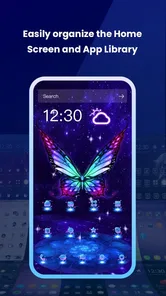
Live Launcher Lite-3Dwallpaper is an innovative application designed to enhance your smartphone experience with dynamic 3D wallpapers and a sleek launcher interface. It offers an array of customizable wallpapers that bring your screen to life with interactive and visually stunning backgrounds. Additionally, the launcher provides efficient app organization and quick access to your favorite tools, making navigation smoother and more engaging.
How do I customize my phone using Live Launcher Lite-3Dwallpaper?
To customize your phone with Live Launcher Lite-3Dwallpaper, you start by browsing through a wide selection of 3D wallpapers available within the app. After selecting your desired wallpaper, you can apply it directly to your home screen. The app also provides options to adjust icon layouts, add widgets, and personalize the launcher settings, allowing for a truly unique and personalized device interface.
Is Live Launcher Lite-3Dwallpaper compatible with all Android devices?
While Live Launcher Lite-3Dwallpaper is designed to work on a wide range of Android devices, compatibility may vary depending on your phone's specifications. The app requires at least Android version 5.0 or newer. Users with older devices may experience limited functionality or performance issues, so it is recommended to check the app's requirements before downloading to ensure optimal performance.
Pros
- Fast and smooth performance
- Customizable themes
- Low battery consumption
- Wide variety of 3D wallpapers
- User-friendly interface
Cons
- Limited free features
- Contains ads
- Occasional crashes
- Requires internet connection
- In-app purchases required for premium features













