

Live Earth Map: Street View 3D
- 1.53K
- 4.1
- Installs
- 10.00M
- Price
- Free
Screenshots
Analysis by Reviewed
The first few sessions with Live Earth Map: Street View 3D are easy to enjoy: spinning a globe and dropping into a street-level scene makes faraway places feel close. I find that novelty is a good reason to try it, but not enough on its own to justify keeping a travel app around. Its longer-term value depends on whether you use map exploration for practical planning as well as casual browsing.
A strong first-week curiosity fix
As a free travel and local app from Droid-Developer, it invites the sort of quick exploration that works well in spare moments: look up a landmark, inspect nearby streets, or get a feel for a destination before deciding whether it interests you. The app is rated for Everyone, and its broad appeal makes sense for families, armchair travelers, and students who want a visual way to explore places. I would treat it as a companion for curiosity, though, rather than assume every view is a substitute for being there.
A useful habit is to begin with a specific question instead of endlessly spinning the globe. Before meeting someone at an unfamiliar venue, for example, I might inspect the surrounding street and look for recognizable landmarks. That gives the visual browsing a clear purpose. If I am simply passing time, I can still wander, but I know that open-ended exploration is where the experience can start to feel repetitive.
Explore the World with a Swipe
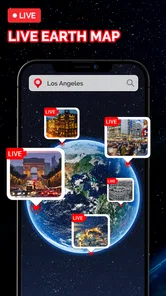
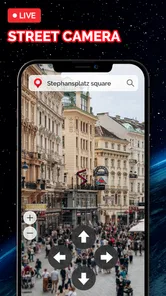
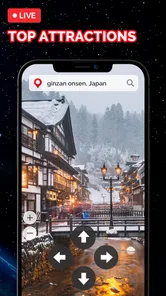
First off, let’s talk about the user interface. The Live Earth Map: Street View 3D app is as intuitive as it gets. You open it up, and bam! You’re greeted with a stunning globe that you can spin around with just a swipe. Fancy a trip to Paris? No problem, just zoom in and voila, you’re standing right next to the Eiffel Tower. The 3D street view is mind-blowing, making you feel as if you’re actually there. It’s so realistic that you might find yourself reaching out to touch the digital landscapes.
Features that Get You Hooked
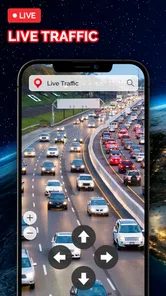
What really caught my eye are the features packed into this app. It’s not just about pretty pictures; you get real-time updates, live traffic conditions, and even weather forecasts. Planning a trip? This app doubles as a handy travel companion. You can bookmark locations, measure distances, and even find the best routes. It’s like Google Maps on steroids!
For an ordinary errand, I would use those tools in sequence rather than treat them as one big promise: save a place I may need again, compare the distance with what seems practical, then check the route before setting off. A bookmark is most useful when it represents a real destination—such as a hotel or meeting point—rather than a long list of places I might never visit. That small bit of discipline can make browsing more useful when I return later.
One practical example is planning a visit to a new clinic or café across town. I would save the destination, inspect the surrounding blocks to see what the approach looks like, and note a landmark that will be easy to recognize when I arrive. Then I would confirm the journey in a navigation app before leaving. This workflow answers two separate questions—“What will the area look like?” and “How do I get there now?”—without expecting one view to do both jobs perfectly.
More From Our News Desk

 Prime Video
Switching to Prime Video: What Changes in Your Viewing Routine
Prime Video can make a compelling second home for streaming, but switching means learning a different catalog, rental layer, and route from browsing to playback.

 Universal TV Remote Control
Universal TV Remote Control Works Best as a Reliable Backup
A phone remote earns its place through quick setup and reliable habits. Here is how to get more from Universal TV Remote Control—and where its limits show.

 Weather - By Xiaomi
Weather by Xiaomi Review: Clear at a Glance, Less Clear Up Close
Xiaomi’s weather app makes everyday forecasts quick to scan, but its calm surface can leave useful details and recovery paths harder to find than they should be.

 X
XX Under Pressure: Can It Recover When Posting Goes Wrong?
A resilience-focused review of X, examining setup, mistaken posts, interruptions, weak connections, and the gaps that matter when recovery needs to be dependable.

 Clash of Clans
Clash of Clans Is Won Between the Battles
Its raids are quick; its community is a long-term project of coordination, teaching, rivalry, and shared responsibility—with all the friction that entails.

 Android Auto
Android Auto Makes the Case for Quieter Car Software
The car interface is no longer judged by how much it can do, but by how quietly it helps. Android Auto shows what drivers now expect—and what still gets in the way.
Latest News



Distance measuring can also help narrow down options before committing to a route. If I am comparing two possible meeting spots, I can use it as a rough visual check of how far apart they are, then rely on route guidance to account for actual streets and travel conditions. I would not treat a straight-line measurement as a promise about walking time or road distance. That distinction is easy to overlook when a map makes everything look neatly measurable.
It is also worth being careful about what a visual map can settle. A street view may help me recognize a building or understand the shape of an area, but I would still check current directions before a time-sensitive trip. Street-level imagery and route guidance answer different questions: one helps me picture a place, while the other helps me get there. For navigation that must be dependable in the moment, I would keep a familiar dedicated map app available too.
And let’s not forget the offline maps. Yep, you heard me right. You can download maps and access them without any internet. This is a total game-changer, especially when you're traveling to remote areas with spotty Wi-Fi.
Making offline access useful rather than assuming it covers everything
Offline access is most useful when I treat it as preparation, not a rescue button. Before a trip through an area with unreliable reception, I would download the relevant map while connected and check that it is available before heading out. That is a good backup for looking at places without a signal, but it does not mean every live detail will keep updating offline. I would still plan around the information I can confirm before departure.
This makes the app appealing for a traveler who wants to get familiar with a destination before arriving, especially when the first hour of a trip may involve patchy internet. It is less suitable as the only travel safeguard: I would keep essential addresses and meeting details somewhere accessible and use a dedicated navigation option for live directions. Offline maps reduce one kind of uncertainty, but they do not remove the need to prepare.
Why You’ll Love It
Now, I’ve got to admit, I’m a bit of a tech geek. But even if you’re not, you’re going to love the simplicity and functionality of this app. It’s perfect for virtual tourists, geography students, or anyone with a bit of wanderlust. The app is constantly updated, so you’re always getting the latest and greatest in map technology. And the best part? It’s totally free! You can explore the world without burning a hole in your pocket.
That free starting point is appealing, but the app also offers in-app purchases, so I would check the purchase screen before relying on any feature that may require payment. The current version is 2.10.10 and it runs on Android 5.0 or later. Its 4.3 average rating from around 62,000 ratings, alongside over 10 million installs, suggests that many people have tried it; those figures are context, not a guarantee that every map view will fit my needs. I would start with the free experience and decide from actual use whether anything else is worth paying for.
Compared with the usual choice of a conventional navigation map, this app’s strongest appeal is the more exploratory, visual approach. A navigation-first app is generally the safer pick when I need turn-by-turn help or want a familiar tool for getting across town. Here, I would use the globe and street-level views to preview a destination, then switch to a dedicated navigation option if accuracy and timing matter most. That division of labor keeps the app useful without asking it to do every travel job.
There is a different trade-off with a traditional atlas or geography resource. Those tools can be better when I want labels, background, and an organized explanation of a region; this app is more immediately useful when I want to look around a specific place. For a student, that visual perspective can make a location feel less abstract, but it is not a replacement for maps or lessons that explain why a place developed as it did. I would choose based on whether the question is “What does it look like?” or “What should I understand about it?”
What Can Wear Thin Over Time
Novelty can fade if every session is just another random spin, and slow street-level loading on a weak connection adds friction at exactly the moment I want a quick answer. Offline maps can help when connectivity is poor, but I would prepare by downloading what I need before leaving reliable Wi-Fi rather than assume every view or live feature will work offline. That distinction matters: offline access is handy for preparation, while live information depends on being connected.
For a regular commute, I would probably reach for a navigation app I already trust; for a geography lesson, a globe-based encyclopedia or atlas may offer more context than visual map browsing alone. This app makes more sense when I want to inspect a place, get oriented before a visit, or explore for fun. It is less compelling if I rarely travel, do not enjoy map-based browsing, or need a single tool whose main strength is dependable, real-time directions.
It is also not the right choice for someone who wants a map to stay out of the way and simply guide them through a routine journey. Its visual exploration is the point, but that emphasis can feel like extra work if all I need is an address and a dependable route. I would skip it if I know I will not browse destinations or prepare for unfamiliar places; a tool that fits an actual habit is more valuable than one with an impressive first impression.
There is also a practical maintenance question: a map app earns space when I return to saved places or use it to prepare for outings, not merely because I once enjoyed exploring it. I would keep bookmarks tidy, remove destinations that no longer matter, and revisit the app before trips rather than expect it to become a daily habit automatically. With that light upkeep, it can serve as a useful visual notebook for places I am considering.
The upkeep is modest, but the routine matters. I would save only places with a clear next use, such as a venue I have not visited yet or a hotel for an upcoming trip. After the outing, I would remove anything that no longer helps. This prevents the saved list from becoming a pile of old curiosities that takes longer to sort through than it saves. If I use the app only once in a while, a small, deliberate collection is more helpful than trying to turn it into a permanent travel journal.
For someone deciding whether it deserves storage, I would give it a short practical trial rather than judge it by how entertaining the first session feels. Pick one real destination, use the map to preview the surroundings, and see whether that changes how confidently you plan the visit. If that one task feels useful, there is a reason to return. If the app adds no value beyond a few minutes of globe-spinning, it may be better as an occasional download than a fixture.
However, like all great things, it’s not without its quirks. Sometimes, the street view can be a tad slow if you’re on a shaky internet connection. But hey, a little patience goes a long way, right?
Overall, the Live Earth Map: Street View 3D app is a must-have for anyone who loves exploring. Whether you’re planning your next vacation or simply satisfying your curiosity about the world, this app has got you covered. So, go ahead, download it, and let your adventures begin!
Does It Deserve a Lasting Place?
For me, it can, but only if visual exploration is something I will actually use. Its free entry, approachable globe, and mix of browsing and practical tools make it worth trying; the experience is less convincing when I need consistently fast loading or navigation to be the sole focus. The app has about 1,400 written reviews, but I would still judge it by a simple test: does it help me prepare for a real outing or make a place more interesting to explore?
If the answer is yes, I would keep it alongside—not instead of—my regular navigation option. If I open it once for the novelty and never return, there is little reason to give it permanent room. That is the honest balance: a pleasant way to look around the world, with lasting value for curious travelers who make a habit of using it with a purpose.
Live Earth Map: Street View 3D Frequently Asked Questions
Can I use Live Earth Map: Street View 3D to preview a destination before traveling?
Yes. The app is aimed at visual exploration, so it can help you look around a place and get a sense of its surroundings before a trip. Its map imagery and street-level views are useful for browsing destinations and landmarks, though they are best treated as a preview rather than a substitute for checking current local conditions or planning travel details.
Does Live Earth Map: Street View 3D provide GPS navigation, and can I rely on it while driving?
The app is described as offering GPS navigation and live traffic updates, alongside map and street-view features. These tools may be useful when exploring routes, but drivers should keep their attention on the road and follow current traffic signs and conditions. It is sensible to review a route before setting off rather than relying entirely on an app while driving.
Is Live Earth Map: Street View 3D useful for finding famous landmarks?
The app is designed to let users explore places visually, including famous landmarks from a 3D perspective. This can make it enjoyable for casual browsing or for getting a preview of a destination before visiting. The experience depends on the imagery available for the location, so some places may offer a more informative view than others.
Does Live Earth Map: Street View 3D show live cameras or live street scenes?
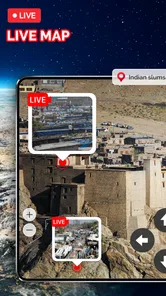
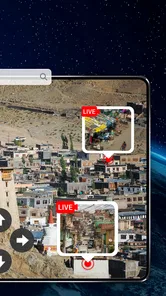
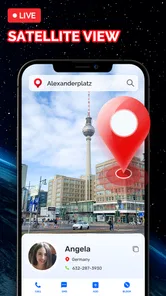
The app’s summary highlights earthcam, live street view, and live satellite view, so it is designed to help users explore places through map-based imagery and street-level views. “Live” describes the viewing experience, but imagery availability and freshness can vary by location. Before downloading, it is helpful to think of the app as a way to explore destinations visually rather than as a guarantee of a continuously updating camera feed everywhere.
Who makes Live Earth Map: Street View 3D, and is it widely used?
Live Earth Map: Street View 3D is developed by Droid-Developer and sits in the Travel & Local category, which suits its focus on exploring places and maps. It has over ten million installs, with an average rating of 4.3 from around 62,000 ratings. Those figures suggest a broad audience, though individual experiences can still differ depending on what features someone expects and how they use the app.
Pros
- High-quality 3D maps enhance navigation.
- Real-time traffic updates improve planning.
- Street view offers immersive exploration.
- User-friendly interface for easy access.
- Customizable map themes for personalization.
Cons
- Requires constant internet for real-time data.
- Heavy on battery usage during long sessions.
- Limited offline map capabilities.
- Ads may interrupt user experience.
- Some areas may lack detailed street view.












