

Live & 4k Wallpaper Home
- 3.00
- 4.1
- Installs
- 100.00K
- Price
- Free

Screenshots
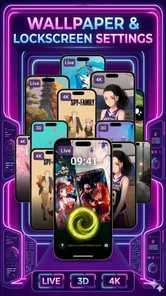
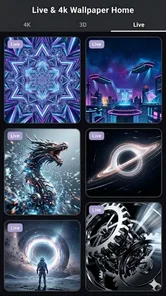


Analysis by Reviewed
Live & 4k Wallpaper Home is the kind of personalization app I would try when my phone feels visually stale and I want more than a single static background. It combines live and high-resolution wallpaper presentation with a home-launcher idea, so the appeal is not only changing the picture behind icons. The goal is to make the first screen feel more deliberate while keeping access to everyday apps close at hand.
My first impression is that this is aimed at people who enjoy adjusting the mood of their phone without turning the process into a long customization project. The store summary describes a fusion of 4K/HD live wallpapers and a smart home launcher, while the short description keeps the promise simple: live and 4K wallpaper. That makes the app easy to understand, but the launcher side is important because it changes how I judge it. A wallpaper tool can succeed with attractive visuals alone; a launcher has to feel comfortable every time I unlock the device.
It is a free Android app from Interior, listed for everyone and available on devices running Android 8.0 or later. The current version is 0.1.3, and the app has already passed one hundred thousand installs with an average rating of 4.1 from roughly one hundred forty ratings. Those figures suggest that it has found an audience, although I would still approach it as an early, focused personalization product rather than a mature replacement for every home-screen tool.
Getting from installation to a useful home screen
I’d start by treating the wallpaper and home screen as two connected choices, not one makeover: pick a calm image, then check whether your usual apps remain easy to reach. That gives you a useful baseline before you explore more dramatic visuals. Next, I’d look at how the combined setup holds up across an ordinary day, when quick access matters more than a striking first glance.
What I would expect before opening it
The best way to approach Live & 4k Wallpaper Home is to decide what I actually want to improve. If the goal is simply a new background every few weeks, a conventional wallpaper picker may be quicker. If I want motion, a more distinctive first screen, and a launcher experience that works together with the wallpaper, this app makes more sense.
I would also keep expectations realistic about the word “smart.” In this context, I read it as a home-screen experience designed to work alongside the wallpaper, not as a promise that the phone will automatically understand my routines or reorganize everything perfectly. That distinction matters because launcher users often expect deep control over gestures, icon packs, folders, search, widgets, and notification behavior. The app’s clearest identity is the combination of visual personalization and home access, not an all-purpose replacement for every specialized launcher.
Before installing, I would check that the phone is running Android 8.0 or newer and leave enough time to judge the first screen rather than making a decision from the setup page alone. Live backgrounds can look impressive in a preview but feel distracting after a full day. I prefer to test one while reading messages, opening maps, and returning to the home screen repeatedly. That reveals whether the motion supports the phone or competes with it.
More From Our News Desk

 Gmail
GmailGmail in a Busy Inbox: Who Benefits Most?
From first account to crowded workday, Gmail earns its place through dependable search and flexible sorting—but its best fit depends on how much inbox maintenance you can tolerate.

 Prime Video
Switching to Prime Video: What Changes in Your Viewing Routine
Prime Video can make a compelling second home for streaming, but switching means learning a different catalog, rental layer, and route from browsing to playback.

 Universal TV Remote Control
Universal TV Remote Control Works Best as a Reliable Backup
A phone remote earns its place through quick setup and reliable habits. Here is how to get more from Universal TV Remote Control—and where its limits show.

 Weather - By Xiaomi
Weather by Xiaomi Review: Clear at a Glance, Less Clear Up Close
Xiaomi’s weather app makes everyday forecasts quick to scan, but its calm surface can leave useful details and recovery paths harder to find than they should be.

 X
XX Under Pressure: Can It Recover When Posting Goes Wrong?
A resilience-focused review of X, examining setup, mistaken posts, interruptions, weak connections, and the gaps that matter when recovery needs to be dependable.

 Clash of Clans
Clash of Clans Is Won Between the Battles
Its raids are quick; its community is a long-term project of coordination, teaching, rivalry, and shared responsibility—with all the friction that entails.
Latest News



The first setup: take it one decision at a time
After installation, I would begin with the visual choice rather than immediately changing every home-screen habit. Select a wallpaper that remains readable behind icons, then look at the screen in both a bright room and a darker setting. A detailed 4K image can be beautiful in isolation but make labels difficult to scan when its contrast is too busy. A calmer scene often works better as a daily background than the most dramatic preview.
The same principle applies to live wallpaper. I would watch the movement for longer than a few seconds and ask whether it still feels pleasant after the novelty fades. Slow, restrained motion usually makes a better everyday choice than an effect that constantly pulls the eye. This is one of the practical trade-offs that a store description cannot communicate: the most visually active option is not automatically the most usable one.
When the launcher portion appears, I would treat it as a separate test. I would locate the apps I use several times a day, return to the home screen, and see whether the arrangement feels natural. If the first screen becomes harder to navigate, the wallpaper has not solved the main problem. A good setup should reduce friction, not merely create a more impressive screenshot.
I recommend changing one element at a time during setup. First choose the background, then assess the home layout, and only afterward decide whether the overall combination suits you. Changing everything together makes it difficult to identify what feels wrong. This small workflow is especially useful for a first-time user because it turns a potentially confusing customization session into a series of reversible choices.
Finding the first meaningful success
For me, the first successful action would be completing a full unlock-and-open routine without hesitation. I would set the chosen background, place or locate the app I use most, lock the phone, unlock it again, and open that app from the new home experience. If I can do that comfortably, the setup has delivered something useful rather than just a decorative change.
A second useful test is returning home after several unrelated tasks. I would open a browser, check a message, view a photo, and then press the home control. The question is whether the launcher gives me a clear visual starting point each time. A live wallpaper should remain in the background while I work; it should not make the screen feel like an animated advertisement.
There is also a practical benefit to choosing a background with intentional empty space. If the main subject sits away from the area where icons appear, the home screen can look polished without sacrificing recognition. This is a small but meaningful design decision: instead of trying to solve clutter with more launcher options, I can use the image itself to create breathing room.
Another tip is to judge the wallpaper with real icon labels visible. Preview screens often hide the exact visual competition that matters in daily use. Once the icons, labels, and launcher elements are present, a background that seemed perfect may need replacing with a simpler one. I consider that a normal part of setup, not a failure.
Common confusion during everyday use
The biggest possible confusion is assuming that a live wallpaper and a launcher are the same thing. They are related in this app, but they solve different problems. The wallpaper changes the visual layer, while the launcher affects the place from which I reach apps and return after tasks. If I dislike the appearance but like the navigation, I should change the background rather than abandon the whole experience. If navigation feels awkward, a prettier image will not fix it.
Another point worth understanding is that high resolution does not guarantee a better result on every phone. A 4K source can look crisp, but the final impression still depends on the screen, cropping, icon placement, and motion. I would prioritize composition and readability over the largest-sounding resolution label. On a smaller display, a well-framed HD image may be more comfortable than a highly detailed scene with tiny visual elements.
Live movement can also change how often I notice the home screen. That is pleasant when I want the phone to feel more personal, but it can be counterproductive if I use the device in situations where a quiet, instantly readable screen matters. I would choose a static or less active option for work-heavy periods and reserve more animated choices for a personal device or relaxed setting.
It is easy to mistake a launcher change for a problem with the phone itself. If an app seems harder to find, I would first slow down and learn the new arrangement instead of repeatedly reinstalling or changing themes. Give the layout a short, consistent trial, then make one adjustment. On the other hand, if the new structure continues to interrupt basic habits, I would return to the familiar launcher. Personalization should serve routine, not demand that routine be rebuilt around it.
A realistic day with the app
Imagine starting the morning by unlocking the phone to a soft moving scene rather than a blank or overused background. I check the weather, answer a message, and open a calendar app. Later, I return to the home screen to start navigation, then come back again to play music. In that scenario, the app succeeds if the visual layer adds character while the launcher keeps those transitions straightforward.
At lunch, the same background may be viewed in brighter light, where contrast becomes more important. In the evening, the motion may feel more noticeable because the phone is used in a darker room. This is why I would not evaluate a setup only at installation time. A background that works in one lighting condition may need replacing when the phone becomes a work tool, a reading device, and an entertainment screen throughout the day.
For someone who changes phones often, the appeal is also emotional: a familiar visual style can make a new device feel personal sooner. For someone who shares a device or needs maximum predictability, the launcher aspect may be less attractive. The right choice depends on whether consistency and efficiency matter more than a customized first impression.
Where it compares well, and where alternatives win
Compared with the standard wallpaper picker included with Android, Live & 4k Wallpaper Home is more appealing when I want the background and home-screen experience considered together. The built-in option is usually the safer choice for simplicity and familiarity, but it may not offer the same sense of a themed first screen. This app earns its place when visual atmosphere is part of the reason I am customizing.
Compared with a dedicated launcher, it is likely to appeal more to users who want a focused visual change without beginning a large customization project. A specialist launcher is usually the better direction for people who need extensive layout controls, advanced gestures, detailed icon management, or a very specific productivity workflow. I would not choose this app solely because I expect it to replace a deeply configured launcher.
Dedicated live-wallpaper apps may offer a broader range of motion-focused choices, while a static wallpaper collection may be gentler on attention and simpler to manage. Live & 4k Wallpaper Home sits between those approaches by connecting the animated or high-resolution background with the home experience. That combination is its most interesting trade-off: fewer separate tools to think about, but potentially less appeal to someone who wants maximum specialization in one area.
Who will enjoy it most
I think this app is a good fit for first-time customizers, people bored with the default home screen, and users who want their phone to feel more expressive without paying for the experience. It also suits anyone who likes testing different moods: a calm image for concentration, a brighter scene for personal use, or a more animated look when the phone is mainly for leisure.
It is less suitable for someone who wants the absolute quietest interface, depends on a carefully tuned productivity launcher, or finds moving backgrounds distracting. I would also steer away from it if the only requirement is a single static image and no interest in changing the home-screen experience. In that case, the standard Android tools may be faster and less disruptive.
The free price lowers the risk of experimenting, and the everyone rating makes it approachable for a broad audience. Still, free does not mean every setup will suit every person. The real cost is attention: I need to spend a little time choosing a readable scene and deciding whether the launcher improves my habits. That time is worthwhile only if I care about the phone’s visual identity.
My practical recommendation for a first install
I would install it, choose one restrained wallpaper first, and use it through a normal sequence of unlocking, opening apps, returning home, and checking the screen in different lighting. I would avoid judging it by the preview alone. If the first arrangement feels clear and the moving background remains pleasant after repeated use, then the app is doing what it promises in a meaningful way.
If the visuals are appealing but the home navigation slows me down, I would keep the lesson simple: the wallpaper idea may suit me, while the launcher approach may not. If the launcher feels comfortable but the background is too busy, I would select a calmer image rather than dismissing the whole app. This separation makes troubleshooting much easier for new users.
Interior’s current release, version 0.1.3, presents Live & 4k Wallpaper Home as a focused personalization choice rather than a universal answer for Android home screens. I like the way it brings high-resolution and live wallpaper styling closer to everyday navigation, and I appreciate that the free entry point makes testing straightforward. My recommendation is strongest for people who want a more distinctive first screen and are willing to spend a few minutes finding the right balance between motion, clarity, and access.
In the end, I would keep it installed when the home screen feels more enjoyable without becoming harder to use. That is the standard I would apply to any personalization app: the best setup is the one that looks special but still disappears into your routine. If Live & 4k Wallpaper Home reaches that balance on your phone, it is a worthwhile way to refresh Android without turning customization into a full-time project.
Live & 4k Wallpaper Home Frequently Asked Questions
Will Live & 4K Wallpaper Home work on my Android phone?
Live & 4K Wallpaper Home is an Android personalization app, and it requires Android 8.0 or later. Check your phone’s operating system before downloading so you can confirm compatibility. The app’s live wallpaper and launcher features may also behave differently across devices, depending on the phone model and its settings.
Who develops Live & 4K Wallpaper Home, and is it suitable for all ages?
The app is developed by Interior and has an Everyone content rating, so it is intended to be suitable for a general audience. It combines wallpaper customization with a home launcher, making it relevant to anyone who wants to change their phone’s appearance. As with any app, parents can review its on-device content and settings with younger users.
What is Live & 4K Wallpaper Home, and what does it offer?
Live & 4K Wallpaper Home is a wallpaper customization app designed for Android devices. It provides a collection of static, animated, and high-resolution 4K backgrounds for the home screen and lock screen. The library generally includes categories such as nature, abstract designs, animals, space, cars, and seasonal themes, allowing users to change the appearance of their phone without creating wallpapers manually.
Does Live & 4K Wallpaper Home support live wallpapers and 4K displays?
The app is intended to support both animated live wallpapers and high-resolution backgrounds, although the exact experience can depend on your phone model, Android version, screen resolution, and manufacturer settings. Some devices may reduce animation quality or battery usage automatically. Before downloading large wallpapers, check that your device has enough storage and that it supports live wallpaper features.
Will using Live & 4K Wallpaper Home drain the battery?
Static wallpapers usually have little effect on battery life, while animated wallpapers can consume additional power because they may use the screen, processor, and sometimes motion effects continuously. Battery impact varies according to animation complexity, display technology, refresh rate, and how long the screen stays active. If battery life is important, choose a darker or less animated background and disable effects when needed.
Pros
- Offers a broad selection of live and 4K wallpapers.
- Can give your home screen a more dynamic
- modern appearance.
- Includes visually sharp backgrounds for high-resolution displays.
- Wallpaper browsing is simple and accessible for most users.
- Supports frequent style changes without editing images manually.
Cons
- Live wallpapers may consume more battery than static backgrounds.
- 4K images can use considerable storage and mobile data.
- Some features or wallpapers may require in-app purchases.
- Performance may drop on older or less powerful devices.
- Animated backgrounds can occasionally distract from app icons.











