Linked Phone Business Number
- 376.00
- 3.7
- Installs
- 50.00K
- Price
- Free

Screenshots
Analysis by Reviewed
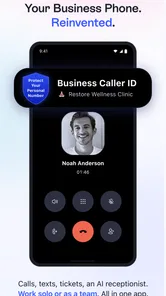
When I tried Linked Phone Business Number, I approached it as a practical question: can a small business keep work calls separate from personal calls without carrying another handset? The app is built around that simple need, offering a professional second line with local and toll-free number options. I found the idea useful, especially for freelancers, home-based businesses, and small teams that want a clearer boundary between private and customer communication.
What makes the app worth considering is not just the extra number. It is the way a second line can make daily communication easier to organize. A person can give customers a business contact while keeping a personal number private, and a worker can use one phone for both roles. That convenience is balanced by the fact that a phone-based business tool still depends on the user being comfortable with calling, reading notifications, and managing conversations on a mobile screen.
What the app is designed to do
Linked Phone Business Number is a business communication app from LinkedPhone. It is free to install, with optional in-app purchases ranging from $0.99 to $99.99 per item. The basic appeal is easy to understand: instead of buying a second device or moving immediately to a full business phone system, I can add a separate professional identity to the phone I already use.
That separation is valuable in several everyday situations. A self-employed designer might put the business number on invoices and keep a personal number for friends. A property manager could use it for prospective tenants. A small shop owner could publish a contact number without exposing a private line. Even someone testing a new side business may prefer a second number before committing to more expensive hardware or an office telephone setup.
The app has been available since August 25, 2016, and its current version is 22.4.0. It works on Android 7.0 or later, which makes it relevant to people using older compatible phones rather than only the newest devices. Its Everyone content rating also makes the app broadly approachable from an age-classification standpoint, although the usefulness of a professional phone line naturally depends more on the user’s work situation than on age.
With a 3.7 average from around 858 ratings and over 50K installs, the public response looks mixed rather than universally enthusiastic. I read that as a reason to evaluate the workflow carefully instead of assuming the app will replace every business phone service. It can be a sensible lightweight option, but it is not automatically the best fit for a team requiring advanced call management.
Readability and navigation in daily work
For this kind of app, readability is not a cosmetic detail. A business caller may be checking a number quickly between appointments, returning a customer call while standing in a noisy shop, or switching between personal and work conversations under pressure. I found the most important usability question was whether the professional line felt visually distinct enough from the personal phone functions.
More From Our News Desk

Weather by Xiaomi Review: Clear at a Glance, Less Clear Up Close

X Under Pressure: Can It Recover When Posting Goes Wrong?

Clash of Clans Is Won Between the Battles

Android Auto Makes the Case for Quieter Car Software

MobiOffice: Transforming Mobile Productivity with Seamless Integration

EA SPORTS FC™ Mobile Soccer: Redefining Mobile Sports Gaming
A second number is only helpful when I can recognize which identity I am using before placing a call. That is particularly important for freelancers who regularly contact both customers and friends from the same device. My practical advice is to slow down during the first setup and make a deliberate habit of checking the active business context before calling. A few seconds of attention can prevent the awkward mistake of contacting a customer from a private number.
People with reduced vision may also need to adjust their phone’s system text size, display scaling, contrast, or screen reader settings to make the interface more comfortable. I would not treat those system adjustments as proof that every part of the app is optimized for accessibility, but they can make a meaningful difference. The app is easier to live with when the user does not have to strain to distinguish labels, numbers, and call controls.
For readers who rely on screen magnification or spoken feedback, the key test is practical: can the important controls be identified without depending on tiny visual cues or color alone? I would recommend trying the main tasks immediately after installation—selecting the business line, finding a contact, and starting a call—before moving the number onto printed materials. If any control is difficult to identify with the phone’s accessibility settings enabled, that friction matters more than the attractive idea of having a second line.
Navigation also affects people with cognitive disabilities, attention difficulties, or limited familiarity with business phone tools. A clear routine helps: open the app, confirm the business identity, find the intended contact, and review the outgoing number before tapping call. I prefer this kind of repeatable workflow over relying on memory, especially when the phone is used for both personal and professional tasks.
Motor and sensory considerations
Making calls on a touchscreen can be demanding for users with tremors, limited dexterity, joint pain, or one-handed use. The risk is not only tapping the wrong contact. It is also the need to navigate several small controls while holding the phone, walking between tasks, or carrying equipment. A second-line app cannot remove those physical demands, so I see it as more suitable for users who can comfortably complete phone tasks through their device’s existing controls.
Voice interaction, external keyboards, switch access, and other phone-level tools may help some users, but the experience can vary depending on the handset and operating system. I would test those tools with the actual app rather than assuming compatibility. The most important scenarios to check are answering a business call, ending it, returning a missed call, and switching away without accidentally exposing the personal line.
Sensory context matters just as much. A café, workshop, delivery route, or shared office can make visual and audio cues unreliable. If the user cannot hear a ringtone, vibration becomes important; if vibration is uncomfortable or ineffective, visible notifications matter more. I would suggest setting up a personal routine around the phone’s notification controls and checking missed calls at planned intervals rather than depending on a single alert.
There is also a privacy angle for people who share living or working spaces. A loud business notification can reveal that a customer has called, while a visible lock-screen preview may expose names or message details. The right solution depends on the phone’s notification settings and the user’s needs, but I would review those settings before using the number for sensitive client work. A separate business line creates separation only if the surrounding notifications are managed thoughtfully.
One useful trade-off is that a second line can reduce the physical burden of carrying two phones. That may help someone with limited hand strength, a small bag, or a job where an extra device is easy to lose. On the other hand, putting both identities on one phone concentrates everything in one place. If the phone is misplaced, damaged, or unavailable, both personal and business communication may be affected.
Situational access: where the second line helps most
The strongest use case I found was a solo professional who needs a public contact number but does not need a receptionist, extension tree, or multi-seat call center. Imagine a freelance cleaner who receives inquiries during the day. The business number can appear on a simple flyer or profile, while the personal number remains private. At the end of the workday, the user can stop treating that line as a personal contact channel and keep the boundary clearer.
Another good scenario is a small online seller handling customer questions from home. A separate number can make it easier to recognize work-related calls and avoid giving customers access to a private line. The benefit is not only privacy; it also makes it easier to decide which calls deserve attention during family time. I would still establish a clear response schedule, because a second number does not automatically create business hours or stop customers from calling at inconvenient times.
Local and toll-free options can also support different kinds of outreach. A local number may feel familiar to nearby customers, while a toll-free option can appear more suitable for a broader service area. The better choice depends on the audience and the image the business wants to present. I would not choose solely on appearance: the number should match where customers are located and how they are likely to contact the business.
For someone with hearing loss, the app’s value depends heavily on whether phone calls are the preferred communication method. If customers mainly communicate by voice, a second line may still be useful, but the user should pay close attention to the phone’s captioning, hearing-device support, volume controls, and notification behavior. If the business depends on rich text conversations, file exchange, or visual support tickets, a dedicated messaging or help-desk platform may be more appropriate than a phone-number app.
People with speech disabilities may also find that a business number is helpful for receiving calls but less convenient for outgoing conversations. In that case, a workflow combining the line with text-based contact or a relay service may be more inclusive than relying on voice calls alone. I would judge the app by the communication methods the business actually needs, not by the presence of a professional number alone.
Travel and unstable connectivity introduce another practical question. I would not treat the app as a guaranteed replacement for a traditional carrier line in every location. Before publishing the number widely, I would test it in the places where work calls normally happen: at home, in the office, on the road, and in any building where reception is weak. A business line that works well only at a desk may not suit a mobile professional.
Where it compares with familiar alternatives
The usual alternative is carrying a second physical phone. That approach can offer a clearer separation between personal and business use, and it may feel more dependable for someone who wants independent battery life or carrier connectivity. The cost is extra hardware, another device to charge, and more items to carry. Linked Phone Business Number is more convenient when the priority is reducing equipment rather than creating complete technical independence.
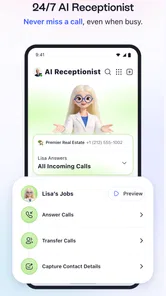
A full virtual phone system is another comparison point. Those services may be better for teams that need extensions, shared answering, call queues, detailed administration, or a structured customer-service workflow. I would choose that route when several people must answer the same business number or when call handling needs to be controlled centrally. For one person or a very small operation, that level of infrastructure can feel excessive.
A regular personal number is the simplest alternative, but it creates a privacy and organization problem. Once a personal number is printed on advertisements or shared with customers, reclaiming that boundary can be difficult. The second-line approach is more useful when the business is still small but the owner already knows that personal and professional calls should not be mixed.
There is also the option of using a messaging platform or email as the main contact channel. Those alternatives may be better for users who need written records, asynchronous replies, attachments, or communication that is easier to review than a live call. Linked Phone Business Number makes more sense when customers genuinely expect a phone conversation and the owner wants that channel to look separate from personal life.
Remaining barriers and points to check first
The biggest limitation is that the app does not remove the complexity of being reachable for work. A second number can actually increase the number of notifications and decisions the user must manage. Someone who already struggles with interruptions may find that the extra line creates another source of pressure unless notification schedules and response habits are set carefully.
Cost also deserves attention. The app is free to download, but optional purchases are available, with individual items priced from $0.99 to $99.99. I would review the purchase details inside the app before depending on the line for a long-term business workflow. A free starting point is attractive, but the total cost of the features or service level a particular business needs should be considered alongside physical second-phone plans and full virtual phone providers.
Older Android users should check compatibility before planning a rollout. The minimum supported operating system is Android 7.0, so the app is not limited to recent phones, but an old device may still have practical constraints such as battery wear, slower performance, or limited notification reliability. Those issues are not unique to this app, yet they matter more when customers depend on timely responses.
I would also avoid treating a business number as a complete record-keeping system. If the work involves regulated information, detailed customer histories, team handoffs, or formal retention requirements, a dedicated business platform may be safer and easier to manage. The app can provide a useful communication layer, but a phone number alone does not replace documented processes.
Accessibility testing should be personal rather than theoretical. Before committing, I would ask: can I read the main controls comfortably, can I operate them with my preferred input method, can I notice incoming calls in my normal environment, and can I keep personal details hidden from customers? If the answer is no to any of these, the convenience of one phone may not compensate for the daily friction.
My inclusive verdict
After using Linked Phone Business Number as a business-focused second-line tool, I see it as a practical fit for individuals and very small businesses that want separation without carrying another handset. Its free entry point, local and toll-free number concept, and compatibility with Android 7.0 or later make it approachable for a broad range of users. The developer, LinkedPhone, has focused the product on a familiar need rather than trying to turn it into an entire office system.
My recommendation is strongest for freelancers, independent service providers, home businesses, and side projects where one person handles most calls. It can also help someone who wants to protect a personal number or reduce the weight of carrying two phones. The best results come from combining it with deliberate notification settings, a clear call routine, and a quick accessibility check using the phone’s own tools.
I would skip it when the business needs several employees on one line, advanced call routing, formal customer records, or communication that is primarily text-based. I would also be cautious if the user has difficulty with touchscreen controls, cannot reliably hear or see alerts, or works in places with inconsistent connectivity. In those situations, a physical second phone, a team-oriented phone system, or a text-first service may provide a better experience.
My bottom line is that Linked Phone Business Number is most valuable as a lightweight boundary between personal and professional life, not as a replacement for every business communication system. If that boundary is your main goal, it is worth trying. If accessibility, team coordination, or dependable enterprise-style call handling is central to the job, test the complete workflow first and compare it with a more specialized alternative before making the number public.
Linked Phone Business Number Frequently Asked Questions
Can I choose a local or toll-free number for my business?
Linked Phone Business Number is presented as a way to get a professional second line, with local and toll-free number options. That can help a business use a number that suits its customers or preferred image. The options available may depend on your location and account choices, so check the number selection details in the app before deciding which line to use.
What should I check before moving my business number to Linked Phone?
Before relying on Linked Phone Business Number as your main business contact, consider how you will handle existing customers, printed materials, and online listings that use your current number. The app is designed to provide a separate professional line, so it may be useful to test the service and confirm that the number and communication options fit your workflow before updating customer-facing contact details.
What is Linked Phone Business Number and who is it designed for?
Linked Phone Business Number is a business communication app that lets users manage a separate professional phone number from a mobile device. It is intended for freelancers, small businesses, sales teams, customer-service workers, and anyone who wants to keep business calls and messages separate from a personal number. The app can be useful for maintaining a more professional presence without carrying a second physical phone.
Can I use Linked Phone Business Number without a traditional second SIM card?
In many cases, the service is designed to provide a business number through the app rather than requiring another physical SIM card. However, availability and activation methods may depend on your country, phone compatibility, and the provider’s current policies. Before downloading, check whether your region is supported, what number options are offered, and whether verification through your existing mobile number is required.
What communication features does Linked Phone Business Number offer?
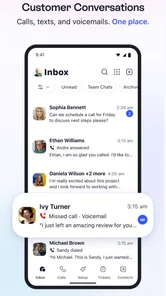
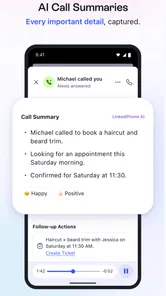
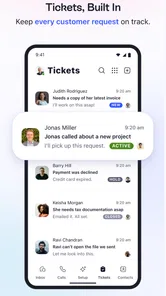
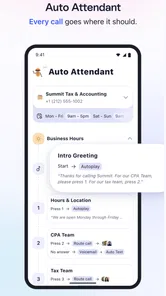
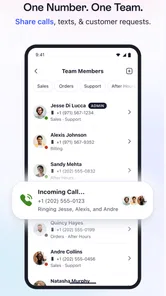
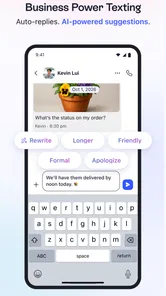
The app is primarily intended to help users handle business communications from one place. Depending on the selected plan and region, features may include calling, business texting, voicemail, contact management, call history, and notifications. Some advanced tools can be restricted to paid subscriptions. It is worth reviewing the current feature list carefully, because available functions may differ between Android and iOS or change with future updates.
Pros
- Keeps business calls separate from your personal number.
- Supports a more professional image for small businesses.
- Useful for handling customer calls while working remotely.
- Can help protect your private number from unwanted contacts.
- Suitable for freelancers
- teams
- and growing businesses.
Cons
- Some features may require a paid subscription or additional credits.
- Call quality can depend heavily on your internet connection.
- Not all countries or phone numbers may be supported.
- Business calls may be affected by app notifications or device settings.
- Users may need time to learn the app’s calling and management tools.











