LightCut -AI Auto Video Editor
- 1.72K
- 4.7
- Installs
- 1.00M
- Price
- Free

Screenshots

Analysis by Reviewed
When I want to turn a handful of clips into a shareable video without settling in for a full editing session, I look for an editor that helps me make decisions as well as perform cuts. LightCut - AI Auto Video Editor is aimed at that quicker, guided style of making videos. It is a free video-editing app from LightCut Inc., and its focus is useful to understand before you install it: this is a practical starting point for short edits, not necessarily a replacement for a detailed desktop timeline.
What free access means in practice
LightCut is listed as free, so there is no purchase price to pay to try it. That makes it easier to test against your own footage before deciding whether its approach suits you. I would treat “free” as a low-risk reason to explore the app, rather than proof that every possible tool or workflow will meet every editor’s needs. The price alone does not tell me how well it will fit a particular project; the useful question is whether its editing approach saves me enough time.
The app is in the video players and editors category, and it is rated for Everyone. It has a 4.7 average from around 61,000 ratings, with over a million installs. Those figures suggest that many people have tried it, but they are not a substitute for checking whether the controls and results feel right for your own style. Its current version is 4.107.0, and it runs on Android 7.0 or later.
Where LightCut earns its place
The strongest reason I would reach for LightCut is to shorten the distance between recording and sharing. A guided editor can be especially useful when I have several clips, a clear subject, and no desire to build every cut manually. Instead of treating every tiny choice as a separate editing task, I can use the app as a way to get an initial version together, then decide what needs my attention.
A faster first cut, with room for your judgement
Automated selection is helpful when the raw footage is repetitive or when I am unsure where to begin. I would still watch the complete result before sharing it. A moment that looks important to an automated edit may not be the moment I want to emphasize, and a quick sequence can miss the small pauses that make a memory feel natural. My best use for automatic editing is as a draft: accept the parts that work, then refine the parts that do not.
That distinction matters for ordinary projects. Imagine filming a family walk, a small celebration, or a few scenes from a day out. I might have clips of the location, people moving, and one moment I especially want to keep. A fast edit can give those pieces shape without turning the evening into a technical project. I would select footage with a clear subject, review the assembled video for awkward jumps, and make a deliberate pass for the moment that matters most.
Useful when a project has a clear purpose
LightCut makes the most sense to me when I already know what a video is for: a short recap, a casual vlog, or a simple post for friends. That purpose helps me choose what to keep instead of endlessly trying different edits. If I am making a quick recap after a weekend trip, for example, I would start with a few distinct scenes rather than every clip on my phone. A tighter selection gives an automatic workflow a better chance of producing something coherent and saves me from sorting through footage I never intended to use.
More From Our News Desk

Clash of Clans Is Won Between the Battles

Android Auto Makes the Case for Quieter Car Software

MobiOffice: Transforming Mobile Productivity with Seamless Integration

EA SPORTS FC™ Mobile Soccer: Redefining Mobile Sports Gaming

How Microsoft OneDrive Became a Mobile Productivity Giant

How Google Translate Breaks Language Barriers Effortlessly
There is also a small but valuable workflow lesson here: decide on the ending before editing. If I know which final shot I want viewers to remember, I can check whether the edit leads naturally toward it. That simple choice often does more for a short video than adding extra effects. It is a practical way to keep a template-driven or automated result from feeling like a random collection of clips.
Where it sits beside other editors
Compared with a conventional timeline editor, LightCut’s appeal is speed and guidance rather than fine-grained control. A timeline-first app is usually the better fit when I need to adjust the exact duration of many clips, build several layers, or manage a carefully timed sequence. By contrast, a guided editor can be less intimidating when I just want a presentable first version and do not want to learn a complex interface first.
It also occupies a different place from a basic trimming tool. A simple trimmer is enough when all I need is to remove the start or end of one clip; opening a fuller editor for that can be unnecessary. LightCut is more appealing when I have multiple pieces of footage and want help turning them into a joined edit. The trade-off is that a guided process may not put every detailed decision immediately under my control, so I would not choose it for a project whose timing must be exact.
How I would avoid common editing frustrations
I would begin by making a small selection of clips rather than feeding in every recording from the day. This is not just a time-saving habit: it gives the editing process a clearer subject and makes it easier to notice whether the final order tells a story. I would also avoid choosing footage only because it looks dramatic. A quiet establishing shot can help a viewer understand where the action is happening, while a sequence made entirely of close-up moments may feel disconnected.
For music and text, restraint is useful. The app’s editing tools can help add polish, but more decoration does not automatically make a video clearer. I would first check whether the images already communicate the point, then add text only when it supplies information a viewer would otherwise miss. I would likewise listen to the finished edit before sharing it, because music that feels energetic during editing may distract from a personal moment. These checks take little effort and make an automatic first cut feel more considered.
Who is likely to get the most value
I would recommend trying LightCut if you make occasional short videos, are new to editing, or want a quicker route from a phone’s camera roll to a shareable recap. It can also suit someone who enjoys capturing moments more than arranging them afterward. The free price makes it reasonable to try for a low-stakes project, while its guided style can reduce the blank-page feeling that often stops beginners from finishing an edit.
I would be more cautious if you already work comfortably in a detailed editor and depend on exact timing or a highly controlled sequence. The same is true if your project needs a specific visual style that you want to shape shot by shot. In those situations, a manual timeline editor is likely to give you more direct control, even if it takes longer. A tool that speeds up a casual recap is not automatically the right tool for every video.
Questions worth settling before you begin
Will it work on an older Android device? The stated minimum is Android 7.0, so a device running an earlier version does not meet that requirement. If your phone is on a supported version, the best practical test is to try a small project first; that tells you more about your own device and editing habits than assuming every phone will feel identical.
Is it suitable for a beginner? I think it is a sensible option to explore if you want guidance rather than a blank timeline. Still, I would not expect automation to make every creative choice for me. A little review of clip order, pacing, and the ending is what turns a quick assembly into a video that feels personal.
Can it replace a more advanced editor? For simple recaps and casual content, it may cover the kind of quick edit I want. If I need precision, complex layering, or a carefully controlled sequence, I would choose a more manual editor instead. The right answer depends on whether I value speed or control more for that particular project.
Is free access enough to make it worth trying? For me, yes, if I have a real short video in mind and keep expectations tied to that task. The free price removes the purchase decision, but it does not remove the need to check the result. I would judge the app by whether it helps me finish a video I am happy to share, not by the number of tools on screen.
Getting Started with LightCut
First off, downloading and installing LightCut is as easy as pie. Available on both Android and iOS, this app is designed to be user-friendly from the get-go. Once you open it, you're greeted with a clean interface that doesn’t overwhelm you with options. It’s like stepping into a well-organized digital workshop where everything you need is at your fingertips.
Features That Shine
Now, let's talk features. This app isn’t just about trimming and cutting videos. Oh no, it goes above and beyond with its AI-powered capabilities. Imagine having an assistant that automatically selects the best moments of your footage and compiles them into one seamless video. That’s exactly what LightCut offers. It’s like having your personal video editor, ready to deliver professional-grade videos without you lifting a finger.
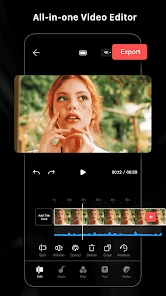
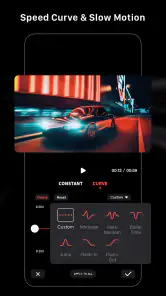
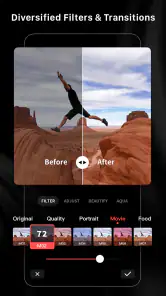
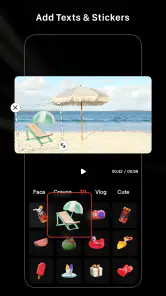
The app also boasts a plethora of editing tools. From filters to transitions, and music to text overlays, it’s got everything you need to add that extra flair to your videos. The best part? You don’t need to be a tech wizard to use them. The intuitive design ensures even a beginner can create magic within minutes.
Performance and Usability
In terms of performance, LightCut runs smoothly without any annoying lags or crashes, which is a huge plus in my book. The AI engine works swiftly, processing edits quicker than you can say “cut.” And when it comes to usability, the app offers a straightforward experience. I love how it provides step-by-step guidance, making it perfect for both novices and seasoned editors alike.
Final Verdict
So, what’s the verdict? If you’re looking for an app that makes video editing as simple as possible while delivering stellar results, LightCut - AI Auto Video Editor is the way to go. Whether you’re creating content for fun or aiming to boost your social media game, this app equips you with the tools to make your videos stand out.
In a nutshell, LightCut takes the hassle out of video editing, letting you focus on what truly matters—the creativity. So why not give it a shot? Your next viral video could be just a few taps away!
LightCut -AI Auto Video Editor Frequently Asked Questions
Can I use LightCut to make social media videos and vlogs?
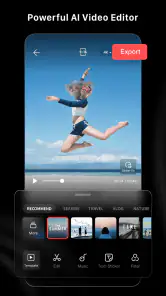
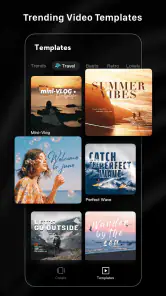
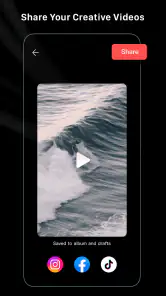
LightCut is presented as a video editor and vlog maker, with templates intended to help turn clips into finished videos quickly. That makes it worth considering if you want to assemble personal footage for sharing or create a vlog without building every edit from scratch. You can use the automatic editing approach as a starting point and then refine the result with the editing tools.
Is LightCut free to download?
LightCut is free to download, so you can try the app without paying an upfront purchase price. The original description says some premium tools and functions may involve in-app purchases or a subscription, including additional templates and effects. If you plan to use specific paid features, check the purchase details shown in your app store before committing.
Is LightCut suitable for someone who has never edited a video before?
LightCut is designed to make video editing approachable for beginners, with AI-assisted editing and ready-made templates that can help turn clips into a finished video. You can start with an automatic edit, then explore the available tools as you become more comfortable. It is also listed for Everyone, making it suitable for a broad audience.
What is LightCut - AI Auto Video Editor?
LightCut - AI Auto Video Editor is an advanced video editing application that leverages artificial intelligence to automatically edit videos for you. It is designed to simplify the video editing process, making it accessible for beginners while providing powerful features for more experienced users. The app includes a variety of templates, effects, and transitions to create professional-looking videos with ease.
Is LightCut available for both Android and iOS devices?
Yes, LightCut - AI Auto Video Editor is available for download on both Android and iOS platforms. Users can easily find it on the Google Play Store for Android devices and the Apple App Store for iOS devices. This cross-platform availability ensures that users can enjoy video editing regardless of their device preferences.
Pros
- Easy-to-use interface for beginners.
- AI-powered editing saves time.
- Wide range of transitions and effects.
- Supports high-resolution exports.
- Regular updates with new features.
Cons
- Limited free version features.
- Occasional lag on older devices.
- Subscription required for premium.
- Some effects need improvement.
- No offline editing mode.
- Category
- Video Players & Editors
- Version
- 4.107.0











