LIFELENZ
- 151.00
- 4.4
- Installs
- 100.00K
- Price
- Free

Screenshots
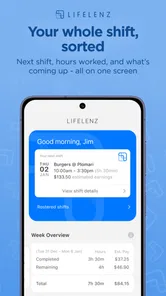
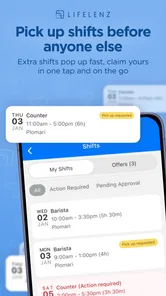
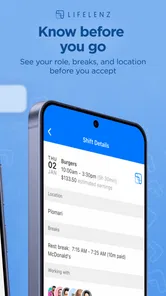
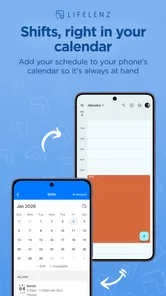
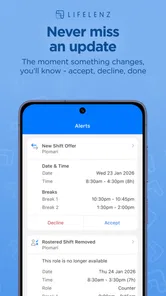
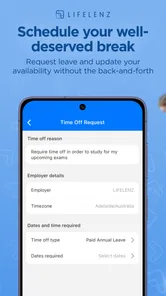
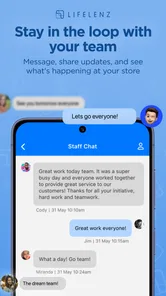
Analysis by Reviewed
I approached LIFELENZ as a practical workforce-management app rather than a general business tool, and that distinction matters. Its purpose is to support work-related coordination on a phone, so the real question is not whether it looks impressive at first glance, but whether it helps different people stay connected to their work without adding unnecessary effort. My overall impression is that it can be useful for teams that already operate through a shared workforce system, especially when employees need access away from a desk. It is less convincing as a standalone productivity app for someone who simply wants a personal task list or calendar.
The app comes from Positive Circularity Pty Ltd and is free to install, with an Everyone content rating. It has passed the point of being an obscure experiment: more than one hundred thousand installs and an average rating of 4.4 from roughly eight hundred ratings suggest that many users find a workable role for it. I would still treat those figures as a starting point, not proof that it will suit every workplace. Workforce software depends heavily on how an employer configures it, what information is available, and how consistently colleagues use the same process.
How clearly the app supports different people and working contexts
I find that LIFELENZ’s usefulness depends less on whether every employee works in the same way and more on whether the workplace makes its mobile role clear. In this section, I’m looking at how different routines, access needs, and work settings can change the experience, then weighing the adjustments that help the app fit without making it the only route to essential information.
Readability and navigation in everyday work
When I judge a workforce app, I look first at whether I can understand what needs attention without having to decode a complicated business interface. LIFELENZ is most useful when it brings work information into a focused mobile setting. That can be more approachable than opening a full desktop platform, particularly for staff who spend much of the day moving between locations, working on-site, or sharing devices and work areas rather than sitting at a permanent desk.
The strongest accessibility choice here is the basic decision to make workforce information available through a phone. A mobile screen can reduce the distance between a worker and the next relevant action. Someone checking a shift-related detail, reviewing an assigned responsibility, or keeping up with workplace information does not necessarily need a large dashboard filled with charts and administrative controls. A narrower mobile experience can make the important part easier to find.
That benefit has a limit. A phone display also gives less room for long labels, dense schedules, and detailed records. If a workplace sends complicated information through the system, the app may feel more demanding than a desktop alternative. I would not assume that a mobile layout automatically means simpler reading. The clarity of the experience will depend on how much information the organization puts into it and how carefully that information is structured.
My practical advice is to use the first session as a test of recognition rather than speed. Can you tell which area contains the information you need? Can you return to the same place later without remembering a long sequence of taps? If the answer is yes, the app is likely to feel manageable. If every visit requires searching through several similarly named areas, the problem may be less about a user’s ability and more about the way the workplace has organized its content.
More From Our News Desk

Weather by Xiaomi Review: Clear at a Glance, Less Clear Up Close

X Under Pressure: Can It Recover When Posting Goes Wrong?

Clash of Clans Is Won Between the Battles

Android Auto Makes the Case for Quieter Car Software

MobiOffice: Transforming Mobile Productivity with Seamless Integration

EA SPORTS FC™ Mobile Soccer: Redefining Mobile Sports Gaming
For people who read more slowly, this matters even more. A workforce app should not force a user to skim hurriedly just to keep up. I found the best approach is to check one work item at a time, avoid opening several sections at once, and use the phone’s own display settings when text feels cramped. Those settings can improve comfort, although enlarging text may also make more content require scrolling. That is a useful trade-off to understand before judging the app unfairly.
Motor, visual, and sensory considerations
LIFELENZ can be a sensible option for users who prefer completing work-related checks on a touchscreen instead of carrying paper or returning repeatedly to a computer. A phone is familiar to many people, and that familiarity can reduce the learning curve. It may also help a worker who has difficulty handling paperwork, keeping printed schedules organized, or remembering where a notice was posted.
At the same time, touch interaction is not equally comfortable for everyone. Users with limited fine-motor control may find small controls, closely spaced choices, or repeated tapping tiring. I would test the app with the phone held in the way the employee actually works, not only while seated at a desk. A control that seems easy during a calm trial can be much harder when someone is wearing gloves, carrying equipment, working outdoors, or trying to use the phone with one hand.
Visual comfort deserves the same attention. Bright light, glare, small text, and busy screens can turn a quick check into a frustrating task. I would recommend pairing the app with the phone’s own brightness, contrast, text-size, and zoom options where available. These are not substitutes for thoughtful interface design, but they can make a meaningful difference for people with reduced vision or light sensitivity.
Sensory needs are often overlooked in workplace technology. A person may be comfortable reading information but dislike unexpected sounds, vibration, or repeated visual prompts. I would therefore avoid treating every alert as urgent. If the workplace process allows it, users should decide which notifications deserve immediate attention and which can wait until a planned check-in. That habit reduces interruption and can make the app less stressful during concentrated work.
There is also a social side to phone-based work tools. Some employees may not want to handle work messages during personal time, while others may depend on frequent updates because their schedule changes. LIFELENZ is more inclusive when the organization explains when it should be checked and what truly requires a response. Without that shared expectation, the same app can feel supportive to one person and intrusive to another.
Where mobile access helps most
The clearest everyday scenario is a worker who begins away from a desk and needs to confirm what the day involves before starting. Instead of waiting to reach a shared computer or asking a supervisor to repeat information, the employee can use the mobile app as part of the normal preparation routine. Later, the same person may check a new instruction while moving between work areas. That makes the tool valuable not because it replaces every workplace system, but because it places a relevant part of that system closer to the person doing the work.
It can also help managers communicate with teams that are spread across different places or working at different times. A shared mobile channel is easier to include in a routine than a notice that only people in one office will see. However, communication is only inclusive if important information remains understandable. Short, direct wording, consistent labels, and a clear distinction between urgent and general updates will make more difference than simply adding more messages.
For employees with fluctuating energy, attention, or concentration, a phone-based workflow can be useful when it reduces the need to remember several separate sources of information. The trade-off is that notifications and frequent checking can become another burden. I would suggest establishing a predictable review pattern, such as checking the app at agreed points in the workday, unless the role genuinely requires immediate updates.
People working in noisy, bright, crowded, or physically demanding settings should trial the app in those real conditions. A quiet office test can hide problems with visibility, hand position, connectivity in the building, or the simple difficulty of pausing safely to use a phone. The app may be perfectly suitable for a worker in one environment and awkward for another person performing the same job under different conditions.
What the app is not designed to replace
I would not choose LIFELENZ as a replacement for a full project-management suite when a team needs extensive planning, document collaboration, complex reporting, or a broad collection of integrations. Its workforce-management identity points toward operational coordination, not an all-purpose workspace. A desktop system may remain better for supervisors who need to compare large amounts of information or build detailed plans.
I also would not recommend it as a personal productivity app for someone who has no connection to a workplace using the platform. The value comes from the relationship between the employee, the organization, and the workforce process. Installing it alone does not create a useful work network. This is an important distinction from ordinary calendar, notes, and to-do apps, which can provide immediate personal value without an administrator or team behind them.
Compared with paper notices, the app offers a more direct mobile route to work information and avoids some of the confusion that comes from outdated printed material. Compared with email, it can feel more focused because work-related information has a dedicated place rather than competing with personal messages and unrelated correspondence. Compared with a full desktop workforce platform, it is more convenient in the field but less comfortable for extended reading and complex administration.
Remaining barriers that workplaces should plan around
The first barrier is organizational, not technical. If only some employees receive updates through the app while others rely on verbal instructions or paper, the mobile channel can create confusion instead of inclusion. A workplace should decide which source is authoritative and make that rule clear. Employees should not have to guess whether the latest information is in LIFELENZ, an email, a noticeboard, or a conversation with a manager.
A second barrier is the difference between having a phone and being able to use it comfortably during work. A person may have limited data, a small screen, a damaged device, difficulty typing, or no safe opportunity to stop and interact with the app. An inclusive rollout needs an alternative way to obtain essential information and a reasonable method for reporting problems. The app can support access, but it should not become the only doorway to work.
Language and comprehension also deserve attention. Workforce messages often contain abbreviations, internal terms, or instructions written for managers rather than employees. LIFELENZ cannot make unclear workplace language clear by itself. I would encourage teams to write messages in plain English, place the action near the beginning, and avoid combining several unrelated requests in one update. That improves usability for people with different reading speeds and for anyone working under pressure.
Another practical issue is privacy in shared or family devices. A worker may use a phone that other people can access, or may need to keep work information separate from personal life. I would review the phone’s notification previews and lock-screen behavior before relying on the app for sensitive workplace messages. Even when the app is useful, the surrounding device settings determine how discreet the experience feels.
Version 1.76.40 supports devices running Android 6.0 or later, which gives it a broad compatibility range for Android users. That is helpful for organizations with a mixed fleet or employees who do not replace phones frequently. Still, compatibility is not the same as comfort. An older phone may technically run the app while offering a slower experience, a smaller display, or less battery capacity. I would test the oldest devices actually used by the team before making the app central to daily operations.
Who should use it and who should look elsewhere
I think LIFELENZ is a good fit for employees and managers who need a mobile connection to an established workforce process. It makes the most sense when people work across locations, need timely operational information, or benefit from having workplace coordination in one dedicated app. It is also appealing for teams that want something free for users to install and simple enough to include in an everyday phone routine.
I would be more cautious if the workforce includes people who rarely use smartphones, cannot safely access a phone while working, or need highly detailed information displayed at once. Those users may prefer a desktop station, printed backup, or a different system with stronger support for their particular workflow. The right decision is not to force everyone into the same interface, but to check whether the app genuinely removes a barrier for the people who will depend on it.
New users should ask their employer three practical questions before relying on it: what information belongs in the app, how often should it be checked, and what should happen if the phone or app cannot be used? These answers reveal more about the real experience than the installation process does. They also prevent a common mistake: treating a workforce app as a complete communication policy.
The app’s Everyone rating makes it appropriate in terms of general audience classification, but that should not be confused with universal suitability. Age, vision, dexterity, language, work environment, and personal boundaries all affect whether a mobile tool feels accessible. I appreciate that the app can be part of a flexible setup, but flexibility comes from the workplace’s choices around it as much as from the software itself.
My inclusive verdict
After looking at LIFELENZ through the lens of different abilities and working conditions, I see a useful, focused tool rather than a complete answer to every workforce problem. Its main strength is bringing workforce management into a mobile context where employees can reach relevant information without being tied to a desk. That can improve everyday access for mobile teams and for people who find paper-based or scattered communication difficult to follow.
Its limits are equally important. Touchscreens, small displays, alerts, unclear messages, shared devices, and inconsistent workplace habits can all reduce the benefit. I would not describe the app as automatically accessible simply because it is mobile. I would describe it as a practical foundation that needs sensible configuration, plain communication, realistic testing, and a backup route for anyone who cannot use it comfortably.
Positive Circularity Pty Ltd has kept the product in a category where usefulness is measured by routine reliability rather than entertainment. With more than one hundred thousand installs, a free price, and a 4.4 average, it has enough adoption to deserve consideration by organizations looking for a mobile workforce option. My recommendation is strongest for teams that will introduce it alongside clear expectations and human support.
My bottom line: choose LIFELENZ when mobile workforce access is the real need, but judge it in the actual environments and abilities of your team. I would recommend trying a small, varied group of employees first, including people who work away from desks and people who need larger text, quieter notifications, or more time to navigate. If that trial feels clear and manageable, the app can become a useful part of the daily work rhythm. If it creates new obstacles, a desktop platform, paper backup, or another workforce solution may be the more inclusive choice.
LIFELENZ Frequently Asked Questions
Who is LIFELENZ designed for?
LIFELENZ is a business app described as a workforce management tool. It may be relevant to people who need to access workforce-related services through an organization using the app. Before downloading, consider whether your workplace or service provider uses LIFELENZ and whether you have the details needed to sign in and use its features.
What is LIFELENZ and what can I use it for?
LIFELENZ is a health and wellness application designed to help users monitor and better understand personal health information in one place. Depending on the supported features and connected devices, it may provide access to measurements, health records, trends, reminders, or reports. Before downloading, check whether its available tools match your needs and are supported in your country and on your device.
Is LIFELENZ a replacement for a doctor or medical advice?
No. LIFELENZ should be treated as a tracking and information tool, not as a substitute for professional medical care. Any readings, notifications, or health summaries should be interpreted carefully and discussed with a qualified healthcare professional when necessary. Do not use the app to diagnose a condition, change medication, or delay urgent treatment. Seek immediate medical help for serious or unexpected symptoms.
What devices and permissions does LIFELENZ require?
The exact requirements depend on the version of LIFELENZ and the features you plan to use. The app may request permissions such as access to notifications, Bluetooth, health data, location, camera, or storage when connecting devices or importing information. Review each permission before accepting it, and confirm that your Android or iOS version, wearable, and other connected equipment are compatible.
Does LIFELENZ protect my personal and health information?
Because LIFELENZ may handle sensitive personal or health-related data, privacy should be checked before creating an account or connecting a device. Read the app’s current privacy policy to understand what information is collected, why it is used, whether it is shared with service providers, and how long it is retained. Use a strong password and avoid sharing account access with other people.
Pros
- Real-time location sharing helps contacts know where you are.
- Emergency alerts can notify selected contacts during risky situations.
- Useful safety tools for travel
- commuting
- and outdoor activities.
- Location updates can provide reassurance to family and trusted friends.
- Designed around personal safety rather than social entertainment.
Cons
- Continuous location tracking may raise privacy concerns.
- Some features may require an active internet connection.
- Location services can increase battery consumption over time.
- The app is less useful if trusted contacts do not install or use it.
- Alerts and tracking may be affected by weak GPS or mobile coverage.











