Life Bible
- 16.86K
- 4.8
- Installs
- 1.00M
- Price
- Free

Screenshots
Analysis by Reviewed
I keep Life Bible in mind for readers who want Scripture, study material, and listening in one place, but its usefulness depends partly on when and how you connect. It is a free Books & Reference app from Tecarta, Inc., with a 4.8 average from around 102,000 ratings and over a million installs. Those figures suggest it has a broad audience, though what matters more to me is whether its mix of reading and study tools suits your routine.
When Connectivity Shapes the Session
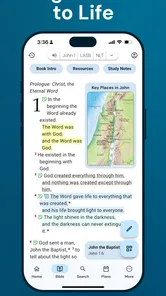
The app’s mix of Bible text, plans, study Bibles, commentaries, and audio means that a session can involve more than opening a chapter. When I’m connected, I can explore that range without having to decide in advance exactly what I need. Away from a dependable network, I’d keep the session focused on material I’ve already opened and avoid counting on unfamiliar resources or audio to load at the moment I need them.
That distinction matters if you read in short gaps throughout the day. A quick passage at home may be straightforward, while deciding to investigate a commentary during a train ride can depend on the connection available at that point. I’d use a stable network to browse and choose what I want to study, then approach less predictable locations with a simpler plan. That’s a practical habit, not a guarantee that any particular content will remain available without a connection.
Getting Started with Life Bible
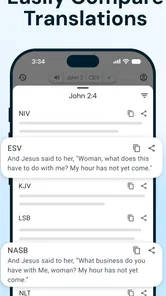
From the moment I downloaded Life Bible, I was impressed with its clean and user-friendly interface. The app makes it super simple to navigate through different sections, whether you’re looking to read scripture, find a devotional, or listen to some audio content. Setting it up was a breeze, and I was able to personalize my experience right from the get-go, choosing from various Bible translations and themes.
Features That Stand Out
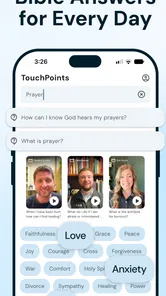
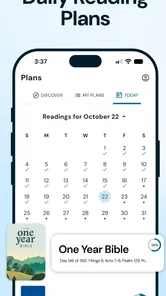
One of the most appealing features is the daily devotional section. Each day, the app provides a new devotional piece that is both inspiring and thought-provoking. It's a great way to start or end your day with a moment of reflection. Plus, the app offers a wide range of reading plans, which can help you explore the Bible in different ways — whether you’re a newbie or a seasoned reader.
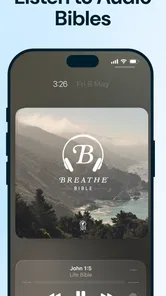
Another handy aspect is the audio Bible feature. Sometimes, sitting down to read isn’t an option, but with the audio feature, you can listen to the Bible while driving, cooking, or even during a workout. It’s a fantastic way to keep connected to your faith no matter where you are.
Network and Everyday Use
Connectivity matters most when I’m opening something I haven’t used before or moving between reading, study resources, and audio. I’d make a habit of loading the passage or material I plan to use before leaving a reliable connection, especially if I’m heading somewhere with patchy service. I wouldn’t assume every part of the app will be available without a network; for a commute or a trip, checking what opens in advance is a sensible precaution.
More From Our News Desk

Weather by Xiaomi Review: Clear at a Glance, Less Clear Up Close

X Under Pressure: Can It Recover When Posting Goes Wrong?

Clash of Clans Is Won Between the Battles

Android Auto Makes the Case for Quieter Car Software

MobiOffice: Transforming Mobile Productivity with Seamless Integration

EA SPORTS FC™ Mobile Soccer: Redefining Mobile Sports Gaming
For a realistic routine, I might read a short passage over breakfast, then return to the same topic later when I have time to explore a reading plan or study resource. The daily verse and plans can give that routine some direction, while audio suits moments when my hands are busy. The trade-off is that switching activities can use more mobile data than simply reading text, so I’d reserve listening for Wi-Fi when data is a concern.
Study Choices and Practical Limits
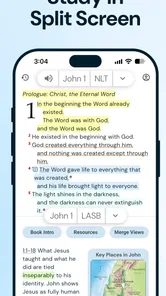
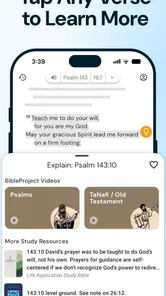
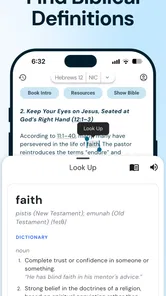
Life Bible is more than a basic text reader: its focus includes study Bibles and commentaries alongside plans and audio. That range can be useful when I want context rather than just a quick verse. Still, someone who only wants to look up a passage may prefer a simpler Bible reader, while a reader who wants a particular translation or a highly specialized scholarly library should check that the available choices meet their needs before building a routine around the app.
The app is free to install and is rated for Everyone. Optional in-app purchases range from $0.99 to $299.99 per item, so I’d review each offer carefully and avoid treating the full study library as automatically included. The current version is 10.2.164, and the minimum operating system is 8.0. If an audio passage or resource does not load, I’d first check the connection, then reopen the app or try again on a stable network; that simple sequence helps distinguish a temporary network hiccup from a recurring problem without assuming a particular offline or recovery feature.
Community and Connection
Life Bible also has a community aspect that allows you to connect with other users. You can share insights, discuss interpretations, and even participate in group reading plans. It’s like having a mini Bible study group in your pocket. This social aspect brings an additional layer of engagement and encouragement, especially for those who thrive on community interaction.
Moreover, the app sends out motivational quotes and verses throughout the day, which I found to be a nice touch. It’s those little reminders that can make a big difference in keeping you uplifted and motivated.
Ending Thoughts
All in all, Life Bible is a robust app that caters to both beginners and seasoned Bible readers. It’s filled with features that make the Bible more accessible and engaging, from the daily devotionals to the audio Bible and community features. I genuinely feel it’s a valuable tool for anyone looking to deepen their spiritual journey.
Whether you’re looking to start a new reading plan, join a community of like-minded individuals, or simply need a daily dose of inspiration, this app has got you covered. So, if you’re on the hunt for a comprehensive Bible app, give Life Bible a try. It might just be what you need to enrich your spiritual path!
Who It Suits Best
I’d recommend it most to someone who wants a daily prompt but also expects to return for longer reading and study sessions. A useful approach is to choose one plan rather than opening several at once: that gives each session a clear purpose and makes it easier to keep a steady pace. If you’re sharing a plan with a group, agreeing on the passage beforehand can also make discussion more focused than simply trading inspirational lines.
By contrast, if you want a distraction-free page with no community elements, or you rarely use devotionals, plans, or audio, a plain digital Bible may be a better fit. Life Bible’s breadth is its strength, but it also means there are more sections and choices to navigate. I’d treat it as a small reading-and-study toolkit, not just a quick search box.
A Sensible Way to Try It
When setting up a routine, I’d test the parts I expect to use most: open a passage, look at a study resource, and try audio while connected to Wi-Fi. That gives a practical feel for the app before relying on it during a commute or a quiet break away from home. If a page seems slow, I’d avoid repeatedly tapping through different sections; return to the passage later on a stronger connection instead. This is especially helpful when deciding whether the app fits a data-limited plan or a location where service is unreliable.
For readers comparing Bible apps, the choice often comes down to focus. A basic reader can be quicker for occasional verse lookups, while a dedicated study tool may suit someone seeking a narrower, deeper set of reference materials. Life Bible sits between those approaches, pairing everyday reading with plans, commentaries, study Bibles, and audio. I find that mix worthwhile if I’ll actually use more than one of those modes; if not, a simpler alternative may feel lighter and easier to maintain.
Making the Most of Short Sessions
One useful way to make the app feel less sprawling is to decide what kind of session you’re having before opening it. For a few spare minutes, I’d stick to a verse or the next part of a reading plan rather than jumping among several study sections. When I have a longer stretch, I can use that time to follow a passage into related study material and take notes mentally or on paper. Separating quick reading from deeper exploration helps the app serve both without turning every visit into a browsing session.
That approach also suits a busy day. I might read over breakfast, then listen while preparing dinner, and leave a commentary for a quieter moment when I can concentrate. Each activity has a different practical setting: audio is convenient when my hands are occupied, but text is easier to revisit and compare at my own pace. I wouldn’t use listening as a substitute for every kind of study, especially when I want to pause over a phrase or follow a line of interpretation carefully.
Choosing Resources and Managing Expectations
Before settling on a translation or relying on a particular study resource, I’d spend a little time checking what is available and how it reads on my device. The app’s range is attractive, but the presence of study Bibles and commentaries does not mean every title or approach will suit every reader. Someone preparing lessons, researching historical context, or following a specific translation may need to compare the available material with their own requirements rather than assume the broad selection covers them all.
The purchase range is another reason to browse deliberately. I’d treat the free app as a way to explore the reading experience, then consider any paid item only after confirming that it addresses a real need. A reader who mainly wants a daily passage may never need to buy anything; someone who wants additional reference material should look closely at each offer instead of assuming purchases work as a single all-access upgrade. That makes the app easier to evaluate without letting a large catalog create pressure to collect resources.
When a Connection Drops
If a page stalls, my first move would be to stop switching between sections and give the current request a moment, then try again when the network is steadier. Repeatedly tapping audio or opening several resources at once can make it harder to tell whether the issue is a brief connection interruption or a particular item that is taking longer to load. If basic reading is the immediate goal, I’d return to the passage and leave resource browsing for later rather than let a temporary delay derail the whole session.
For anyone who depends on a phone during travel, the practical question is not simply whether the app has useful material, but whether the parts they intend to use are accessible in the places they go. I’d test a normal session at home and another on the route or in the setting where I expect to read. That small trial can reveal whether the app’s rhythm fits a commute, a rural visit, or a workplace break, and it helps avoid relying on audio or study content before learning how the connection behaves there.
Who May Prefer Another Approach
Life Bible makes the most sense to me when I want a combination of everyday reading and optional depth. If I were only checking a verse now and then, a lightweight reader with fewer sections could get me to the text faster. If I were doing sustained academic research, I’d look for a reference setup centered on the translations and scholarly tools I specifically need. The appeal here is the middle ground: a daily habit can grow into study without requiring separate apps for every activity.
It may also be a less comfortable choice for someone who dislikes prompts, community features, or a menu of possible next steps. Those elements can be encouraging if I want a nudge to return, but they may feel like extra noise if I prefer a deliberately quiet reading space. I’d try it with a clear goal—such as completing one plan or using audio on selected days—and judge whether its variety supports that goal or distracts from it.
Final Connectivity Verdict
My main advice is to let the connection shape the session rather than letting it interrupt one. Use a reliable network to explore unfamiliar resources, keep text reading as the low-data default when needed, and plan audio for a time when streaming is practical. Life Bible works best for me as a flexible companion for a regular faith practice, not as something I’d assume will behave identically in every network situation. With that expectation, its combination of reading, reflection, and study makes it a considered option for anyone looking to build a more consistent Bible-reading habit.
Life Bible Frequently Asked Questions
Can I listen to Bible content in Life Bible, or is it mainly for reading?
Life Bible supports both reading and listening, with audio included among its Bible resources. That can be useful if you prefer to follow along by ear or want Bible content in a format that fits your routine. The app also brings together reading plans, study resources, and a daily Bible verse, so it serves more than one kind of study habit.
Does Life Bible include tools for studying Scripture, such as commentaries or study Bibles?
Yes. Life Bible includes study Bibles and commentaries alongside its Bible-reading resources. These can provide context while you explore a passage, making the app relevant for readers who want more than the text alone. The range of available resources may include optional paid offerings, so it is sensible to review what is included before choosing any purchase.
Can I follow a structured Bible reading plan with Life Bible?
Life Bible offers Bible reading plans, which can help you approach Scripture in a more organized way rather than deciding what to read each day on your own. The app also features a daily Bible verse and audio, giving you different ways to engage with its content. Together, these tools make it practical for readers who want a regular routine.
What does the Life Bible app cost, and are there optional purchases?
Life Bible is free to download, and it offers optional in-app purchases for additional content or features. The available purchases range from $0.99 to $299.99 per item, so it is worth checking the price of any particular option before buying. You can start with the free app and decide whether its paid offerings suit your needs.
Who makes Life Bible, and what devices can install it?
Life Bible is a Books & Reference app developed by Tecarta, Inc. It is available for Android and iOS devices, with a minimum operating-system requirement of version 8.0. Before downloading, check that your device meets this requirement and that the app is available for your device through its app store.
Pros
- User-friendly interface
- easy navigation.
- Daily verses for spiritual encouragement.
- Offline access for reading anywhere.
- Multiple translations available.
- Customizable reading plans.
Cons
- Contains in-app advertisements.
- Limited free features.
- Occasional app crashes reported.
- Requires account for syncing data.
- Some users find font too small.













