Lexington Herald-Leader | News
- 76.00
- 2.9
- Installs
- 10.00K
- Price
- Free

Screenshots
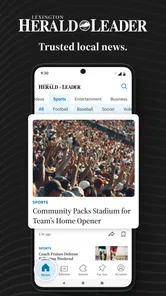
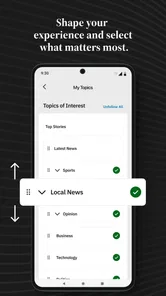
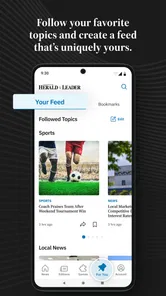
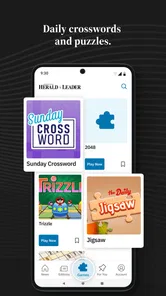
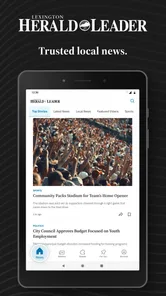
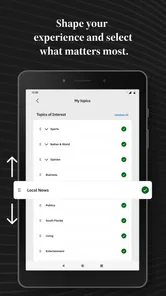
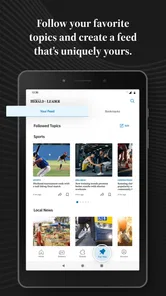

Analysis by Reviewed
Keeping up with Eastern Kentucky news can be surprisingly difficult when local stories are scattered across television, social media, search results, and national news apps. I spent time with Lexington Herald-Leader to see whether it works as a practical daily news tool rather than simply another headline feed. My impression is mixed but useful: it has a clear local purpose, covers the subjects people in the region are most likely to follow, and is free to install, yet its average rating of 2.9 from around 198 ratings suggests that the experience has not worked equally well for everyone.
The app comes from McClatchy and sits in the News & Magazines category. Its focus is narrow in a good way: local breaking news, politics, business, weather, and sports connected to Eastern Kentucky. That makes it more relevant than a broad national app when I want regional context, but less flexible when I am looking for a complete news service covering the whole country or the world.
I would describe it as a companion for people who already care about Lexington and surrounding communities, not as a universal replacement for every source of information. The important question is whether local reporting is valuable enough to justify adapting to the app’s limitations. For many residents, that answer may be yes. For casual readers who only check headlines occasionally, the trade-off is less convincing.
How I built a practical daily routine around local coverage
I built my routine around a simple question: what local information could actually change my plans today? That keeps a quick check focused instead of turning into an open-ended scroll, and it gives weather, community developments, and regional reporting different levels of urgency. I’d use the next section to look at the small setup choices that make that habit easier to sustain.
The baseline workflow: check the app with a purpose
My most useful approach was not opening the app repeatedly throughout the day. Instead, I treated it as a focused local-news stop. I would open it when I wanted to know what was happening in Eastern Kentucky, scan the main stories, and then move into the section that matched my immediate interest. This simple habit helped keep the app from becoming an endless scroll.
The regional emphasis matters. A national news reader may mention Kentucky only when a story becomes significant outside the state, while a local publication can give attention to decisions, incidents, teams, businesses, and weather conditions that affect residents directly. If I were planning a commute, following a local political development, or checking the effect of severe weather on the area, this app would be more useful than a general-purpose feed.
A realistic everyday scenario is a weekday morning when I need a quick sense of what could affect my plans. I would first look at the main news stream, then check weather coverage, and finally glance at sports or business if I had time. That sequence is more efficient than browsing every section without a goal. It also makes the app feel like a local briefing rather than a collection of unrelated articles.
More From Our News Desk

Weather by Xiaomi Review: Clear at a Glance, Less Clear Up Close

X Under Pressure: Can It Recover When Posting Goes Wrong?

Clash of Clans Is Won Between the Battles

Android Auto Makes the Case for Quieter Car Software

MobiOffice: Transforming Mobile Productivity with Seamless Integration

EA SPORTS FC™ Mobile Soccer: Redefining Mobile Sports Gaming
For breaking stories, I would still avoid relying on one source alone. A local news app can be valuable for fast regional awareness, but urgent situations often develop quickly. If a road closure, storm, public safety event, or major political announcement affects me immediately, I would compare the report with an official local source before making an important decision. That is not a criticism unique to this app; it is a sensible habit for any news service.
The app is available for free, which makes trying this workflow easy. However, free access does not necessarily mean every part of the reading experience will feel equally open or frictionless. In-app purchases range from around eight dollars to around 160 dollars per item, so I would pay attention to what the app asks me to access before assuming that every article or feature follows the same path.
What I would check before making it my main news app
One of the first things I would do is explore the app’s available settings and reading controls instead of immediately judging it from the opening screen. News apps often become easier to use when the reader decides which areas deserve attention and which can be ignored. With a publication focused on local coverage, that matters because the most important section for one person may be sports, while another person may care mainly about politics, weather, or business.
I would also check how the app presents alerts and whether those controls can be adjusted to suit my routine. Breaking news notifications can be helpful during a major local event, but too many alerts quickly turn a useful tool into a distraction. My preference would be to keep alerts limited to genuinely important developments and use the app itself for ordinary reading. If the available controls do not offer that level of balance, I would leave notifications off and create a manual checking habit instead.
Another setting worth examining is the reading experience itself. I would look for options that make longer articles comfortable to read, especially if I use the app at night or on a smaller phone. Text size, display behavior, and any available layout choices can make a bigger difference than readers expect. I would not assume that the default presentation is the best one for every screen or every pair of eyes.
Because the current version is 11.1.16 and the app supports Android 8.0 or later, compatibility is reasonable for people using older Android phones that still receive normal support. I would still install it on the device I actually plan to use rather than assuming that an older operating system will deliver the same smooth experience as a newer phone. Performance can depend on the handset, storage, connection, and the way the app handles article content.
The age rating is Everyone 10+, which makes the app broadly suitable for families and general readers, though local news can naturally include serious or upsetting subjects. I would be comfortable recommending it to a teenager interested in local events, but I would still expect parents to explain that news coverage may include crime, accidents, political conflict, or severe weather.
Faster patterns for people who read in short bursts
The best speed improvement I found was to stop treating every visit as a complete reading session. I would scan headlines first, open only the stories that could affect my day, and leave background pieces for a quieter moment. This is especially useful when checking the app before work, during a lunch break, or while waiting for an appointment.
A second helpful pattern is to separate awareness from deep reading. On a quick visit, I only need to know what changed. Later, I can return to the most relevant article and read it carefully. This prevents the common problem of spending too much time on the first interesting headline and missing other local developments that may be more important.
I also found it sensible to use the app alongside, rather than instead of, a broader news source. The Herald-Leader’s regional identity is its main strength, but it is also the reason it cannot cover every topic with equal depth. I might use this app for Eastern Kentucky reporting, a national app for international headlines, and official weather or government sources for information that requires direct confirmation. That combination is more dependable than expecting one app to do everything.
For sports followers, the focused regional coverage can make the app a more relevant daily stop than a general sports application. The same is true for local business readers who want developments connected to the area rather than a stream dominated by national companies. The trade-off is that readers who want extensive league-wide statistics, international business coverage, or a highly customizable news algorithm may prefer specialized alternatives.
Politics is another area where a repeatable reading habit helps. I would read beyond the first headline, compare the wording of separate stories, and avoid forming an opinion from a single short update. A local publication can provide useful context, but the reader still needs to distinguish reporting from commentary and developing information from settled facts. The app can support that process, but it cannot replace careful reading.
Where the experience becomes less convenient
The biggest limitation is the gap between the app’s clear local mission and the expectations people bring from polished national news platforms. I would not expect the same breadth of personalization, discovery, or international coverage here. If my main goal were a customized mix of technology, entertainment, world affairs, and finance, this would feel too narrow.
The rating of 2.9 is also worth taking seriously, even though a rating alone cannot explain every individual complaint. It tells me to approach the app with realistic expectations and to test it on my own phone before building my entire news routine around it. A publication can offer valuable reporting while the mobile experience still feels imperfect for some users.
Potential purchase prompts deserve attention as well. Since individual in-app purchases can reach around 160 dollars, I would read each screen carefully before proceeding. I would not tap through a subscription or purchase dialogue simply because I want to continue reading. Anyone sharing a device with children should be especially deliberate about purchase controls and account settings.
I would also be cautious about using the app as the only source during fast-moving emergencies. Local reporting is valuable, but an article may be updated as facts change. For evacuation instructions, official closures, medical guidance, or immediate safety decisions, I would seek the relevant authority directly. The app is best for understanding what is happening and following the story, not for replacing emergency communication channels.
Readers who dislike advertisements, account prompts, or any form of paid access may find the experience frustrating depending on how they use it. I would recommend trying several ordinary reading sessions before deciding whether it fits. The free installation lowers the barrier to testing, but it does not remove the need to judge the complete reading journey.
Advanced habits that make the narrow focus work better
Experienced users can get more value by matching the app to a specific information need. Instead of opening it with the vague goal of “seeing the news,” I would decide whether I am checking local politics, weather, business, sports, or breaking events. That small change reduces wandering and makes the app’s focused coverage feel intentional rather than limited.
I would also create a personal distinction between stories to monitor and stories to act on. A developing political article may be worth revisiting later, while a weather update may require an immediate check against current conditions. Keeping those categories separate helps prevent an interesting article from receiving the same attention as information that could change my plans.
Another useful trade-off is reading locally first when the subject is regional, then widening the view afterward. For example, I would start with this publication when learning about a Kentucky business or local policy issue, then consult a broader source if I need national context. Starting with a national summary can hide the details that matter most to people who live nearby.
For families, I would use the age rating as a general guide rather than a promise that every story will be comfortable for younger readers. A parent could encourage a teenager to follow sports or business coverage and discuss more difficult news together. That makes the app a possible starting point for local awareness without treating it as a filtered children’s service.
For older Android devices, I would keep the workflow simple: install the latest available version, allow the app to settle after installation, and avoid judging it during a moment of poor connectivity. If articles load slowly or the interface feels unstable, I would compare the behavior on a stronger connection before deciding that the app is unusable. At the same time, I would not excuse persistent problems just because the phone is older.
Who should choose it, and who should look elsewhere
I would recommend Lexington Herald-Leader to residents, former residents, students, families, and local professionals who want a convenient way to follow Eastern Kentucky. It is particularly suitable for someone who wants regional politics, weather, business, and sports in one publication instead of piecing together every local topic through social networks.
It can also suit people who have moved away but still care about the area. Local stories often matter for family, property, schools, community events, and business decisions even when the reader is no longer nearby. In that situation, the app’s narrow coverage is an advantage because it avoids burying regional news beneath a large volume of unrelated headlines.
I would not make it my first recommendation for someone who wants a completely free, highly personalized, worldwide news dashboard. I would also steer away readers who need detailed live data, extensive multimedia tools, or one-stop coverage across many countries and specialist subjects. A national aggregator or dedicated topic app may serve those needs better.
People who are very sensitive to purchase prompts should test the app carefully and understand the difference between installing it and paying for access. Likewise, anyone who needs guaranteed real-time emergency instructions should use official channels first. This app can add context and local reporting, but it should not be confused with an emergency alert system.
My final view after settling into the routine
After using it as a focused regional reader, I see a worthwhile idea wrapped in an experience that requires some patience. The strongest reason to install it is local relevance, not technological novelty. When I want news that connects directly to Eastern Kentucky, the app has a clearer purpose than a general feed. Its coverage areas also match the everyday concerns of many residents: what is happening locally, how politics may affect the community, what businesses are changing, what the weather is doing, and how regional teams are performing.
At the same time, I would not recommend installing it without thinking about how it fits into a larger news routine. The middling average rating, possible purchase friction, and narrower scope mean that it is not an automatic choice for everyone. I would use the free app first, adjust the available reading and notification controls, and decide after several normal days rather than after one quick glance.
For me, the most sensible setup is a three-part habit: use this app for local reporting, use official sources for urgent instructions, and keep a broader news service for national and international context. That arrangement respects what the publication does well without asking it to become something it is not.
Lexington Herald-Leader is best for readers who value Eastern Kentucky coverage enough to accept a few limitations in exchange for regional focus. If that describes you, it is worth trying as a daily local-news companion. If you mainly want a polished, all-purpose news aggregator with deep customization and worldwide breadth, I would choose a different tool and keep this one only as a supplementary local source.
Lexington Herald-Leader | News Frequently Asked Questions
Who publishes the Lexington Herald-Leader | News app, and who is it for?
The app is published by McClatchy and is aimed at readers who want local journalism about Lexington and Eastern Kentucky on a phone or tablet. It falls under News & Magazines, and its age rating is Everyone 10+. If you follow local developments, politics, business, weather, or sports, its regional focus may make it useful alongside broader national news sources.
What is the Lexington Herald-Leader | News app?
The Lexington Herald-Leader | News app is a mobile way to read reporting from Lexington, Central Kentucky, and surrounding communities. It typically combines breaking news, local politics, crime, education, business, sports, entertainment, opinion, and lifestyle coverage in one place. The app is designed for readers who want convenient access to the newspaper’s journalism while away from a desktop browser.
Is the Lexington Herald-Leader app free to download and use?
Downloading the app is free, but access to all articles and features may depend on your subscription status. Some stories or a limited number of articles may be available without payment, while unlimited reading, premium reporting, digital editions, and other subscriber benefits can require a paid plan. In-app purchases range from $7.99 to $159.99 per item, so review the current pricing, trial terms, renewal conditions, and cancellation policy shown in the app store or within the application before subscribing.
What type of news and content can I find in the app?
The app focuses primarily on news relevant to Lexington and the wider Central Kentucky region, with its store description highlighting local breaking news, politics, business, weather, and sports for Eastern Kentucky. Readers can also find reporting on community developments and other regional topics. Content availability can change throughout the day as journalists publish updates, follow-up reports, and breaking-news alerts.
Does the app support breaking-news notifications and personalized updates?
The app may offer push notifications for breaking news, major local developments, sports results, weather-related events, and other important updates. Notification categories can usually be managed through the app’s settings and your phone’s permission controls, which is useful if you want timely alerts without receiving every headline. Keep in mind that enabling notifications can increase interruptions and may use a small amount of mobile data.
Pros
- Provides reliable local news from the Lexington area.
- Covers Kentucky politics
- sports
- business
- and community events.
- Breaking-news alerts help users stay informed throughout the day.
- Clean layout makes articles easy to browse and read.
- Offers in-depth reporting beyond short social media updates.
Cons
- Some articles or features may require a digital subscription.
- Advertising can interrupt browsing and reduce reading space.
- News coverage is focused mainly on Lexington and nearby communities.
- Push notifications may feel frequent for users wanting fewer alerts.
- App performance and content access can depend on internet connectivity.













