

Lennar Account
- 28.00
- 3.9
- Installs
- 10.00K
- Price
- Free

Screenshots
Analysis by Reviewed
Managing a new home claim is rarely something I want to do from a laptop at a desk. A loose fitting, a door that needs attention, or a question about an installed feature usually appears while I am moving through the house, taking a photo, or trying to explain the problem to someone else. Lennar Account is built for that homeowner moment: it gives Lennar homeowners a place to submit and track claims from a mobile device.
I reviewed it as a House & Home app, not as a general maintenance planner or a replacement for every kind of customer support. That distinction matters. Its value depends heavily on whether you own a Lennar home and need to keep warranty-related requests organized. For the right household, the focused approach is useful. For renters, prospective buyers, or anyone looking for broad home-repair management, it is much less relevant.
How the app feels to use in everyday home maintenance
I find the app’s everyday value lies less in managing the whole house and more in giving a homeowner one place to return to when a claim is already in motion. That makes it worth thinking about how a small, well-described report can prevent a minor issue from getting lost amid ordinary household tasks. From there, the next section looks at what that focused workflow means when several home concerns compete for attention.
Readability and navigation for a focused task
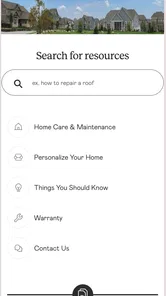
The strongest design choice is the narrow purpose. Instead of asking me to sort through a large collection of home-improvement tools, the app centers the homeowner journey around claims: starting a request, checking its progress, and returning to an existing issue. That focus can reduce mental effort when the goal is simply to report something and remember what happened next.
I find this especially helpful when several small issues appear at once. Rather than relying on a note in my phone or a message thread with a family member, I can treat each concern as a separate item and revisit its status. A good workflow here is to prepare the description before opening the app: identify the room, describe what is happening, and decide whether a photo would make the problem easier to understand. That small bit of preparation makes a short claim form more useful.
The interface is best approached as a task tool rather than an information hub. I would not open it expecting renovation ideas, contractor comparisons, appliance manuals, or a full household inventory. Its simplicity is a strength when I already know that I need to submit or follow a Lennar claim, but it also means there is little reason to browse casually.
For people who read slowly, process information carefully, or become overwhelmed by crowded screens, a limited claim-focused flow may be easier than a broad homeowner portal. I appreciate that the app’s purpose is immediately understandable from its name and store description. At the same time, the practical clarity of any individual screen still depends on how much information a homeowner needs to enter and how clearly the app presents the next action.
More From Our News Desk

 Gmail
GmailGmail in a Busy Inbox: Who Benefits Most?
From first account to crowded workday, Gmail earns its place through dependable search and flexible sorting—but its best fit depends on how much inbox maintenance you can tolerate.

 Prime Video
Switching to Prime Video: What Changes in Your Viewing Routine
Prime Video can make a compelling second home for streaming, but switching means learning a different catalog, rental layer, and route from browsing to playback.

 Universal TV Remote Control
Universal TV Remote Control Works Best as a Reliable Backup
A phone remote earns its place through quick setup and reliable habits. Here is how to get more from Universal TV Remote Control—and where its limits show.

 Weather - By Xiaomi
Weather by Xiaomi Review: Clear at a Glance, Less Clear Up Close
Xiaomi’s weather app makes everyday forecasts quick to scan, but its calm surface can leave useful details and recovery paths harder to find than they should be.

 X
XX Under Pressure: Can It Recover When Posting Goes Wrong?
A resilience-focused review of X, examining setup, mistaken posts, interruptions, weak connections, and the gaps that matter when recovery needs to be dependable.

 Clash of Clans
Clash of Clans Is Won Between the Battles
Its raids are quick; its community is a long-term project of coordination, teaching, rivalry, and shared responsibility—with all the friction that entails.
Latest News



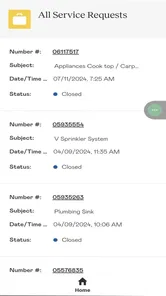
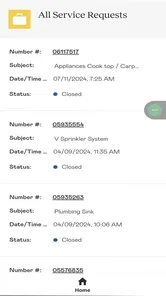
One useful habit is to review the claim after submitting it instead of assuming the process is finished. Tracking is not just a convenience; it creates a place to check whether the issue was recorded correctly and whether the request is still active. If a problem changes, I would keep the explanation precise and avoid combining unrelated repairs into one vague description. Clear separation should make later follow-up easier for both the homeowner and the people handling the request.
Motor and sensory considerations
Mobile claim reporting can be more comfortable than typing a long message on a desktop, particularly when I am already near the problem in the house. A quick photo and a short description can reduce the amount of writing needed. That may help someone with limited stamina, hand discomfort, or difficulty carrying out a longer computer-based process.
There are trade-offs, though. A phone can be awkward for users who have tremors, reduced dexterity, or difficulty pressing small controls accurately. I would use the device in a stable position, enlarge system text where possible, and take breaks rather than trying to complete a detailed report while standing, carrying tools, or moving between rooms. These are practical ways to reduce strain, but they are not substitutes for app-level accessibility features.
People with low vision may benefit from the phone’s own display and text settings if the app responds well to them. I would test the claim flow with larger text before an urgent repair is needed. If labels become clipped, buttons move unpredictably, or important status information is difficult to distinguish, the app may become frustrating even when the underlying claim process is straightforward.
For users who are deaf or hard of hearing, a text-based claim record can be preferable to depending on a telephone conversation. It leaves the homeowner with written details to revisit. That said, the app should not be treated as proof that every later part of the service journey will be equally accessible, because follow-up may involve communication beyond the screen.
Sensory load is another consideration. A calm, single-purpose workflow is easier for me than a portal packed with promotions and unrelated account sections. Still, homeowners who are sensitive to bright displays, animation, or notification interruptions should adjust their phone settings and choose a quiet time to submit a request. The app’s focused role helps, but it does not remove the general challenges of using a small touchscreen.
Situational access in the home
The most convincing use case is a homeowner who notices a defect during normal life and wants to record it before forgetting. Imagine finding that a cabinet door no longer closes properly after unpacking boxes. I would take a clear picture, note the room and the exact behavior, submit the claim, and later return to the tracking area rather than searching through email. That workflow turns an easily forgotten observation into a documented request.
Another scenario is a household with different people sharing responsibility for the home. One person may notice the issue, another may have the account details, and a third may need to remember whether the request is still open. A central claim record can reduce duplicated reports and avoid the uncertainty of asking, “Did anyone contact Lennar about that?” The benefit is organizational rather than dramatic, but it can save time over the life of a new home.
The mobile format also suits people who cannot easily sit at a traditional computer. A parent managing a busy household, an older homeowner who prefers a phone, or someone recovering from an injury may find it easier to report a problem in short steps. I would still wait until I am safely stationary. Trying to type while walking through a house or climbing stairs is a poor trade-off for convenience.
For users who rely on assistance, the app can support a shared workflow even if only one person completes the form. A family member or caregiver could help gather the description and photograph while the homeowner reviews the wording before submission. That review step is important: the person receiving assistance should remain in control of what is reported, especially when the issue involves access, safety, or a room that needs special consideration.
Situational access also includes connectivity and attention. A homeowner may notice a problem during a hectic move, while hosting visitors, or during a stressful repair situation. I would draft the essential facts first and submit when I can concentrate. If the app does not immediately fit the moment, a temporary written note or photograph can preserve the details until I am ready to complete the digital claim.
Where the experience still creates barriers
The biggest barrier is eligibility. This is for Lennar homeowners, so its usefulness is tied to that relationship. It is not the right tool for a renter reporting a landlord’s repair, a homeowner dealing with a different builder, or a person who wants one app to manage independent contractors and routine maintenance. In those cases, the usual property-management channel or a general task app is a better match.
The second barrier is scope. Submitting and tracking a claim is not the same as diagnosing a problem, arranging every repair, or maintaining a complete record of the home. I would not expect the app to tell me whether a symptom is urgent, teach me how to fix it, or replace emergency services. If there is immediate danger, a mobile claim workflow should not delay the appropriate emergency response.
There is also a documentation burden. A vague report such as “the bathroom is broken” is unlikely to be as useful as a specific description of what happens, where it happens, and when it began. Users with dyslexia, limited English proficiency, cognitive fatigue, or difficulty composing text may need help turning an observation into a concise claim. A family member can assist, but that introduces another person into a process that should ideally be understandable on its own.
Photos can improve clarity, yet taking a good image is not equally easy for everyone. Glare, low light, small defects, and difficulty holding a phone steady can all reduce the value of visual evidence. I would take more than one view when appropriate: one showing the location and another showing the actual issue. That is a practical workaround, not a guarantee that the claim will be resolved faster.
Tracking can also create false reassurance if I treat a visible status as the complete story. I would still read any available updates carefully and keep my own brief record of important dates or conversations. The app is most useful as a central reference point, not as permission to stop paying attention to a problem that affects safety, habitability, or daily access.
How it compares with the usual alternatives
The familiar alternative is email or a phone call. Those methods can be more flexible when a claim is unusual or when I need to explain a complicated situation in conversation. They can also be harder to organize: messages get buried, attachments are scattered, and it may take effort to reconstruct what was reported. A dedicated claim tracker has a clear advantage when I want one place to revisit the request.
A general notes app is faster for capturing an idea, especially when I am away from a stable internet connection or do not yet have all the account details ready. It is not a replacement for submitting the claim, though. Notes help me remember; Lennar Account is intended to connect that information with the homeowner claim process. My preferred workflow is to use a note only as a temporary draft, then transfer the final details into the official request.
A web portal may be preferable for users who type more comfortably with a full keyboard, need a larger screen, or want to inspect several details at once. The mobile app wins when proximity and convenience matter: I can document the issue while I am looking at it. For accessibility, the better choice is the format that lets the individual review every field accurately and complete the process without pain or confusion.
Calling support remains the better option when the issue is urgent, highly complex, or difficult to describe in writing. The app’s focused workflow is not a universal replacement for human assistance. I see it as the most practical option for ordinary claim submission and status checking, while phone or other support channels may be more suitable when the situation does not fit a standard report.
Who should use it and who should skip it
I would recommend trying it if you are a Lennar homeowner who wants a dedicated way to submit and monitor claims. The app is free, carries an Everyone content rating, and was developed by Lennar Corporation. Its audience is specific, but that specificity is precisely why it can feel more useful than a generic home-maintenance checklist.
The public response gives it a 3.9 average from around 164 ratings, with roughly 27 written reviews, and it has passed 10K installs. Those figures suggest a modest but established user base rather than a broadly adopted household platform. I would treat the rating as a reason to set realistic expectations, not as a final verdict. A claim app can be valuable to one homeowner and irrelevant to another depending on whether the account and workflow fit their situation.
The release date was May 22, 2024, and the current version is 256.020.1. It requires Android 10 or later. Before relying on it during a move or a time-sensitive repair, I would install it on the phone I actually use and complete the sign-in process in advance. That simple preparation avoids discovering an account or compatibility problem when I am already frustrated.
I would skip it if I am looking for a complete home-management suite, a repair tutorial, a contractor marketplace, or a tool that works independently of Lennar ownership. I would also choose another route when I need extended conversation, detailed technical guidance, or support for an emergency. The app’s narrow purpose is a benefit only when that purpose matches the task in front of me.
My inclusive verdict
After looking at it through the lens of different abilities and real household situations, I see Lennar Account as a practical, specialized companion for Lennar homeowners. Its clearest strength is reducing the distance between noticing a home issue and creating a trackable claim. The mobile format can support people who prefer short digital tasks, written records, and the ability to report a problem near the place where it occurs.
Its limitations are equally important. Accessibility depends not only on the app but also on the phone, the user’s motor and visual needs, the complexity of the problem, and what happens after submission. I would not describe it as a complete solution for every ability or communication preference. Instead, I would test the core claim flow with the device settings I rely on and keep an alternative support method available.
My recommendation is conditional but positive: use it as the official claim notebook for a Lennar home, not as an all-purpose home app. Prepare clear descriptions, take steady photos when they help, review each submission, and check the tracking area rather than assuming the first report ends the process. If the app’s focused workflow matches your needs, it can replace a messy trail of notes and messages with a more manageable routine. If it does not, a larger-screen portal, direct support, or assistance from someone you trust may be the more inclusive choice.
For me, the deciding question is simple: do I need to submit and follow Lennar homeowner claims from a phone? If the answer is yes, this free app is worth trying. If the answer is no, its narrow design leaves little reason to keep it installed.
Lennar Account Frequently Asked Questions
Who is eligible to use Lennar Account?
Lennar Account is intended for Lennar homeowners, rather than being a general home-maintenance app for anyone. You will need an account connected to your homeownership records to access its homeowner tools. If you are considering a Lennar home or are helping a homeowner, check with Lennar about the appropriate way to get access before downloading, since the app’s features are tied to homeowner accounts.
What devices can run Lennar Account?
The app is available for mobile devices, and the Android version requires Android 10 or later. Before installing, check your device’s operating-system version and make sure you have a stable internet connection for signing in and using account features. Keeping your device and app updated can also help with compatibility and access to the latest version.
What is the Lennar Account app used for?
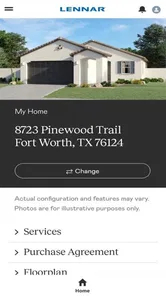
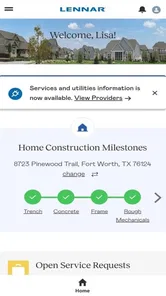
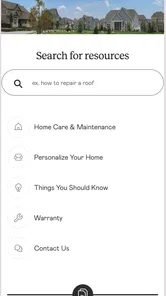
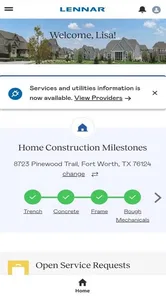
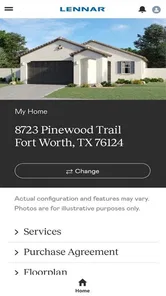
Lennar Account is designed to give Lennar homeowners a convenient way to manage important homeownership information in one place. Depending on your community and account access, you may be able to review purchase or closing details, access documents, follow service requests, view warranty-related information, and receive updates. Available features can vary, so the app may not display every option for every homeowner.
How do I create or access a Lennar Account?
To use Lennar Account, you generally need to register with the email address associated with your Lennar home purchase or homeowner records. After downloading the app, follow the sign-up or login instructions and complete any verification steps requested. If your email is not recognized, your account information is outdated, or you have trouble signing in, contacting Lennar support or your local division may be necessary.
Can I submit and track a warranty or service request through Lennar Account?
One of the most useful reasons to use Lennar Account is the ability to manage homeowner service information digitally. Where supported, you can submit details about an issue, attach photos or documents, and monitor updates or responses from the appropriate team. The exact process, response times, and request categories may differ by location, community, warranty coverage, and the age of your home.
Pros
- Quick access to Lennar account details and home information.
- Helpful tools for tracking warranty requests and service updates.
- Convenient way to manage appointments from a mobile device.
- Keeps important homeownership documents available in one place.
- Useful notifications can reduce the chance of missing account updates.
Cons
- Some features may only work for Lennar homeowners with eligible accounts.
- Login or verification issues can make access frustrating.
- Information may take time to appear after changes are made online.
- The app’s usefulness is limited before the home purchase is complete.
- Support options may still require contacting Lennar through other channels.







