Legion Workforce Engagement
- 3.97K
- 4.7
- Installs
- 1.00M
- Price
- Free

Screenshots
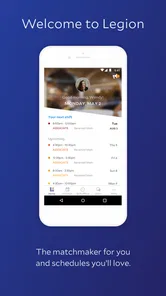
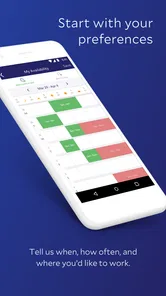
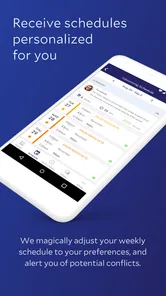
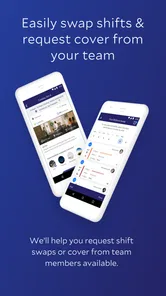
Analysis by Reviewed
When shift details are scattered across messages, paper notes, and a manager’s memory, even a small change can cause confusion. I see Legion Workforce Engagement as most useful when a workplace needs one shared place for employees and managers to handle scheduling and stay connected. That focus matters more than a long list of tools: a workforce app earns its place when it makes the next shift easier to understand and coordinate.
Scheduling is the central promise
The clearest reason to consider this business app is its emphasis on workforce scheduling. In principle, bringing schedules into a mobile workspace can reduce the familiar back-and-forth of asking who is working, checking a noticeboard, or trying to keep up with last-minute changes. Legion Technologies develops the app, and its stated purpose is to help teams engage and coordinate through a mobile device.
That does not mean every employee will find it useful in the same way. A team member mainly needs a dependable way to check work information; a manager needs a practical channel for keeping the team aligned. The value comes from making those routines easier to follow, rather than expecting a phone app by itself to fix staffing problems or workplace communication.
What a normal workday might look like
Imagine arriving at work unsure whether a shift detail has changed. Instead of relying on a chain of messages or waiting to ask a supervisor, you can use the workforce app as the place to check the information your organization makes available. A manager can likewise direct staff toward a shared mobile channel instead of repeating the same update individually. That is a modest benefit, but it can make a busy handover feel less scattered.
My practical tip is to treat the app as a companion to your workplace’s established process, not as a substitute for confirming important instructions. Employees should make sure they know where their organization expects schedule questions and urgent updates to go. Managers, meanwhile, can get more out of a shared tool by being consistent about where they post information; a mobile app cannot prevent confusion if the team keeps using several competing channels.
Who is likely to benefit, and who may not
This is a better fit for employees whose work is organized around shifts and for managers coordinating a team that needs a common mobile point of reference. If you often need to check work-related updates while away from a desk, that kind of access may be more convenient than relying on printed schedules or separate conversations. The app is free, has an Everyone content rating, and has reached over 500,000 installs, so trying it is a low-commitment option for people whose employer uses it.
It is less compelling if you work independently, rarely need team scheduling, or already have a reliable process that everyone follows. It is also not a replacement for a full desktop workforce-management system when your job requires detailed administrative controls. Before relying on it, I would ask a manager whether the workplace actively uses the app and what information staff are expected to check there. A workforce tool is only helpful when it fits the team’s actual routine.
More From Our News Desk

Weather by Xiaomi Review: Clear at a Glance, Less Clear Up Close

X Under Pressure: Can It Recover When Posting Goes Wrong?

Clash of Clans Is Won Between the Battles

Android Auto Makes the Case for Quieter Car Software

MobiOffice: Transforming Mobile Productivity with Seamless Integration

EA SPORTS FC™ Mobile Soccer: Redefining Mobile Sports Gaming
How it compares with familiar alternatives
Compared with a paper rota, a group chat, or a shared calendar, a dedicated workforce app can give work-related coordination a clearer home. Paper is easy to glance at but awkward when details change; chats are familiar yet important updates can disappear between unrelated messages. A general calendar can work for simple schedules, but it may not match the way an employer wants to organize team communication. The trade-off is that employees have to adopt another app, and a digital channel only reduces friction if the team uses it consistently.
I would not choose an app just because it claims to streamline work. I would first check whether my employer supports it, whether the information I need is actually kept current, and whether colleagues use the same channel. Those are practical questions that matter more than a polished screen: if the schedule is not maintained or messages still arrive elsewhere, the app may add one more place to check rather than simplify the day.
Using Legion Workforce Engagement at work
Legion Workforce Engagement is a comprehensive app designed to revolutionize how businesses manage their workforce. Available on both Android and iOS, this app promises to streamline scheduling, increase employee engagement, and enhance overall productivity. Having spent some time with this app, I'm excited to share my insights.
From the moment I downloaded Legion Workforce Engagement, I was impressed by its sleek and user-friendly interface. The app boasts a modern design that is both intuitive and easy to navigate. Even if you're not tech-savvy, you'll find it a breeze to set up and start using right away. The Legion Workforce Engagement app is clearly designed with the user in mind, ensuring that all essential features are just a few taps away.
Features That Stand Out
One of the standout features of Legion Workforce Engagement is its smart scheduling capabilities. The app uses advanced algorithms to create optimized schedules that align with business needs and employee preferences. This not only saves time for managers but also improves job satisfaction for employees, who can easily view and adjust their schedules through the app.
Another feature that caught my attention is the employee engagement tools. The app allows for seamless communication between staff and managers, fostering a collaborative and engaging work environment. Employees can provide feedback, participate in surveys, and even access training materials directly through the app.
Boosting Productivity and Efficiency
With Legion Workforce Engagement, businesses can expect a significant boost in productivity. The app's analytics tools provide valuable insights into workforce performance, helping managers make informed decisions. By identifying trends and areas for improvement, businesses can optimize their operations and cut down on unnecessary costs.
The app also supports compliance with labor laws and regulations, reducing the risk of costly violations. It's a reliable companion for any business looking to stay on top of their game.
Making the schedule useful day to day
The practical test for any shift tool is not whether a schedule looks organized on a screen; it is whether people can make better decisions from it. For an employee juggling work with classes, caregiving, or another part-time role, a clear place to check the next shift can make planning less dependent on memory. I would still compare the displayed details with the workplace’s official process when a change affects transport, childcare, or an agreed handover. Convenience is valuable, but a missed shift has real consequences.
Managers can make the shared channel more effective by setting a simple routine: tell staff where the current schedule lives, explain how to raise a conflict, and use the same route for schedule changes. That small bit of process design matters. If one supervisor updates the app while another relies on a chat, employees may reasonably wonder which version to trust. The useful insight here is that adoption is partly a management decision, not just an individual download.
For a worker who covers different locations or teams, I would avoid assuming that every work detail appears in the same place. The right habit is to check the schedule and then follow the employer’s direction for location-specific instructions or urgent matters. Legion can serve as a central point when the organization has set it up that way, but the employee still benefits from knowing who to contact when the information looks incomplete or conflicts with what a supervisor said.
Questions worth settling before relying on it
Would I install it before asking my manager? I would ask first. A workforce app is most useful when the employer has an active process for it, and a manager can explain whether staff are expected to use it for schedules, team updates, or both. That conversation also clarifies what to do if a shift appears wrong, which is more important than exploring menus without knowing the local workflow.
Can it replace every other work channel? I would not assume so. The workplace may still use a separate route for urgent messages, formal requests, or details that require a direct conversation. I’d keep those distinctions clear instead of treating one mobile app as the answer to every communication need. For employees, this prevents a routine schedule check from turning into a false sense that all important information has been covered.
Is it the right choice for a small team? It can be, if shift coordination is a recurring source of confusion and the team is willing to maintain one shared process. A tiny team with stable hours and a manager who communicates clearly may find a simple calendar or existing conversation sufficient. The deciding factor is not team size by itself; it is whether schedule changes and staff coordination create enough friction to justify another dedicated channel.
Where the trade-offs become clearer
A workforce platform also changes how people expect updates to arrive. Some employees prefer a quick face-to-face confirmation, while others want to check details on their own time. A mobile channel can help with access, but it should not quietly become a reason to expect everyone to monitor work information constantly. I would want the employer to define reasonable expectations around when staff should check updates, especially for people who are off shift.
There is also a difference between having access to scheduling tools and having control over the schedule. Employees should not assume that a mobile app lets them approve changes, choose any shift, or resolve staffing conflicts on their own. Those decisions depend on the organization’s setup and manager practices. In my view, this is an important expectation to set early: the app can make work information easier to reach, but it does not automatically give every user the same authority.
For employers comparing options, a general calendar may be enough when the need is simply to publish a stable rota. A group chat is often easier to start, but it can bury essential details in conversation. A dedicated workforce app makes more sense when the organization wants work coordination to have a distinct home and staff will use it consistently. The trade-off is a little more onboarding and another routine for employees to learn; that cost is worthwhile only if it replaces, rather than duplicates, existing habits.
One non-obvious way to judge whether the app is helping is to watch what happens after a schedule change. Do employees know where to look, and do managers receive fewer repeated questions because the process is clearer? That is a more useful measure than counting how often people open an app. If staff still have to check multiple channels to be certain, the issue may be the team’s workflow rather than the software itself.
In conclusion, Legion Workforce Engagement is a game-changer for businesses aiming to improve workforce management. Its user-friendly interface, smart scheduling, and robust engagement tools make it a must-have for any organization. Whether you're a manager looking to streamline operations or an employee seeking a more flexible work environment, this app has something for everyone. Give it a try and see how it can transform your workplace dynamics.
It has an average rating of 4.7 from around 13,000 ratings, and its current version is 3.3.1, with Android 9 or later required. Those figures offer a quick sense of its audience and compatibility, but they do not tell me whether it matches a particular employer’s setup. I would check with a manager before making it part of my work routine, especially if schedule updates are time-sensitive.
Overall, I’d recommend it to someone whose workplace already relies on Legion for team coordination, because the app’s strongest potential is making routine work information easier to reach. If your employer does not use it, or your schedule is already handled cleanly through another channel, there may be little reason to add it. Its value depends on a shared habit: managers need to keep the workplace process clear, and employees need to know when the app is the right place to look.
Legion Workforce Engagement Frequently Asked Questions
What should I check before downloading Legion Workforce Engagement?
Legion Workforce Engagement is a business app developed by Legion Technologies, intended to help teams engage through the Legion Mobile app. Before downloading, consider whether your workplace uses Legion and whether you have a work-related reason to access it. The app is free, but its usefulness depends on your organization’s setup and the access provided to employees.
Can I use Legion Workforce Engagement without my employer?
This app is intended for workplace use, so its usefulness depends on your organization’s Legion setup and the access your employer provides. Downloading it alone may not give you access to schedules, tasks, or team communications. If your workplace uses Legion, ask your manager or administrator how employees should sign in and which features are available to your team.
Who is Legion Workforce Engagement designed for?
Legion Workforce Engagement is a business app for employees and managers who need to stay connected around workforce tasks. Its focus is on helping teams engage through the Legion Mobile app, with tools for schedules, shift changes, communication, and task management. Whether it suits you depends on how your workplace uses Legion and which features your employer has enabled.
What is Legion Workforce Engagement and how does it work?
Legion Workforce Engagement is a comprehensive app designed to enhance workforce management through AI-driven scheduling, communication, and task management features. It allows managers to create optimal schedules by analyzing labor forecasts and employee preferences. Employees can access schedules, swap shifts, and communicate with managers in real-time, all within the app. This ensures a seamless and efficient workflow for both managers and employees.
Is Legion Workforce Engagement available on both Android and iOS devices?
Yes, Legion Workforce Engagement is available for download on both Android and iOS platforms. Users can access the app through the Google Play Store and the Apple App Store, ensuring compatibility with a wide range of devices. This cross-platform availability allows for greater flexibility and accessibility for all users. On Android, the listed minimum operating-system requirement is version 9, so check your device’s software before installing.
Pros
- User-friendly interface enhances productivity
- Comprehensive scheduling features
- Effective communication tools
- Real-time updates improve workforce management
- Customizable to fit different organizational needs
Cons
- Steep learning curve for new users
- Limited offline functionality
- Occasional sync issues
- Requires constant internet connection
- Can be resource-heavy on older devices











