

Learning Genie for Parents
- 361.00
- 4.9
- Installs
- 100.00K
- Price
- Free

Screenshots
Analysis by Reviewed
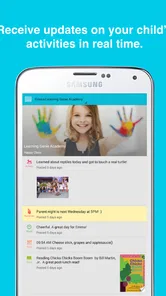
Learning Genie for Parents is an education app from Learning Genie Inc that puts the family side of early learning in one place. I see its main value in a simple but meaningful capability: it helps parents stay connected to a child’s learning through photos and daily reports instead of waiting for a formal conversation or trying to reconstruct the day from a few rushed questions.
That focus makes it different from a typical children’s learning game. It is not mainly something I would open to keep a child occupied with exercises. I would use it as a communication window between home and an early-learning setting, where small observations can make the child’s progress easier to understand. The app is free, rated for Everyone, and has a 4.9 average from around 1.6 thousand ratings, so it has clearly found an audience among families looking for that connection.
Why the daily learning record matters
The strongest idea here is not the photo itself. A picture of a child painting, sorting objects, reading, or playing outside is pleasant, but its real usefulness comes when it becomes part of a continuing record. Daily reports give that image context: what the child was doing, how the day went, and what parents might want to ask about later.
In my experience, this changes the quality of the conversation at home. Instead of asking a broad question such as “What did you do today?” and receiving a short answer, I can refer to something specific. I might ask what the child enjoyed about an activity, whether a similar task could be tried at home, or why a particular moment seemed exciting. That turns a routine update into a starting point for interaction.
The practical benefit is continuity, not extra screen time. The parent is not necessarily using the app to teach a lesson directly. The app helps connect what happens during early learning with what happens after pickup, at dinner, or during a quiet moment at home. For young children, that continuity can make learning feel like part of ordinary life rather than something that ends when the school day finishes.
This is also why the app’s audience matters. Parents of very young children often receive less detailed feedback than they would like, while children may not yet be able to describe their day clearly. A visual update can fill that gap. It gives the adult something concrete to notice without requiring the child to produce a polished explanation.
Photos are most useful when parents use them actively
I would not treat the photo stream as a gallery to scroll through once and forget. Its better use is to spot patterns. If a child appears repeatedly engaged in building, drawing, movement, or group activities, those observations can guide questions and home activities. A parent might offer blocks after seeing construction work, read a related story after noticing a theme, or simply ask the child to explain what is happening in the image.
More From Our News Desk

 Instagram
Instagram’s Power Comes From Its Place in Your Phone
A close look at how Instagram turns Meta’s reach, recommendation systems and everyday camera habits into durable platform power—and what that costs users.

 Gmail
GmailGmail in a Busy Inbox: Who Benefits Most?
From first account to crowded workday, Gmail earns its place through dependable search and flexible sorting—but its best fit depends on how much inbox maintenance you can tolerate.

 Prime Video
Switching to Prime Video: What Changes in Your Viewing Routine
Prime Video can make a compelling second home for streaming, but switching means learning a different catalog, rental layer, and route from browsing to playback.

 Universal TV Remote Control
Universal TV Remote Control Works Best as a Reliable Backup
A phone remote earns its place through quick setup and reliable habits. Here is how to get more from Universal TV Remote Control—and where its limits show.

 Weather - By Xiaomi
Weather by Xiaomi Review: Clear at a Glance, Less Clear Up Close
Xiaomi’s weather app makes everyday forecasts quick to scan, but its calm surface can leave useful details and recovery paths harder to find than they should be.

 X
XX Under Pressure: Can It Recover When Posting Goes Wrong?
A resilience-focused review of X, examining setup, mistaken posts, interruptions, weak connections, and the gaps that matter when recovery needs to be dependable.
Latest News



That does require a little effort. The app can make information available, but it cannot create a meaningful family conversation by itself. Parents who only glance at updates may enjoy the reassurance without gaining much insight. Parents who pause and respond to what they see are more likely to get educational value from it.
Daily reports reduce guesswork
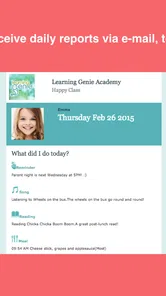
A daily report is helpful because it compresses a busy day into information a parent can actually use. Early-learning environments contain many small moments, and remembering all of them is difficult. A report gives the family a reference point, especially on days when the child is tired and does not want to talk.
I also like the possibility of using the report to notice changes over time. One update may not say much on its own. Several updates can help a parent recognize interests, recurring challenges, or activities that consistently lead to enthusiasm. That does not replace a teacher’s professional judgment, but it can help the parent arrive at a conversation with better questions.
A useful habit is to choose one detail from the report rather than trying to discuss everything. Young children can lose interest if adults turn the evening into an interview. A single question connected to a real photo or activity usually feels more natural and gives the child room to lead the conversation.
What using it feels like in everyday family life
The app makes the most sense when it becomes part of a short routine. I would check it at a predictable time, perhaps after work or before collecting the child, then decide whether there is one update worth discussing. This avoids the trap of constantly checking for notifications or treating every photo as an urgent event.
Imagine a parent finishing a busy afternoon and opening the app before pickup. A photo shows the child involved in a group activity, while the daily report adds a little context. At pickup, the parent can ask about that activity in a specific way. Later, at home, a related book, drawing task, or conversation can continue the theme. Nothing about this routine needs to be elaborate. The value comes from making the connection while the experience is still fresh.
For separated parents or relatives who do not handle pickup, updates can also make the child’s day easier to share in conversation. A grandparent might ask about a picture, or another caregiver might understand what the child has been exploring. I would still keep the discussion centered on the child rather than turning the app into a constant stream of forwarded images.
Another practical use is preparing for a meeting with educators. If several reports point to a repeated interest or a recurring difficulty, I can note that pattern and raise it constructively. The app does not need to provide a formal assessment to be useful in this situation. Its role is to help the parent remember real examples instead of relying on vague impressions.
A simple workflow that gets more from the app
Check the latest update at a calm moment rather than while rushing between tasks.
Choose one photo or report detail that gives useful context.
Ask the child an open question connected to that detail, without expecting a long answer.
Look for patterns across several days before drawing conclusions about progress or preferences.
Bring recurring questions to the educator instead of trying to interpret every update alone.
This workflow is one of the less obvious strengths of a parent-focused learning app. It encourages observation. A parent can become more aware of the child’s interests without turning ordinary play into a test. The distinction matters: a photo can suggest a conversation, but it should not be treated as proof of a skill, a problem, or a complete picture of the child’s day.
Where it fits beside ordinary alternatives
The usual alternatives are informal conversations, paper notes, classroom messaging, or a general photo-sharing service. Informal conversations are personal but easy to lose in a busy week. Paper notes can be useful but are less convenient to revisit. A general messaging service may handle communication well without giving the updates an early-learning focus.
Learning Genie for Parents sits between those options. It is more structured than relying only on memory, while remaining more personal than a broad educational resource library. I would choose it when the important question is “What happened during my child’s learning day, and how can I connect with it?” I would choose a child-focused learning game instead when I want interactive practice that the child completes directly on the device.
That distinction prevents disappointment. This is not the right replacement for a phonics app, a math practice tool, or an offline activity box. Its educational contribution comes through awareness and communication. Parents expecting a large collection of lessons may find the experience too indirect. Parents who want a clearer view of everyday learning may find that indirect approach exactly right.
The tradeoffs I noticed
The first tradeoff is that the app’s usefulness depends on the quality and regularity of the updates available to the family. A parent can only engage with what appears in the app. If updates are brief or occasional, the experience may feel more like a pleasant noticeboard than a dependable learning record. I would therefore judge it by whether it supports a useful routine, not by how many individual photos appear.
The second tradeoff is attention. A photo can invite connection, but it can also encourage passive scrolling. If the parent spends more time browsing images than talking with the child, the central purpose gets diluted. I think the best approach is selective use: notice, ask, and then put the phone away.
There is also a risk of overinterpreting snapshots. Early learning is varied, and one image captures only one moment. A child may look deeply engaged in one activity and uninterested in another without that meaning anything lasting. I would use the app to start conversations and notice themes, not to compare children or make quick judgments about development.
Families should also consider whether this style of communication matches their habits. Some parents want a detailed digital connection with the learning environment. Others prefer a direct conversation with an educator and may not want another app to check. For the second group, the app could feel like an extra responsibility, especially if daily reports become something they feel obliged to monitor constantly.
The app is free, which removes a common barrier for families deciding whether to try it. Even so, “free” does not mean it costs no attention. The real commitment is building a habit of reading the updates and turning them into useful interaction. If that habit is unlikely to happen, the benefit will be limited regardless of the price.
Questions about devices and access
On the Android side, the listed minimum operating system is Android 5.0, and the current version is 5.0.29. That makes the app relevant to families using older compatible devices, although I would still keep the phone’s operating system and app installation current when possible for a smoother experience.
The app has more than one hundred thousand installs, which suggests it is not an obscure experiment. Its Everyone age rating also fits the family-oriented purpose. Still, the parent is the person who should decide how a child’s photos and reports are handled within the family’s own routines. I would avoid treating access to updates as a reason to give every relative unrestricted involvement; sharing should remain deliberate and child-centered.
Another question is whether a parent needs to be highly technical. I would say no for the basic idea. The value comes from opening updates, looking at the context, and using it in conversation. The more important requirement is consistency, not technical skill. Someone who wants a complex dashboard or detailed educational analysis may find the experience too light, while someone who wants a straightforward connection may appreciate that it does not demand specialist knowledge.
Who benefits most from this approach
I think the strongest fit is a parent of a preschool or early-learning child who wants more than a quick pickup summary. It is especially useful when the child is not yet a reliable narrator of the day, when work schedules make communication hurried, or when a parent wants practical prompts for talking about learning at home.
It can also suit families who value small, regular observations over occasional formal updates. A parent does not need to be an education expert to use the information well. Asking what a child enjoyed, what they remember, or whether they want to try something similar at home is enough to turn a report into interaction.
I would be more cautious about recommending it to families seeking direct academic instruction. If the goal is independent practice, measurable exercises, or a large set of child-led activities, another education app will probably be a better match. Learning Genie for Parents supports the relationship around learning rather than replacing the learning materials themselves.
It may also be a weak fit for someone who dislikes digital updates or already has a reliable, detailed communication routine with educators. In that case, the app may repeat information rather than add something new. Its advantage appears when it fills a communication gap, not when it duplicates an excellent system that a family already uses comfortably.
Learning Genie Inc has kept the concept focused: give parents a clearer view of early learning through visual updates and daily information. The result is not flashy, and I would not recommend it as a general-purpose educational game. I would recommend it to a parent who wants to turn ordinary school-day moments into better conversations at home.
After using it as a communication tool rather than a passive photo feed, I found the distinction important. The app is most valuable when I use one update to notice, ask, and follow up. If that sounds like the kind of connection your family needs, the free app is worth trying. If you want lessons delivered directly to a child, look elsewhere; if you want a practical bridge between early learning and family life, this is where Learning Genie for Parents makes the strongest case.
Learning Genie for Parents Frequently Asked Questions
What devices and operating systems can I use with Learning Genie for Parents?
Learning Genie for Parents is an education app for families who want to follow their child’s early-learning experience. It supports Android devices running version 5.0 or later, so check your device’s operating system before installing. If you use an iPhone or iPad, look for the app in the Apple App Store and confirm that it is compatible with your device before downloading.
Who develops Learning Genie for Parents, and what kind of app is it?
Learning Genie for Parents is an education app developed by Learning Genie Inc. Its focus is helping families engage with a child’s early learning through photos, daily reports, and other updates shared by the child’s program. It is intended for parents connected to a participating school or childcare provider, rather than as a standalone learning course for children.
What is Learning Genie for Parents used for?
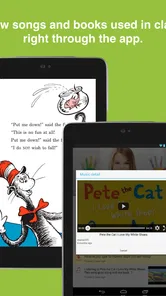
Learning Genie for Parents is a family communication and engagement app designed to connect parents with their child’s early-learning program or school. After signing in through an invited account, parents can typically view messages, announcements, classroom updates, photos, learning observations, activities, and other information shared by teachers. The exact tools available may depend on the school’s subscription, configuration, and the child’s enrolled classroom.
How do I create an account or join my child’s classroom?
In most cases, parents cannot freely create a complete classroom connection without an invitation from the child’s school, teacher, or childcare provider. You may receive an email, text message, access code, or registration link containing instructions. During setup, use the same contact information provided to the school and carefully follow the invitation steps. If the invitation does not work, the school administrator usually needs to resend or correct it.
Can I communicate directly with my child’s teacher through the app?
The app may provide secure messaging or communication features, allowing parents to receive updates and contact teachers or program staff. However, available communication options vary by institution, and some schools may limit messaging to certain hours, topics, or approved contacts. Notifications can also depend on your phone settings. For urgent matters, attendance issues, or emergencies, contact the school directly rather than relying only on an in-app message.
Pros
- Keeps parents informed about classroom activities and child progress.
- Supports direct communication with teachers in one convenient place.
- Allows quick access to photos
- updates
- and important announcements.
- Helps families stay involved in learning beyond the classroom.
- Useful notifications can reduce the chance of missing school information.
Cons
- Some features depend on the child’s school or teacher using the platform.
- Frequent notifications may feel overwhelming for busy parents.
- The interface can take time to understand for first-time users.
- Limited activity may appear when teachers post updates infrequently.
- Requires a reliable internet connection for timely updates and messages.











