Lawn Buddy Management Software
- 100.00
- 4.0
- Installs
- 10.00K
- Price
- Free

Screenshots
Analysis by Reviewed
I approached Lawn Buddy Management Software as a working tool for a lawn-care business rather than as a casual phone app. Its purpose is to bring everyday business organization into one place and reduce the repetitive tasks that can quietly consume a workday. That focus makes it more relevant to contractors, small crews, and owner-operators than to someone simply looking for gardening advice.
The app comes from Lawn Buddy, LLC and is listed as a free Business app for Everyone. It has reached over ten thousand installs, with a 4.0 average from around one hundred sixty ratings. Those figures suggest a useful but not universally smooth experience: enough adoption to make it worth considering, while the rating also hints that setup and day-to-day fit matter.
My overall impression is that Lawn Buddy is most valuable when it becomes the central place where a lawn-care operator organizes work. It is less convincing if you only need a simple calendar, a basic notes app, or a quick way to track a handful of customers. The difference comes down to whether you are trying to manage a repeatable service operation or merely remember appointments.
Where users are most likely to get stuck
The first difficulty is usually not the idea behind the app; it is translating an existing lawn-care routine into a structured workflow. Many small operators begin with text messages, paper notes, phone contacts, and a general calendar. Moving those habits into dedicated lawn-care software requires deciding what information belongs where and which task should become the official record.
I would start by treating each customer, property, service, and appointment as separate pieces of business information. Mixing them together makes later follow-up harder. For example, a customer may own more than one property, and a property may receive more than one kind of service. Keeping those distinctions clear is more useful than entering everything in one long note.
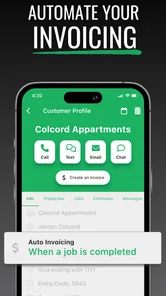
Another common sticking point is expecting automation to fix an unclear process. The store summary emphasizes organizing the business and automating time-consuming work, but automation only helps after the underlying schedule and customer details are consistent. If service names are entered differently every time, or if an appointment is changed in one place but not another, the app can appear unreliable when the real problem is an inconsistent workflow.
The best early goal is not to enter everything at once; it is to build one complete customer-to-service cycle. Add a real customer, connect the relevant property or job information, schedule the work, and then review what you would need when the next visit arrives. That small test exposes confusing fields much faster than a large import or a rushed setup.
More From Our News Desk

Weather by Xiaomi Review: Clear at a Glance, Less Clear Up Close

X Under Pressure: Can It Recover When Posting Goes Wrong?

Clash of Clans Is Won Between the Battles

Android Auto Makes the Case for Quieter Car Software

MobiOffice: Transforming Mobile Productivity with Seamless Integration

EA SPORTS FC™ Mobile Soccer: Redefining Mobile Sports Gaming
Why the first few entries matter
In a lawn-care business, small details have practical consequences. A vague customer record can lead to a missed gate instruction. An unclear service label can make a recurring job look like a one-off visit. A rushed schedule can leave a crew with an incomplete picture of the day. I would therefore use the first entries as templates for future work, not as disposable test data.
There is also a mental adjustment involved. A general calendar is organized around time, while lawn-care management is organized around customers, properties, and services that happen repeatedly. If you continue thinking only in terms of appointments, you may overlook the business history that makes repeat work easier to manage.
That is where this app can feel more useful than a calendar alone. A calendar tells me when something is supposed to happen. A dedicated management tool is intended to connect that event to the customer and the service operation around it. The trade-off is that it asks for more careful data entry at the beginning.
Setup checks that prevent avoidable frustration
Before relying on the app during a busy route, I would check the basics in a quiet moment. Confirm that the phone meets the minimum operating-system requirement of version 7.1, install the current version shown as 6.0.323, and make sure the device has enough free space for normal app operation. These are simple checks, but they eliminate several problems that can be mistaken for software bugs.
I would also test the account and sign-in process before entering a full customer list. Use a small amount of information first, close and reopen the app, and confirm that the entries still appear as expected. If the app behaves differently after a restart, it is better to discover that before a full afternoon of scheduling.
For a small company, the most useful setup check is a role-based walkthrough. Ask yourself what the owner needs to see, what a crew member needs before visiting a property, and what information must be available after the job. Even if one person performs all those roles, separating them mentally reveals missing steps.
I would prepare a consistent naming method as well. Use the same style for customer names, property descriptions, and service names. Avoid creating near-duplicates such as “mow,” “mowing,” and “lawn cut” unless they genuinely represent different work. Consistency makes searching and reviewing the schedule less confusing later.
Another practical check is to review the first scheduled jobs from the perspective of someone who did not create them. Could that person identify the right customer, the right property, and the intended service without calling you? If the answer is no, the setup needs clearer information rather than more automation.
Testing before a real route
I recommend using a low-risk trial period with a few genuine jobs rather than immediately replacing every existing system. Keep the old calendar or paper route sheet available while you compare the app’s records with what actually happens. The aim is not to duplicate work permanently; it is to learn where your current process and the app’s structure do not line up.
During that trial, pay attention to the moments when you reach for another tool. If you still need a separate note for property instructions, a separate calendar for timing, and a separate message thread for customer changes, identify why. Sometimes the app is missing a detail you need. Sometimes the detail is being recorded in the wrong place. That distinction helps you decide whether to adjust your process or use Lawn Buddy alongside another tool.
Because the app is free to download but offers in-app purchases ranging from twelve dollars to three hundred sixty dollars per item, I would also review any paid step carefully before committing. The sensible approach is to understand which part of your workflow a purchase would improve and whether that improvement matters to your business size. A paid option should remove a real bottleneck, not simply add another layer of complexity.
Recovering a workflow when something goes wrong
When a job seems to disappear, a schedule looks wrong, or a customer record is incomplete, I would avoid making several changes at once. First identify the smallest point where the information stopped matching reality. Was the customer saved? Was the service attached to the right property? Was the appointment changed after the route was already planned?
A useful recovery method is to compare one known job across the app and your backup record. Choose a visit that definitely happened, then check the customer details, service description, and scheduled time separately. This narrows the problem to a missing record, an incorrect connection, or a timing mistake.
If the app appears frozen or fails to display an expected change, close and reopen it, confirm the device connection, and check whether the same issue affects one record or every record. General troubleshooting is safer than repeatedly tapping buttons or creating duplicate entries. Duplicate jobs are particularly dangerous in lawn care because they can look like extra work rather than an error.
I would keep a temporary recovery note outside the app while investigating, but only with the minimum information needed to protect the day’s route. Do not create a second permanent database unless the problem continues. Once the record is corrected, remove the temporary note or mark it clearly as resolved so two competing versions do not remain.
For recurring work, recovery should include the next visit, not just the current one. A corrected appointment may still leave a future service out of alignment. Check the next scheduled occurrence manually after fixing a change. This is one of the less obvious habits that prevents a small scheduling error from repeating.
Separating a display problem from a process problem
If information is present but difficult to find, the issue may be organization rather than loss. Search using the exact customer naming style you chose during setup. Review related property and service records instead of assuming every detail will appear in a single view. A structured business app often requires moving between connected pieces of information.
If only one phone shows the problem, restart the device and verify the app version. If several people see the same incorrect job, compare the underlying entry and the change that produced it. This simple distinction helps determine whether you are dealing with a device issue or a shared workflow mistake.
I would also avoid editing a record while a crew member is actively using the same information unless the change is urgent. Even without assuming a particular synchronization behavior, simultaneous edits make it harder to know which version should be trusted. Agree on who owns schedule changes during the working day.
When the app may not be the cause
Lawn-care operations create problems that no software can solve by itself. A customer may change access instructions at the last minute, weather may disrupt a route, or a crew may complete work without updating the office. In those situations, an app can preserve the record, but it cannot replace communication and a clear responsibility for updating it.
Many apparent scheduling failures begin with an ambiguous agreement. “Every other week” may mean a different weekday during busy periods, while “monthly” may not identify a specific service window. Entering an unclear arrangement into Lawn Buddy will not make it precise. Before blaming the schedule, confirm what the customer actually expects and record the operating decision consistently.
Likewise, a missed notification may be caused by the phone rather than the app. Check the device’s general notification settings, battery restrictions, connection, and available storage. If other apps are also delayed, the wider phone environment deserves attention. These checks are safer than assuming a single application is responsible.
There is also a business-size limit to consider. An owner handling a modest number of regular properties may find the structure helpful. A larger operation with complex dispatching, accounting, inventory, or specialized reporting may eventually need a broader platform. Lawn Buddy can still be part of that process, but it should not be judged as a complete replacement for every business system.
On the other hand, someone with only a few occasional mowing jobs may find a normal calendar and contact list faster. The dedicated structure adds value when repeated services and customer organization are the problem. If your main need is remembering one appointment, the extra setup may not repay its cost in time or attention.
How it compares with familiar alternatives
A paper notebook is flexible and works without a device, but it is difficult to search, update cleanly, or share with another person. A general calendar is excellent for time-based reminders, yet it usually does not organize the wider customer and property context in a lawn-care-specific way. A spreadsheet offers more control, but it requires you to design and maintain the system yourself.
Lawn Buddy sits between those choices. It is more purpose-built than a calendar or notebook, while being less open-ended than a spreadsheet. That can be a strength for an operator who wants a ready-made structure and does not want to build formulas or complicated templates. The trade-off is reduced freedom if your business uses unusual service arrangements that do not fit neatly into the app’s workflow.
I would also compare it with a broad field-service platform before moving a growing company over completely. A larger platform may suit teams that need extensive dispatch, billing, inventory, or reporting controls. Lawn Buddy is more appealing when the priority is organizing lawn-care work without taking on an unnecessarily heavy system.
Who should use it and how I would start
I would recommend trying it if you run a lawn-care business, manage repeat residential work, or are tired of combining customer messages with scattered schedule notes. It is especially suitable for an owner-operator who wants a clearer connection between the person requesting service, the property receiving it, and the work planned for that visit.
I would be more cautious if your operation depends on highly customized reporting, complicated crew dispatch, or a large collection of business tools that must exchange information. I would also skip it as a primary system if you only have occasional jobs and already manage them comfortably with a calendar.
My suggested starting sequence is deliberately small:
Choose a few active customers representing different kinds of work.
Enter their information using consistent names and service descriptions.
Schedule the next real visits and compare them with your existing route plan.
Run one complete workday using the app as the main reference while keeping a temporary backup.
Review what required another tool before deciding whether to expand usage or investigate a paid option.
This approach answers the practical questions most new users have: whether the app can fit a real route, whether setup is manageable, and whether it reduces duplicate work. It also protects the business from a rushed migration.
My practical verdict after weighing the friction
Lawn Buddy Management Software is a focused Business app with a sensible purpose: helping lawn-care operators organize the information and repeated tasks behind their services. Its free entry point makes experimentation easier, and its Everyone rating means it is positioned as a general business tool rather than something restricted to a narrow audience. The current version is 6.0.323, and the developer is Lawn Buddy, LLC.
I like the idea of using it as the operational center for a small lawn-care business, but I would not treat installation as the finish line. The real benefit appears only after the business adopts consistent records and agrees on how schedule changes are handled. Users who invest that small amount of discipline are more likely to see value than users who expect the app to organize an already chaotic process automatically.
The 4.0 average reflects my balanced view: promising and useful for the right workflow, but not something I would recommend blindly to every contractor. The main trade-off is structure versus flexibility. You gain a more relevant system than a generic calendar, but you must learn its way of organizing work and decide whether that matches your operation.
For me, the deciding test is simple: after a week, can I find the correct customer, property, service, and next visit without checking several other places? If yes, Lawn Buddy is doing something valuable. If I still depend on scattered notes and messages for essential details, I would either refine the setup or choose a broader alternative.
My recommendation is to try it gradually, with real jobs and a clear naming system. It is a reasonable choice for small and growing lawn-care businesses that need more than a calendar but do not yet need an all-purpose enterprise platform. Just keep the workflow tidy, check the next visit after every major change, and judge the app by whether it genuinely removes daily friction.
Lawn Buddy Management Software Frequently Asked Questions
Is Lawn Buddy free to download, and are there additional costs?
Lawn Buddy is free to download, so you can install the app without paying an upfront download price. It also offers in-app purchases, with listed items ranging from $12 to $360 each, so the total cost can depend on the plan or features you choose. Check the current purchase options before signing up to make sure they fit your business budget.
Which devices and software versions can run Lawn Buddy?
Lawn Buddy is available for mobile use, and its listed minimum operating-system requirement is version 7.1. Before downloading, check that your device meets the requirement and that you have enough space for the app. Keeping your operating system and app updated can also help you use the latest available version and avoid compatibility problems.
Who develops Lawn Buddy, and is it intended for general business use?
Lawn Buddy is developed by Lawn Buddy, LLC and is a business app focused on lawn-care management. Its store summary describes software for organizing a business and automating time-consuming tasks, so its tools are most relevant to lawn-care and related field-service operations. The app has an Everyone content rating, though the business features may be more useful to owners and staff than to casual users.
What is Lawn Buddy Management Software used for?
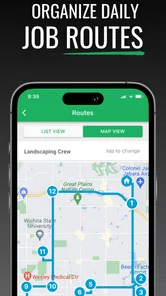
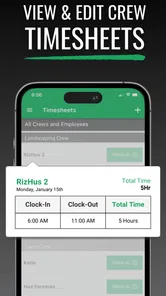
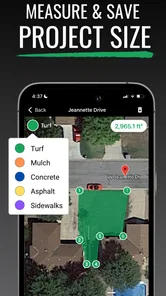
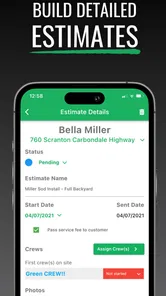
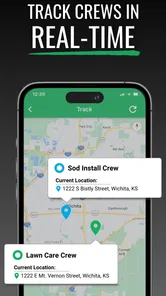
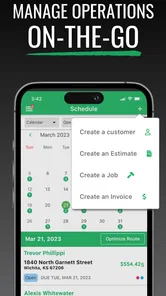
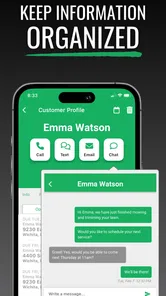
Lawn Buddy is a business management platform designed for lawn-care, landscaping, and other field-service companies. It helps organize customers, properties, services, estimates, scheduling, work orders, invoices, payments, and team communication in one place. After reviewing its workflow, it is best suited to businesses that want to replace spreadsheets, paper notes, and disconnected messaging tools with a more structured operational system.
Is Lawn Buddy suitable for a small lawn-care business or only larger companies?
Lawn Buddy can be useful for both small and growing lawn-care businesses, although the value depends on how many operational tasks you need to manage. A solo operator may appreciate customer records, scheduling, estimates, and invoicing, while larger teams can benefit from assigning jobs and coordinating field staff. Before downloading or subscribing, check the current plan details because available features and limits may vary.
Pros
- Centralizes lawn-care schedules
- clients
- and property details in one place.
- Automates reminders
- helping reduce missed appointments and follow-ups.
- Useful tools for tracking jobs
- payments
- and recurring maintenance plans.
- Improves communication between lawn-care businesses and their customers.
- Can support business growth by organizing daily operations more efficiently.
Cons
- Some advanced features may require a paid subscription or upgraded plan.
- Initial setup can take time when importing customers and service information.
- Small businesses may find the full feature set more than they currently need.
- Dependence on internet access may limit use in areas with poor connectivity.
- Users may need training to make the most of its management and reporting tools.











