Launcher iOS 19
- 2.05K
- 4.5
- Installs
- 10.00M
- Price
- Free

Screenshots
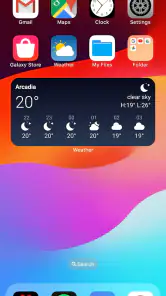
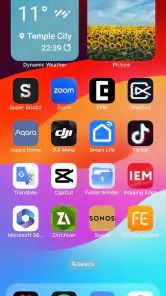
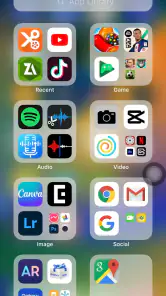
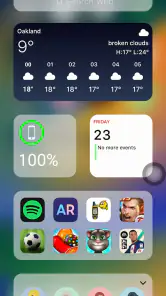
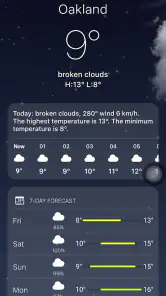
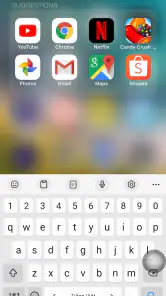
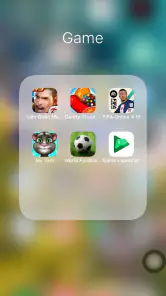
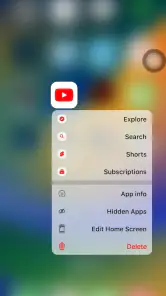
Analysis by Reviewed
I find a launcher most useful when it makes everyday actions easier, not just when it changes the wallpaper and icons. Launcher iOS 19 is for Android users who want an iPhone-inspired home screen while keeping their Android phone. That visual shift can make a familiar device feel different without requiring you to replace it. I’d consider it for a style change, but I’d judge it by how comfortably I can read, find, and open the apps I use most.
Readability and finding the right app
After using it, I found the familiar home-screen arrangement and app search helpful for routine navigation. If you tend to open the same handful of apps, keeping them easy to spot matters more than reproducing every detail of another phone’s interface. I’d spend a few minutes arranging the main screen around your daily essentials, then use search for less frequent apps rather than filling every available space.
That approach can also help someone who finds crowded screens tiring: a deliberate layout is easier to scan than a collection of icons added without a plan. The launcher’s app drawer gives you another route when you don’t remember where you placed something. It won’t change the content or controls inside each app, though, so the improvement is mainly about reaching apps through a different home-screen style.
Making the layout work in a real routine
A useful test is to set up the screen for one ordinary day rather than trying to make it look finished immediately. On a weekday morning, for instance, I’d put the apps I reach for before leaving home where they’re easy to recognize, then try opening them while carrying a bag or switching between tasks. If I keep pausing to scan the screen, the arrangement needs work; a visually neat grid is not necessarily a usable one.
Search is most valuable as a backup, not as a reason to hide every app. I’d keep frequent choices visible and use the drawer or search for occasional tools, so the home screen stays calm without making common actions slower. This also helps when someone else needs to use the phone briefly: a small set of familiar, clearly placed apps is easier to explain than a deeply customized layout.
The iOS Experience on Android
From the moment I installed Launcher iOS 19, I felt like I was holding an iPhone. The transition was smooth and surprisingly authentic. The app mimics the iOS interface with precision – from the home screen layout to the app icons, everything feels just right. I was particularly impressed by how it managed to replicate the subtle animations and the overall fluidity of iOS.
Customization Galore
One of the standout features of this launcher is its customization options. While it stays true to the iOS aesthetic, it doesn't restrict you like Apple might. You can tweak your home screen to your liking, which is a win-win in my book. Want to mix in a little bit of Android flair? Go for it! It’s like having the best of both worlds.
More From Our News Desk

Weather by Xiaomi Review: Clear at a Glance, Less Clear Up Close

X Under Pressure: Can It Recover When Posting Goes Wrong?

Clash of Clans Is Won Between the Battles

Android Auto Makes the Case for Quieter Car Software

MobiOffice: Transforming Mobile Productivity with Seamless Integration

EA SPORTS FC™ Mobile Soccer: Redefining Mobile Sports Gaming
A setup that fits different needs
I’d use that flexibility with a specific goal rather than changing everything at once. For example, on a busy morning, I might keep only the apps I need for messages, travel, and work within easy reach, then leave less-used apps in the drawer. That can reduce visual hunting when I’m in a hurry. If you’re setting up a phone for someone else, make the layout together and ask them to try finding their everyday apps; what looks tidy to me may not be obvious to them.
For motor or sensory comfort, the useful question is whether the layout feels manageable on your own device. A simpler screen can mean fewer icons to scan, but animations and visual changes may not suit everyone. I wouldn’t assume a launcher provides specialized accessibility controls; if you rely on system-level settings or assistive tools, check that your usual setup still feels comfortable after changing the home screen.
Motor comfort and sensory preferences
Home-screen changes can affect the small movements people repeat all day. If you have limited dexterity or prefer not to make precise taps, I’d test whether the apps you need most are placed where your hand naturally rests and whether their icons are easy to distinguish at a glance. A launcher can reorganize access, but it does not make the controls inside each app larger or simpler. Keep using your phone’s existing accessibility settings where needed, and judge the launcher alongside them rather than as a replacement.
The visual style is also a matter of personal comfort. Some people enjoy motion and a polished, lively interface; others find movement distracting, especially when they are tired or trying to focus. Since the launcher’s animations are part of its appeal, I’d try it during a quiet moment and then again in a setting where you normally use your phone quickly. If the screen feels busy, a more restrained default launcher may be a better fit than trying to make yourself adapt.
Performance and Usability
Now, no app is perfect, and Launcher iOS 19 does have its quirks. On some lower-end devices, I noticed a slight lag, especially when swiping between screens or launching apps. However, on my mid-range phone, it performed quite well, maintaining a balance between looks and functionality. The app drawer is neatly organized, and the search function works like a charm, making it easy to find and launch apps quickly.
This is where it differs from sticking with your phone’s standard launcher. The default option usually keeps the manufacturer’s familiar look and avoids adding another visual layer; this app is the more appealing choice if the iOS-inspired presentation is the point. If quick, predictable response matters more than appearance, especially on an older or slower phone, I’d stay with the built-in launcher. Trying a small, practical layout first is a sensible way to see whether the trade-off works for you.
Choosing between this and other home-screen options
The usual alternative is the launcher already installed on an Android phone. It tends to be the straightforward choice if you value the manufacturer’s familiar arrangement, want fewer changes to learn, or simply need the home screen to stay out of the way. This app makes more sense when its iPhone-like presentation is a real part of the experience you want, rather than a passing novelty. I wouldn’t switch just because a different layout looks polished in screenshots; the question is whether you like using it after the first impression fades.
There is also a practical distinction between changing a launcher and changing phones. This gives Android a different home-screen appearance, but it doesn’t turn the device into an iPhone or replace Android apps and system behavior. That makes it a low-commitment experiment for someone curious about the look, while anyone seeking a complete change of ecosystem should not expect a home-screen app to provide it. I’d compare the two options by the daily tasks you care about, not by how closely the screens resemble one another.
Who will enjoy the change—and who may not
The app is free, is rated for Everyone, and comes from LuuTinh Developer. Its average rating is 4.5 from around 233,000 ratings, with about 2,000 written reviews and over 10 million installs. It first appeared on December 27, 2022; version 8.6.9 supports Android 5.0 and later. Those figures show that many people have tried it, but they don’t tell you whether its look or responsiveness will suit your particular phone.
I’d recommend giving it a try if you enjoy the iPhone-style arrangement but want to keep using Android apps and hardware. It may also suit someone who likes to refresh a phone’s appearance without rebuilding their daily routine from scratch. I’d skip it if you’re already happy with your manufacturer’s home screen, dislike visual imitation, or find added animation distracting. And if a phone is already slow, a cosmetic change is unlikely to solve the underlying problem.
Questions worth settling before you switch
If you are wondering whether you need an iPhone to use it, the answer is no: this is an Android personalization app, and its supported minimum is Android 5.0. If you are asking whether it changes the apps themselves, it does not; its role is to reshape the home-screen experience and how you reach those apps. That distinction matters if your main frustration is inside a particular app rather than with the way your phone’s home screen is arranged.
You may also wonder whether it is a sensible choice for a family member who needs a simpler screen. It can be worth testing if a familiar visual arrangement and a carefully chosen set of visible apps make navigation easier for that person, but I would set it up with them and watch how they actually use it. For someone who depends on specific system-level accessibility tools, the right answer is to test those tools with the changed home screen before relying on it day to day.
Finally, if you dislike the result, you do not have to treat the experiment as permanent. I’d first decide whether the friction comes from the arrangement, the visual style, or sluggish response on the device. A layout adjustment may solve the first issue; if the motion or overall imitation is what bothers you, returning to the standard launcher is the more sensible choice. That quick diagnosis can save time spent rearranging a screen that simply isn’t for you.
Final Thoughts
To wrap it up, if you’re yearning for that iOS vibe without leaving your Android ecosystem, Launcher iOS 19 is definitely worth a shot. It’s a nifty little app that brings a fresh aesthetic to your phone, making it feel brand new. Just be mindful of the occasional performance hiccups if you're using a device that's not up to speed. Overall, it’s a fun and stylish way to switch things up and impress your friends with your "new iPhone," without actually buying one. So go ahead and give it a try!
My practical advice is to treat the first setup as a trial, not a commitment: arrange a few key apps, test search and swiping during a normal day, and see whether the look stays comfortable in your usual settings. If it gets in the way, returning to your phone’s standard launcher is the better choice. For me, the appeal is a recognizable visual change, while the best reason to keep it is that the new layout still feels easy to use.
An inclusive choice depends on the person using it
I see the strongest case for this launcher as personal choice rather than a universal accessibility fix. Its flexible presentation can help someone create a screen that feels less cluttered or more familiar, but another person may find the motion, visual imitation, or new arrangement harder to follow. Neither reaction is a failure: the useful measure is whether the phone becomes easier for its owner to use in their actual surroundings.
For a shared or family phone, I’d avoid making a polished layout on someone else’s behalf and assuming it will work. Put the most-used apps in reach, let the person try them, and make changes based on where they hesitate. That small test is more useful than aiming for a perfect-looking screen, and it keeps the decision grounded in individual needs instead of assumptions about age, eyesight, or dexterity.
My verdict is that this is a worthwhile personalization option for Android users who specifically want an iPhone-inspired home screen and are willing to test how it feels on their own device. Its strengths are visual identity, a familiar route to apps, and room to arrange the screen to suit a routine. Its boundaries are just as important: it does not alter app interfaces, guarantee better access for every user, or remove the performance limits of a slower phone. If those distinctions match what you want, a careful trial is a reasonable next step.
Launcher iOS 19 Frequently Asked Questions
Can I set Launcher iOS 19 as my default home app, and can I switch back later?
A launcher changes the home-screen experience, so Android may ask you to choose it as your default home app when you open it. You can use the phone’s home-app settings to select another launcher again if you decide to return to your previous layout. This makes it easier to try the iOS-inspired look without treating the change as permanent.
Will Launcher iOS 19 change my apps, files, or Android settings?
Launcher iOS 19 is a personalization app that changes how parts of the interface look; it does not replace Android itself. Your installed apps and the underlying system remain part of your Android phone. Before changing your home-screen setup, it is sensible to check the options Android presents and choose the arrangement that feels comfortable for everyday use.
Is Launcher iOS 19 free, and what Android version do I need?
Launcher iOS 19 is free to download and is listed for Android devices running version 5.0 or later. It is a personalization app from LuuTinh Developer, so it is intended to change the look and feel of your phone rather than replace Android itself. Check that your device meets the minimum Android requirement before installing, then decide whether its iOS-inspired appearance suits you.
What is Launcher iOS 19 and how does it work?
Launcher iOS 19 is an application designed to replicate the iOS experience on Android devices. It transforms the interface to resemble the latest iOS operating system, offering features such as app icons, animations, and a control center similar to that found on iPhones. This launcher aims to provide users with the aesthetic and functional elements of iOS without needing to switch devices.
Is Launcher iOS 19 safe to use on my Android device?
Yes, Launcher iOS 19 is safe to use on Android devices. It is available on the Google Play Store, where it has undergone security checks to ensure it is free of malware and viruses. However, it is essential to download the launcher from trusted sources only and to keep your device's security settings up to date to avoid potential security risks.
Pros
- Smooth transition effects
- User-friendly interface
- Highly customizable widgets
- Improved app organization
- Supports dynamic wallpapers
Cons
- Consumes more battery
- Limited theme options
- Ads in free version
- Occasional lag on old devices
- Requires frequent updates
- Category
- Personalization
- Version
- 8.6.9











