Langua: AI language learning
- 132.00
- 4.4
- Installs
- 100.00K
- Price
- Free

Screenshots
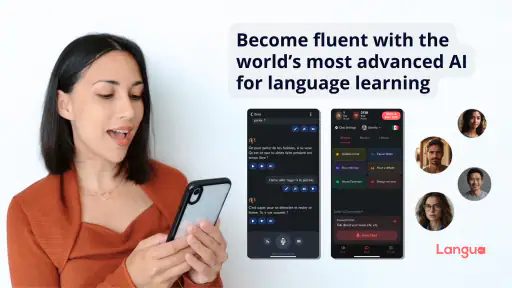

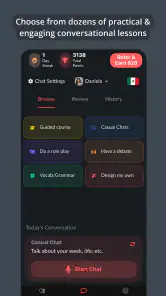

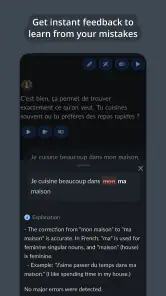

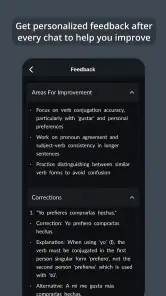
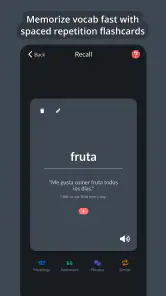
Analysis by Reviewed
Learning a language is easy to start and surprisingly difficult to keep alive. I have tried enough language apps to recognize the familiar pattern: the first sessions feel encouraging, the interface makes progress look close, and then the routine quietly disappears. Langua takes a more conversational route. Developed by LanguaTalk, this free education app puts AI interaction at the center rather than treating it as a small extra beside flashcards or short quizzes. That makes the first week feel more active, but it also raises an important question: does it still deserve space on your phone after the novelty of speaking with an AI wears off?
My answer is cautiously positive. Langua is most useful when you treat it as a regular speaking practice partner, not as a complete replacement for a teacher, course, or carefully structured study plan. It is easy to test because the app itself is free, while optional in-app purchases range from $19.90 to $199.90 per item. That distinction matters: you can decide whether its style fits your learning habits before committing money, but the more serious long-term use may involve paid choices.
How Langua feels when the novelty is still fresh
The first appeal is obvious once you stop thinking of language study as a sequence of exercises. Instead of waiting for a scheduled lesson or searching for a conversation partner, I can open the app and begin practicing immediately. That lower barrier is valuable on busy days. A ten-minute conversation before work, during a commute, or while waiting for an appointment feels more realistic than arranging a lesson or preparing a full workbook session.
The AI approach also changes the emotional pressure. Many learners understand more than they can say because they are afraid of making mistakes in front of another person. Practicing with an artificial conversation partner can make the first attempts less intimidating. I can repeat a sentence, try a different answer, or slow down without feeling that I am wasting someone else’s time. For beginners, that private rehearsal can be the difference between knowing a phrase and actually attempting it.
Langua’s store presence describes it as an advanced AI tool for language learning, but the useful part is not the slogan. The practical value comes from using conversation as a bridge between passive recognition and active recall. Reading a phrase is comfortable; producing one under a little pressure is harder. An app built around interaction can expose that gap quickly.
That said, the first-week experience can be misleading. AI conversation feels engaging because it responds instantly and can keep a session moving. Engagement is not the same as a learning system. If I simply chat without choosing a purpose, I may enjoy the exchange while repeating familiar vocabulary and avoiding the grammar or pronunciation problems that need attention. The app works better when I enter with a small target, such as describing yesterday, practicing restaurant language, or forcing myself to use a new tense.
A realistic early routine would be simple. I might spend a few minutes talking about my morning, notice the words I could not produce, and then return to the same topic later that day. The second attempt is more valuable than endlessly changing subjects, because it shows whether the missing language has actually become available. This is one of the less obvious ways to use an AI conversation app: repetition should be deliberate, not embarrassing. Familiar topics create room to improve accuracy rather than merely improvise.
More From Our News Desk

Clash of Clans Is Won Between the Battles

Android Auto Makes the Case for Quieter Car Software

MobiOffice: Transforming Mobile Productivity with Seamless Integration

EA SPORTS FC™ Mobile Soccer: Redefining Mobile Sports Gaming

How Microsoft OneDrive Became a Mobile Productivity Giant

How Google Translate Breaks Language Barriers Effortlessly
Where the conversational format helps most
I see the strongest fit for learners who already know some basic vocabulary but rarely speak. Traditional flashcard apps can help with recognition, and grammar references can explain rules, but neither automatically creates the need to form a complete response. Langua can fill that middle space. It gives a learner a reason to retrieve words in context, even when there is no teacher or friend available.
It can also help someone preparing for a specific situation. Before traveling, I would use it to rehearse checking into accommodation, asking for clarification, explaining a dietary preference, or handling a misunderstanding. The goal is not to memorize one perfect script. It is to become comfortable with the turns a conversation may take when the other person does not respond exactly as expected.
For an absolute beginner, the experience may be less comfortable. A conversational tool can feel demanding when the learner has too little vocabulary to understand the exchange. In that case, a structured beginner course with a clear progression, audio modeling, and controlled exercises may be a better first step. Langua becomes more attractive once the user can form short answers and wants to move beyond isolated drills.
What remains useful after the first month
The long-term value depends on whether the app becomes part of a broader maintenance loop. I would not rely on it alone to teach every part of a language. Instead, I would use it for output practice after learning words or grammar elsewhere. For example, after studying a set of travel expressions, I could ask the app to make me use them in several changing situations. That turns study material into something active and reveals which items I only recognize on paper.
This workflow is more sustainable than opening the app with no plan. It also gives each session a measurable purpose without pretending that a conversation alone proves mastery. The useful question is not “Did I chat today?” but “What did I fail to say today, and did I try again?” Keeping a short note of those gaps can make the next session much more focused.
Another strong use is maintenance between formal lessons. A weekly tutor can correct important mistakes and guide a curriculum, but the time between lessons is where skills often become rusty. Short AI conversations can keep the language available in memory. I especially like this role for learners who have finished a course but are not ready to use the language daily in real life. The app provides a low-friction way to keep producing sentences.
Still, recurring value is not automatic. Conversation can become repetitive if I always discuss the same safe subjects, and AI encouragement can make a session feel successful even when my language remains vague. To prevent that, I would rotate constraints: one day speak only about past events, another day explain a process, and another day ask for clarification instead of immediately switching to a familiar phrase. These restrictions create productive difficulty and make the practice less passive.
Langua is also better judged as a companion to, rather than a substitute for, human interaction. A person can react with hesitation, cultural assumptions, slang, interruptions, or an unexpected change of subject. An AI practice environment may prepare me to speak, but it cannot reproduce every social detail of a real conversation. Learners who need professional fluency, exam preparation, or nuanced correction should keep a teacher, class, or specialist resource in the mix.
The maintenance burden is low, but the learning burden is yours
One reason the app can survive beyond the first week is convenience. There is no need to coordinate schedules with another person, and a short session can fit into an ordinary day. The current Android version is 2.2.0 and requires Android 7.0 or later, so the technical entry point is not especially demanding for users with a compatible device. It is also rated for Everyone 10+, which makes it suitable for a broad range of learners, although younger users still need sensible supervision around any conversational technology.
The harder part is deciding what to practice. A course normally tells me what comes next. With an AI conversation partner, I have more freedom, but freedom can become drift. If I am tired, I will naturally choose easy topics and familiar vocabulary. That is comfortable, yet it may not address the gaps that limit me. A small weekly plan solves much of this: assign one practical theme, one grammar challenge, and one review conversation rather than relying on motivation in the moment.
I would also avoid measuring progress only by session length or the number of conversations. Those figures can reward endurance instead of improvement. A better personal check is whether I can give a clearer answer, ask a follow-up question, or recover after forgetting a word. Language ability is often visible in those small repairs. The app is most valuable when it encourages that behavior rather than becoming another streak to protect.
For users considering payment, the free starting point is helpful because the right question is personal: do you actually return to unscripted practice? If I only open the app for a few entertaining exchanges and then stop, a paid plan or purchase would not fix the underlying habit. If I use it several times a week with specific goals and notice that it helps me speak more readily, the paid options may be easier to justify. I would make that decision after testing a routine, not during the excitement of the first session.
Why fatigue can appear even when the technology works
The biggest source of fatigue is conversational sameness. AI can make practice feel fresh at first, but learners often repeat the same introductions, hobbies, travel plans, and daily routines. Once the prompts stop challenging me, I may start answering automatically. The solution is not simply longer sessions. Shorter conversations with unusual constraints are often more useful than extended chats that stay inside familiar vocabulary.
Another issue is the temptation to accept corrections without understanding them. If the app reformulates a sentence, I might read the improved version and move on. That feels efficient, but the mistake may return because I never worked out why the original was weak. I would pause after important corrections, say the revised sentence aloud, and create a second example with the same structure. This turns feedback into learning rather than decoration.
There is also a trade-off between comfort and realism. An AI partner is patient and available, which makes practice approachable. Real people are less predictable. Learners who use only the app may become confident in a controlled environment while still struggling with background noise, interruptions, accents, or the speed of spontaneous speech. I would pair Langua with occasional real listening and human conversation whenever possible, even if those activities happen less often.
Privacy and personal boundaries are worth considering with any conversational AI tool. I would keep practice topics ordinary and avoid sharing sensitive personal information simply because the exchange feels private or friendly. That is not a criticism unique to this app; it is a sensible habit whenever a service invites open-ended conversation.
The app may also frustrate learners who want a clearly visible, textbook-like route from one level to the next. A conversation partner gives flexibility, but it does not necessarily provide the same feeling of curriculum completion as a traditional language course. Someone preparing for a formal test may prefer an exam-focused product with fixed sections, timed tasks, and explicit scoring. Someone who wants pronunciation judged by a human specialist may also need a different tool.
Who should keep it installed
I would recommend Langua to an intermediate learner who understands a fair amount but hesitates when speaking. It is particularly appealing to people with irregular schedules, limited access to conversation partners, or anxiety about making mistakes in public. It can also serve returning learners who once studied a language and need a gentle way to reactivate it before traveling or joining a class.
I am less likely to recommend it as the only resource for someone starting from zero, a student following a strict examination syllabus, or a learner who needs detailed human correction. In those cases, a structured course, tutor, or classroom should lead, with Langua used as extra speaking practice if the learner enjoys the format.
The app has established a respectable presence for a relatively recent release: it carries a 4.4 average from around 1.9 thousand ratings and has passed 100 thousand installs. Those figures suggest that the idea resonates with a meaningful group of learners, but they do not answer the personal question of whether it will fit a particular routine. The developer, LanguaTalk, has chosen a format that is easy to sample and potentially habit-forming, yet the lasting result still depends on how intentionally the learner uses it.
My long-term verdict is that Langua earns a place on my phone when I give it a defined job: make me produce language regularly, revisit the phrases I could not retrieve, and prepare me for real conversations. It does not earn that space merely by being novel or by making practice feel pleasant. After the first month, the app must compete with the rest of daily life, and unstructured chatting is not always strong enough to win that competition.
For me, the best routine would be brief but deliberate: choose a topic, impose one language target, notice one recurring weakness, and return to it later. Used that way, this free education app offers something many conventional alternatives lack: immediate opportunities to speak without arranging a lesson. Used without a plan, it risks becoming an entertaining conversation toy. Its lasting value comes from turning convenient AI access into a repeatable habit, not from convenience alone.
Langua: AI language learning Frequently Asked Questions
Is Langua available for my device?
Langua is an education app for Android, with a minimum operating-system requirement of Android 7.0. It is also listed for iOS, so check the App Store entry for compatibility with your Apple device before downloading. The app is free to install, and its age rating is Everyone 10+. Keeping your device’s operating system up to date can help ensure the app works as intended.
Who makes Langua, and how well is it rated by users?
Langua is developed by LanguaTalk and is designed around AI-supported language practice. It has an average rating of 4.4 from around 1.9 thousand ratings, alongside more than a hundred written reviews. Those figures offer a useful general impression, but individual experiences can differ depending on the language being studied, learning goals, and how regularly the app is used.
What is Langua: AI Language Learning, and how does it work?
Langua is an AI-powered language-learning app designed to help users practise speaking, listening, vocabulary, and everyday conversation. Its main feature is interactive dialogue with an AI tutor, allowing you to simulate real situations such as travel, work, introductions, and casual conversations. After activities, the app can provide corrections, explanations, and suggestions to help improve fluency and confidence.
Which languages can I learn with Langua?
Langua supports several popular languages, although the exact selection may vary depending on the current version of the app and your region. Before downloading, check the language list shown in the Google Play Store or App Store. The app is particularly focused on conversational practice, so it may be most useful for learners who already understand basic grammar and want to improve speaking, listening, pronunciation, and natural expression.
Is Langua suitable for complete beginners?
Langua can be useful for beginners, especially when practising simple phrases and guided conversations, but it is not necessarily a complete replacement for a structured beginner course. New learners may benefit from using the app alongside lessons that explain pronunciation, grammar, and basic vocabulary in a systematic way. The AI can adapt explanations and repeat conversations, but users should still expect to practise regularly and review unfamiliar words.
Pros
- Real-time AI conversations provide practical speaking practice.
- Personalized feedback helps identify grammar and pronunciation weaknesses.
- Supports multiple languages for users with different learning goals.
- Flexible lesson format works well for short daily study sessions.
- Conversation topics feel more natural than fixed textbook exercises.
Cons
- Advanced features may require a paid subscription.
- AI feedback can occasionally miss context or misunderstand responses.
- Heavy conversation use may consume mobile data and battery.
- Beginners may need extra grammar explanations beyond the app’s feedback.
- Progress tracking may feel limited compared with dedicated language courses.
- Category
- Education
- Version
- 2.2.0











