

LA Wallet
- 1.03K
- 3.9
- Installs
- 1.00M
- Price
- Free
Screenshots
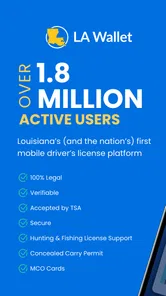
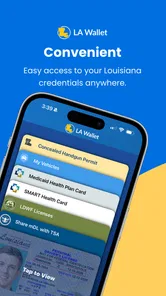
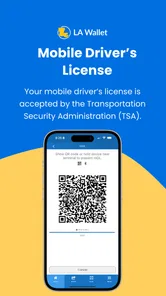
Analysis by Reviewed
When I think about using a digital driver’s license, the real question is not whether a phone can hold it; it is whether I can present it easily when I need it, in the places where it is accepted. LA Wallet is Louisiana’s digital driver’s license app, and that focused purpose makes it most useful as a convenient way for residents to keep a license available on a smartphone. I see it as a practical option to use alongside a physical card, rather than a reason to leave every other form of identification at home.
Readability, navigation, and access in context
For a task-focused identity app, I value a screen that makes the important action easy to find more than one crowded with extras. LA Wallet’s purpose is narrow: keep a Louisiana digital driver’s license available and use it when a situation calls for identification. That focus can make it easier to understand than a broad travel app filled with maps, bookings, and alerts. The practical test is whether you can open the license calmly before you are standing at a counter or speaking with an officer, so I’d take a moment at home to learn where it appears rather than trying to work it out under pressure.
That small bit of preparation also helps people who prefer larger text, extra time, or a predictable routine when using a phone. I would check how the app behaves with the display settings and accessibility tools already enabled on the device, then make sure the license remains legible without changing settings in a public place. A digital ID can reduce the need to search a physical wallet, but the phone interface still has to be comfortable for the person using it.
Motor and sensory needs affect this kind of app in very practical ways. A person with limited dexterity may find tapping a screen simpler than sorting through cards, while another may prefer a physical license because it can be handed over without unlocking or positioning a phone. Bright light, glare, noise, and stress can all make a quick interaction harder. I’d keep the phone charged, avoid relying on a last-second setup, and consider whether the screen and touch controls are manageable in the places where I expect to show identification.
A useful companion, not a universal replacement
A realistic use case is heading out for errands with a charged phone and using the digital license when identification is needed, instead of discovering at the checkout that the wallet was left behind. Age checks are another clear use: the digital option can save rummaging for a card, but the person checking it must be willing and able to accept that form of ID. For a Louisiana resident who already carries a phone everywhere, this can be a useful backup and a convenient way to present a license. It is less compelling for someone who rarely uses a smartphone, dislikes handling identity documents on a screen, or needs an option that works without a functioning phone.
Compared with keeping a physical license in a wallet, the app trades a separate card for dependence on a charged, accessible device. Compared with carrying a photo of an ID, a dedicated digital-license app is intended for presenting the license as an ID rather than simply displaying an image; I would not assume that a saved photo will be treated the same way. The physical card remains the sensible companion for situations where a phone is unavailable, its battery is depleted, or a person asking for ID cannot use the digital presentation. For trips beyond Louisiana, I would also carry the physical license rather than assume the app will be accepted everywhere.
One small planning habit makes a noticeable difference: I would open the app before leaving home, not for the first time in a queue. That lets me confirm I can reach the license comfortably, with my usual phone settings, and avoids turning a simple age check into a hurried search through menus. If I am carrying bags or helping someone else, I would also think through which hand will hold the phone and whether I can keep it steady enough for the other person to view. These are ordinary details, but identity checks often happen at inconvenient moments.
More From Our News Desk

 Weather - By Xiaomi
Weather by Xiaomi Review: Clear at a Glance, Less Clear Up Close
Xiaomi’s weather app makes everyday forecasts quick to scan, but its calm surface can leave useful details and recovery paths harder to find than they should be.

 X
XX Under Pressure: Can It Recover When Posting Goes Wrong?
A resilience-focused review of X, examining setup, mistaken posts, interruptions, weak connections, and the gaps that matter when recovery needs to be dependable.

 Clash of Clans
Clash of Clans Is Won Between the Battles
Its raids are quick; its community is a long-term project of coordination, teaching, rivalry, and shared responsibility—with all the friction that entails.

 Android Auto
Android Auto Makes the Case for Quieter Car Software
The car interface is no longer judged by how much it can do, but by how quietly it helps. Android Auto shows what drivers now expect—and what still gets in the way.

 MobiOffice: Word, Sheets, PDF
MobiOffice: Transforming Mobile Productivity with Seamless Integration
MobiOffice: Word, Sheets, PDF is redefining mobile productivity with a surprising blend of functionality and innovation.

 EA SPORTS FC Soccer Mobile 26
EA SPORTS FC™ Mobile Soccer: Redefining Mobile Sports Gaming
Dive into EA SPORTS FC™ Mobile Soccer, where immersive gameplay and strategic depth transform mobile sports gaming.
Latest News



What to expect when a phone is the bottleneck
Digital presentation is only as useful as the device and the situation around it. A phone that is nearly out of power, locked behind a passcode the user cannot enter quickly, or hard to see in glare can make the app less convenient than a card. If you need identification for an appointment or transaction where a delay would matter, carrying the physical license as a backup is the straightforward choice. I would not make a digital license the sole plan for a long day away from a charger or for someone who has difficulty using the phone’s ordinary controls.
There is also a difference between having an app available and knowing that a particular person or business will accept a digital license. The app may be useful for situations in Louisiana where digital presentation is recognized, but a venue’s process can still shape what works at the counter. If acceptance is important, I would check beforehand rather than argue about format after arriving. That is especially worthwhile when visiting somewhere unfamiliar, travelling outside Louisiana, or dealing with a service that has its own identity-check procedure.
For people with visual, motor, or sensory needs, the right choice depends on the whole interaction, not just the screen. Someone who benefits from carrying fewer objects may appreciate having a license on a phone they already use. Someone who finds bright screens uncomfortable, has trouble with touch targets, or prefers not to unlock a personal device in public may find the physical card simpler. I would try the app in a low-pressure setting first and decide based on the actual routine, rather than assuming that digital is automatically more accessible.
Getting Started with LA Wallet
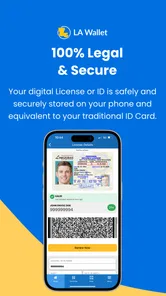
So, what's the big deal about the LA Wallet? Well, it’s Louisiana's official digital driver’s license app. For those of us who constantly forget our wallets at home but never our phones, this app is a lifesaver. Setting it up is quite straightforward. You just download it from the App Store or Google Play, and after a few quick steps, your digital ID is ready to go. The app even lets you link your physical driver’s license, ensuring you always have a backup right there on your phone.
Features That Stand Out
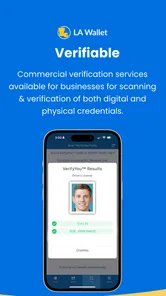
One of the coolest features of LA Wallet is its ability to verify your age. If you’ve ever been carded at a bar or when buying certain items, you know how annoying it can be to dig through your bag. With LA Wallet, you just flash your phone, and voilà, age verified! It’s not only convenient but also saves you from the embarrassment of an expired ID.
Another noteworthy feature is its integration with local law enforcement. In Louisiana, it’s legal to present your digital license to the authorities, making LA Wallet not just a convenience but a practical tool for everyday life. Plus, it’s constantly updated, meaning you don’t have to worry about renewal dates sneaking up on you.
Everyday trade-offs and who benefits most
A realistic use case is heading out for errands with a charged phone and using the digital license when identification is needed, instead of discovering at the checkout that the wallet was left behind. Age checks are another clear use: the digital option can save rummaging for a card, but the person checking it must be willing and able to accept that form of ID. For a Louisiana resident who already carries a phone everywhere, this can be a useful backup and a convenient way to present a license. It is less compelling for someone who rarely uses a smartphone, dislikes handling identity documents on a screen, or needs an option that works without a functioning phone.
Compared with keeping a physical license in a wallet, the app trades a separate card for dependence on a charged, accessible device. Compared with carrying a photo of an ID, a dedicated digital-license app is intended for presenting the license as an ID rather than simply displaying an image; I would not assume that a saved photo will be treated the same way. The physical card remains the sensible companion for situations where a phone is unavailable, its battery is depleted, or a person asking for ID cannot use the digital presentation. For trips beyond Louisiana, I would also carry the physical license rather than assume the app will be accepted everywhere.
Remaining barriers and practical preparation
Digital convenience does not remove every awkward moment. A slow connection, a dim or damaged screen, low battery, or difficulty unlocking the device can turn a fast check into a delay. I would set up the app and check that the license is accessible before leaving home, keep the phone charged, and avoid treating it as the only identification option. If a phone is shared, borrowed, or difficult to secure, using it for a personal license may not suit the user’s circumstances.
Questions about acceptance are best handled before the moment of need. The app is aimed at Louisiana residents and has a role in presenting a digital license in Louisiana, but an individual business or a location elsewhere may have different expectations. I would ask the venue or relevant authority in advance when acceptance matters, and keep the physical card available for travel or an unfamiliar setting. The app is free, rated for Everyone, and developed by the State of Louisiana; its broad reach is reflected in more than a million installs and an average rating of 4.3 from around 2,800 ratings. It was released on July 2, 2018, and version 2.5.43 requires Android 5.0 or later.
Security and Privacy
Now, I know what you’re thinking. Is it safe? In the age of digital everything, security is a major concern. Rest assured, LA Wallet takes your privacy seriously. It employs high-level encryption to keep your information safe and sound. Your data isn’t floating around in cyberspace; it’s securely tucked away, only accessible to you and those you permit. This peace of mind is priceless.
The app also offers layers of security with features like fingerprint and facial recognition, meaning no one but you can access your documents. It’s like having a digital vault in your pocket, and honestly, who doesn’t want that?
Because this is identity information, I would take the same care with the phone that I take with a physical wallet: use a device lock, avoid leaving the phone unattended during an ID check, and be deliberate about who can see the screen. A digital presentation can be convenient, but it does not remove the need to protect the device itself. Anyone uneasy about putting identification on a smartphone may prefer to keep using the physical license; that is a reasonable personal choice, not a failure to make use of technology.
My Final Thoughts
In a world that’s rapidly going digital, LA Wallet is a step in the right direction. It’s convenient, secure, and incredibly user-friendly. Whether you’re tired of carrying a bulky wallet or just want to embrace the digital age, this app is a must-have. Sure, it’s only available in Louisiana right now, but one can only hope it sets a precedent for other states to follow. So, go ahead and give it a whirl. You might just find your physical wallet gathering dust in a drawer.
My recommendation is more measured: I’d try it if I live in Louisiana, routinely carry my phone, and want a digital way to present my license in suitable local situations. I would keep the physical card, especially for travel and any interaction where acceptance is uncertain. The app’s strongest case is convenience within a familiar routine; it is not a universal replacement for a card or a good fit for someone who cannot reliably use a smartphone. For accessibility, the best test is simple: set it up without pressure, check whether the screen and controls work for you, and choose the option that makes identification easiest in your actual day.
LA Wallet Frequently Asked Questions
Who can use LA Wallet, and what should I have ready before downloading it?
LA Wallet is a Louisiana-focused app for residents who want to keep a digital version of their driver's license on a mobile device. Before downloading, make sure you have a compatible smartphone and are prepared to authenticate your identity during setup. The app is free, and its minimum operating system requirement is Android 5.0; the developer is the State of Louisiana.
What is LA Wallet and how does it work?
LA Wallet is a digital application developed for the state of Louisiana, allowing residents to store a digital version of their driver's license on their mobile device. Users can download the app from the Google Play Store or Apple App Store, authenticate their identity, and securely access their official state ID on their smartphones. This app provides an easy and convenient way to carry your driver's license, reducing the need for a physical card.
Is LA Wallet legally recognized as a valid form of identification?
Yes, LA Wallet is legally recognized by the state of Louisiana as a valid form of identification. It can be used for age verification, law enforcement checks, and other scenarios where a state-issued ID is required. However, it's recommended to check if out-of-state entities accept the digital ID, as acceptance may vary outside Louisiana.
Is my personal information safe with LA Wallet?
LA Wallet prioritizes user privacy and data security. The app uses advanced encryption methods to protect personal information and ensures that data is only accessible on the user's device. Additionally, the app requires user authentication, such as fingerprint or face recognition, adding an extra layer of security to keep your information safe from unauthorized access.
How can I update my information on LA Wallet?
To update your information on LA Wallet, you must first ensure that your details are correct with the Louisiana Office of Motor Vehicles (OMV). Once updated there, the changes will reflect in your digital license on the LA Wallet app. It's important to keep your OMV records up-to-date to ensure your digital ID is accurate and valid.
Pros
- Official digital driver's license for Louisiana.
- Secure and easy to use interface.
- Supports COVID-19 vaccination records.
- Offline access to digital IDs.
- Frequent updates with new features.
Cons
- Limited to Louisiana residents only.
- Requires initial internet for setup.
- No support for international IDs.
- Not accepted at all checkpoints.
- May drain battery with prolonged use.











