

Kohler Energy Management
- 143.00
- 3.8
- Installs
- 10.00K
- Price
- Free
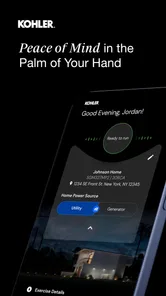
Screenshots
Analysis by Reviewed
Managing a home generator is one of those jobs I would rather make routine than memorable. When the power goes out, I do not want to walk outside in bad weather, search for a control panel, or wonder whether the system is ready. Kohler Energy Management is built for that homeowner-focused task. Developed by Discovery Energy, LLC, this free House & Home app gives Kohler Energy users a mobile place to think about generator management instead of treating the equipment as something that only matters during an emergency.
My overall impression is that the app makes the most sense as a companion for someone who already owns a compatible Kohler home-generator setup and wants a simpler way to stay connected with it. It is not a general home-automation dashboard, a replacement for professional servicing, or a universal generator controller. That distinction matters. The app’s value depends heavily on whether your equipment belongs in the Kohler Energy ecosystem, but for the right homeowner, that focused approach is more useful than a crowded app trying to control every device in the house.
The current Android release is version 1.5.202606, and the app runs on Android 6.0 or later. It is rated for Everyone, which fits the straightforward household-management purpose. The app has passed the early adoption stage with over ten thousand installs, while its average sits at 3.8 from roughly two hundred fifty ratings and around one hundred forty reviews. Those figures suggest a useful but not universally smooth experience, so I would approach it as a practical tool whose success depends on setup, connectivity, and the generator it is paired with.
How Kohler Energy Management fits into everyday generator ownership
I find a generator app most useful when it turns a rarely considered piece of equipment into something the household can check calmly, before a storm makes every decision feel urgent. This section looks at where Kohler Energy Management can fit into that routine and why I would test it well ahead of an outage. From there, the practical question is how a shared household can use it without confusing convenience with a safety plan.
A focused tool rather than a broad smart-home app
The first thing I noticed about this app’s role is how narrow it is in a good way. The store summary describes it as being for homeowner generator management, and that is the right mental model. Instead of filling the screen with unrelated energy advice or general smart-home controls, the app is intended to keep the generator relationship closer to the homeowner’s phone.
That focus is especially helpful for people who do not regularly think about backup power. A generator can sit quietly for long periods, which makes it easy to forget about readiness until a storm arrives. A dedicated management app encourages a different habit: check the system before severe weather, look at its current state when needed, and use the phone as the first place to orient yourself. I find that more reassuring than relying only on memory or a paper manual stored somewhere in the house.
There is also a useful division of responsibility here. The app can make information and management more accessible, but it does not turn an ordinary homeowner into a generator technician. If the equipment needs physical inspection, fuel attention, electrical work, or professional repair, a phone interface should not be treated as a substitute. I would use the app to understand the situation and decide what needs attention, not to take risks around live equipment or assume that an apparently normal screen proves every mechanical part is perfect.
More From Our News Desk

 Gmail
GmailGmail in a Busy Inbox: Who Benefits Most?
From first account to crowded workday, Gmail earns its place through dependable search and flexible sorting—but its best fit depends on how much inbox maintenance you can tolerate.

 Prime Video
Switching to Prime Video: What Changes in Your Viewing Routine
Prime Video can make a compelling second home for streaming, but switching means learning a different catalog, rental layer, and route from browsing to playback.

 Universal TV Remote Control
Universal TV Remote Control Works Best as a Reliable Backup
A phone remote earns its place through quick setup and reliable habits. Here is how to get more from Universal TV Remote Control—and where its limits show.

 Weather - By Xiaomi
Weather by Xiaomi Review: Clear at a Glance, Less Clear Up Close
Xiaomi’s weather app makes everyday forecasts quick to scan, but its calm surface can leave useful details and recovery paths harder to find than they should be.

 X
XX Under Pressure: Can It Recover When Posting Goes Wrong?
A resilience-focused review of X, examining setup, mistaken posts, interruptions, weak connections, and the gaps that matter when recovery needs to be dependable.

 Clash of Clans
Clash of Clans Is Won Between the Battles
Its raids are quick; its community is a long-term project of coordination, teaching, rivalry, and shared responsibility—with all the friction that entails.
Latest News



A realistic storm-day workflow
Imagine a weekday evening when a storm is moving through the area. The lights flicker, the internet connection becomes uncertain, and the family wants to know whether the backup system is behaving normally. In that moment, the practical benefit of having a dedicated management app is not entertainment or convenience in the abstract. It is reducing the number of steps between concern and useful information.
I would open the app before going outside, check the generator’s available status information, and use that view to decide whether the next step is simply waiting, checking the home’s electrical situation, or contacting support. If the phone cannot communicate because the local network or power situation is affected, I would not keep tapping blindly. I would move to the equipment’s normal manual guidance and follow the manufacturer’s safety instructions.
That scenario reveals an important trade-off: remote visibility is valuable only when the communication path is working. The app can improve awareness, but it cannot guarantee connectivity during every outage. For that reason, I would install and sign in well before storm season, become familiar with the screens while conditions are calm, and keep the generator’s physical instructions accessible. The best use of this app is preparation, not frantic first-time setup during a blackout.
Who will get the most from it
I think the strongest audience is a homeowner with a Kohler Energy generator who wants a phone-based way to stay involved without visiting the equipment repeatedly. It should also appeal to households where more than one person may need basic awareness of the system. A family member who is home during an outage may not know the generator’s controls, while a familiar mobile interface can provide a more approachable starting point.
It can be useful for people who travel as well. If you are away from home, the ability to check the system through the app may help you decide whether someone nearby should inspect the property or whether a service call deserves attention. I would still avoid treating that as a guarantee that every problem can be solved remotely. The real benefit is better awareness and faster decisions, not complete remote ownership of every maintenance task.
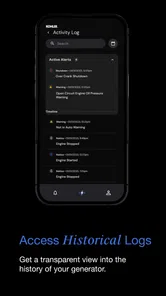
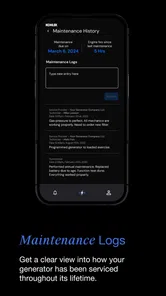
On the other hand, I would skip it if you do not have a compatible Kohler Energy generator or if you are looking for a general app to manage unrelated home-energy products. I would also hesitate to recommend it to someone who expects detailed electrical diagnostics, a full maintenance log, or a replacement for an installer’s support. Its focused purpose is a strength for the intended user and a limitation for everyone else.
What the recent version tells me about the product’s direction
The current version, 1.5.202606, indicates that the app has continued beyond its initial release rather than remaining frozen after launch. It was released on September 6, 2024, so the product is still relatively young compared with many long-established household utilities. That combination is worth noting: the app has had time to move past its first appearance, but users should still expect the experience to evolve.
I see the version history as a sign to keep expectations practical. A newer app may improve its handling of device communication, account flows, or presentation over time, but a version number alone does not prove that every rough edge has disappeared. I would update it before relying on it during a major weather event, while also remembering that an update can change where controls or information appear. A quick test after updating is a sensible part of generator preparation.
For existing users, the most important effect of continued development is not a flashy new screen. It is whether the app becomes more dependable at the moments when homeowners actually need it: opening quickly, showing understandable status information, preserving a clear connection to the right equipment, and making the next action obvious. Those are the details I would judge over time, because they matter more than decorative changes.
What it changes for people who already have a generator
If you already manage your generator through physical controls or occasional visits to the equipment, this app can change the rhythm of ownership. Instead of checking only when you remember, you can make a phone check part of a broader home-preparation routine. For example, before leaving town, I would review the generator’s available information, make sure the app still recognizes the intended system, and confirm that I know how to reach the appropriate help if something looks wrong.
That workflow has a less obvious advantage: it separates observation from intervention. You can first gather information from a safe distance, then decide whether the situation calls for waiting, reading the manual, contacting a professional, or physically inspecting something only when it is safe. This is better than immediately pressing controls simply because the household is anxious.
Another practical tip is to let the app complement, rather than replace, a household emergency plan. A generator app does not tell family members where flashlights are, how to protect sensitive electronics, or whom to call for electrical concerns. I would make sure other adults in the home know the basic plan and understand that the app is one source of information. That prevents a single person’s phone, account, or familiarity from becoming the only link to the generator.
The 3.8 average rating gives me a balanced impression of the current experience. It is high enough to show that many users find value in the app, but it is not a signal that every installation will feel effortless. In practical terms, I would pay attention during setup to account details, equipment selection, network access, and the exact wording of any status message. Small configuration mistakes can look like app problems when the real issue is that the phone is connected to the wrong system or the generator is not communicating as expected.
Where the everyday friction is likely to appear
The main limitation is dependence on the wider setup. A mobile app can only show useful generator information when the generator, its communication path, the phone, and any required account connection are all cooperating. That creates more possible failure points than a simple button on the generator itself. If the app does not show the expected information, I would not immediately conclude that the generator is unsafe or broken; I would first check the phone connection, reopen the app, verify the selected equipment, and then consult the normal support or manual route.
There is also a learning curve caused by the subject matter itself. Generator status terms are not always obvious to a first-time owner, particularly during a stressful outage. I would prefer clear explanations that distinguish normal operation, a condition needing attention, and a situation requiring professional help. Even when the app presents information correctly, the homeowner still needs enough context to interpret it responsibly.
The app’s free price is welcome, especially for an owner who has already made the larger investment in backup power. Still, free does not mean frictionless. The cost may be measured in setup time, connectivity requirements, and the need to keep the app current. I would judge it by whether it saves time and uncertainty over the life of the generator, not simply by the absence of a download fee.
Compared with using only the generator’s built-in controls, the app offers a more convenient viewpoint and can reduce unnecessary trips outdoors. Compared with a general smart-home platform, it should be more relevant to the specific generator relationship, but less useful for controlling lights, thermostats, security devices, or unrelated appliances. Compared with calling a service professional, it is faster for basic awareness but cannot replace skilled diagnosis. Those comparisons make the choice fairly clear: use the app for visibility and routine management, and use the traditional alternatives when the task involves safety, repair, or equipment outside its scope.
Three habits that make the app more useful
Use calm periods as your test environment. The best time to learn the app is when the house has normal power and you are not under pressure. Open it, identify the generator associated with your household, and become comfortable with the information it presents. This turns an emergency opening into a confirmation step instead of a discovery session.
Pair every digital check with a physical plan. I would keep the generator manual, service contact details, and basic outage supplies in a known place. If the app cannot connect, you still need a safe next action. This is a small but important distinction between digital convenience and genuine preparedness.
Use status information to decide, not to guess. If the app presents an unfamiliar condition, avoid repeatedly changing settings just to see what happens. Record what you saw, check the manufacturer’s guidance, and contact qualified help when the issue involves electrical or mechanical safety. The app is most valuable when it helps you make a measured decision rather than encouraging trial and error.
Questions I would settle before depending on it
A prospective user will reasonably ask whether the app works for every generator. I would answer that the product should be considered specifically for homeowners in the Kohler Energy ecosystem, not as a universal generator utility. Before building your emergency routine around it, confirm that your particular equipment and installation are intended to work with the app. That is a more important question than whether your phone can install it.
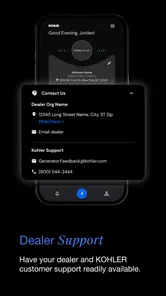
You may also wonder whether it can replace a service visit. In my view, it cannot. It can make routine awareness easier and may help you recognize that something deserves attention, but professional maintenance and repair remain separate responsibilities. Treating an app screen as a complete mechanical inspection would create false confidence.
Another question is whether it is worth installing if you rarely experience outages. I think it can still be worthwhile for preparation, especially before travel or severe weather, but only if you actually use it occasionally. An app that remains unopened for years will not provide much value when you suddenly need it. A short periodic check is more useful than downloading it and forgetting the login.
Finally, I would ask whether the free app is better than simply keeping the generator’s controls nearby. For basic physical operation, the controls and manual remain essential. The app earns its place by adding a convenient mobile perspective and helping the homeowner stay informed without always standing beside the equipment. If you do not value that convenience, the traditional approach may be enough.
What I would watch as the app continues to mature
Because the product is still relatively new and has reached version 1.5.202606, I would watch for improvements in clarity, reliability, and the way it handles less-than-perfect connections. The most meaningful progress would be easier recovery when communication is interrupted, clearer explanations for homeowner-facing statuses, and a smoother path from an alert or concern to the correct next step.
I would also watch how well the app serves households with changing circumstances. People move, replace equipment, share responsibility with family members, or depend on a neighbor while traveling. An app that remains clear when ownership and access arrangements change will be more useful than one designed only for the initial installation.
My current recommendation is therefore specific rather than universal. If you own a compatible Kohler home generator, Kohler Energy Management is worth trying because it can make routine awareness more convenient and help you approach outages with better information. I would install it early, test it during normal conditions, and keep the physical safety plan alongside it.
If you need a universal generator controller, a complete smart-home hub, or a substitute for professional service, I would choose a different solution or keep using the equipment’s established controls. For the intended homeowner, though, the app has a sensible purpose and a useful place in preparedness. My final view is positive with a clear condition: it is best treated as a generator companion, not the generator itself. That mindset lets its convenience help without asking the app to do more than it can responsibly promise.
Kohler Energy Management Frequently Asked Questions
Is Kohler Energy Management free, and what devices can install it?
Kohler Energy Management is a free House & Home app for homeowners managing Kohler energy equipment. It is rated for Everyone and supports Android 6.0 or later, making it available on a range of compatible Android devices. Before installing, make sure your phone or tablet meets that requirement and that you are looking for the homeowner-focused Kohler Energy app.
What is Kohler Energy Management used for?
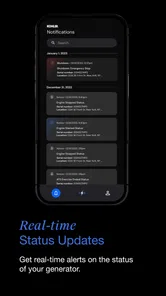
Kohler Energy Management is designed to help users monitor and manage compatible Kohler power and energy equipment from a mobile device. Depending on the supported system, the app may provide information such as generator status, operating conditions, alerts, maintenance notifications, energy usage, and connectivity. Its usefulness depends on the specific Kohler products installed and whether they are compatible with the app.
Which Kohler products and devices are compatible with the app?
Compatibility can vary by generator model, energy-management equipment, controller, communication module, and region. Before downloading, users should check the official Kohler documentation or product support page to confirm that their equipment is supported. The app may also require a compatible Android or iOS version, an internet connection, and properly configured hardware before monitoring and remote features become available.
Can Kohler Energy Management control my generator remotely?
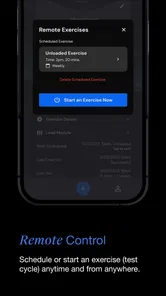
For supported Kohler systems, the application may allow remote monitoring and certain control functions, such as checking operating status, reviewing alerts, or managing selected settings. However, available controls are not identical across all installations. Remote operation can also depend on internet connectivity, account permissions, equipment configuration, and safety restrictions. Users should never rely on the app as their only source of emergency or electrical-system information.
Does the app require an account, internet connection, or additional hardware?
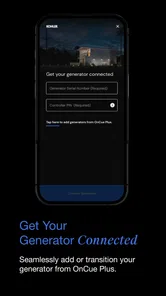
Kohler Energy Management may require users to create or sign in to a Kohler account in order to connect equipment and access cloud-based monitoring features. A stable internet connection is generally needed for remote access, notifications, and synchronization. Some installations may additionally require a compatible communications device, gateway, or professionally configured controller. Without these requirements, the app’s functionality may be limited.
Pros
- Monitors household energy use in one convenient mobile dashboard.
- Helps identify high-consumption periods and potential energy-saving opportunities.
- Provides useful visibility into compatible Kohler energy equipment.
- Can support better awareness of backup power and system status.
- Designed for convenient remote access when away from home.
Cons
- Requires compatible Kohler equipment to provide its full value.
- Some features may depend on an active internet connection.
- Setup can be less straightforward for users unfamiliar with energy systems.
- Energy data and controls may vary by installed hardware and configuration.
- Limited usefulness for households without Kohler energy products.







