

Knott's Berry Farm
- 1.18K
- 3.0
- Installs
- 500.00K
- Price
- Free

Screenshots

Analysis by Reviewed
I think the most useful way to approach Knott's Berry Farm is as a pocket guide for making the next decision, not as a promise that your whole park day will run itself. Its central draw is ride wait times: check what looks worthwhile, weigh that against where you are, and decide whether to move, pause, or choose something nearby. That can make a busy day feel less like guesswork, particularly when the group has different ideas about what to do.
Why wait times matter on a park day
The most useful idea behind this travel app is simple: seeing ride wait times can help you decide what to do next instead of guessing from across the park. I find that especially helpful when a group has different priorities. One person may want a major coaster, while someone else would rather take a break or find a snack. A quick look at current waits gives everyone a better basis for choosing, even if it cannot promise that the line will stay the same by the time you arrive.
That distinction matters. I would treat the displayed time as a planning aid, not a guarantee or a reason to race across the park. If a ride is nearby and the wait looks reasonable, it may be worth heading over; if it is on the other side of the grounds, compare it with the options around you before changing course. This small habit can prevent the app from turning a relaxed day into a series of hurried detours.
A useful detail is that a wait-time check works best as part of a decision, rather than as a score to chase. I would consider the walk, the group’s energy, and whether there is another nearby choice before acting on a number. When the displayed wait is attractive but the trip across the park is not, staying put can be the better use of everyone’s time.
Making the check useful instead of distracting
I would build a simple rhythm around the feature: check before leaving one area, choose a destination, then put the phone away while walking. Once there, take another look only if the situation has changed or the group is reconsidering its plan. This keeps the app useful without turning every few minutes into a fresh debate about whether another ride might have a shorter line.
For a group, it can help to agree on a few priorities before the first wait-time check. That way, the screen helps answer “which of these should we do now?” instead of opening an endless discussion about every possible attraction. If people have different must-dos, taking turns choosing the next stop is a fair, low-effort way to keep the information from serving only the loudest voice.
Getting Started with the App
First things first, downloading the app is a breeze. Available on both Android and iOS, it’s ready to whisk you away into the fun world of roller coasters, funnel cakes, and Snoopy all with a few taps. Once installed, you’re greeted with a slick, user-friendly interface that even a tech newbie could navigate. It’s like having your personal amusement park concierge. The app is free, is rated for Everyone, and is developed by Cedar Fair Entertainment Company. Its current version is 8.4.21, and it requires Android 8.0 or later.
More From Our News Desk

 Weather - By Xiaomi
Weather by Xiaomi Review: Clear at a Glance, Less Clear Up Close
Xiaomi’s weather app makes everyday forecasts quick to scan, but its calm surface can leave useful details and recovery paths harder to find than they should be.

 X
XX Under Pressure: Can It Recover When Posting Goes Wrong?
A resilience-focused review of X, examining setup, mistaken posts, interruptions, weak connections, and the gaps that matter when recovery needs to be dependable.

 Clash of Clans
Clash of Clans Is Won Between the Battles
Its raids are quick; its community is a long-term project of coordination, teaching, rivalry, and shared responsibility—with all the friction that entails.

 Android Auto
Android Auto Makes the Case for Quieter Car Software
The car interface is no longer judged by how much it can do, but by how quietly it helps. Android Auto shows what drivers now expect—and what still gets in the way.

 MobiOffice: Word, Sheets, PDF
MobiOffice: Transforming Mobile Productivity with Seamless Integration
MobiOffice: Word, Sheets, PDF is redefining mobile productivity with a surprising blend of functionality and innovation.

 EA SPORTS FC Soccer Mobile 26
EA SPORTS FC™ Mobile Soccer: Redefining Mobile Sports Gaming
Dive into EA SPORTS FC™ Mobile Soccer, where immersive gameplay and strategic depth transform mobile sports gaming.
Latest News



It sits in the travel-and-local category, which feels right: its strongest purpose is helping visitors manage a place-based outing, not replacing general trip planning. The app was released on April 1, 2015, so it has been around long enough to be a familiar option for park visitors, though I would still judge it by whether its current information is helpful during the visit rather than by its age alone.
Features that Stand Out
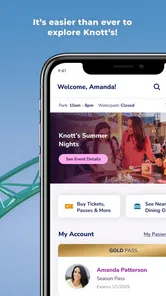
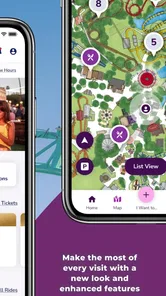
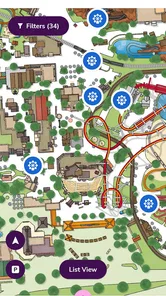
The app is loaded with nifty features that make planning your visit to the park a walk in the park. One feature that I found particularly handy was the interactive map. No more fumbling around with paper maps or getting lost amidst the attractions. The map is detailed and it lets you zoom in and out to find the quickest routes to your favorite rides or snack spots.
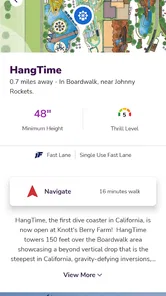
Let’s not forget about the wait times feature. This is a game-changer. Imagine knowing exactly how long you’ll have to wait for that adrenaline-pumping roller coaster or the newest attraction. It helps you plan your day better, maximizing your fun quotient without the hassle.
I would pair those tools rather than use either in isolation. A wait that looks appealing has less value if the ride is awkward to reach from where you are, while the map gives the decision some context. It is also a good reason to make small, local choices: compare nearby options first, then consider a longer walk only when the ride matters enough to justify it.
A realistic way to use it
Picture arriving with a short list of rides you care about, rather than trying to cover every attraction. I would check the wait times before choosing the first destination, then use the map to orient myself and keep nearby alternatives in mind. If a favorite has a long line, I can spend that time on something closer or take a break, then check again later. The practical benefit is not just picking a ride; it is avoiding needless backtracking and making changes with the group before everyone is already walking in different directions.
For families or friends, one person can act as the navigator while the rest enjoy the surroundings. I would still agree on a meeting point in advance, because a phone map is no substitute for a simple plan if people split up. And if the screen is inconvenient while walking, it is better to stop somewhere safe, check the map, and then move on rather than trying to follow it continuously.
One everyday scenario makes the value clearer: imagine a group arriving with a couple of rides in mind, then finding that the first choice has a wait nobody wants. Instead of marching there anyway, the navigator can look for a more workable nearby option, explain the choice, and give the group a chance to agree before setting off. Later, when energy dips, the same check can help the group decide whether to keep riding or take a proper pause. The app does not make the decision for you; it makes the options easier to discuss.
For a first visit, I would avoid trying to learn every part of the map at once. Pick a starting area and a backup destination, then let the map help with the next move. Returning visitors may prefer the opposite approach: use familiar knowledge to set priorities and consult the app only when a wait or route makes the usual plan less attractive. In both cases, the map is most helpful when it reduces uncertainty without dictating the whole day.
Exclusive Offers and Updates
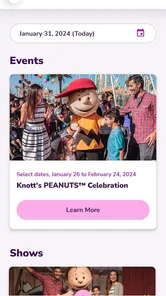
Another sweet spot for this app is the exclusive offers and updates. You get notifications about special events, seasonal attractions, and even discounts that you might miss otherwise. It’s like having a VIP pass without shelling out the extra bucks. Plus, the app keeps you updated on park hours, so you’ll never be caught off-guard if there’s a change in schedule.
I would check offers and hours before setting out, then use the app mainly for decisions once inside. That split keeps the phone from becoming the focus of the visit: plan the essentials at home, and save quick checks for moments when a wait-time change could genuinely affect what you do. People who prefer to make a fixed itinerary may find the live information less important, while spontaneous visitors can use it to adjust their plans without starting over.
Offers are a useful extra, but I would not make a day’s budget or schedule depend on an offer appearing at a particular moment. I would look before the visit, decide whether anything is relevant to my plans, and then treat it as a bonus rather than the main reason to install the app. The same practical approach applies to hours: checking them before leaving home helps avoid planning around a day that does not fit the visit.
Where it fits among park-planning options
Compared with a paper map, the app’s advantage is that it brings ride waits and park information into the same pocket-sized tool; paper remains useful as a no-battery backup and gives an easy overview without a screen. General map apps are familiar for getting to the park, but they are not a substitute for park-specific wait times or offers. I would use each for its own job: a general map for the journey there, and this one for choices inside the grounds.
There is a trade-off, though. The app is most valuable when I am comfortable checking a phone during the day and when current ride information affects my choices. Anyone who wants to stay off-screen, already knows the park well, or prefers to follow a set route may get less from it. I would also avoid promising the group a particular wait based only on what appears on screen; conditions can shift, so flexibility is still part of the plan.
For a visitor deciding between this and a general-purpose travel app, the distinction is straightforward: the general app is better for getting to the destination and handling the surrounding journey, while this park-specific one is the more relevant companion once ride choices and park information become the focus. A paper map has a different strength: it stays visible without battery concerns and can be easier for a whole group to look at together. I would not force one tool to do every job; using a general map for arrival and this app for in-park decisions is the more sensible combination.
The main friction is the attention a phone demands. Looking up information can interrupt a conversation or pull people away from the place they came to enjoy, especially if every change in a displayed wait triggers a new plan. My rule would be to check at natural pauses, not continuously. If the group is already happy with what it is doing, there is little value in refreshing information just to see whether a theoretical alternative has improved.
People often wonder whether the app is worth installing before a visit or only once they reach the park. I would install it ahead of time so I can become familiar with its layout and review the practical details before the day begins. That does not mean spending the evening building a rigid itinerary: a short list of priorities and a quick look at the map are enough to make the first decisions easier.
Another sensible question is whether a visitor should follow the wait times literally. I would not. They are best read as a snapshot that helps compare choices, not a binding promise about what the line will be when you arrive. The best response to a surprising wait is not always to cross the park immediately; sometimes the nearby option, a break, or simply staying with the original plan is more comfortable for everyone.
Who gets the most from it
I see the biggest benefit for people visiting Knott’s Berry Farm for the first time, families coordinating different interests, and returning guests who like to improvise rather than follow a fixed route. It is less necessary for someone who already knows where they want to go and would rather keep the phone in a bag. Visitors who want detailed guidance for the entire surrounding trip may also need a general travel tool, since this app’s value is centered on the park itself.
It is also a better fit for groups that can make decisions quickly. If every person wants to inspect every option before moving, live information can add debate instead of saving time. A simple agreement—one person checks, the group chooses from a small set of options, then everyone enjoys the walk—makes the tool more useful and keeps the visit from feeling like a planning exercise.
On a long outing, I would keep the device charged and avoid depending on a single screen for every detail. That is not a criticism unique to this app; it is a practical way to make sure a useful guide remains useful throughout the day. Anyone who strongly prefers not to use a phone can still rely on a paper map and their own plan, accepting that they will not have the same convenient view of park-specific information in one place.
My Personal Take
As someone who adores theme parks, the Knott’s Berry Farm app is a delightful companion. It’s not just about the convenience it offers, but also the way it enhances your overall park experience. Whether you’re planning a visit or just daydreaming about one, this app keeps the excitement alive.
Its audience is clearest to me: first-time visitors who want help orienting themselves, returning guests who like to adapt their route, and groups trying to make shared decisions without wasting time retracing their steps. It is less compelling for someone only curious about the park from afar or for a visitor who already has an offline plan and does not want to consult a phone. Before relying on any app on a long day out, I would also make sure my device is charged and keep the park’s basic plan in mind independently.
The app has an average rating of 3.0 from around 2,600 ratings, with about 1,200 written reviews, and it has been installed over 500,000 times. I see those figures as a reason to keep expectations measured rather than assume every visit will be seamless. The core idea is useful, but the value depends on how much you want digital guidance while navigating the park.
In conclusion, if you’re a fan of amusement parks or just looking to escape into a world of fun and fantasy, this app is a must-have. It’s like holding a golden ticket to adventure and joy right in your pocket. So why wait? Dive into the fun and let the app guide your way through a berry delightful experience!
Knott's Berry Farm Frequently Asked Questions
Is Knott's Berry Farm app suitable for a first-time visitor?
It can be a useful companion if you have not visited the park before. The app is listed in the Travel & Local category and is designed around information for a Knott's Berry Farm visit. Its store summary highlights ride wait times and special offers, while the app also includes park-planning features such as maps and attraction information, helping you get oriented as you plan your day.
What is Knott's Berry Farm app and what features does it offer?
The Knott's Berry Farm app is a comprehensive guide to enhance your visit to the theme park. It offers features like interactive maps, real-time updates, showtime schedules, and an option to purchase tickets directly from the app. Additionally, users can explore dining options, receive notifications on special events, and find directions to rides and attractions. This app is designed to make your visit seamless and enjoyable.
Is the Knott's Berry Farm app available for both Android and iOS devices?
Yes, the Knott's Berry Farm app is available for download on both Android and iOS platforms. Users can find it on the Google Play Store for Android devices and the App Store for iOS devices. Ensure your device meets the app's system requirements for optimal performance. Regular updates are provided to enhance user experience and fix any bugs. On Android, the listed minimum operating system is 8.0, so check your device settings before downloading.
How does the Knott's Berry Farm app enhance my visit to the park?
The app significantly enhances your park visit by offering real-time information and updates, reducing wait times, and optimizing your schedule. With features like ride wait times, show schedules, and dining options, you can plan your day efficiently. The GPS-enabled map guides you through the park with ease, ensuring you make the most of your visit without missing any attractions.
Are there any costs associated with using the Knott's Berry Farm app?
The Knott's Berry Farm app itself is free to download and use. However, certain features such as purchasing tickets or booking special experiences may incur additional costs. While using the app, data charges may apply depending on your mobile carrier's plan. Always check with your service provider for any data usage fees when using the app at the park.
Pros
- Rich variety of thrilling rides.
- Family-friendly attractions for all ages.
- Unique themed dining experiences.
- Seasonal events and live shows.
- Easy access to park information via app.
Cons
- Long wait times during peak hours.
- Some rides may have height restrictions.
- Food prices can be high.
- Parking fees add to overall cost.
- Limited shade in some areas.











