

Knot IQ - The Bear Essentials
- 190.00
- 5.0
- Installs
- 10.00K
- Price
- $4.99

Screenshots
Analysis by Reviewed
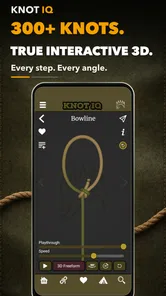
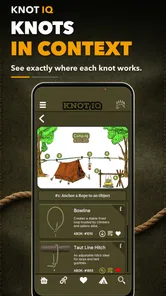
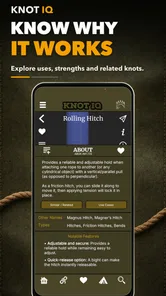
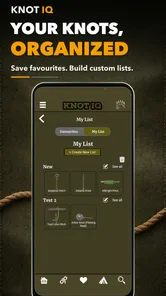
I installed Knot IQ - The Bear Essentials expecting a practical reference rather than a casual reading app, and that is exactly how it feels. This Books & Reference app from The Bear Essentials Outdoors Co. LTD. is built around learning knots through three-dimensional, offline guidance. I found the idea especially useful because knot tying is difficult to learn from a still image: one strand can pass behind another, a loop can collapse, and a small mistake near the beginning can ruin the finished knot.
The app costs $4.99, carries an Everyone age rating, and has attracted over 10K installs. Its average rating is 5.0 from around 500 ratings, with around 200 written reviews, so it has clearly found an audience among people who want a focused knot reference. It was released in March 2025 and is currently at version 3.8.1, while Android 6.0 or later is required. Those details matter less than the way the app fits into an actual task: I start with a cord, decide what I need the knot to do, follow the visual instructions, and then check whether the result behaves correctly.
From loose cord to a usable knot
I start this section with a practical question: what do I need the cord to do? Naming the task before choosing a knot helps me avoid copying a shape that looks right but suits the job poorly. Once that purpose is clear, I can focus on how the strands travel and what to inspect before tightening.
Starting with the real problem
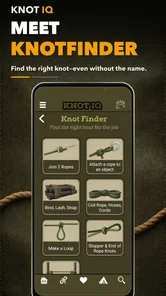
The best way to use this app is not to open it and browse randomly. I get more from it when I begin with a clear situation: securing a load, joining two lines, making a loop, creating tension, or finishing a line. That starting condition changes how I judge the instructions. A knot can look impressive in a guide and still be the wrong choice for a particular rope, load, or direction of pull.
That is where a dedicated reference has an advantage over searching the web. A normal search often produces a mixture of short videos, diagrams, forum advice, and pages that assume I already understand terms such as standing part, working end, bight, or dressing. Knot IQ gives me a more concentrated place to study the tying process. I am not jumping between unrelated pages or trying to remember which video showed the version I wanted.
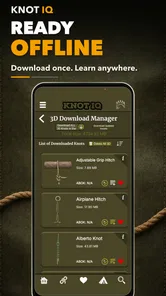
I also appreciate the offline design. Outdoors, a connection is not something I want to depend on while standing in a poor-signal area. Offline access makes the app suitable for preparing before a walk, keeping on a phone during a camping trip, or checking a technique beside a workbench without treating mobile reception as part of the equipment.
Following the three-dimensional view
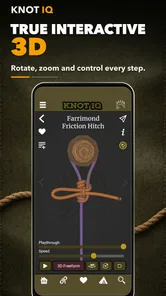
The central strength is the 3D presentation. When I learn from ordinary diagrams, I often lose track of which section of cord is in front and which is behind. A three-dimensional model can make that relationship easier to understand because the path has depth instead of being flattened onto a page.
More From Our News Desk

 Gmail
GmailGmail in a Busy Inbox: Who Benefits Most?
From first account to crowded workday, Gmail earns its place through dependable search and flexible sorting—but its best fit depends on how much inbox maintenance you can tolerate.

 Prime Video
Switching to Prime Video: What Changes in Your Viewing Routine
Prime Video can make a compelling second home for streaming, but switching means learning a different catalog, rental layer, and route from browsing to playback.

 Universal TV Remote Control
Universal TV Remote Control Works Best as a Reliable Backup
A phone remote earns its place through quick setup and reliable habits. Here is how to get more from Universal TV Remote Control—and where its limits show.

 Weather - By Xiaomi
Weather by Xiaomi Review: Clear at a Glance, Less Clear Up Close
Xiaomi’s weather app makes everyday forecasts quick to scan, but its calm surface can leave useful details and recovery paths harder to find than they should be.

 X
XX Under Pressure: Can It Recover When Posting Goes Wrong?
A resilience-focused review of X, examining setup, mistaken posts, interruptions, weak connections, and the gaps that matter when recovery needs to be dependable.

 Clash of Clans
Clash of Clans Is Won Between the Battles
Its raids are quick; its community is a long-term project of coordination, teaching, rivalry, and shared responsibility—with all the friction that entails.
Latest News



My preferred workflow is to watch the full movement first without trying to copy it. Then I restart mentally from the beginning and tie along with the guide, pausing after each major change in direction. I keep the working end visible and avoid tightening too early. This is a small but important habit: if I pull everything tight after every step, I can hide an error before I notice it.
The visual approach is particularly helpful for knots that contain crossings or tucked sections. I can compare the shape in my hand with the shape on screen rather than relying on a sentence such as “pass the end through the loop.” That wording may be technically correct, but it leaves too much room for misunderstanding when several loops are already present.
The most useful lesson is to treat the app as a spatial guide, not as a speed-running tutorial. I slow down at crossings, keep the rope loose enough to inspect, and only tighten once the overall structure matches the model. That method reduces the common problem of producing a knot that looks close but has a reversed turn or an incorrectly dressed loop.
A practical handoff from screen to rope
The first handoff is from the phone to my hands. This is where many digital guides become less useful. A screen can show the path, but it cannot feel whether the cord is twisted, whether the material is slipping, or whether I am pulling from the wrong section. I therefore use the app for sequence and my own hands for tension, texture, and final inspection.
For a realistic example, imagine I am preparing a line before leaving for a day outdoors. At home, I open the guide while the rope is clean and easy to see. I study the movement once, then reproduce it slowly. After tying it, I loosen it and repeat the process without looking constantly at the phone. Finally, I check the knot under the kind of pull I expect to use, without assuming that a successful shape automatically means a safe setup.
That last check is essential. A reference app can help me form a knot, but it does not replace judgment about rope condition, load, anchor quality, or the consequences of failure. I would not use a newly learned knot in a safety-critical situation simply because the animation looked clear. For climbing, rescue work, or any task where a mistake could seriously hurt someone, I would seek formal instruction and use equipment according to appropriate guidance.
When another person becomes part of the process
Knot tying often involves a second person. Someone may ask me to make a loop, prepare a tie-down, or demonstrate a technique. In that situation, the app works well as a shared visual reference. Instead of explaining every movement verbally, I can show the path and then let the other person compare their cord with the model.
There is still some friction in that handoff. A phone screen is not as easy to watch while both hands are occupied, and a person unfamiliar with knot vocabulary may need more explanation than the visual sequence alone provides. I find it better to agree on the starting point before handing over the rope: identify the working end, identify the fixed section, and leave enough slack to see the structure.
This approach also helps when teaching children or beginners, although the Everyone rating does not mean every knot is appropriate for every child or situation. An adult should supervise the activity, choose soft and manageable cord, and focus on learning rather than testing strength. The app can show the movement, but it cannot supervise behavior or decide whether a setup is safe.
Turning the finished shape into a useful result
The outcome I want is not simply a knot that resembles the picture. I want a knot that is correctly dressed, holds in the intended direction, and can be untied or adjusted when appropriate. After following a guide, I look for crossed strands that should run parallel, loose sections that may collapse, and an end that has been routed through the wrong opening.
This is one of the app’s strongest practical uses: it gives me a repeatable reference while I develop the eye to inspect my own work. After a few attempts, I rely less on constant screen watching and more on recognizing the intermediate shapes. The app becomes a training aid rather than a permanent crutch.
Offline access makes that training loop convenient. I can practice in short sessions, save the phone battery from repeated searching, and return to the same visual explanation when a knot has faded from memory. For someone building a small personal set of dependable knots, that consistency is more valuable than a huge collection of disconnected tutorials.
Where the workflow breaks down
The app is not a complete substitute for hands-on instruction. A three-dimensional guide can clarify the route of the cord, but it cannot tell me whether the rope is too stiff, too thin, damaged, contaminated, or unsuitable for the task. It also cannot feel whether I have applied proper tension. Beginners may still need several attempts before the animation translates into reliable muscle memory.
There is also a difference between learning a knot and choosing a knot. The guide can help with the first job, while the second depends on context. If I am joining different rope sizes, working with slippery material, tying under changing loads, or preparing something that must be released under tension, I need knowledge beyond the tying sequence. In those cases, a specialist manual, an experienced instructor, or a formal course may be the better companion.
Another limitation is the $4.99 purchase decision. I think the price is reasonable for someone who will use an offline visual reference more than once, especially if outdoor preparation is part of their routine. I would skip it if I only need one basic knot for a single household task. A free video may be enough for that narrow need, although the quality and clarity of search results can vary.
Compared with a printed knot book, this app is easier to consult when the problem is depth and movement. A book is better for broad background reading, terminology, history, and notes that I want to mark permanently. Compared with video platforms, the app feels more focused and less dependent on finding a trustworthy presenter, but a video may offer more spoken explanation and real-world demonstrations. The right choice depends on whether I learn better from an interactive visual path or from watching a person explain the entire context.
Who will get the most from it
I would recommend it to campers, hikers, boaters, scouts, makers, gardeners, and anyone who regularly handles cordage. It also suits a learner who has watched knot demonstrations before but still gets lost when the rope folds over itself. The 3D approach addresses that exact weakness better than many flat diagrams.
It is less suitable for someone looking for a general outdoor survival manual, a rope-care guide, or a safety certification resource. It is also not the first thing I would choose for an advanced professional who already knows the relevant knots and needs load tables, material specifications, or formal procedural standards. This is a focused learning and reference tool, not a complete technical library.
My buying advice after using it
If I were advising a friend, I would ask one question: will you practice or consult knots more than once? If the answer is yes, the combination of 3D instruction and offline availability makes the purchase easy to justify. I would install it before the trip, practice with the same kind of cord I expect to use, and avoid waiting until I am tired, cold, or under pressure to learn a new technique.
I would also keep a short personal routine. First, identify the job the knot must perform. Next, watch the complete sequence. Then tie it with the rope loose enough to inspect. After that, dress it carefully, test it in a controlled and non-critical way, and repeat it without looking at the screen. This turns the app from a passive reference into a useful practice system.
My final view is positive, with sensible limits. Knot IQ - The Bear Essentials solves the hardest part of many knot tutorials: understanding where the cord goes in three-dimensional space. It is compact, offline, and focused enough to keep beside real equipment. I would not trust it alone for high-consequence work, and I would not buy it for a one-time household fix, but for repeated learning and outdoor preparation it is a thoughtful reference that earns its place on my phone.
Knot IQ - The Bear Essentials Frequently Asked Questions
How much does Knot IQ - The Bear Essentials cost, and is it suitable for my device?
Knot IQ - The Bear Essentials costs $4.99. It is an app in the Books & Reference category, and its age rating is Everyone, so it is intended for a broad audience. The current version is 3.8.1 and it requires Android 6.0 or later. Check your device’s operating system before downloading to make sure it meets that requirement.
Does Knot IQ - The Bear Essentials include 3D demonstrations?
Yes. Knot IQ - The Bear Essentials is presented as a 3D knot-tying guide, making visual instruction a central part of the experience. Seeing a knot from different angles can help users follow how the rope moves through each step, especially when a flat diagram is hard to interpret. The app is developed by The Bear Essentials Outdoors Co. LTD.
What is Knot IQ - The Bear Essentials?
Knot IQ - The Bear Essentials is an educational reference app designed to help users learn and review different types of knots. It is aimed at outdoor enthusiasts, campers, hikers, anglers, boaters, scouts, and anyone who wants to improve their practical knot-tying knowledge. The app focuses on 3D visual guidance and easy-to-follow instructions rather than advanced theoretical lessons, making it useful for beginners and quick refreshers. Its store summary highlights offline knot-tying guidance as well.
Which types of knots can I learn with Knot IQ - The Bear Essentials?
The app includes a selection of commonly used knots, covering practical situations such as camping, fishing, boating, climbing-related activities, and securing loads. The exact collection may vary depending on the app version, but users can expect instructions for foundational knots and useful variations. Before downloading, it is worth checking the current store description to confirm whether the specific knots you need are included.
Is Knot IQ - The Bear Essentials suitable for beginners?
Yes, the app is primarily useful for beginners because it presents knot-tying information in a structured and accessible way. Step-by-step visuals can make it easier to understand how the rope should be positioned at each stage, while knot descriptions help explain practical uses. However, users should practice with real rope and avoid relying on the app alone for safety-critical climbing, rescue, or load-bearing applications.
Pros
- Challenging knot puzzles improve logical thinking and problem-solving skills.
- Clean interface makes the game easy to understand from the first puzzle.
- Short levels fit well into quick gaming sessions during breaks.
- Progressive difficulty keeps the experience engaging for experienced players.
- Works well as a relaxing
- low-pressure brain-training game.
Cons
- Some puzzles may feel repetitive after extended play sessions.
- The learning curve can be steep for players unfamiliar with knots.
- Limited variety may reduce long-term replay value for some users.
- Precision-based controls can occasionally feel awkward on smaller screens.
- Players seeking action or fast gameplay may find it too slow-paced.











