Kisi
- 323.00
- 4.8
- Installs
- 500.00K
- Price
- Free

Screenshots

Analysis by Reviewed
I found Kisi most useful when I stopped thinking of it as another office app and started treating it as a digital replacement for the keycard I normally keep in my wallet. It is a free business app from Kisi Inc that lets a compatible access system use a smartphone as a key. That sounds simple, but the difference is noticeable in everyday routines: fewer cards to carry, less time spent searching for the right pass, and a clearer connection between my phone and the places I am allowed to enter.
The app has been available since July 23, 2013, and its Everyone age rating makes it approachable for a wide range of users. It has also built a strong reception, with a 4.7 average from around 4.2 thousand ratings and more than 500 thousand installs. Those figures suggest that Kisi is not a niche experiment, although the real question is whether the building or workplace you need to enter uses Kisi-compatible access hardware. Without that match, the app has little practical value on its own.
How Kisi feels during a normal access routine
I find the everyday routine with Kisi is shaped less by time spent in the app than by how prepared I am before reaching the door. I would test my usual entrance ahead of a busy day and keep a clear plan for getting help if my access does not work. That practical habit makes it easier to judge whether phone-based entry fits my workplace, rather than discovering its tradeoffs when I am already in a hurry.
Quick access is the main attraction
In my experience, the appeal of Kisi is the reduction of small points of friction. A physical card can be left at home, buried in a bag, or confused with another card. A phone is usually already in my hand when I arrive somewhere, so using it as an access credential feels more natural. The best version of the experience is not flashy; it is the moment when entering a workplace or shared space becomes a brief, almost forgettable action.
That also shapes my expectations about speed. Kisi is not an app I open to browse content or spend time inside. I expect it to respond promptly when I need access, then get out of the way. The perceived speed depends on more than the app itself: the phone, the access reader, the connection between them, and the setup managed by the organization all matter. A smooth reader interaction can make the process feel instant, while a delay at the door can be difficult to diagnose from the user side.
For that reason, I would not judge the app by how quickly its screens load alone. The useful measure is the complete journey from arriving at a door to knowing whether I can enter. Kisi is strongest when the permissions are already configured and the phone is ready. It is less reassuring when I am standing outside trying to solve an account or access issue under time pressure.
A realistic morning scenario
Imagine arriving at a shared office before a meeting. Instead of checking a keycard pocket, I take out my phone and use Kisi at the entrance. If the access setup is working, I can move directly inside, put the phone away, and continue to the meeting room. That is a small improvement, but it happens repeatedly, which is where the convenience becomes meaningful.
More From Our News Desk

Weather by Xiaomi Review: Clear at a Glance, Less Clear Up Close

X Under Pressure: Can It Recover When Posting Goes Wrong?

Clash of Clans Is Won Between the Battles

Android Auto Makes the Case for Quieter Car Software

MobiOffice: Transforming Mobile Productivity with Seamless Integration

EA SPORTS FC™ Mobile Soccer: Redefining Mobile Sports Gaming
The same routine can help someone who works across several managed spaces. A phone-based credential is easier to keep with me than several cards, especially when my schedule changes. It can also reduce the awkwardness of borrowing or carrying a temporary card, provided the organization has arranged access correctly. I would still keep a backup plan for important appointments, because digital convenience does not remove the possibility of a dead phone, a connectivity problem, or an account that has not been granted the right permission.
Where the app fits better than a physical card
Kisi makes the most sense for offices, coworking environments, managed buildings, and other workplaces where access rights change over time. It is particularly appealing when people move between doors or locations and the organization wants credentials handled digitally rather than distributed as pieces of plastic.
Compared with a normal keycard, the phone is harder to forget if I already rely on it for navigation, messages, and scheduling. Compared with a physical key, the digital approach can be more convenient for managed access because the organization can associate entry with an account rather than handing over a permanent object. That does not automatically make it better for every building. A small office with one simple door may find physical keys or cards easier, cheaper to understand, and less dependent on phones.
What happens during heavier use
The demanding moments are not usually long sessions inside the app. They are clusters of small access attempts: entering the building, passing through an internal door, returning from lunch, or moving between shared rooms. In those moments, the app needs to feel predictable rather than merely functional once.
I would pay attention to whether the phone is already unlocked, whether the app is easy to reach, and whether the access action remains clear when I am carrying a bag or rushing between meetings. A system that works well in a quiet test can feel less convenient when used repeatedly during a busy day. The practical strength of Kisi is that it focuses on a narrow task, but that also means every delay is visible because there is no broader feature set to distract from it.
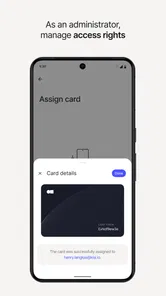
For teams, the heavier-use question is slightly different. The organization has to think about onboarding, changing permissions, and removing access when someone leaves. Kisi can be a useful part of that workflow because the credential lives on a phone rather than as a card that must be physically collected. Still, the quality of the experience depends on whoever administers the access system. A well-organized setup can make the app feel effortless; poorly prepared permissions can make the same app appear unreliable.
Reliability and recovery when something goes wrong
Reliability matters more here than visual polish. I can tolerate a slow screen in a casual app, but I do not want uncertainty at a locked door. My confidence in Kisi comes from using it as a repeatable access tool, while remembering that an access app has more points of failure than a simple metal key. The phone battery, the operating system, the account, the reader, and the building’s configuration can all affect the result.
That is why I recommend testing Kisi before the first important day rather than waiting until a meeting or shift begins. Install it, sign in as required by the organization, and try the intended entrance when there is time to ask for help. This is one of the most useful practical steps because it separates setup problems from genuine day-to-day performance problems.
Recovery is also a matter of preparation. I would make sure I know who to contact if access is missing, and I would avoid assuming that reinstalling the app will solve every issue. If the permission is controlled by the workplace, the administrator may need to correct it. If the phone is unavailable, a physical backup or an agreed alternative may be more useful than repeatedly attempting the same action.
One subtle trade-off is that a phone-based key combines two things I normally keep separate: communication and entry. That is convenient when the phone is charged and available, but inconvenient when it is damaged, misplaced, or being used by someone else. For a regular employee, that may be an acceptable exchange. For a visitor, contractor, or person who does not want work access tied to a personal device, a temporary card or staffed entry process may be preferable.
Device constraints deserve attention
The app is designed around smartphone access, so the phone becomes part of the access routine. That sounds obvious, but it changes how I plan. Battery level is no longer only about calls and messages; it can affect my ability to enter. A phone that is technically working but difficult to unlock, buried in a backpack, or restricted by a workplace policy may make the experience less smooth than a card.
I also would not assume that every phone behaves identically. Screen state, background behavior, connectivity, and the way the device handles nearby access interactions can influence perceived responsiveness. Kisi may be perfectly suitable on one device and more awkward on another, especially if the owner uses aggressive battery-saving settings or rarely keeps the phone ready for quick access.
The sensible approach is to keep the app updated through the normal app-store process, avoid changing important phone settings immediately before a workday, and test the door after any major device change. If I switch phones, reset the device, or alter account settings, I would verify access again rather than trusting that the previous setup will automatically feel the same.
Resource demands appear modest in the role Kisi plays because it is a focused access utility rather than a media-heavy or constantly interactive app. Still, I would avoid making absolute claims about battery use across all devices. The phone’s operating system and the way the access setup communicates with the reader are part of the overall experience. What matters to me is that the app should not require prolonged attention or a long session for a simple entry task.
Who should use it, and who should skip it
I would recommend Kisi to employees, coworking members, and teams whose buildings already use its access system. It is also a good fit for people who dislike carrying several cards and prefer keeping credentials on a phone they already carry. Organizations may appreciate the operational side of digital access, especially when people join, change roles, or need different levels of entry.
I would skip it if I am looking for a universal key replacement that works with any lock. Kisi is not a magic upgrade for an ordinary door; its usefulness depends on the access environment supporting it. I would also hesitate if I regularly work in places where my phone battery is unreliable, where personal phones are restricted, or where a physical credential is simpler and more dependable.
Another group that should think carefully is anyone who needs guaranteed access during emergencies or outside normal support hours. A digital key can be convenient, but convenience is not the same as independence. If the organization has no clear recovery process, the user may be left waiting for an administrator. In that situation, a well-managed physical backup can still be valuable even when Kisi is the main method.
How it compares with the usual alternatives
The closest alternative is the traditional keycard. A card is familiar, easy to hand to a visitor, and independent of phone battery. Its weaknesses are equally familiar: it can be lost, forgotten, damaged, or left active after it should have been returned. Kisi trades that physical simplicity for phone dependence and a more digital workflow.
Compared with a metal key, Kisi is better suited to shared or changing access because a key is difficult to manage once many people need different permissions. A key remains appealing for a private door or a small operation where simplicity matters more than centralized control.
Compared with a generic smart-lock app, Kisi feels more specifically aimed at managed business access rather than casual home automation. That distinction matters. Someone searching for a way to share access to a family home may find a home-focused lock system more appropriate. Someone entering a professionally managed workplace may benefit more from a system designed around organizational credentials.
The deciding factor is therefore not whether smartphone access sounds modern. It is whether it solves a real problem in the place I use. If I carry multiple access cards every day, the improvement can be substantial. If I have one reliable key and rarely share access, the change may add complexity without enough benefit.
My performance verdict
Kisi succeeds by making access feel less like a separate chore. Its speed is best understood as a quick, focused interaction rather than a full app session, and its stability depends on the complete access chain rather than the phone alone. When the account, device, and reader are prepared properly, the experience can be pleasantly uneventful, which is exactly what I want from a door-access tool.
My main reservation is not that the concept is weak, but that recovery requires planning. I would not rely on it blindly for a first-day arrival, an important appointment, or a situation where there is no alternative way inside. A short setup test and a clear support contact make a real difference.
As a free Business app from Kisi Inc, it offers a practical option for organizations moving away from physical access cards. Its Everyone rating also makes it broadly approachable, but suitability is still determined by the building’s access system and the user’s comfort with phone-based credentials. The app has earned a 4.7 average and broad adoption, with over 500 thousand installs, yet those figures should support—not replace—an on-site test.
My recommendation is simple: use Kisi when your workplace already supports it and you value carrying one less credential. Keep a backup routine for battery, device, and permission problems. For the right building, it is a sensible, focused tool; for a door that does not support its ecosystem, a conventional keycard remains the more practical choice.
Kisi Frequently Asked Questions
Does Kisi work on both Android and iPhone?
Kisi is a smartphone-based access app, so it is intended for use on a supported mobile device. Before downloading, check that your phone can install the app from its relevant app store and that your organization’s access setup supports your device. You will also need to use the account and permissions provided by the organization managing the Kisi system.
Is Kisi free to download?
Kisi is free to download, but installing the app does not automatically provide access to a building or its doors. Your workplace, school, residential building, or property manager must use Kisi and invite you to its system. Check with that organization before relying on the app, since your access depends on its setup and the permissions assigned to your account.
What is Kisi and what can I use it for?
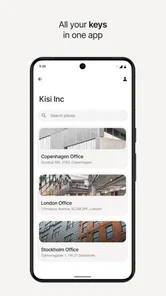
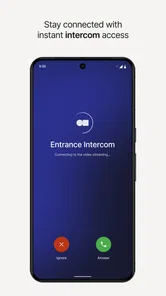
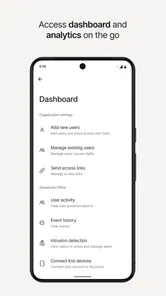
Kisi is a cloud-based access control app designed to let authorized users unlock and manage compatible doors, gates, and other entry points from a smartphone. Depending on the organization’s setup, it may also display available spaces, provide access credentials, support visitor management, and show activity-related information. Its usefulness depends on whether your workplace, school, residential building, or property manager uses Kisi hardware and services.
How do I unlock a door with the Kisi app?
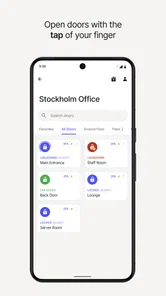
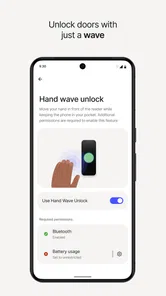
After your administrator invites you and assigns the correct permissions, you generally sign in to the Kisi app and select an available door or access point. Depending on the installation, you may tap an unlock button, use Bluetooth near the reader, scan a QR code, or use another supported method. Bluetooth, location permissions, internet access, and a compatible reader may be required, so the exact experience can vary by building.
Does Kisi work without an internet connection or when my phone battery is low?
Kisi’s functionality can depend on the access-control configuration and the unlocking method used by your organization. Some credentials or readers may support limited offline behavior, while other actions require an active connection to verify permissions. A dead or nearly dead phone can also prevent access if the system relies on the app. It is wise to keep your phone charged and follow your building’s backup entry procedures.
Pros
- Simple mobile access control for doors and shared spaces
- Supports remote unlocking without physical keys or access cards
- Useful visitor access and temporary credential management
- Access activity can improve security monitoring and accountability
- Works well for offices using Kisi-compatible hardware
Cons
- Requires compatible Kisi hardware for full functionality
- Availability of features may depend on your organization’s plan
- Internet or Bluetooth issues can affect door-unlocking reliability
- Users may need administrator approval before accessing doors
- Not useful for personal homes without a Kisi access-control setup











