Kinedu: Baby Development
- 838.00
- 3.2
- Installs
- 5.00M
- Price
- Free

Screenshots




Analysis by Reviewed
When it comes to tracking your baby’s development, Kinedu: Baby Development is like having a pocket-sized parenting expert at your fingertips. As someone who's dived deep into this app, I’m here to spill all the details. Whether you’re a first-time parent or adding another bundle of joy to the family, this app is designed to be your go-to guide on nurturing those early years.
Getting Past the First Hurdles
For me, the main challenge with a parenting app like this is not opening it; it is deciding how much of its guidance to fit into an already unpredictable day. A baby may be ready to play one moment and tired or fussy the next. I would treat suggested activities as ideas to choose from, not a schedule to complete. If a plan feels like another obligation, pick one activity that suits your baby’s mood and leave the rest for later.
It also helps to keep expectations grounded. A milestone tracker can make changes easier to notice, but a ticked item is not a diagnosis and an unticked one is not a reason to panic. I’d use the app to prompt observation and questions, then bring concerns about a child’s development to a qualified health professional rather than trying to settle them through an app.
Starting Without Turning Setup Into Homework
Before relying on a personalized plan, I’d take a moment to check that the baby’s details and developmental stage are entered as intended. That simple check can prevent a mismatch between the suggestions you see and what you hoped to explore. If more than one caregiver uses the app, agree on who will update shared information and when; otherwise, different assumptions about the child’s stage can make the recommendations feel inconsistent.
I’d also decide what I want the app to do before browsing deeply. “Give me one play idea for this afternoon” is a more useful starting point than trying to explore every section at once. If you are mainly curious about classes or articles, start there instead of setting up a tracking habit you may not need. This keeps the first session short and gives you a fair test of whether Kinedu fits your family.
Features That Make Parenting Easier
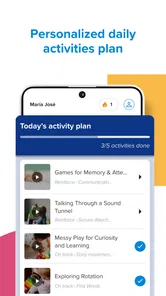
Let me kick things off by saying that Kinedu: Baby Development is packed with a variety of features aimed at enhancing your parenting experience. From personalized activity plans to expert advice, it’s like having a virtual parenting coach. The app creates a customized plan based on your baby’s age and developmental stage, offering over 1,600 activities to boost their cognitive, linguistic, social, and physical development.
And guess what? It's not just about your baby’s development milestones. The app also empowers you with knowledge through its extensive library of articles and videos. Whether you want to learn more about sleep training or understand the nuances of baby nutrition, Kinedu has you covered.
More From Our News Desk

Weather by Xiaomi Review: Clear at a Glance, Less Clear Up Close

X Under Pressure: Can It Recover When Posting Goes Wrong?

Clash of Clans Is Won Between the Battles

Android Auto Makes the Case for Quieter Car Software

MobiOffice: Transforming Mobile Productivity with Seamless Integration

EA SPORTS FC™ Mobile Soccer: Redefining Mobile Sports Gaming
Setting Up a Routine That Fits Real Life
Kinedu is a parenting app from Kinedu, and I see its clearest use as a source of structured play ideas rather than a replacement for a family’s existing routine. If you are comparing it with a basic baby tracker, the difference is the emphasis on activities and learning material alongside developmental tracking. A simple notes app may be quicker for recording a feeding or appointment, while Kinedu makes more sense when you want an activity to try or a topic to explore.
A practical way to use it is to look ahead during a calm moment, choose an activity that fits the time and space you have, and then return to your day instead of browsing while your baby waits. For example, if you have a short stretch together before a nap, you could choose a brief play idea, follow its instructions, and stop when your child loses interest. That approach makes the app a prompt for interaction, not a demand to finish a lesson.
Making Activities Work With the Space and Energy You Have
When choosing an activity, I’d look beyond the developmental label and check the instructions for what the adult and baby actually need to do. A suggestion that sounds appealing may not suit a noisy room, a tired child, or a moment when you have only a few minutes. It is perfectly reasonable to save it for another time or choose a simpler idea. The value is in making play easier to begin, not in completing every suggestion.
A useful habit is to try one activity and notice how your baby responds, rather than treating the plan as a checklist. If the idea holds their attention, you can repeat it naturally; if not, you have learned that it is not right for that moment. This small feedback loop helps you use the recommendations with your own judgement, instead of assuming that a personalized plan must always match the mood of the day.
Interactive and Engaging
One of the things I love about Kinedu is its interactive nature. Each activity comes with a detailed description and a video guide, making it super easy to follow along. You’ll find yourself engaging in meaningful play with your baby, and trust me, they’ll love every moment of it! The app makes sure that you’re not just a spectator but an active participant in your child’s growth journey.
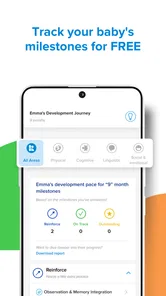
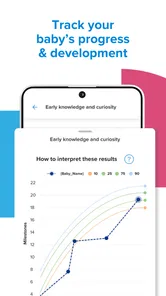
Besides, the app also allows you to track your baby’s progress. It’s quite satisfying to see those little checkmarks as your baby masters new skills, and it gives you a tangible sense of accomplishment as a parent.
When a Plan Needs a Reset
If something seems out of place, I would first check the basics: make sure the baby’s age and stage are entered as intended, confirm that the app is current, and reopen it before assuming a feature is broken. Kinedu is free to download, but it also offers in-app purchases ranging from $0.99 to $299.99 per item, so I’d check what an activity or class requires before building a routine around it. That matters especially if you are testing the app casually and do not want to commit to paid content.
When a video or page does not behave as expected, a sensible recovery is to close and reopen the app, check your connection, and try again later. If tracking entries are the issue, I’d avoid repeatedly adding the same information; first review what is already recorded. These are general troubleshooting steps, not a guarantee that every problem has the same cause, but they help separate a temporary hiccup from a mismatch in expectations.
When the App May Not Be the Problem
Not every disappointing recommendation points to a technical fault. A baby’s interest can change quickly, and an activity that worked last week may not suit today’s energy or surroundings. I’d first try it at a calmer moment or adapt the setup to what is practical, rather than repeatedly refreshing the plan in search of a perfect match. The app can suggest a starting point, but it cannot read the room or know how your child is feeling.
Similarly, milestone notes are most useful as a record of what you have observed, not as a verdict on how a child is doing. If a prompt worries you, pause the app-based comparison and speak with a qualified health professional. That boundary matters: Kinedu can help you notice and organize questions, but it should not be asked to diagnose a delay or reassure you about a medical concern.
Friendly User Interface
Navigating through Kinedu is a breeze. The user interface is clean and intuitive, making it accessible for everyone, even if you’re not tech-savvy. All the features are neatly organized, so you can find what you need without any hassle. Plus, the app’s vibrant design and straightforward layout make the whole experience enjoyable.
Another highlight is the community feature. You can connect with other parents, share your experiences, and get tips from those who are in the same boat. It’s like having a support group right in your pocket.
Choosing Between Kinedu and Simpler Alternatives
Compared with a paper notebook or a basic tracker, Kinedu’s appeal is the combination of development prompts and ideas for interaction. That breadth is useful if you want inspiration as well as a place to keep an eye on progress. The trade-off is that a dedicated tracker can be quicker when all you need is a straightforward record, while a notebook gives you freedom to write in your own terms without navigating a content library.
I would not replace a family calendar or a clinician’s advice with Kinedu. For appointments, shared schedules, and practical care notes, the tools your household already uses may be clearer. For a parent who wants guided play ideas and learning material in the same parenting app, Kinedu has a more relevant role. The right choice depends on the task, and using it alongside simpler tools is a sensible option rather than a failure to make the app work.
Who Will Get the Most From It
I think the app is best suited to parents who want fresh play ideas, enjoy learning through short articles or videos, and like having development notes in one place. It can also help a caregiver who wants a concrete activity to try without having to invent one from scratch. The useful trade-off is that personalization and a broad library offer choice, but they can also create more to browse than a tired parent wants to deal with.
If you mainly need a quick log for naps, feeding, or appointments, a dedicated tracker or a simple shared family note may be faster. If you prefer to follow your own play routine without milestone prompts, the app may feel more structured than necessary. Its content rating is Everyone, and it has a 3.0 average from around 42,000 ratings; I’d take that mixed reception as a reason to try the free experience and judge whether its style fits your household rather than assuming it will suit every parent.
A Small Trial Is Better Than a Big Promise
To see whether it earns a place in your routine, I’d set one modest goal for the first few days: find an activity for a particular part of the day, or use an article to explore a question you already had. Afterward, ask whether the suggestion made it easier to spend engaged time together. If you find yourself browsing without using anything, that is useful feedback too; a smaller collection of saved ideas or a simple note may serve you better.
This approach also helps answer a practical question: do you need to use Kinedu every day? I would not make daily use a requirement. The app is more helpful when it solves a real need, such as offering a fresh play prompt or helping you organize observations, and less helpful when opening it becomes another task to maintain. You can return when you want guidance rather than keeping a streak or trying to use every section.
Final Thoughts
In a nutshell, Kinedu: Baby Development is a must-have for parents who want to take an active role in their child’s development. It’s comprehensive, user-friendly, and incredibly resourceful. You’ll find yourself coming back to it time and time again, discovering new ways to engage with your little one.
So, if you’re on the lookout for an app that supports you in nurturing your child’s early years, Kinedu is definitely worth checking out. Trust me, you won’t regret it!
My practical verdict is a little more cautious: Kinedu is worth trying if activity inspiration and developmental learning are what you want, but it should not become a scorecard for parenting or a substitute for professional advice. It has more than 5 million installs, first appeared on March 6, 2018, and its current version is 2.25.1 for devices running Android 6.0 or later. I’d start with one small use case, see whether the activities genuinely help your day, and keep it only if the guidance feels supportive rather than like extra work.
Who Should Skip It, and How to Decide
I would skip Kinedu if what you need is only a fast feeding or sleep log, if developmental prompts tend to make you anxious, or if you strongly prefer an unstructured approach to play. Those are not shortcomings in your parenting; they are signs that a different tool—or no app at all—may reduce friction. A family’s existing routine can be enough, and not every useful moment with a baby needs to be planned or recorded.
For everyone else, the clearest test is whether the app turns a question into a practical next step without making you feel behind. Try a single activity, read one relevant piece of guidance, and check whether either genuinely helps. If so, keep using those parts selectively. If the app adds more browsing, expense, or pressure than useful ideas, it is reasonable to move on. Its strongest role is as a flexible companion for play and reflection, not as a measure of how well anyone is doing.
Kinedu: Baby Development Frequently Asked Questions
Who develops Kinedu, and what kind of app is it?
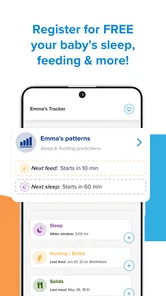
Kinedu is a parenting app developed by Kinedu. It brings together play activities, milestone information, expert-led classes, and a baby tracker, giving families several kinds of support in one place. Its focus is practical help for parents and caregivers who want ideas for interacting with a young child and tools for following development.
Is Kinedu free to download, and what should I know about its age rating?
Kinedu is free to download and is rated Everyone, so its app rating is suitable for a general audience. The free download lets parents explore what the app offers, while some features or content may involve optional purchases. If a child can access your device, it is sensible to review purchase controls and supervise app use.
Does Kinedu cost anything to download, and are there optional purchases?
Kinedu is free to download, so parents can explore the app before deciding whether its additional offerings suit their needs. It also includes in-app purchases, with prices ranging from $0.99 to $299.99 per item. Check the purchase details in the app before confirming anything, especially if a child may use the device, so you understand what you are selecting.
What devices and operating systems can run Kinedu?
Kinedu is an app for Android devices, and it requires Android 6.0 or later. Before downloading, check the operating system on your device to make sure it meets that requirement. The app’s current version is 2.25.1, so keeping your device and app updated can help you use the available features as intended.
What is Kinedu and how can it benefit my child's development?
Kinedu is a parenting app designed to support early childhood development through personalized daily activity plans. It offers activities developed by experts to enhance cognitive, linguistic, social, emotional, and physical skills. By using Kinedu, parents can track developmental milestones, gain insights into their child’s growth, and strengthen parent-child bonding through interactive play.
Pros
- Offers personalized activities for babies
- Tracks development milestones effectively
- User-friendly interface with easy navigation
- Includes expert video tutorials
- Supports multilingual access
Cons
- Requires subscription for full access
- Limited offline functionality
- May have occasional bugs or glitches
- Content might feel repetitive over time
- Notifications can be overwhelming











