Keyboard Maker: Keyboard Theme
- 3.40K
- 4.6
- Installs
- 5.00M
- Price
- Free

Screenshots



Analysis by Reviewed
I like a keyboard that feels easy to use before I notice how it looks, but I also understand the appeal of changing a design I see every day. Keyboard Maker: Keyboard Theme is aimed at that small, frequent part of phone use: personalizing the keyboard rather than replacing your whole phone interface. I’d consider it when the default look feels dull and I want to experiment with color and style without turning customization into a big project.
What to expect when opening it
The first useful question is not how many designs I can browse, but whether I can settle on one that still works for ordinary typing. I’d treat the maker as a place to explore visual options, then test the result in the messaging and search apps I actually use. A theme that looks appealing in a preview can feel different when I’m replying quickly or typing with one hand, so a little real-world testing is worthwhile.
It also helps to separate visual personalization from keyboard functionality. This app is for changing the keyboard’s appearance; it is not necessarily the right answer if my main frustration is autocorrect, layout, language support, or a typing feature. When those are the priorities, I’d compare dedicated keyboard apps or first check the settings on the keyboard already installed on my phone.
A low-effort way to choose a theme
I’d begin with a simple design rather than trying to perfect every visual choice at once. Pick a color direction, use it for a few messages, and notice whether the keys and labels remain easy to distinguish. If something feels off, change one element at a time. That makes the process less fiddly and helps identify whether the issue is contrast, color, or simply a style that looked better in the editor than in use.
For anyone wondering whether customization has to become a daily chore, I’d say it does not. The best outcome may be one comfortable design that stays in place. Constantly switching themes can be entertaining, but it makes it harder to know which version is genuinely readable and can turn a quick personalization task into an endless search for a perfect look.
Who will get the most from it
I see the strongest fit for people who enjoy making their devices feel personal, especially if they spend a lot of time messaging and notice the keyboard’s appearance. It could also be a pleasant small project to do with someone who likes choosing colors and styles. If I were setting up a phone for a family member, I’d focus less on a dramatic look and more on clear labels and a layout they already find comfortable.
On the other hand, I would skip it if I’m happy with the standard keyboard or if I need a dependable specialist tool more than a visual change. A person who types for work and depends on a particular layout may be better off keeping a familiar keyboard unchanged. Likewise, anyone who wants a keyboard makeover to solve slow typing or inaccurate corrections should look for a tool that directly addresses those problems.
You May Like

Clash of Clans Is Won Between the Battles

Android Auto Makes the Case for Quieter Car Software

MobiOffice: Transforming Mobile Productivity with Seamless Integration

EA SPORTS FC™ Mobile Soccer: Redefining Mobile Sports Gaming

How Microsoft OneDrive Became a Mobile Productivity Giant

How Google Translate Breaks Language Barriers Effortlessly
Where it sits among keyboard choices
The usual alternative is simply to keep the keyboard that came with the phone. That is the easiest route when familiarity and a consistent layout matter more than appearance. Another option is a general-purpose keyboard app, which may be a better match for someone looking for typing-focused controls. The particular appeal here is the chance to make the keyboard look more like my own, so I’d choose based on whether that is the problem I’m trying to solve.
One trade-off is that a highly expressive design can be less practical than a restrained one. Bright colors may look lively but can make labels harder to pick out, especially when I’m in a hurry. I’d also consider where I type: a theme that feels fine in a quiet moment may be distracting when I’m composing a longer message or switching between tasks. A few ordinary test messages are a more useful check than judging a design solely by its first impression.
Everyday use and sensible expectations
A realistic routine might be choosing a theme at home, then using it for quick replies during a busy day. I’d check whether I can spot the keys without slowing down and whether the look remains comfortable across different apps. If I start making more mistakes or hesitate because the lettering is hard to see, I’d switch to a clearer design rather than trying to tolerate it just because it looks distinctive.
That same practical approach applies to performance. The useful measure is whether the keyboard is ready when I need to type and remains comfortable through normal use. I’d avoid judging the app by how long I can browse themes, since that is different from typing speed. A visual customization app also cannot make an older or already sluggish phone feel faster; if the device is struggling, I would keep the design simple and compare the experience with the default keyboard.
Privacy-conscious keyboard habits
Because a keyboard is involved whenever I type, I’d be deliberate when setting up any alternative input method. I’d read the prompts on the device carefully, understand which keyboard is active, and avoid entering sensitive information while I’m still unsure about the setup. That is sensible for any keyboard change, not a claim about this app’s data practices. If I prefer not to use a third-party keyboard at all, keeping the phone’s built-in option is a straightforward choice.
I’d also make sure I know how to return to my usual keyboard before experimenting. That small precaution makes trying a new look less stressful: if the result is uncomfortable or I need a familiar layout urgently, I can switch back rather than feeling committed to the change. A customization tool should make the phone more enjoyable, not leave me searching for basic controls when I need to send a quick reply.
Customization at Your Fingertips
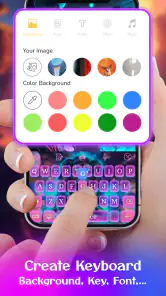
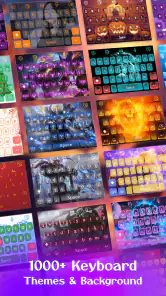
First things first, the amount of customization Keyboard Maker: Keyboard Theme offers is insane. You can literally tweak everything. From the color schemes to the font styles, you’re in full control. I spent a good hour just playing around with the themes. There’s something oddly satisfying about creating a keyboard that’s uniquely yours.
Easy Peasy Setup
If you’re worried about complicated setups, don’t be. Getting started is a breeze. I was up and running in no time. The app guides you through the process with simple steps. Even if you’re not tech-savvy, you’ll find it super intuitive.
Variety of Themes
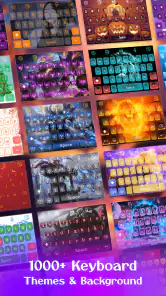
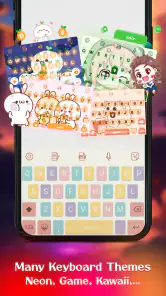
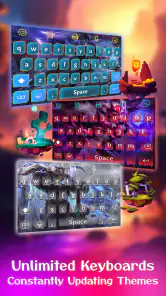
And let’s talk about the variety. Whether you’re into sleek, minimalistic designs or vibrant, popping colors, there’s a theme for everyone. I personally went for a neon blue theme, and it looks absolutely stunning. The themes are so diverse that sometimes it feels like having a new keyboard every day.
Choosing for everyday readability
My useful rule is to test a theme in the situations where I actually type: a short message, a longer note, and a quick search. A style that looks striking on its own may be less comfortable if the lettering blends into the keys or the colors make the layout harder to scan. I’d also avoid changing several visual choices at once; adjusting one thing at a time makes it easier to tell what improved the look and what made typing less clear.
This is a personalization app from BlueSkySoft, rather than a general-purpose keyboard recommendation for people seeking a different typing system. Compared with sticking to a phone’s standard keyboard appearance, its draw is the chance to shape the visual style yourself. If you mainly want advanced typing tools or a familiar, unchanged layout, the keyboard already on your device may be the simpler fit.
Performance and Usability
Now, you might wonder, does all this customization affect performance? Not at all! The keyboard remains responsive and fast. I didn’t experience any lags or crashes. Typing feels smooth, and the keys are well-spaced, making it a joy to use for long texting sessions.
Speed, stability, and device fit
For this kind of app, the speed that matters most is whether the keyboard feels ready when I need to type, not how quickly I can browse decorative choices. My experience with it was smooth, but I wouldn’t treat a visual makeover as a fix for an older or already sluggish phone. The app supports Android 5.0 and later; on a device with limited room or older hardware, I’d keep expectations modest and judge it by ordinary messaging rather than by extended theme browsing.
If a theme stops feeling right, changing the design again is a more sensible first step than assuming the keyboard itself is broken. I’d also keep a familiar alternative available if I rely on a particular keyboard layout or typing habit. That matters most during a busy day: a custom appearance is enjoyable, but comfort and dependable access to the layout I know take priority when I need to reply quickly.
Why You Should Try It
So, who would I recommend Keyboard Maker: Keyboard Theme to? Honestly, anyone who wants to add a personal touch to their device. It’s a fun way to express your style, and it makes typing a more enjoyable experience. Plus, it’s a great conversation starter. I’ve had friends ask how I got such a cool keyboard!
It is free to install, with optional in-app purchases priced from $0.49 to $6.99 per item. Its 4.6 average comes from around 99,000 ratings, and it has passed 5 million installs. The app is rated for Everyone, so it suits a broad audience; the current version is v47. Those details make it easy to try, though I’d decide whether it earns a place on my phone by checking that the finished design is comfortable in daily use, not simply attractive at first glance.
My practical verdict
For me, the best way to approach Keyboard Maker is as a visual change with a clear purpose: make the keyboard feel more personal without sacrificing readability. I’d try a few looks, settle on one that stays clear in the apps I use most, and leave the standard keyboard as an option if my needs change. The free install lowers the barrier to experimenting, while the optional purchases mean I’d check what is available before paying for anything. I wouldn’t spend money just to keep browsing; I’d only consider a purchase if a particular customization genuinely improves the look I want.
Overall, I’d recommend it to someone who enjoys personalization and wants the keyboard itself to reflect their taste. I’d point a speed-focused typist, someone attached to a specific typing setup, or a person who simply prefers the stock look toward their existing keyboard or a more function-led alternative instead. If you are curious, try it with a simple theme and judge it during real messages, not just in the editor. That is the quickest way to tell whether the makeover makes everyday typing more enjoyable.
In conclusion, if you’re on the hunt for a way to spice up your phone’s interface, look no further. This app does exactly what it promises, and it does it well. So go ahead, unleash your inner designer and give your keyboard the makeover it deserves.
Keyboard Maker: Keyboard Theme Frequently Asked Questions
Is Keyboard Maker: Keyboard Theme free to download?
Yes. Keyboard Maker: Keyboard Theme is free to download, so you can try its keyboard-personalization features without paying upfront. Some optional content is available through in-app purchases, which range from around fifty cents to seven dollars per item. You can start with the free options and decide whether any paid customization is worthwhile for your needs.
Who makes Keyboard Maker: Keyboard Theme, and what is the app designed for?
Keyboard Maker: Keyboard Theme is made by BlueSkySoft and is a personalization app for people who want to create a keyboard that feels more personal. Its store summary invites users to try creating their own keyboard, and its short description is Keyboard Maker. If customizing your typing screen is the main reason you are considering a download, the app is built around that purpose.
What devices and operating systems can I use Keyboard Maker: Keyboard Theme on?
Keyboard Maker: Keyboard Theme is an Android personalization app, and it requires Android 5.0 or later. Before downloading, check that your device meets this requirement and that the app is available for your device in its app store. It is listed for Everyone, making its content suitable for a broad audience.
What customization options does Keyboard Maker: Keyboard Theme offer?
Keyboard Maker: Keyboard Theme provides an extensive range of customization options to tailor your keyboard's appearance. Users can choose from a variety of themes, colors, and fonts. Additionally, the app allows for the inclusion of custom backgrounds using personal photos, providing a unique typing experience. These features ensure that the keyboard reflects the user's personal style.
Is Keyboard Maker: Keyboard Theme compatible with all devices?
Keyboard Maker: Keyboard Theme is designed for Android devices running version 5.0 or later. Compatibility can still depend on your particular device and operating-system setup, so check the app’s store page before installing. If your phone or tablet meets the minimum requirement, you can try its keyboard customization features and see how they work on your device.
Pros
- Highly customizable keyboard layouts
- Wide range of themes and colors
- User-friendly interface
- Seamless integration with apps
- Supports multiple languages
Cons
- May drain battery quickly
- Limited free features available
- Occasional lag in response time
- Ads can be intrusive
- Some themes require in-app purchases

- Category
- Personalization
- Version
- v47











