

Kansas State Fair
- 5.00
- 4.6
- Installs
- 10.00K
- Price
- Free

Screenshots
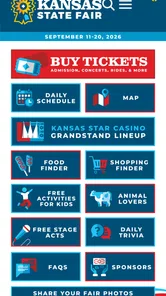
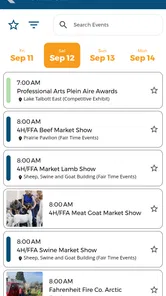
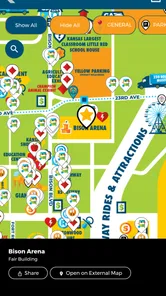
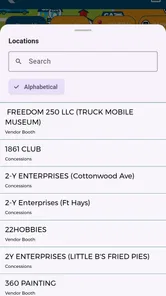
Analysis by Reviewed
I approached Kansas State Fair as a practical event companion rather than as an app I would keep open every day. It is the official app for the Kansas State Fair, developed by Kansas State Fair, and its appeal is straightforward: put fair-related information in one place so visitors do not have to rely entirely on memory, scattered notes, or repeated web searches.
That sounds simple, but event apps are judged in a very specific way. They matter most when I am already busy, moving through a crowded venue, checking plans with other people, or trying to make a quick decision. A useful fair app should reduce small moments of uncertainty. It should help me prepare before leaving, find the information I need during the visit, and recover gracefully when something does not load as expected.
My overall impression is positive, with an important qualification: this is a focused tool for people attending the Kansas State Fair, not a broad entertainment platform. It is free, rated for Everyone, and available for devices running Android 6.0 or later. The current release is version 3.0.2, and its average rating is 4.6 from around twenty ratings. Those numbers suggest a favorable response, although the relatively small amount of feedback means I would treat the rating as encouraging rather than conclusive.
Where visitors are most likely to get stuck
The first difficulty with an official event app is not usually the installation itself. It is knowing what the app is meant to replace. Some visitors expect a complete digital ticket wallet, a live navigation system, or a social guide. Others simply want the fair’s essential information in a more convenient format. If expectations are unclear, the app can feel limited even when it is doing its intended job.
I would begin by thinking of this app as a planning and reference tool for the Kansas State Fair. That mindset makes the experience more useful. Before opening it, decide what problem you want it to solve: checking fair information before leaving home, keeping details handy while visiting, or helping a group coordinate its day. This prevents the common mistake of searching through the app without a clear purpose.
Another point of friction is timing. An event app is most valuable when its information matches the current fair period, but a user may install it long before visiting. If the app appears quiet or less useful outside the event context, that does not automatically indicate a malfunction. The fair itself is a seasonal experience, so the app’s practical value naturally rises around a visit and falls when there is no immediate trip to plan.
I also would not assume that installing the app removes the need for basic preparation. A phone can lose signal, a battery can run low, and a group can split up. The app may make information easier to access, but it cannot replace a simple meeting plan or a quick look at the day’s priorities. My best approach would be to use it before arriving, then treat it as a convenient reference rather than the only source of every decision.
More From Our News Desk

 Gmail
GmailGmail in a Busy Inbox: Who Benefits Most?
From first account to crowded workday, Gmail earns its place through dependable search and flexible sorting—but its best fit depends on how much inbox maintenance you can tolerate.

 Prime Video
Switching to Prime Video: What Changes in Your Viewing Routine
Prime Video can make a compelling second home for streaming, but switching means learning a different catalog, rental layer, and route from browsing to playback.

 Universal TV Remote Control
Universal TV Remote Control Works Best as a Reliable Backup
A phone remote earns its place through quick setup and reliable habits. Here is how to get more from Universal TV Remote Control—and where its limits show.

 Weather - By Xiaomi
Weather by Xiaomi Review: Clear at a Glance, Less Clear Up Close
Xiaomi’s weather app makes everyday forecasts quick to scan, but its calm surface can leave useful details and recovery paths harder to find than they should be.

 X
XX Under Pressure: Can It Recover When Posting Goes Wrong?
A resilience-focused review of X, examining setup, mistaken posts, interruptions, weak connections, and the gaps that matter when recovery needs to be dependable.

 Clash of Clans
Clash of Clans Is Won Between the Battles
Its raids are quick; its community is a long-term project of coordination, teaching, rivalry, and shared responsibility—with all the friction that entails.
Latest News



Why the first launch deserves a calm check
After installation, I would open the app while connected to a reliable network instead of waiting until I was already at the fair. This is a small habit, but it separates setup problems from on-site problems. If the app needs time to display its content, that is much easier to handle at home than while walking through a busy entrance or trying to answer a child’s question.
I would also check that the app is actually the official Kansas State Fair application and that the device meets the stated minimum requirement of Android 6.0. The age rating of Everyone makes it suitable for a broad audience, but that does not mean every older phone will provide the same smooth experience. Screen size, available storage, background activity, and the general condition of the phone can all affect how comfortable an event app feels.
One useful setup trick is to open the sections I expect to use before leaving. I would not merely install the app and assume I know where everything is. I would spend a few minutes becoming familiar with its layout, especially if I am visiting with relatives or friends who may ask me to find something quickly. The goal is not to memorize the whole app; it is to remove hesitation when the environment becomes noisy and distracting.
It is also sensible to update the app before the visit rather than during it. Version 3.0.2 is the current version, and keeping the installed release current is a basic way to avoid issues that may already have been corrected. I would do this over a dependable connection, then launch the app again afterward. If the update changes the layout, that gives me a chance to adjust before I need the information.
For a family visit, I would make the setup process part of the planning conversation. One person can check the app while another handles transport, food, or tickets. This avoids a common event-day problem where one phone becomes the single point of failure. If several people in the group can access the app, everyone is less dependent on one person remembering every detail.
Simple checks that prevent false alarms
When an app seems empty, slow, or incomplete, I would first check the basics rather than immediately blaming the app. Is the phone connected to the internet? Is airplane mode enabled? Is the device low on storage? Is the operating system compatible? Has the app been updated? These questions sound obvious, but event-day pressure makes people skip them.
I would close and reopen the app once if a screen does not respond normally. If that does not help, restarting the phone is a reasonable next step. These are general troubleshooting actions, not guarantees, but they often distinguish a temporary phone issue from a persistent application problem. I would avoid repeatedly tapping the same control, because that can make it harder to tell whether the app is processing a request or has actually stopped responding.
Another practical check is to compare the app’s behavior on a stable connection at home with its behavior at the venue. If it works normally before leaving but struggles only in a crowded area, the network environment may be responsible. That distinction matters because reinstalling the app will not improve a weak or congested connection.
I would also keep the phone’s battery in mind. Bright outdoor conditions often encourage higher screen brightness, and frequent checking can use power quickly. Even if the app itself is efficient, the overall phone experience may not be. A charged phone and a small backup plan are more useful than assuming every problem comes from the application.
Recovering your workflow when something goes wrong
The most helpful way to use an event app is to build a fallback into the workflow. Before leaving, I would identify the information I am most likely to need and review it while the app is working normally. I would then remember the broad plan rather than depending on one screen to remain available for the entire day. This is especially useful when traveling with people who have different interests or energy levels.
Suppose I am visiting with a family. In the morning, I would use the app to organize the day around a few priorities instead of trying to cover everything. I might decide which part of the fair matters most to each person, agree on a time to regroup, and use the app as a reference when plans change. If the group later separates, the meeting point and time remain useful even if one phone has poor reception.
This is one of the less obvious strengths of a focused event app: it can reduce conversation overhead. Rather than one person repeatedly explaining what is available, the group can look at the same official source. That does not guarantee agreement, but it makes planning more concrete. I found this approach more practical than trying to build a full schedule that leaves no room for wandering.
If a page does not load, I would try the following sequence:
Wait briefly and check whether the phone still has a dependable connection.
Close and reopen the app instead of repeatedly pressing the same control.
Restart the phone if other apps are also behaving slowly.
Compare the app with information already reviewed before leaving.
Use the fair’s normal in-person information channels if an immediate answer is needed.
The final step is important. A digital tool should make a visit easier, not turn a small technical problem into a major disruption. If I need an answer immediately and the app is unavailable, I would move on with the day and return to troubleshooting later. That is a healthier workflow than spending ten minutes staring at a loading screen while everyone else waits.
I would be cautious about uninstalling and reinstalling during the visit. Reinstallation can be useful when an app consistently fails after ordinary checks, but it is a poor first response when time is limited. It may also create another setup step at exactly the wrong moment. I would reserve it for a controlled situation with a reliable connection and enough time to test the result.
Because the app is free, trying it involves little financial risk. The more meaningful trade-off is attention. Installing it, learning its layout, and checking it occasionally take time. That investment makes sense for someone attending the Kansas State Fair, but not necessarily for someone who is only curious about the event or needs one isolated piece of information.
When the phone is not the real cause
It is easy to blame an app when the real issue is the environment around it. A large public event can create crowded networks, noisy surroundings, limited charging opportunities, and interruptions from calls or messages. If the app works at home but not reliably in a busy area, I would look at connectivity and phone conditions before deciding that the application is defective.
Location confusion can also be a human problem rather than a software problem. Even with useful event information, a fairground can feel different in person than it does on a screen. I would avoid assuming that a digital reference automatically provides perfect physical orientation. Reading the relevant information before walking, then putting the phone away while moving, is safer and less stressful than navigating while distracted.
There is also a difference between current event information and personal preferences. An official app can help me understand the fair, but it cannot decide whether my group wants a quiet break, a particular food, or a flexible afternoon. I would use the application to support those decisions, not to replace them. This is where a paper note, a group message, or a simple meeting plan can complement the app better than another complicated tool.
Compared with using a general search engine, the official app has a clear advantage in focus. A web search may return scattered pages, outdated discussions, or unrelated results, while a dedicated fair application is designed around this one event. On the other hand, a browser can be more convenient for someone who does not want to install anything or who is using a device that cannot run the app. For a one-time visitor, that lower commitment may be preferable.
Compared with a general calendar or notes app, the Kansas State Fair application should be more relevant to the fair itself, while a calendar remains better for reminders and personal scheduling. I would not expect one tool to replace the other. My practical combination would be to use the official app for fair-specific reference and a normal calendar or message thread for transport times, meeting arrangements, and personal commitments.
The app is also not the right choice for someone looking for a broad event-discovery service. Its identity is tied to the Kansas State Fair, so its value depends on that specific visit. If I wanted to compare many festivals, manage tickets for unrelated events, or maintain a long-term entertainment calendar, I would choose a different category of tool. Installing this one for those purposes would create the wrong expectations.
Who will get the most from it
I think the strongest audience is a visitor who wants an official, centralized companion without paying for another service. Families can benefit because the app gives them a shared reference point. First-time visitors may appreciate having a dedicated place to begin planning. Regular fairgoers may find it useful when they want to confirm details instead of relying only on habit.
It is also a sensible choice for anyone who dislikes juggling browser tabs. The dedicated format makes the fair feel like a separate task rather than one more search among unrelated information. That focus is the main reason I would recommend trying it before a visit.
I would be less enthusiastic for someone who has no upcoming connection to the Kansas State Fair, has very limited phone storage, or prefers to keep all event planning in a browser. The free price removes a major barrier, but it does not make the app universally necessary. A person who already has a reliable personal system may gain little from adding another reference point.
My final view is that Kansas State Fair succeeds when I treat it as a practical companion, not a complete replacement for preparation or common sense. The official connection, free access, Everyone rating, and focused purpose make it easy to justify installing before a visit. The rating of 4.6 and more than ten thousand installs indicate that it has found an audience, though I would still judge it by how well it fits my own plans rather than by numbers alone.
My recommendation is to install it before arriving, test it on a stable connection, learn where the information I need is located, and keep a simple offline backup plan. That workflow addresses the most likely friction without making the app responsible for every part of the day. If I were attending the Kansas State Fair, I would use it as a helpful starting point and quick reference, while keeping meeting arrangements and essential plans somewhere I can access even if the phone or network has a bad moment.
Kansas State Fair Frequently Asked Questions
Is the Kansas State Fair app free, and which devices can run it?
The Kansas State Fair app is free to download and is intended for visitors who want fair-related information on their mobile device. It is suitable for everyone, and the current version requires Android 6.0 or later. Before downloading, check that your device meets that minimum requirement so you can install and open the app smoothly.
Who publishes the Kansas State Fair app, and is it the official app?
The app is published by Kansas State Fair and is identified as the official app of the Kansas State Fair. That makes it a useful starting point for visitors looking for fair information in one place. Its Events category reflects its focus on planning and following activities, rather than serving as a general-purpose travel or entertainment app.
What is the Kansas State Fair app used for?
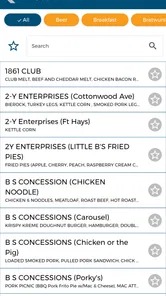
The Kansas State Fair app is designed to help visitors plan and enjoy their trip to the fairgrounds. It typically provides practical information such as event schedules, entertainment listings, maps, food and vendor details, ticket information, and important announcements. Having these details in one place can make it easier to organize your day and avoid missing performances or activities.
Can I use the Kansas State Fair app to find events and entertainment?
Yes, one of the most useful features is the ability to browse fair events and entertainment options. Visitors can check performance times, discover activities for families, and review special attractions before arriving. Because schedules may change due to weather or other circumstances, it is still a good idea to check the app regularly for updated times, cancellations, or location changes during the fair.
Does the Kansas State Fair app include a map of the fairgrounds?
The app may include a digital map or location information to help visitors navigate the fairgrounds. This can be especially helpful when looking for stages, livestock areas, food stands, restrooms, entrances, and vendor booths. Depending on the version available for your device, some map features may require an internet connection, so downloading or reviewing key information before arrival can be useful.
Pros
- Easy access to fair dates
- schedules
- and event information.
- Useful way to discover concerts
- shows
- exhibits
- and daily activities.
- Helps visitors plan their trip before arriving at the fairgrounds.
- Convenient access to fair updates from a mobile device.
- Could make finding favorite attractions and events more efficient.
Cons
- Some information may become outdated if schedules change unexpectedly.
- The app may offer limited value outside the annual fair period.
- Event details could vary depending on the selected fair year.
- Users may still need maps or signage for precise on-site navigation.
- Performance and availability may depend on the quality of the internet connection.











