

K Health | 24/7 Virtual Care
- 9.07K
- 4.6
- Installs
- 1.00M
- Price
- Free

Screenshots


Analysis by Reviewed
When a health question comes up outside a clinic’s usual hours, I want a clear way to decide what to do next—not a confident-sounding answer that encourages me to ignore a problem. K Health | 24/7 Virtual Care is built around that first step: describing symptoms, getting AI-assisted guidance, and having the option to speak with a medical provider. I see it as a practical route into care for suitable concerns, with an important limit: a phone-based service cannot examine you or replace emergency help.
A practical place to start
I see K Health as a useful first stop when a concern feels important enough to address but not obviously urgent. Its medical focus is more specific than a general wellness tracker: the aim is to help you make sense of symptoms and, when appropriate, connect that question to a medical provider. The key distinction is that an app can help organize the next step, but it cannot replace emergency services or an in-person examination when those are needed.
For example, imagine waking up with a new, mild symptom before work and being unsure whether to wait, book a routine appointment, or ask for medical guidance. A symptom checker can give you a structured way to describe what is happening instead of searching scattered pages online. If the concern seems more serious or changes quickly, I would skip the app-based route and seek urgent care directly. That judgment matters more than the convenience of any virtual option.
Getting to Know K Health
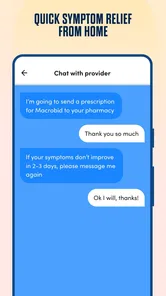
First off, let's talk about what makes K Health stand out. The app is designed to provide you with immediate access to medical care, right from your smartphone. No more waiting days for an appointment or spending hours in a waiting room. With K Health, you can chat with a doctor, get prescriptions, and even have your health questions answered without ever leaving your couch.
How It Works
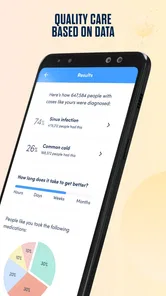
Using K Health is super straightforward. You start by entering your symptoms, and the app uses AI to compare them with millions of similar cases. This gives you a detailed report on what might be ailing you, and then you can decide if you want to chat with a doctor. It's like having a personal medical detective on call! The AI-driven diagnosis is pretty impressive, and it's backed by real doctors who are available around the clock.
To get more value from that first step, I’d describe the timeline as clearly as possible: when the symptom began, whether it is changing, and what makes it better or worse. Keeping the question focused also helps. Rather than entering a long list of unrelated worries at once, I’d start with the issue that is bothering me most, then bring relevant background into a provider conversation if one is needed. AI suggestions are a starting point for discussion, not a final diagnosis, so I wouldn’t use a reassuring result to ignore symptoms that are severe or worsening.
User Experience
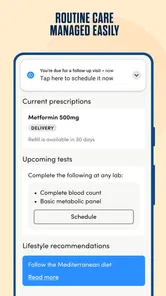
The user interface of K Health is sleek and intuitive. Navigating through the app is a breeze, even if you're not tech-savvy. All the features are neatly organized, so you don't have to fumble around when you're not feeling your best. Plus, the app maintains a history of your interactions and medical records, which comes in handy if you need to reference past consultations.
More From Our News Desk

 Gmail
GmailGmail in a Busy Inbox: Who Benefits Most?
From first account to crowded workday, Gmail earns its place through dependable search and flexible sorting—but its best fit depends on how much inbox maintenance you can tolerate.

 Prime Video
Switching to Prime Video: What Changes in Your Viewing Routine
Prime Video can make a compelling second home for streaming, but switching means learning a different catalog, rental layer, and route from browsing to playback.

 Universal TV Remote Control
Universal TV Remote Control Works Best as a Reliable Backup
A phone remote earns its place through quick setup and reliable habits. Here is how to get more from Universal TV Remote Control—and where its limits show.

 Weather - By Xiaomi
Weather by Xiaomi Review: Clear at a Glance, Less Clear Up Close
Xiaomi’s weather app makes everyday forecasts quick to scan, but its calm surface can leave useful details and recovery paths harder to find than they should be.

 X
XX Under Pressure: Can It Recover When Posting Goes Wrong?
A resilience-focused review of X, examining setup, mistaken posts, interruptions, weak connections, and the gaps that matter when recovery needs to be dependable.

 Clash of Clans
Clash of Clans Is Won Between the Battles
Its raids are quick; its community is a long-term project of coordination, teaching, rivalry, and shared responsibility—with all the friction that entails.
Latest News



That history can be especially useful when the same concern returns: instead of relying on memory, you can look back at what you previously discussed and explain what has changed. I’d still keep my own notes for details that matter to me, such as a symptom’s timing or questions I want answered, rather than assuming the app’s record captures every detail I might need later. If you share a phone or prefer not to keep health information on a device, consider that convenience alongside your own comfort with storing medical details in an app.
Who benefits most, and where it fits
I think the strongest fit is someone who wants an accessible way to ask about a non-emergency concern, especially when arranging an in-person visit is inconvenient. It may also suit people who like having a guided symptom conversation before deciding what kind of care to seek. Compared with searching the web, a symptom flow is more focused and can lead into a provider interaction; compared with a regular clinic, it avoids the trip but cannot offer a hands-on examination. The right choice depends on the problem, not just on which option is faster.
I would not make it my only source of care for complex or ongoing conditions that need examination, tests, or continuity with a clinician who knows my history. Nor would I turn to it for an emergency. If you already have a primary-care professional and need a physical assessment or coordinated follow-up, that familiar in-person relationship is likely the better route. Virtual access is most useful as an additional path, not a reason to abandon care that requires more than a conversation.
What the current version tells existing users
K Health is a medical app from developer K Health. It is free to install, has an Everyone age rating, and its current version is 5.0.5. It was released on January 7, 2018, so it has been around long enough to feel like an established product rather than a brand-new experiment. The app has a 4.6 average from around 26,000 ratings, with more than a million installs.
Those figures provide a sense of broad adoption, but they do not tell me whether a particular consultation will suit my needs. The version number identifies the current build; by itself, it does not prove which features changed or how an update affects an individual account. For an existing user, I’d judge the experience by whether the symptom flow remains clear and whether the provider conversation addresses the question at hand, rather than assuming that a newer build automatically means better care.
Cost, access, and the trade-offs
The free download makes it easy to try the app, but I would separate that from the cost of care. The earlier claim that consultations have a flat fee should not be treated as a universal promise: before starting a visit, check the terms and any charges shown for the specific service you plan to use. That small pause is worthwhile, particularly if you are comparing virtual care with an insurance-covered appointment or a local clinic.
Availability at any hour is helpful when a question comes up outside office hours, but being able to start a conversation does not guarantee that every concern can be handled remotely. A provider may need more information, or an in-person evaluation may be more appropriate. I’d go in with a concise account of the issue and a clear question, then use the response to decide on the next step rather than expecting an app to resolve every part of a health problem.
Making a virtual conversation more useful
A small preparation step can make a provider chat easier to use: before opening it, write down the main concern, when it started, what has changed, and the one decision you need help making. For instance, if a symptom is disrupting sleep but is not rapidly worsening, I’d note when it tends to appear and what I have already tried. That gives the conversation a practical focus and makes it less likely I’ll remember an important detail only after the visit ends.
I’d also separate observations from guesses. “This began yesterday and is worse when I do a particular activity” is more useful than arriving convinced of a specific diagnosis. If medication, allergies, or a relevant health history could affect the advice, I would have those details ready rather than relying on memory under pressure. This is not a guarantee of a particular outcome; it is simply a better way to use limited screen-based communication.
Why I Love It
One of the things I absolutely love about K Health is its accessibility. Whether you're at home, at work, or on vacation, you can reach a doctor within minutes. It's like having peace of mind in your pocket. Another highlight is the cost-effectiveness. With healthcare costs skyrocketing, K Health offers a budget-friendly alternative without compromising on quality. You pay a flat fee for consultations, which is often much cheaper than traditional visits.
Moreover, the app is a lifesaver for those with busy schedules. Who has time to sit in a waiting room for hours? With K Health, you can manage your health on your terms, fitting it around your lifestyle rather than the other way around.
Where the convenience has limits
The main trade-off is that a smooth app experience can make remote care feel more complete than it is. A provider can ask questions and offer guidance, but cannot perform a physical examination through a phone. If the issue depends on seeing or feeling something directly, or requires tests, a local clinician may be the more useful first choice. I would treat a recommendation to seek in-person care as a sensible boundary of the format, not as a failure of the app.
There is also a difference between reaching a service and getting the exact kind of help you hoped for. A conversation may clarify what to do next without settling the underlying cause. That distinction matters if you are choosing between this app and a routine appointment: for a short, focused question, virtual access may reduce hassle; for a problem that needs monitoring or a series of coordinated decisions, an established care relationship has advantages the app cannot supply on its own.
Before you rely on it
If you are deciding whether to try it, I’d ask yourself what you need from the visit: a preliminary perspective, a conversation with a provider, or a physical assessment. The first two are where a virtual service can be convenient; the last usually calls for in-person care. I’d also check the consultation details before proceeding, prepare a short symptom timeline, and keep expectations realistic about what can be decided remotely.
For someone who mainly wants symptom information, the guided checker may be enough to help frame a question. Someone seeking diagnosis and treatment for a complicated issue may be better served by a clinician who can examine them and coordinate follow-up. That is not a flaw unique to K Health; it is the central trade-off of phone-based care. Its strongest role is making a sensible first conversation easier to reach.
Who may prefer another option
I would skip K Health as the main route if I needed emergency attention, a physical examination, or a care plan that depends on regular follow-up with the same clinician. I’d also choose my usual doctor when the issue is tied to a complicated history and the context matters as much as the current symptom. In those situations, the extra effort of arranging in-person care can be worthwhile because the clinician can assess more than a description on a screen.
For a simple question, the alternatives have different strengths. A web search is quick but can leave you sorting through broad or alarming possibilities on your own. A routine clinic visit offers face-to-face assessment but takes planning and travel. K Health sits between those options: it gives the symptom question a more guided path and can connect it to a provider, while keeping the limitations of remote assessment. I’d choose based on what the concern requires rather than treating one route as best for every situation.
What to watch as the app evolves
The product has a long enough history to be familiar to many users, but a release date and version label are not a changelog. I would not assume that version 5.0.5 brought a particular improvement simply because it is the current build. Existing users can judge changes by whether the flow remains understandable, whether relevant history is easy to find, and whether the handoff from symptom questions to a provider feels clear in their own use.
For anyone considering it now, the useful things to pay attention to are practical: whether the service fits the kind of question you have, what the specific visit will cost before you proceed, and what next step is advised if remote care is not enough. Those checks are more meaningful than expecting any single update to remove the basic limits of virtual medicine. A helpful app can make access easier, but the quality of the decision still depends on matching the care setting to the problem.
Wrapping It Up
In conclusion, K Health | 24/7 Virtual Care is a revolutionary app that brings healthcare to your fingertips. It's convenient, user-friendly, and offers reliable medical advice whenever you need it. If you're looking for a smart, efficient way to manage your health, give K Health a try. Trust me, once you experience the ease of virtual care, there's no going back! So, next time you're feeling under the weather, remember your virtual doctor is just a tap away.
My recommendation comes with one important boundary: I’d use it to make a non-urgent question easier to raise, not as a substitute for emergency help or care that requires an examination. The app’s value is in reducing friction between noticing a problem and asking for guidance. If that is the gap you need to bridge, it is worth considering; if you need hands-on evaluation or ongoing coordination, choose a care option built for that instead.
K Health | 24/7 Virtual Care Frequently Asked Questions
Is K Health available at any time, and how quickly can I speak with a provider?
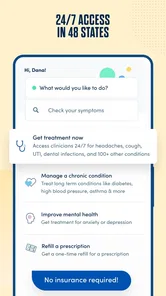
K Health is presented as a 24/7 virtual care app, making it an option to consider when you want medical guidance outside a traditional appointment. The app connects users with virtual medical providers, but the time it takes to reach someone may vary. For severe or rapidly worsening symptoms, contact emergency services rather than waiting for an app-based response.
What do I need to get started with K Health?
K Health is a medical app for mobile devices, so you can begin by installing it on a compatible phone or tablet. Before using its care features, be prepared to describe your concern and symptoms clearly so the app’s symptom checker or a provider can understand what you need. The app is free to download, though some services may involve payment.
What conditions can K Health help me with?
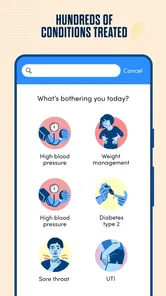
K Health is designed for primary care and virtual medical support, so it may be a convenient place to start when you have a health concern or want guidance about symptoms. Its AI-powered symptom checker can offer insights, while medical providers can discuss your needs. For an urgent or life-threatening situation, seek emergency care rather than relying on an app.
What is K Health and how does it work?
K Health is a virtual healthcare app that provides access to 24/7 medical consultations with doctors and healthcare professionals. Users can communicate with certified doctors through chat or video calls, receive personalized health advice, and manage their medical needs without needing a physical appointment. The app leverages AI technology to analyze symptoms and offer insights, making healthcare more accessible and convenient.
Is K Health free to use?
K Health is free to download, but some services may involve payment. Users can access symptom checking and some basic health information for free, while consultations with doctors and personalized treatment plans may require a subscription or one-time payment. Check the available options in the app before beginning a service so you know what applies to the care you want.
Pros
- 24/7 access to healthcare professionals.
- Affordable subscription plans.
- User-friendly interface.
- Quick response time.
- Extensive health database.
Cons
- Limited to text-based consultations.
- No in-person visit option.
- Requires stable internet connection.
- May not cover all health issues.
- Limited integration with local pharmacies.











