Jotform - Form, Sign & Survey
- 2.10K
- 4.7
- Installs
- 1.00M
- Price
- Free

Screenshots


Analysis by Reviewed
When a customer asks me to gather a few details, collect a signature, or run a quick survey, I want a workflow I can manage from my phone without turning a simple task into a project. That’s where Jotform - Form, Sign & Survey fits for me: it brings form work and e-signing into a business app from Jotform Inc. It’s free to install, rated for Everyone, and currently at version 2.12.36; in-app purchases range from $39.99 to $999.99 per item. Its 4.7 average from around 27,000 ratings and more than a million installs suggest it has found a broad audience, though popularity alone can’t tell you whether it suits your workflow.
Where it fits into a working day
The clearest reason I’d reach for this app is that it turns scattered questions into a repeatable process. Imagine a repair technician finishing a visit: instead of asking the customer to send their details in a text, then following up separately for approval, the technician can use a form to gather the relevant information and a signing step when the job calls for one. The customer has a defined task, and the business has a more consistent record to refer back to.
That kind of workflow is useful for freelancers, small teams, event organizers, and anyone who handles the same sort of intake more than once. It is less compelling for a person who only needs to ask a friend a one-off question. In that case, a message, email, or simple poll avoids the extra work of setting up and maintaining a form. I think the deciding question is not whether the app can do the job, but whether the job happens often enough to justify a structured process.
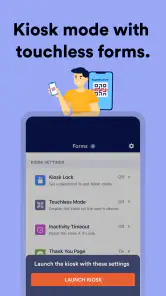
For an event organizer, for instance, I’d prepare a registration form in advance, check that its questions are easy to answer on a phone, and keep a separate signing step only if the event actually requires it. Once people start arriving, the app’s kiosk mode can make a shared-device workflow more practical than asking each person to open a link on their own phone. I’d still test the full sequence before the event, including how the next person begins, rather than assume that a form designed for individual use will automatically feel natural at a busy check-in table.
Seamless Form Creation
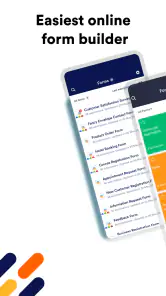
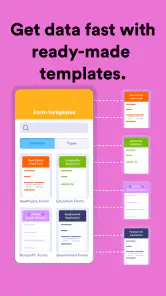
Creating forms on Jotform - Form, Sign & Survey is as smooth as butter. The intuitive interface is a blessing for tech-savvy users and beginners alike. You don’t need to be a coding wizard to whip up a form. Just drag, drop, and you’re good to go. It’s almost like magic! With a plethora of customizable templates, you can design anything from a simple contact form to a detailed survey with ease.
For a small business, the practical benefit is being able to reuse a well-planned intake form instead of repeatedly asking the same questions in messages. I’d keep fields focused, put essential contact details first, and test the form on a phone before sharing it. That last check matters: a form that looks tidy on a larger screen can still feel tedious when someone is completing it between errands. If you only need to ask one question once, a quick message or a basic poll may be less effort than building a form.
Features that Stand Out
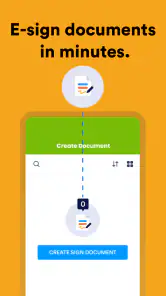
Let’s talk about the features, shall we? First up, the e-signature capability. It's a lifesaver, especially when you’re on the clock and need that signature ASAP. It turns your device into a signing pad, making document signing a breeze.
More From Our News Desk

Clash of Clans Is Won Between the Battles

Android Auto Makes the Case for Quieter Car Software

MobiOffice: Transforming Mobile Productivity with Seamless Integration

EA SPORTS FC™ Mobile Soccer: Redefining Mobile Sports Gaming

How Microsoft OneDrive Became a Mobile Productivity Giant

How Google Translate Breaks Language Barriers Effortlessly
Another feature that deserves a shoutout is the offline mode. Yes, you heard it right! You can create and edit your forms even when you’re off the grid. Once you’re back online, everything syncs up effortlessly. It’s like having your cake and eating it too!
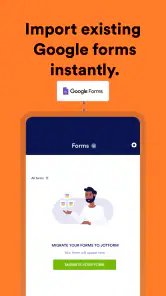
Oh, and did I mention the integrations? From PayPal to Google Sheets, Jotform plays well with a variety of platforms, making data management seamless and efficient.
A useful habit is to decide where responses should go before a form is circulated. For example, a market-stall owner could use a short form to record customer enquiries, then review the collected details later rather than trying to remember names and requests after a busy shift. When a signature is needed, I’d make the signing step clear and avoid mixing it with unrelated questions; a straightforward sequence is easier for the person completing it and easier to check afterward.
Settings that are worth a deliberate check
Before sending a form out, I’d take a moment to review the wording and the order of the questions, not just whether the fields are present. A person filling it in should be able to tell what information is needed and why. If a field is optional, making that clear can prevent someone from getting stuck or entering a placeholder simply to move on. This is especially useful when the form is completed in person, where a confusing question can interrupt a queue and leave staff explaining the same thing repeatedly.
I’d also treat the destination for responses as part of the form setup, rather than an afterthought. If the information is intended for a spreadsheet or another connected service, test one sample submission and check that the result is useful there. A connection that technically passes data along can still leave a team with awkward columns or unclear answers. This small trial helps catch practical problems before real customer responses begin accumulating.
One trade-off with integrations is that they make a workflow more convenient only when someone owns the whole chain. A team should decide who checks incoming responses, who follows up, and what happens if a connected service is unavailable. Jotform can help collect information, but it does not remove the need for a sensible process around it. For a solo user, keeping the first version simple is often better than connecting every tool at once.
Usability on the Go
We all know how crucial it is to have apps that work smoothly on mobile devices. Thankfully, Jotform has nailed it in terms of mobile usability. The app adapts beautifully to any screen size, ensuring that you can continue your work without any hiccups. Whether you’re using a tablet or a smartphone, the experience is consistently top-notch.
And let’s not forget about the notifications. The app keeps you in the loop with real-time updates, so you’re always informed about who’s filling out your forms and when. It’s like having a personal assistant who never sleeps.
Offline work is especially handy when you’re preparing or editing a form somewhere with a weak connection, but I’d still treat reliable internet as important when it is time to share forms or bring work back online. Before relying on an offline workflow at an event, I’d test the exact form and device in advance, then check that responses have synced once connectivity returns. That small routine helps avoid assuming that a completed task has already reached everyone who needs it.
Faster habits for repeat work
Once a form has been used successfully, I’d keep a short checklist for the next time rather than relying on memory. Check the questions, confirm the intended destination for responses, and submit a test entry. That routine is more valuable than making a form elaborate: the aim is to catch stale instructions or a field that no longer belongs before customers see it. For a recurring appointment or event, a consistent form also makes it easier to compare responses because people are being asked the same relevant things.
On a phone, it helps to separate designing from running the task. I’d build or revise a form when I have enough time to read it carefully, then use the mobile workflow for sharing, checking activity, or handling an in-person interaction. Trying to invent questions while someone waits can lead to unclear wording and unnecessary fields. A prepared form is quicker to use precisely because the decisions were made earlier.
For a small team, I’d agree on a simple naming habit for forms so that a colleague can recognize the right one without opening several similar versions. That is not a special feature; it is ordinary housekeeping that becomes important once a few reusable forms exist. Keeping one current version and reviewing it before each new run is safer than assuming a familiar form still matches the task.
Where the limits become important
Jotform’s flexibility is a strength, but it can encourage overbuilding. A form with too many questions, multiple tangents, and an unnecessary signature may look thorough to its creator while feeling like work to the person completing it. I’d remove anything that does not help make a decision or complete the task. If the goal is simply to hear opinions, a lightweight survey tool may be quicker; if the goal is to explore a topic conversationally, an interview is usually more revealing than a form.
It is also worth distinguishing collecting information from analyzing it. A spreadsheet is often the more comfortable place to sort, compare, and work directly with rows of data, while Jotform is more appealing when the first challenge is giving people a clear way to submit consistent answers. Connecting the two can make sense, but it adds a step that someone needs to check. If the workflow is mostly spreadsheet editing, starting in a spreadsheet may be simpler.
Cost is another point to think through before a team builds a routine around paid capabilities. The app is free to install, but in-app purchases are listed from $39.99 to $999.99 per item. I would first identify which part of the workflow is genuinely valuable, then check the relevant plan details before committing. A one-person operation with occasional forms may have different needs from a business that relies on repeated collection and signing, so I wouldn’t treat the free download as a promise that every ongoing use case has no cost.
Compatibility is straightforward to check before installation: the listed minimum operating-system requirement is 7.0. Jotform Inc developed the app, which sits in the business category. It has a 4.7 average across around 27,000 ratings, with roughly 2,100 written reviews, and more than a million installs. Those figures offer useful context about its reach, but I’d still judge it by trying one real form on the device and in the workflow I intend to use.
Choosing the Right Workflow
Compared with a basic survey tool, Jotform is a better fit when the job involves more than collecting opinions: forms, signatures, and business-oriented data gathering can sit in the same mobile workflow. A spreadsheet, by contrast, is usually better for editing and analyzing data directly, while a simple messaging app is quicker for informal questions. I wouldn’t choose a form builder for every task; the advantage appears when responses need a consistent structure or a signature, not when a casual conversation will do.
For repeat tasks, I’d keep a proven form as a starting point and adjust only the fields that change for each occasion. That reduces setup work, but it also calls for a quick review before sending: remove questions that no longer apply, check instructions, and make sure the form still asks only for information the task needs. Reuse saves time only when the reused version remains relevant.
A sensible first trial is to choose a low-stakes process that already involves repeated questions, such as collecting details from prospective clients, and run the form with a few people before relying on it for every enquiry. Watch where they hesitate and whether the answers arrive in a shape your team can use. If the trial creates more follow-up than it removes, simplify the questions or use a different channel. That gives you a practical answer to whether a form-based workflow suits the task without redesigning the whole operation around it.
Final Thoughts
To wrap things up, Jotform - Form, Sign & Survey is a powerhouse app that combines functionality with ease of use. Whether you’re a business professional or someone who just loves organizing events, this app is a must-have in your toolkit. The flexibility, coupled with the robust set of features, makes it a standout choice for anyone looking to streamline their form, signature, and survey processes.
My recommendation depends on how often you need structured information. If you regularly collect details, ask people to sign, or want a repeatable mobile process, I can see the appeal; if your needs are occasional and uncomplicated, a lighter tool may be easier to maintain. The app is listed in the Business category, and its 2.1K reviews give prospective users another perspective to consider alongside its rating. It was released on June 16, 2019, and requires iOS 7.0 or later, so I’d check device compatibility before installing.
So, if you haven’t tried it yet, give it a whirl. You might just find it to be the perfect solution to your data collection needs. Happy form building!
Jotform - Form, Sign & Survey Frequently Asked Questions
Does Jotform let me collect information on a shared device?
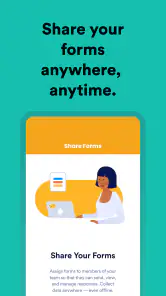
Yes. Jotform supports kiosk mode, which is useful when people need to submit information using a shared device. This can suit settings such as reception areas, events, or other situations where visitors complete a form themselves. You can create and share forms through the app, so kiosk use is part of a broader workflow for collecting data and handling forms.
Can I sign documents electronically with Jotform?
Jotform includes e-signature tools for signing documents electronically, alongside its form and survey features. This can help when you need to collect a signature as part of a document-based workflow rather than manage paper copies. The app is intended for creating and sharing forms and e-sign documents, so it may be useful for business tasks that combine information collection with signatures.
Can I create and manage forms from my phone with Jotform?
Jotform is designed for mobile use, letting you create and share forms and e-sign documents to collect data. It can also be used in kiosk mode, which may suit situations where people need to submit information from a shared device. The app is free to download, and its business-focused tools can be useful whether you are handling occasional forms or regular data collection.
What is Jotform and what can I use it for?
Jotform is a versatile application designed for creating custom forms, e-signatures, and surveys. It caters to a wide range of users, from businesses to educators, allowing them to gather data efficiently. Whether you need to collect feedback, sign documents, or conduct market research, Jotform offers an array of tools to simplify these processes, making it an essential app for data-driven tasks.
Is Jotform free to use, or are there any costs involved?
Jotform offers a free plan that includes basic features suitable for individuals or small projects. However, for more advanced features, such as increased form submission limits, storage, and access to premium templates, paid plans are available. These plans are tiered, allowing users to choose one that best fits their needs and budget, ensuring flexibility in usage. In-app purchases are listed from $39.99 to $999.99 per item, so check the available options before choosing a paid upgrade.
Pros
- User-friendly interface for easy form creation.
- Extensive template library for quick setup.
- Seamless integration with third-party apps.
- Robust data analysis and reporting tools.
- Mobile-friendly forms for on-the-go access.
Cons
- Limited features in the free version.
- Occasional sync issues with integrations.
- Advanced features require a learning curve.
- Customization options can be overwhelming.
- Data export options are somewhat limited.

- Category
- Business
- Version
- 2.12.36











