Joist Invoice & Estimate App
- 4.85K
- 4.6
- Installs
- 1.00M
- Price
- Free

Screenshots
Analysis by Reviewed
I judge a contractor’s money app by what happens between leaving a job and getting paid: can I turn the work I just finished into a clear estimate or invoice without recreating everything at a desk? That mobile-first moment is where Joist Invoices makes sense. It is a business app from Joist Software Inc., built around job paperwork rather than the broad bookkeeping dashboards that can feel oversized for a one-person trade business. I’d consider it if estimates, invoices and client details are the daily admin I most want to get under control.
Where a connection changes the workflow
Making an estimate on site is useful only if the finished document can move smoothly to the customer. I’d treat sending or checking an invoice as a moment to make sure my phone has a reliable connection, rather than assuming every part of the process works without one. In practice, that means drafting the job details while I have the relevant measurements and material notes in front of me, then checking the document and its destination before I send it. That small pause can prevent a rushed typo from becoming a confusing quote.
Connectivity also matters when a customer asks for a revision while I’m away from the office. A phone-based workflow can help me respond promptly, but I’d still confirm the revised scope and totals before sharing anything. For work with several stages or changing material costs, I find it sensible to keep my own notes on what changed and why; a polished estimate is not a substitute for a clear agreement about the job.
Useful in the truck, less so for complex office work
The strongest fit is a contractor who wants to handle routine paperwork in the same mobile context where jobs are discussed: between appointments, at a site, or after a customer approves the scope. A realistic example is finishing a small repair, listing labor and materials while the details are fresh, and preparing an estimate before driving to the next job. That can reduce the end-of-day pile of half-remembered tasks. I would avoid entering sensitive or easily confused job details while distracted, though; a few minutes parked and focused beats correcting an invoice later.
Compared with a spreadsheet, an invoice-focused app can make repeat customer paperwork feel more orderly and presentable. A spreadsheet may be preferable if I want complete control over formulas, columns and unusual pricing rules, but it also leaves more formatting and checking to me. Compared with full accounting software, Joist’s appeal is its narrower contractor-centered job flow; a business needing deeper bookkeeping, payroll or financial oversight should choose a tool designed for those demands instead of expecting an invoicing app to cover everything.
What I would check before relying on it
My practical advice is to build one representative estimate first: include the kinds of labor and materials I actually bill, review the wording, and make sure the result is easy for a customer to understand. Then test the path from estimate to invoice on a low-stakes job before using it as the sole record for a larger project. Keep a separate record of agreed changes and payment arrangements when the job is complex. This is not busywork; it gives me a useful fallback if a phone is unavailable or a message needs to be checked later.
Joist has a 4.6 average from around 12,000 ratings, and it has been installed over a million times. It is free to start, rated for Everyone, and its current version is 3.64.0, with in-app purchases ranging from $7.99 to $309.99 per item. I’d look carefully at which paid options matter to my own workflow before committing, rather than assuming every contractor needs them. It first appeared on April 14, 2014, and supports Android 8.0 or later.
More From Our News Desk

Weather by Xiaomi Review: Clear at a Glance, Less Clear Up Close

X Under Pressure: Can It Recover When Posting Goes Wrong?

Clash of Clans Is Won Between the Battles

Android Auto Makes the Case for Quieter Car Software

MobiOffice: Transforming Mobile Productivity with Seamless Integration

EA SPORTS FC™ Mobile Soccer: Redefining Mobile Sports Gaming
Easy Peasy Setup
Getting started with the Joist Invoices for Contractors app is smoother than a fresh jar of Skippy. The app is available for both Android and iOS, so no one's left out. Once you download it, you're greeted with a clean and straightforward interface that even my tech-averse uncle could navigate. Setting up your account is quick, and the app guides you through every step to ensure you’re not left scratching your head.
A Contractor's Best Friend
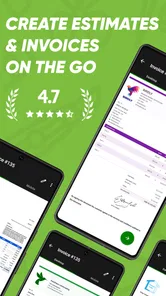
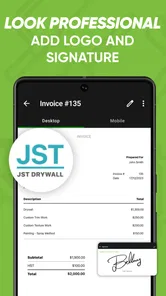
Now, let's dive into the nitty-gritty. What makes this app a contractor's best friend? For starters, it lets you create professional invoices in the blink of an eye. You can customize them with your logo, add details like labor and material costs, and boom, you’ve got yourself an invoice that screams professionalism.
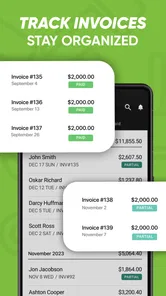
But wait, there’s more! The app also keeps track of your clients, saving you from having to remember every single detail. It even sends out automatic reminders for those pesky late payments. Honestly, it’s like having a personal assistant who never takes a day off.
Features That Pack a Punch
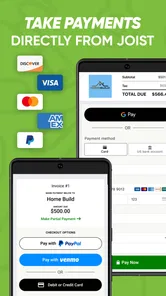
The features of this app are like the toppings on a pizza; they make everything so much better. You can track your expenses, generate detailed reports, and even accept payments directly through the app. Whether you’re on a job site or sipping coffee at a café, managing your finances has never been easier.
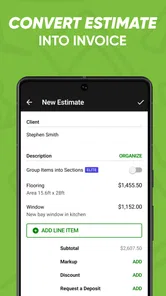
One feature that deserves a special mention is the ability to estimate projects. You can whip up detailed estimates and get them approved by clients with just a few taps. It’s a game-changer, especially when you’re juggling multiple projects and need to keep everything organized.
Keeping work moving when plans change
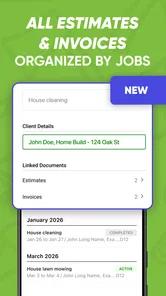
On a busy day, the value is less about producing paperwork at top speed and more about keeping each job distinct. I’d use a consistent naming habit for customers and projects, and check that the estimate describes the work rather than relying on a vague label such as “repair.” That makes it easier to revisit a document when a customer calls later, and reduces the chance of mixing up similar jobs. For a contractor who works with many small projects, this bit of discipline can matter as much as the template itself.
There is still a trade-off: mobile convenience encourages quick edits, but a phone screen is not ideal for reviewing a complicated scope line by line. I would prepare routine quotes on the go and reserve a calmer moment for larger estimates, checking quantities, labor and any exclusions before sending. If my business depends on detailed inventory, multi-step approvals or extensive financial reconciliation, I’d pair an invoicing tool with a more comprehensive system or choose that broader system as the main workspace.
Connectivity verdict
My recommendation is conditional but straightforward. If you are a solo contractor or small trade business looking for a practical way to prepare job paperwork and keep client interactions moving, Joist is worth considering. If you need a full accounting platform, depend on intricate pricing logic, or regularly work where you cannot count on a connection to complete important tasks, compare alternatives and test your exact workflow before making it central to your business. I’d also keep a clear backup of essential job details instead of treating any single phone app as the only place those details exist.
Wrap-Up: A Must-Have for Contractors
In conclusion, if you're a contractor looking to simplify your financial management, this app is a must-have. It’s packed with features that make your job easier, and it’s as reliable as your favorite tool. The Joist Invoices for Contractors app is more than just an invoicing app; it’s a comprehensive tool designed to make your life a whole lot simpler. Trust me, once you try it, you'll wonder how you ever managed without it.
Joist Invoice & Estimate App Frequently Asked Questions
Can I use Joist Invoices for Contractors on my device?
Joist Invoices for Contractors is a mobile app for creating invoices and estimates, so it is intended for people who want to handle billing from a compatible device. It is free to download, with in-app purchases available. Before installing, check that your device runs a supported operating system; the app requires version 8.0 or later.
What does Joist Invoices for Contractors cost, and are there paid features?
The app is free to download, while in-app purchases are offered for users who want access to paid options. Those purchases range from $7.99 to $309.99 per item, so the total cost depends on what you choose to buy. It is sensible to review the purchase details in the app before selecting anything, particularly if you only need basic invoicing.
Who develops Joist Invoices for Contractors, and is it intended for all ages?
Joist Software Inc. develops Joist Invoices for Contractors, a business app focused on invoicing and estimates. Its content rating is Everyone, so it is classified as suitable for a broad audience. The app has been available since April 14, 2014, and its current version is 3.64.0. Those details may help you assess whether it fits your device and business needs before installing.
What is Joist Invoices for Contractors and how does it work?
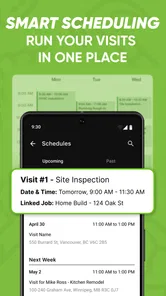
Joist Invoices for Contractors is an app designed to streamline the invoicing process for contractors and small business owners. It allows users to create professional invoices and estimates on the go, directly from their mobile devices or desktop. The app also features tools for managing clients, tracking payments, and organizing projects, making it easier to keep financial records in order and ensure timely billing.
Is Joist Invoices for Contractors suitable for small businesses?
Yes, Joist Invoices for Contractors is particularly suitable for small businesses and independent contractors. The app is designed to cater to the needs of businesses that require a simple yet effective solution for invoicing and financial management. Its user-friendly interface and comprehensive features make it easy for small business owners to manage their invoicing without needing extensive accounting knowledge.
Pros
- User-friendly interface simplifies invoicing.
- Customizable templates for branding.
- Automatic payment reminders enhance cash flow.
- Integration with accounting software.
- Secure cloud storage for easy access.
Cons
- Limited free version features.
- Occasional sync issues with bank accounts.
- Requires stable internet connection.
- Customer support availability is limited.
- Mobile app lacks some desktop features.











