Jobber: Field Service Software
- 959.00
- 4.5
- Installs
- 1.00M
- Price
- Free

Screenshots


Analysis by Reviewed
Before I would put any field-service app at the center of a business, I’d first decide how jobs move from an enquiry to a completed visit and an invoice. Jobber: Field Service Software is most useful when that path is currently scattered across calendars, messages, paper notes, and separate billing tools. It is a business app from Jobber Software, and its focus is helping home-service operators keep day-to-day work organized rather than replacing the practical judgement that goes into running a crew.
A sensible way to try it is to pick one ordinary workday and follow a job through the whole process. Notice where you still have to switch tools, chase a detail, or remind someone about the next step. That gives you a fair test: the value is not simply having a digital schedule, but whether keeping job details, customer context, and billing together makes the handoffs less fragile. If your current setup already works smoothly, switching everything at once may create more disruption than benefit.
Start with the work you need to coordinate
Before migrating records or changing a team’s habits, write down the points where a job can stall: an enquiry waiting for a reply, a visit that was never added to the shared calendar, a customer detail known only to one worker, or an invoice postponed until the owner has time. This makes the trial more concrete than simply exploring screens. Choose a representative job, including one handoff between the office and the person in the field, and see whether the app makes that handoff clearer.
I would also keep the first trial deliberately small. Use a limited set of current jobs and agree on where the authoritative information lives while testing. If half the crew continues to use a paper diary and the other half relies on the app, the test will measure the confusion of running two systems rather than the app’s usefulness. Once the team knows what to update and when, it becomes easier to judge whether a shared workflow is saving effort.
Streamlining Your Business Operations
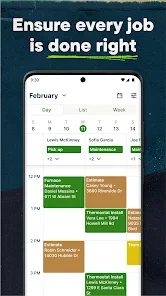
First off, let's talk about the app's user-friendly interface. Jobber: Field Service Software is designed with simplicity in mind, ensuring that even the least tech-savvy among us can navigate through it with ease. The dashboard is your control center, offering a clear overview of all ongoing tasks, appointments, and client communications. This feature is particularly useful for keeping track of your team’s schedule and making sure nothing falls through the cracks.
Efficient Scheduling and Dispatching
One of the standout features of Jobber is its scheduling and dispatching capabilities. Imagine having all your appointments and tasks neatly organized in one place, allowing you to assign jobs to your team with just a few clicks. This means less time spent on the phone and more time getting things done. The real-time updates ensure that everyone is on the same page, reducing the risk of miscommunication.
A useful habit is to treat each scheduled visit as a handoff, not just a time slot. Before the day gets busy, check that the person doing the work has the correct appointment and customer context, then review the schedule when a job changes. For example, if a morning visit runs long, a dispatcher can use the shared schedule to reassess the rest of the day instead of relying on a chain of calls and memory. The benefit depends on the team actually keeping the schedule current; a digital calendar cannot resolve conflicting plans if changes are left in someone’s texts or on paper.
More From Our News Desk

Clash of Clans Is Won Between the Battles

Android Auto Makes the Case for Quieter Car Software

MobiOffice: Transforming Mobile Productivity with Seamless Integration

EA SPORTS FC™ Mobile Soccer: Redefining Mobile Sports Gaming

How Microsoft OneDrive Became a Mobile Productivity Giant

How Google Translate Breaks Language Barriers Effortlessly
Capture information that helps the next visit
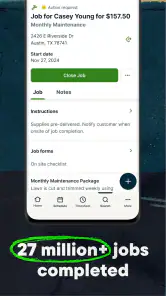
For repeat work, the useful question is not only “When is the appointment?” but “What will the next person need to know?” A customer record can help keep practical context from disappearing between visits, but the team needs a shared standard for what belongs there. I’d favor short notes tied to the work—such as a customer’s scheduling preference or a detail that helps prepare for a return—over long narratives that are difficult to scan on a busy day.
There is a small but important trade-off here: centralizing information makes it easier for colleagues to pick up a job, while also making outdated notes more visible. When a detail changes, make it clear which information is current rather than adding another note that contradicts the old one. This is especially useful when the person who answers a call is not the person who last visited the customer. The app can organize the record, but good record-keeping still depends on the people entering it.
Invoicing and Payments Made Easy
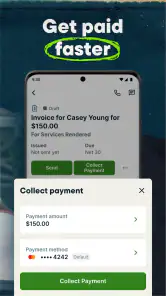
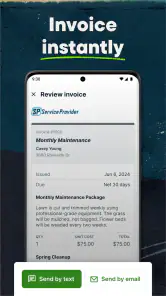
Now, let's talk money. With Jobber, invoicing is no longer a dreaded task. The app allows you to create professional invoices that reflect your brand, and you can send them directly to clients. Plus, with integrated payment processing, clients can pay you online, making the whole process faster and more secure. This not only helps in maintaining a steady cash flow but also enhances your professional image.
For a small operator, a practical routine is to make billing part of closing a job rather than a task saved for the end of the week. That can make it easier to spot an unfinished invoice while the visit is still fresh in everyone’s mind. Still, online payment is not a cure for every delay: customers may have their own preferred ways to pay, and you should make sure the workflow suits the expectations of your clients before relying on it for every job. If you need highly customized accounting processes, compare the app’s invoicing workflow with the system you already use before moving your whole operation.
Make the routine fit the size of the team
A useful way to decide whether the app is earning its place is to assign responsibility for the handoffs. One person might keep the schedule current, while whoever completes a visit makes sure the job is ready for billing; in a smaller business, the same person may do both, but the steps still need to be explicit. Otherwise, a shared tool can give everyone access to information without making anyone responsible for keeping it accurate.
For a team that is growing, this distinction matters more than adding another process. A simple end-of-day check can catch a visit that was moved but not reflected in the schedule, or work that has been completed but not prepared for invoicing. The point is not to add administration for its own sake. It is to make the next action visible while there is still time to handle it, instead of depending on someone’s memory the following morning.
Customer Relationship Management
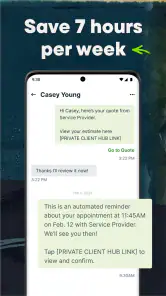
Building strong relationships with your clients is crucial, and Jobber helps you do just that. The app’s CRM features let you store important client information, track interaction history, and even automate follow-ups. This personalized touch can go a long way in retaining clients and boosting customer satisfaction.
The customer record is most valuable when it becomes the team’s reliable memory. Keep notes clear and useful to the next person who handles the account: a preference, a previous conversation, or a detail that affects how you arrange a return visit. Avoid treating a CRM as a place to dump every passing thought. Consistent, concise records make follow-ups feel personal; inconsistent notes can instead leave staff unsure which information is current.
What a normal workday can look like
Picture a small home-service crew starting with several scheduled visits. The office checks the day’s assignments, then a customer calls to move a later appointment while the first job is taking longer than expected. With the schedule and customer context kept in a shared routine, the person handling the call can make the change visible to the crew rather than leaving it in a private message. When the visit is done, the team can turn to closing out the work and preparing its invoice instead of trying to reconstruct the details days later.
This is not a promise that the day will run perfectly. A job may still take longer than expected, and somebody still has to make a decision about what to move. The practical advantage is that the decision has a better chance of being reflected where the rest of the team looks. If your current alternative is a group chat plus a calendar, the test is whether Jobber reduces the number of places someone must check—not whether it removes every phone call or unexpected change.
Making the Routine Stick
In everyday use, the smoothest workflow is usually a simple one: review the day’s appointments, keep job changes reflected in the schedule, record useful customer context, and close out completed work with the appropriate invoice. A small team can agree on who owns each step so that the owner is not the only person who knows what happened. This is especially helpful when the person answering customers is not the person completing the visit.
Compared with combining a general calendar, a spreadsheet of clients, and a separate invoicing tool, Jobber’s appeal is having those parts of field-service work organized around jobs. The trade-off is that an all-in-one routine asks the team to adopt one shared way of working. If your business only needs a basic appointment calendar, or you work alone with very few repeat customers, simpler tools may be easier to maintain. A dedicated accounting tool may also remain preferable when financial reporting is the main priority rather than coordinating field visits.
In a very small operation, the familiar calendar-and-spreadsheet combination can be perfectly reasonable if everyone knows how it is maintained and invoices go out promptly. It may also be easier to adapt when the business has unusual bookkeeping practices or needs a specialized tool for one narrow task. Jobber makes more sense when the cost of stitching those separate pieces together—missed updates, duplicated entry, or lost customer context—has become more troublesome than learning a shared job-centered process.
Where It Fits—and Where It Doesn’t
I’d consider it for a home-service business with recurring appointments, multiple people involved in scheduling or customer communication, and invoices that too often get delayed until later. A realistic example is a busy day with a morning repair, an afternoon maintenance visit, and a customer calling to rearrange a later appointment. Keeping the schedule and client context in one working routine can reduce the chance that the change is passed to only one person.
I would be more cautious if the crew resists updating shared records, if the business has unusual billing requirements, or if the current process is already dependable and quick. Before committing, test the whole path with a typical job: create or locate the customer record, arrange the visit, communicate a change, and prepare the invoice. That reveals whether the app fits your actual work better than a collection of familiar tools. It is free to install, with in-app purchases ranging from $9.99 to $349.99 per item, so consider the ongoing cost of the plan or items you need rather than assuming every useful workflow is included at no charge.
The app is aimed at the operational side of a service business, not at replacing every system a company might use. If you mainly need sophisticated financial reporting, a dedicated accounting product may be a better center of gravity, with field-work coordination handled separately. If you need only a personal diary for occasional appointments, even a general calendar could be less work. I’d adopt Jobber when several people need a dependable view of jobs and customer dealings, and skip it when the team’s coordination problem is small enough that a simpler tool already solves it.
Before making a longer-term decision, check the practical fit on the device and operating system your team actually uses, and review the purchase choices against the way you intend to work. The app is free to install, but the available in-app purchases mean that the complete cost depends on what your business needs. I would also make sure the team is comfortable with the process of entering updates as jobs change; the best workflow is the one people will maintain on a busy day, not the one that looks most complete in a quiet planning session.
Jobber has an average rating of 4.5 from around 5,600 ratings, with over 1 million installs, which suggests it has found a broad audience among business users. It is rated for Everyone, and the current version is 6.59.1, with Android 8.0 or later required. Those details help set expectations for compatibility, but the best decision still comes from testing it against the way your own team schedules, communicates, and bills.
In conclusion, Jobber: Field Service Software is a game-changer for anyone in the field service industry. It brings together efficiency, professionalism, and simplicity in one powerful package. Whether you're a small business owner or managing a large team, this app can help streamline your operations and give you more time to focus on growing your business. So, if you're tired of the chaos and ready for a change, give Jobber a whirl. Trust me, it's worth it!
Jobber: Field Service Software Frequently Asked Questions
Is Jobber free to download, and are there extra costs?
Jobber is a free app to download, but some purchases are available within the app. Those purchases range from $9.99 to $349.99 per item, so the download itself does not necessarily cover every option a business may want to use. Check the available purchase details before committing, and consider whether the app’s tools fit your team’s needs.
What devices can run Jobber: Field Service Software?
Jobber is available for Android devices running version 8.0 or later. Before downloading, check your device’s operating system version to make sure it meets that requirement. The app is a business tool for field service operations, so it is worth considering whether the device your team uses while working can comfortably support the software.
Is Jobber appropriate for all ages and what kind of app is it?
Jobber is a business app developed by Jobber Software, intended for people managing home service operations rather than for entertainment. Its content rating is Everyone, so it is suitable for general audiences. The app’s focus is on tasks such as scheduling, dispatching, invoicing, and getting paid, which makes it most relevant to service businesses and their teams.
What is Jobber: Field Service Software used for?
Jobber is a comprehensive field service management software designed to help small to medium-sized businesses manage their operations more efficiently. It offers features such as scheduling, invoicing, client management, and job tracking, making it ideal for service-based industries like HVAC, plumbing, cleaning, and landscaping. By streamlining communication and administrative tasks, Jobber enables businesses to focus on delivering quality service to their clients.
Can Jobber integrate with other apps and software?
Yes, Jobber offers integration capabilities with a variety of apps and software solutions to enhance its functionality. It can seamlessly connect with popular accounting software such as QuickBooks and Xero, as well as customer relationship management tools and payment processors. This allows businesses to have a unified platform where they can manage their operations, finances, and client interactions efficiently.
Pros
- User-friendly interface for easy navigation
- Efficient scheduling and dispatching tools
- Comprehensive client management features
- Seamless integration with QuickBooks
- Customizable templates for invoices
Cons
- Limited offline functionality
- Higher cost for premium features
- Occasional sync issues with calendar
- Mobile app lacks some desktop features
- Customer support response time varies

- Category
- Business
- Version
- 6.59.1











