Jerusky ירושמיים
- 37.00
- 4.0
- Installs
- 100.00K
- Price
- Free

Screenshots

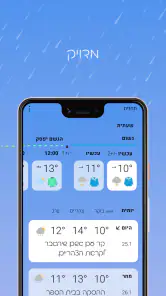
Analysis by Reviewed
Weather apps are usually built to answer one quick question: should I take an umbrella? Jerusky ירושמיים takes a narrower, more local approach. It is a weather app centered on an online station for Jerusalem, developed by 02ws.co.il, and that focus changes how I judge it. I do not see it as a replacement for every broad forecasting service. I see it as a practical local tool for people who want Jerusalem conditions in a simple, direct setting.
After using it as a daily weather reference, I found its main appeal to be concentration rather than an overload of worldwide information. The app is free to install, intended for Everyone, and has reached more than 100 thousand installs. Its average rating sits at 4.0 from around 2.1 thousand ratings, which suggests a generally positive experience but also leaves room for individual expectations to differ.
How clearly the Jerusalem weather information comes across
The first thing I noticed is that the app’s identity is very specific. Instead of presenting itself as a general-purpose weather dashboard for every destination, it points the user toward Jerusalem conditions. That makes the opening experience easier to understand for a resident, visitor, student, or family member checking the city from elsewhere.
For readability, local focus can be an advantage. A person who only wants to know what is happening in Jerusalem does not have to mentally filter a long list of unrelated locations. This is especially useful when checking the app quickly before leaving home, planning a walk, or deciding whether outdoor plans need to change.
The short name, Jerusky, together with its Hebrew title, ירושמיים, gives the product a distinctly local character. I found that useful context rather than decoration: it signals that the app is tied to Jerusalem and may feel more familiar to people who already identify with the city. At the same time, a visitor who does not read Hebrew may need a moment to understand the naming, even though the English-facing name remains recognizable.
Navigation is most comfortable when I approach the app with one clear purpose. I open it to check the current local situation, absorb the information, and move on. That workflow is less demanding than navigating a full weather platform with maps, radar layers, multiple saved places, alerts, and several forecast models.
That simplicity can also be a limitation. Users who rely on visual comparison between several cities, detailed map layers, or a richly explained long-range forecast may find a dedicated global weather service easier for those tasks. Jerusky’s strength is not trying to be everything; its usefulness depends on whether Jerusalem is the place that matters most to you.
More From Our News Desk

Clash of Clans Is Won Between the Battles

Android Auto Makes the Case for Quieter Car Software

MobiOffice: Transforming Mobile Productivity with Seamless Integration

EA SPORTS FC™ Mobile Soccer: Redefining Mobile Sports Gaming

How Microsoft OneDrive Became a Mobile Productivity Giant

How Google Translate Breaks Language Barriers Effortlessly
Reading conditions for different users
When I think about accessibility, I look beyond whether an app merely opens and displays information. I ask whether someone can understand the important part without unnecessary effort. Here, the focused subject helps. A user is less likely to be distracted by unrelated locations, and the local purpose is easy to grasp from the name and store summary.
For someone with limited attention or mild cognitive fatigue, a single-city weather tool may be easier to use than a crowded forecast application. A caregiver could also check Jerusalem conditions without first setting up a complicated collection of locations. Likewise, a person who is not confident with technology may appreciate having a clear reason to open the app.
However, I would not assume that the display works equally well for every reader. The available product information does not establish particular text-size controls, screen-reader behavior, color-contrast settings, or alternative presentation modes, so I judge the app by its focused purpose rather than promising specialized support. Anyone who depends on those features should test the current version on their own device before making it their only weather source.
The current version is 2.6.20-prod, and the app requires Android 7.0 or later. That makes it relevant to many older Android phones, although the practical experience can still vary with the handset, display scaling, system font settings, and the user’s preferred accessibility tools. I would check the app on the actual phone used every day, not just on a newer device in a shop or at home.
Motor effort and sensory comfort
Weather checking is usually a short interaction, and that matters for users with limited hand movement, tremor, or fatigue. A narrowly focused app can reduce the amount of scrolling and searching needed before a decision. If I only need Jerusalem conditions, I do not want to perform several gestures just to reach the relevant place.
There is a useful habit here: open the app before you are in a hurry. I would test whether the main information appears where I expect it, whether controls are easy to activate, and whether the screen remains understandable with the phone held in one hand. A calm test at home is much more revealing than trying to use any weather app while carrying bags or standing at a bus stop.
For people sensitive to bright screens, small text, or dense visual layouts, the best experience will depend on the phone’s own display settings as well as the app. Increasing system text size may help, but it can also change how much content fits on screen. I would make that adjustment in advance and confirm that important weather details remain visible rather than assuming every element will scale perfectly.
People with low vision may also need to consider how weather symbols, colors, or compact labels are presented. I would avoid relying on a quick glance alone if the conditions affect safety, travel, medication routines, or outdoor work. A second source, spoken assistant, or human confirmation can be sensible when the visual presentation is difficult to interpret.
For users with hearing loss, a weather app is naturally less dependent on sound than many communication or entertainment apps. That is a practical advantage of the category. Still, I would not treat the absence of an audio requirement as proof that every notification or interaction is accessible. If receiving timely information is important, check how the phone communicates updates and whether the chosen setup is noticeable without relying on sound.
Useful situations beyond a quick forecast check
The strongest everyday scenario is a Jerusalem resident preparing for a changeable day. Before leaving for work or school, I can check the local station, decide whether light clothing is sensible, and reconsider a long outdoor route. The value is not that the app replaces judgment; it reduces the time needed to make a basic decision.
It can also help someone who coordinates plans for another person. A family member living outside Jerusalem could check the city before calling an older relative, arranging transport, or suggesting suitable clothing. A visitor planning a walking day can use it as a local reference instead of searching through a general service that treats Jerusalem as just one point on a worldwide map.
One less obvious use is routine comparison. If you check the app at roughly the same points in your day, you can build a personal sense of how the local conditions change between morning, midday, and evening. I would not turn that into a scientific record, but it can make the app more useful for deciding when to run errands, ventilate a room, or schedule a short outdoor break.
Another practical workflow is to pair it with a broader service rather than forcing one app to do every job. I would use Jerusky for the Jerusalem-specific check, then consult a larger weather platform when traveling, comparing destinations, examining maps, or looking for more extensive planning tools. That combination may be less convenient than a single all-purpose app, but it gives each tool a clear role.
This is also where the app may suit people with different levels of digital confidence. A family can agree that this is the simple local check, while a more experienced user handles detailed travel planning elsewhere. Separating those tasks can prevent an occasional user from getting lost in features they do not need.
Where the focused design stops being enough
The same local specialization that makes the app approachable can make it a poor fit for some users. If you regularly move between cities, need international forecasts, or want one screen containing several saved destinations, a broader weather app will probably be more efficient. I would not install Jerusky expecting a complete travel-planning system.
I would also be cautious about using any single weather source for decisions with serious consequences. Outdoor work, long hikes, driving in difficult conditions, health-related routines, and time-sensitive travel deserve confirmation from another reliable source when the forecast matters. A local station can be valuable without being the only information a person consults.
Users who need advanced accessibility controls should take a similarly careful approach. The app’s focused purpose may reduce cognitive and navigation demands, but that is different from offering confirmed support for every visual, motor, hearing, or reading need. Try the exact combination of device, operating-system settings, and assistive technology you depend on.
There may also be a small psychological barrier for people who expect a polished, highly customizable weather dashboard. The app’s local identity is appealing, but users coming from feature-heavy alternatives may initially interpret the narrower scope as a lack of depth. I think that trade-off is acceptable for a Jerusalem-first tool, provided the user understands what it is meant to do.
The app is free, which makes trying it low-risk, but it includes in-app purchases ranging from $0.99 to $19.99 per item. I would check the purchase screen carefully before confirming anything, especially if the phone is shared with children or someone who may tap through prompts quickly. The Everyone age classification makes it broadly suitable by content category, but responsible device settings still matter when purchases are available.
How it compares with ordinary weather alternatives
Compared with a general weather app, Jerusky feels more like a local noticeboard than a universal forecasting toolbox. A large mainstream service usually wins when I need multiple cities, travel planning, radar views, extensive hourly details, or a wider set of customizable alerts. Jerusky is more appealing when the question is simply, “What is Jerusalem like right now, and what should I expect locally?”
Compared with checking a browser search, the app offers a more direct habit. I do not need to remember a search phrase or sort through results each time. That convenience is modest, but repeated small conveniences are exactly what make a weather app worth keeping installed.
Compared with relying on a social media post or a message from a friend, a dedicated local weather tool gives me a more consistent place to begin. It does not remove the need for common sense, and I would still confirm important conditions elsewhere, but it is preferable to making plans from a casual comment that may already be outdated.
The most sensible choice depends on the user’s context. A Jerusalem resident who values a quick, focused check may find the app more comfortable than a busy international service. A tourist moving through several regions may prefer one broader application. Someone with specific accessibility requirements should compare the actual interface on their phone rather than choosing solely by category or rating.
My inclusive verdict after using it
I like Jerusky because it has a clear job. The Jerusalem focus can make weather checking less distracting, easier to explain to another person, and faster for everyday decisions. Its local identity also gives it a sense of place that generic weather tools often lack.
From an inclusion perspective, the strongest point is its reduced conceptual load: one city, one familiar purpose, and a short path to useful information. That can help people who find feature-heavy apps tiring or confusing. The app is also free to start, available for Android 7.0 and later, and classified for Everyone, so the entry barrier is fairly low.
The important qualification is that a simple purpose does not automatically guarantee complete accessibility. Users who need large-text reliability, screen-reader compatibility, strong contrast, alternative controls, or dependable alert behavior should test the current app with their own setup. I would also keep a second weather source for travel and high-stakes decisions.
Overall, I would recommend it to people whose daily weather questions are specifically about Jerusalem and who prefer a focused tool over a crowded forecast platform. I would skip it if I needed worldwide coverage, advanced mapping, or one highly customizable dashboard. For the right user, the best reason to keep this app is its local clarity, not a long list of extra features.
Jerusky ירושמיים Frequently Asked Questions
Is Jerusky ירושמיים a weather app for Jerusalem?
Yes. Jerusky ירושמיים is a weather app centered on Jerusalem, presented as an online weather station. It is intended for people who want to check weather information for the city, whether they live there, are planning a visit, or simply want to keep up with local conditions. Its focus is narrower than a general-purpose service covering many kinds of local information.
Who develops Jerusky ירושמיים, and what devices can install it?
Jerusky ירושמיים is developed by 02ws.co.il and is available for Android devices that meet its minimum operating-system requirement. Before downloading, check that your device’s software is compatible and that you are choosing the correct version for your platform. The app is categorized for everyone, so its stated age suitability is broad, though parents may still want to review its features and permissions.
What is Jerusky ירושמיים, and what can I use it for?
Jerusky ירושמיים is an app focused on Jerusalem-related information and experiences, helping users discover places, activities, services, and local content in and around the city. Depending on the section you use, it may be useful for planning visits, finding interesting locations, exploring recommendations, or keeping up with local updates. The available content and features can vary by language, location, and app version.
Is Jerusky ירושמיים free to download and use?
The app is free to download, but it also offers in-app purchases. Check the current purchase details before buying anything, since optional paid items may have different prices. Some features, services, reservations, promotions, or partner content could require payment or may be subject to separate terms. Review the app’s description, pricing information, and any in-app purchase notices carefully so there are no surprises after downloading.
Does Jerusky ירושמיים require location access or an internet connection?
Many location-based features work best when the app has an active internet connection and permission to access your device’s location. Location access may help display nearby places, directions, or relevant recommendations, while internet access is generally needed to load updated content. You can usually manage these permissions in Android or iOS settings, although disabling them may limit parts of the app’s functionality.
Pros
- Useful for discovering Jerusalem events
- places
- and local activities.
- Hebrew-focused content suits residents and visitors comfortable with the language.
- Can help users find less-known spots beyond standard tourist attractions.
- Convenient mobile access to local information while exploring the city.
- May offer timely recommendations for seasonal or community happenings.
Cons
- Most content may be difficult to use without Hebrew language skills.
- Information quality can vary depending on updates from local contributors.
- Some listings may lack detailed directions
- prices
- or accessibility notes.
- Coverage may be less useful outside Jerusalem or nearby areas.
- Features and availability may depend on an active internet connection.
- Category
- Weather
- Version
- 2.6.20-prod











