

iVisa: Online Travel Visas
- 371.00
- 4.1
- Installs
- 1.00M
- Price
- Free

Screenshots
Analysis by Reviewed
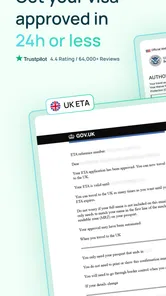
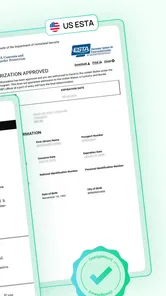
Visa paperwork is easiest to underestimate when a trip still feels far away. I find it more manageable to check entry-document requirements as soon as I know my destination, rather than trying to sort everything out between packing and heading to the airport. iVisa is built around that task: it helps travelers handle applications for documents such as ETAs, eVisas, ESTA and NZeTA. Its main appeal is having a travel-document process gathered in one app, though it still depends on a reliable connection at important moments.
When a connection matters
Looking up a destination and beginning an application are online tasks, so I would use the app while connected and with enough time to read each step carefully. A train platform or airport queue may be a convenient place to check something, but a weak signal is a poor setting for entering personal details or trying to resolve a form issue. I’d start at home, then keep any application-related messages easy to find for later.
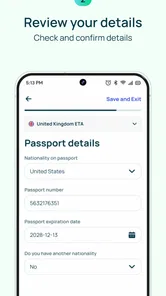
A useful habit is to confirm that the destination and traveler details are correct before moving through the application. If you are applying for more than one person, treating each application as its own task can help prevent names or passport details from getting mixed up. This kind of careful review matters more than rushing through a form just because the trip is close.
Choosing the right moment to apply
For a realistic example, imagine that I have booked a trip and am checking the entry paperwork after dinner, with my passport and itinerary beside me. That is a better moment to compare the destination and traveler details than a hurried check on the way to the airport. I can stop if a question is unclear, check official guidance, and return when I have the information in front of me. The app’s value is not simply that it fits on a phone; it is that I can make the application a deliberate part of planning instead of a last-minute scramble.
I would also separate research from submission when the trip has several stops. First I’d identify which destination’s requirements apply to each traveler and leg, then handle one application at a time. This small bit of organization can reduce the chance of choosing the wrong destination or mixing up information between family members. It is particularly helpful when one person is coordinating documents for a group but is not the person whose passport details are being entered.
What’s the Buzz About?
First things first, iVisa is your one-stop-shop for all things visa-related. Whether you’re planning a quick getaway and need an ETA or looking to explore New Zealand with an NZeTA, this app has got your back. It offers a multitude of services – from eVisas to traditional visas, covering an array of countries. The app is like having that savvy travel buddy who knows all the shortcuts.
A practical fit for mobile trip planning
The app is most useful when a traveler wants guidance through a document application without piecing together every step alone. A family organizing a holiday, for example, could use a quiet evening to check what each traveler needs, then work through the applications one at a time. That is a more dependable workflow than trying to do everything on the way to the airport, when a connection may be patchy and a typo harder to catch.
More From Our News Desk

 Weather - By Xiaomi
Weather by Xiaomi Review: Clear at a Glance, Less Clear Up Close
Xiaomi’s weather app makes everyday forecasts quick to scan, but its calm surface can leave useful details and recovery paths harder to find than they should be.

 X
XX Under Pressure: Can It Recover When Posting Goes Wrong?
A resilience-focused review of X, examining setup, mistaken posts, interruptions, weak connections, and the gaps that matter when recovery needs to be dependable.

 Clash of Clans
Clash of Clans Is Won Between the Battles
Its raids are quick; its community is a long-term project of coordination, teaching, rivalry, and shared responsibility—with all the friction that entails.

 Android Auto
Android Auto Makes the Case for Quieter Car Software
The car interface is no longer judged by how much it can do, but by how quietly it helps. Android Auto shows what drivers now expect—and what still gets in the way.

 MobiOffice: Word, Sheets, PDF
MobiOffice: Transforming Mobile Productivity with Seamless Integration
MobiOffice: Word, Sheets, PDF is redefining mobile productivity with a surprising blend of functionality and innovation.

 EA SPORTS FC Soccer Mobile 26
EA SPORTS FC™ Mobile Soccer: Redefining Mobile Sports Gaming
Dive into EA SPORTS FC™ Mobile Soccer, where immersive gameplay and strategic depth transform mobile sports gaming.
Latest News



Compared with searching the web and moving between separate government pages, a single app can make the process feel more organized. The trade-off is that an intermediary is not the same thing as an official immigration authority. I would use iVisa to help navigate an application, while carefully checking the destination’s official requirements before travel, especially if my itinerary, nationality or travel purpose makes the situation less straightforward.
User-Friendly Interface
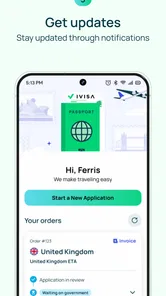
Okay, let’s talk about the interface – it’s as if they knew we hated complicated stuff. The app is intuitive and straightforward. You simply enter your nationality and destination, and boom – you get all the info you need. The process is as easy as pie, and who doesn’t love pie? It’s got this no-nonsense approach that keeps things clear and simple, which is a breath of fresh air in the usually chaotic world of travel documents.
Small checks that prevent bigger hassles
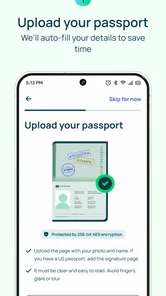
Before starting, I’d have the traveler’s passport information and trip details close at hand, and I’d avoid switching between apps repeatedly while entering them. A stable connection is useful not only for submitting an application but also for checking progress later. If a page stalls or an entry seems uncertain, pausing to verify the information is safer than submitting a guess and hoping to correct it afterward.
For a traveler who only needs a straightforward application and is comfortable following official instructions, applying directly through the relevant government channel may be the better choice. iVisa makes more sense when its guided approach is worth the convenience. Either way, I would not treat a phone screen or a submitted form as a substitute for checking the final travel documents and the requirements for the whole itinerary.
Speedy Processing
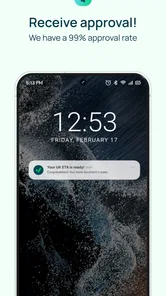
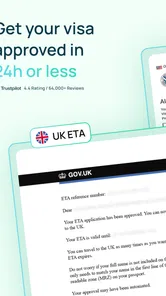
Time is of the essence, especially when you’re itching to get on that plane. iVisa understands this urgency and ensures that your applications are processed in record time. I mean, we’re talking about getting your visa faster than you can say “I’m ready to travel!”. Whether it’s an express service or a regular application, the app keeps you updated every step of the way, so you’re never left in the dark.
What to expect when plans change
Travel details can shift after an application starts, which is why I would keep the relevant confirmation and application information accessible and check for updates before leaving home. If the connection drops, I would avoid submitting the same information repeatedly without first checking whether the earlier attempt went through. When something looks unclear, contacting support is more sensible than assuming an application is complete.
iVisa is a free app from Document Advisor Inc in the Travel & Local category. It has a 4.3 average from around seven thousand ratings, with more than one million installs, and its content rating is Everyone. The current version is 5.18.2, and it requires Android 10 or later. Those details make it easy to see why it attracts travelers, but popularity alone cannot tell you whether a particular application route suits your trip.
Customer Support That’s Got Your Back
Ever had an issue and felt like you’re shouting into the void? Well, that’s not happening here. With a robust customer support team that’s available 24/7, iVisa makes sure you’re covered. Whether you need help filling out forms or just have a question about your application, their team is just a tap away, ready to assist like the pros they are.
I’d still plan around support as a backup, not as a reason to leave an application until the last minute. A question asked while there is time to respond is less stressful than one raised at check-in. Since completing travel-document tasks involves exchanging information online, I would also use a trusted connection and avoid entering sensitive details while relying on public Wi-Fi.
Keeping information and connectivity in perspective
Because document applications involve personal details, I would avoid filling them out while casually hopping between public networks or trying to save mobile data by repeatedly reloading pages. Instead, I’d gather the required information first, use a connection I trust, and complete the steps in one focused session where possible. This is a practical precaution, not a claim about a special privacy setting or an offline mode.
If a page stops responding, my first move would be to check the connection and then look for any indication that the previous action completed before trying again. Re-entering or resubmitting without checking can create uncertainty about which attempt is current. I’d keep any confirmation messages available for reference and, if the status remains ambiguous, ask support or consult the relevant official channel rather than infer that everything is settled.
Who should use it—and who may not need it
If you travel internationally and value a guided way to explore document options, this app is worth considering. It can be especially handy when you are arranging several parts of a trip on your phone and want a clear place to begin. It is less compelling for someone who already knows the official application route, prefers to deal directly with authorities, or has a complicated case that calls for direct clarification from the relevant government office.
My practical approach would be to use the app early, check every detail before submitting, and revisit the application status while connected rather than relying on a last-minute airport check. That workflow keeps the convenience in perspective: the app can help organize the process, but the traveler remains responsible for confirming that the right document is in place for the journey.
Where the convenience is worth it
I’d choose iVisa when I want a guided starting point and prefer to keep application tasks together while planning on my phone. It is a reasonable fit for a traveler who has a clear destination, can provide accurate details, and is willing to verify the result before departure. It may also help someone who is coordinating applications for relatives, provided each person’s details are handled carefully rather than treated as interchangeable.
I would lean toward the official government route when I already know exactly which document applies and want to deal directly with the authority, or when the case involves circumstances that need an authoritative answer. An app can make a process easier to navigate, but convenience does not remove the need to understand eligibility, confirm the document is appropriate for the trip, and allow time for any issue to be resolved. That distinction is the main trade-off I would keep in mind.
To sum it all up, if you’re looking to simplify your travel preparations, iVisa is the way to go. It’s user-friendly, fast, and backed by a support team that knows their stuff. So next time you’re planning a trip, give iVisa a go – it might just become your new travel companion.
iVisa: Online Travel Visas Frequently Asked Questions
Is the iVisa app free to download, and are application costs separate?
iVisa is free to download, so you can install it and explore its travel-document services without paying for the app itself. Applying for a visa or travel authorization is a separate matter: any costs associated with a particular application depend on the document and destination. Review the details for your chosen application carefully before submitting it.
Which devices can run the iVisa app?
The iVisa app is available for Android and iOS devices. On Android, it requires version 10 or later, so check your device’s operating system before downloading. The app is listed for everyone and is intended for travelers looking to handle electronic travel documents through a mobile app. Keeping your device software up to date can also help with everyday app use.
What services does the iVisa app offer?
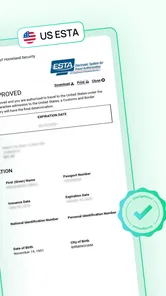
The iVisa app provides a comprehensive range of services, including the ability to apply for electronic travel authorizations (eTAs), electronic visas (eVisas), and New Zealand Electronic Travel Authorities (NZeTAs). Users can easily navigate and apply for travel documents required for various countries, ensuring a hassle-free travel experience. The service also covers documents such as ESTA, making it useful to check whether your destination and travel plans match an available application.
How user-friendly is the iVisa app?
The iVisa app is designed with a user-friendly interface, allowing users to easily access and navigate through its various features. Whether you are applying for an eVisa or checking the status of your application, the app provides clear instructions and a straightforward process, making it accessible for all users, even those who are not tech-savvy. It is a travel-focused app, so its tools are organized around applying for travel documents rather than general trip planning.
Is my personal information secure with the iVisa app?
Yes, the iVisa app takes user privacy and data security seriously. The app uses advanced encryption technology to protect users' personal and payment information. Additionally, iVisa complies with international data protection regulations, ensuring that your personal information is secure and confidential throughout the application process. Since applications involve personal details, read the relevant privacy information in the app and make sure your information is accurate before submitting it.
Pros
- User-friendly interface for easy navigation.
- Supports multiple countries' visa applications.
- Provides real-time updates on application status.
- 24/7 customer support for any queries.
- Secure payment options available.
Cons
- Processing fees can be quite high.
- Limited to specific visa types only.
- Occasional delays in application processing.
- Not all countries are supported yet.
- Requires constant internet connection.











