isolved People Cloud
- 719.00
- 4.3
- Installs
- 500.00K
- Price
- Free

Screenshots
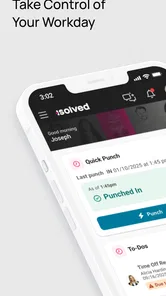
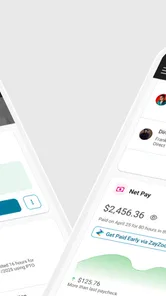
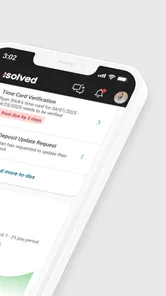
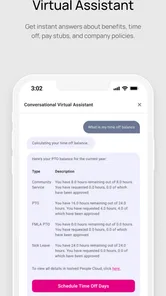
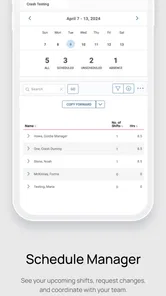
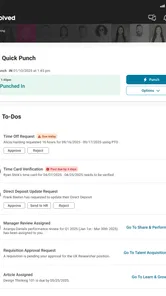
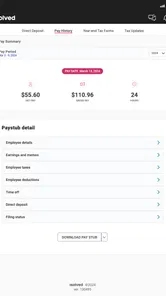
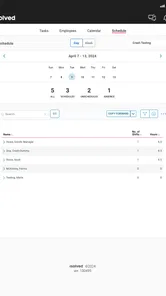
Analysis by Reviewed
When work depends on HR information, convenience matters, but so does knowing exactly what you are looking at. I tested isolved People Cloud as a mobile business app from Infinisource, and my impression is that it is most useful as a practical companion for employees and managers who already work within an isolved environment. It puts essential people-related tasks within reach on a phone or tablet rather than forcing you to find a computer every time.
The app is free, carries an Everyone age rating, and works on devices running Android 6.0 or later. Its public reception is encouraging, with a 4.4 average from around 1.7 thousand ratings and more than 500 thousand installs. Those figures suggest that it has found a real audience, although they do not change the most important question: whether your employer’s isolved setup gives you the functions you personally need.
How the everyday workflow feels
The sensible way to use isolved People Cloud is to treat it as a quick access point for HR rather than as a complete replacement for every workplace process. I would open it when I need to check information, complete an available employee task, or handle a routine matter away from my desk. That distinction is important. A mobile HR app is valuable when it removes small interruptions from the day, not when it tries to turn a phone into a full payroll office.
In a normal workday, the strongest use case is the five-minute task. Imagine noticing during a commute that you need to review an HR item, or remembering during a shift that you must check a workplace record. Instead of waiting until you return to a laptop, you can use the mobile app and deal with the matter while it is fresh. That kind of access is especially helpful for people who move between locations, work away from a desk, or manage teams while travelling around a site.
I also like the idea of separating urgent checks from deeper administrative work. On a phone, I would use the app for a focused action and leave complicated review or data-heavy work for a larger screen where possible. This habit makes the experience feel faster and reduces the temptation to tap through important information in a hurry.
There is a practical onboarding question every employee should ask before relying on it: does the organization already use isolved in a way that includes mobile access for your role? The app itself is not a universal HR account. Your experience depends on the workplace connection, the information made available to your user profile, and the tasks your organization expects you to complete there.
That makes isolved People Cloud a better fit for an existing isolved user than for somebody looking for an independent personal HR organizer. If you want an app to track private goals, store your own documents, or manage freelance administration without an employer platform behind it, this is probably the wrong category of tool.
More From Our News Desk

Weather by Xiaomi Review: Clear at a Glance, Less Clear Up Close

X Under Pressure: Can It Recover When Posting Goes Wrong?

Clash of Clans Is Won Between the Battles

Android Auto Makes the Case for Quieter Car Software

MobiOffice: Transforming Mobile Productivity with Seamless Integration

EA SPORTS FC™ Mobile Soccer: Redefining Mobile Sports Gaming
What I would do before depending on it
After installing it, I would first sign in when I have a stable connection and enough time to resolve any account or organization-specific setup. I would not wait until I am standing outside a workplace or trying to complete a time-sensitive task. The first successful login is the point at which you learn whether your account is ready for mobile use and which areas are actually available to you.
Next, I would look through the main areas calmly instead of assuming that every HR function is immediately visible. A mobile interface often presents only the actions relevant to the current user, so the absence of a button does not necessarily mean the platform is missing a capability altogether. It may reflect your role, your employer’s configuration, or the way the task is handled in the wider isolved system.
My most useful routine would be to check one ordinary task from start to finish. For example, I would open the relevant employee area, review the information shown, complete the action if available, and confirm that the app reflects the result. This creates confidence before the app becomes part of a real deadline-driven workflow.
The best mobile HR habit is verification, not speed. I would always pause at the final screen and make sure the intended action was actually completed. A quick tap is not useful if you later discover that you only opened a form, viewed a summary, or left a required step unfinished.
Settings and habits worth checking
Experienced users usually gain more from a few careful habits than from constantly exploring the interface. With isolved People Cloud, I would pay attention to the account context, the device itself, and the way notifications or sign-in behavior fit into my workday. I would avoid inventing a complicated routine around features that my employer has not enabled.
First, check that you are using the correct workplace account and that the profile shown after sign-in matches your role. This sounds basic, but HR information is personal and organizationally sensitive. If you work for more than one employer using related systems, or if you have recently changed roles, confirming the active account before reviewing or submitting anything is a worthwhile safeguard.
Second, consider the phone’s own privacy settings. A notification preview can reveal more than you intend on a shared desk or borrowed device. I would review how alerts appear on the lock screen and use the device’s normal security controls rather than leaving HR-related information visible. This is not a special isolved feature; it is a sensible way to use any app containing employment information.
Third, keep the application and operating system in a condition that supports reliable sign-in. The current version is 52.20250212.3, and the app supports Android from version 6.0 onward. I would not install it on an old device simply because it technically meets the minimum requirement if that phone struggles with modern account security or has little free storage.
Another useful setting-related decision is when to use mobile data. If you are checking an important record or submitting a work-related action, a dependable connection is preferable to repeatedly retrying on a weak signal. I would prepare non-urgent tasks before travelling and avoid assuming that a mobile app makes every workplace process available offline.
There is also a human setting to consider: your notification discipline. If the app or your workplace setup sends alerts, do not allow them to become background noise. I would keep only the prompts that help me act, then use a regular check-in time for less urgent items. This prevents the app from turning every small HR update into an interruption.
Small changes that make repeat use easier
I would place the app where it is easy to reach but not so prominently that it becomes a reflexive tap. A predictable location helps when I need it, while a deliberate opening reduces accidental checks. On a work phone, grouping it with other business tools can make the purpose clear and keep personal and professional activity separate.
I would also decide which tasks belong on the phone and which belong on a desktop before a busy week begins. Mobile is ideal for short reviews and straightforward actions. A larger screen is usually more comfortable for comparing information, reading lengthy material, or handling anything that requires careful cross-checking. This division of labor is more realistic than expecting one device to be best at everything.
For managers, the key setting is often not inside the app but in the workflow around it. If a team member reports that an item is unavailable, first establish whether the issue is account access, role permissions, or the mobile presentation itself. That simple distinction prevents wasted time and avoids telling someone to reinstall an app when the real limitation is organizational configuration.
Faster patterns for regular users
Once the basic workflow is familiar, I would build a repeatable sequence around the tasks I actually perform. The goal is not to tap faster for its own sake. The goal is to reduce hesitation, avoid duplicate checking, and know when to stop using the phone and move to a full workplace system.
My preferred pattern would be: open the app, identify the specific task, verify the relevant details, complete one action, and confirm the result before closing it. That sequence sounds simple, but it prevents a common mobile mistake: opening several areas, losing track of the original purpose, and leaving without knowing whether anything changed.
For a recurring employee task, I would use a calendar reminder outside the app if the organization expects regular attention. The reminder should say what to check, not merely “open HR app.” A prompt such as “review the pending employee item” is more useful because it gives the session a clear endpoint. This is a practical shortcut that does not depend on undocumented features.
Managers can use a similar approach by grouping related checks into one deliberate session instead of repeatedly opening the app throughout the day. If the work is not urgent, one focused review is less disruptive than many partial glances. If something requires a conversation or supporting documentation, the app should be the starting point, not the entire management process.
Another non-obvious advantage of this approach is that it exposes configuration gaps quickly. If a task appears in your normal routine but is missing from mobile, you can identify the exact point of friction and ask a precise question: is this unavailable on the phone, unavailable to my role, or intended for another isolved interface? Specific questions are easier for workplace administrators to answer than a general complaint that “the app does not work.”
I would also avoid repeatedly refreshing when information seems unchanged. First check the connection, account context, and whether the task has actually been submitted. Repeated taps can create confusion, especially when a process takes a moment to respond. A calm confirmation step is more reliable than treating the screen like a vending machine button.
Where mobile access saves the most time
The biggest time saving comes from removing the gap between remembering and acting. A desk-based alternative may require finding a computer, opening a browser, locating the HR system, and navigating to the right page. For a small task, that setup can be more annoying than the task itself. isolved People Cloud earns its place when it shortens that chain.
It is also useful for employees whose workday is not centered on email. Someone moving between rooms, sites, or shifts may not keep a laptop open, yet still need occasional access to workplace information. In that situation, a mobile HR companion is more natural than expecting every interaction to happen through a desktop portal.
However, speed should not be confused with completeness. If you need to examine a complicated history, compare several records, or carefully prepare a longer response, I would switch to the usual desktop or browser-based alternative. The phone is the efficient front door for selected tasks, not automatically the best room for every task.
Advanced limits and realistic trade-offs
The main limitation is that isolved People Cloud is tied to an employer’s isolved environment. That connection is its strength and its boundary. The app can be highly convenient when your organization has configured the relevant HR functions for mobile use, but it cannot replace the decisions, permissions, and processes managed by the employer.
This also means two people can install the same app and encounter different practical experiences. A regular employee, a supervisor, and an administrator may not see identical options. Before judging the app, I would separate three questions: can I sign in, can I see the information I need, and can I complete the action I need? Each answer may depend on a different part of the workplace setup.
Users should also be realistic about phone ergonomics. A small screen is convenient for a quick check, but less comfortable for reading dense content or reviewing several details at once. If an action feels unusually difficult on mobile, that may be a sign to change devices rather than force the task through the app.
Privacy is another trade-off. Mobile access means HR information is closer at hand, but it also means the device must be treated responsibly. I would use a secure screen lock, avoid leaving the app open in public, and be cautious about showing the display during a conversation. These precautions matter more than the novelty of accessing work information anywhere.
People who expect a consumer-style app with extensive personalization may find the experience narrower than expected. This is a business tool, and its usefulness comes from connection to workplace processes. If your goal is independent payroll planning, private document storage, or a general employee diary, a dedicated personal app may be more suitable.
There is a similar trade-off when comparing it with a normal browser portal. A browser can be more flexible on a computer and may feel better for long sessions. The mobile app wins when you want a focused, device-friendly route to supported HR actions. I would choose the app for convenience and the browser for breadth or extended review, assuming both are available in the organization’s setup.
Who should use it and who should skip it
I would recommend trying it if your employer already uses isolved, you regularly need employee or manager access away from a desk, and your routine contains short tasks that do not justify opening a full computer session. It makes particular sense for distributed teams, mobile workers, and managers who need a practical way to stay connected to HR work during the day.
I would be more cautious if your work depends on detailed administration, if you rarely need HR information outside a computer, or if your organization handles most requests through another established channel. Installing another app does not automatically improve a process that is already clear and efficient.
I would skip it as a standalone solution if you are not part of an organization using isolved. The free price is attractive, but free installation alone does not create access to an employer’s HR system. The value comes from the relationship between the app, your account, and the workplace configuration behind it.
The public age rating of Everyone makes it broadly suitable from a content perspective, but that should not be confused with unrestricted access to employment information. The important question for an adult user is still whether the account is authorized and whether the organization’s process is appropriate for mobile use.
My verdict after building a repeatable routine
isolved People Cloud is a useful business app when you approach it with the right expectations. I see it as a focused mobile companion for an existing isolved HR setup, not as a complete independent workplace platform. Its strongest quality is practical access: it can make small, legitimate HR tasks easier to handle when a computer is inconvenient.
In my experience, the best results come from combining a clear task routine with sensible device privacy, careful confirmation, and a willingness to move complicated work to a larger screen. Those habits matter because the app’s usefulness is shaped by both the software and the employer’s configuration.
The developer, Infinisource, has positioned it for broad workplace access, and its adoption suggests that many users find that model worthwhile. Still, I would not recommend installing it blindly. First confirm that your organization supports it, then test one ordinary workflow, check which functions fit your role, and decide whether mobile access genuinely saves time.
My final recommendation is simple: choose isolved People Cloud when you need convenient access to supported HR tasks, but keep the desktop or browser workflow available for anything demanding careful comparison or extended attention. For the right employee, that balance makes the app genuinely useful without asking a phone to do a job it was never meant to handle.
isolved People Cloud Frequently Asked Questions
Does my employer need to use isolved for me to use the app?
Yes. isolved People Cloud is intended for employees and managers whose organization uses isolved and has enabled access to the relevant services. Downloading the app alone does not create an employee account or provide access to workplace records. If you are unsure whether your employer supports it, check with your HR department or payroll administrator before installing.
What should I check before installing isolved People Cloud on my phone?
Check that your device runs Android 6.0 or later and that you can access the account details provided by your employer. The app is free, is rated for Everyone, and is developed by Infinisource. It is a business app for mobile access to HR functions, so its usefulness depends on whether your organization has configured the services you need.
What is isolved People Cloud used for?
isolved People Cloud is a workforce management and human resources platform designed to bring employee-related tasks into one place. Depending on the features enabled by an employer, users may be able to view pay information, access benefits, request time off, clock in or out, review schedules, complete onboarding tasks, and update personal details. The exact tools available can vary between organizations and subscription plans.
Can employees use isolved People Cloud on Android and iOS devices?
Yes, isolved People Cloud is intended to support mobile access for employees and managers, although the available experience may depend on the organization’s setup and the version of the application provided in the relevant app store. Before downloading, users should confirm that their device meets the operating system requirements. Some features may also work differently on mobile than they do in the web portal.
How do I log in to isolved People Cloud?
Login details are normally provided or managed by your employer, payroll administrator, or HR department. In many cases, access requires an organization-specific account, company code, username, password, or multifactor authentication. If you cannot sign in, the app itself may not be able to resolve the issue. Contact your employer’s isolved administrator for account activation, password assistance, or reset instructions.
Pros
- Centralizes HR
- payroll
- benefits
- and employee data in one platform.
- Employee self-service reduces routine requests to HR teams.
- Cloud access supports remote work and distributed organizations.
- Automated workflows can improve consistency in HR processes.
- Reporting tools help managers monitor workforce information.
Cons
- The interface may feel complex for employees using it for the first time.
- Some features depend on the employer’s selected modules and setup.
- Payroll availability and functionality can vary by country.
- Performance may be affected by slow internet connections.
- Support response times may differ depending on the organization’s plan.











