

Islamic Ringtones 2026
- 72.00
- 4.5
- Installs
- 1.00M
- Price
- Free

Screenshots



Analysis by Reviewed
I judge a ringtone app by more than whether its sounds are attractive. A tone can interrupt a conversation, a quiet room, or a moment of worship, so I want to know what I’m choosing and how it will behave on my phone. Islamic Ringtones 2025 is a free app from KellyApps in the libraries and demo space, made for people looking for Islamic-themed audio to use as phone alerts rather than for a general music collection.
What to consider before making it part of your routine
The app has an average rating of 4.5 from around 46,000 ratings, with over a million installs. That popularity suggests it has found an audience, but it cannot tell me whether a particular tone will suit my needs or whether I’m comfortable with the choices the app makes on my device. I’d treat listening before setting anything as the important first step, especially if the sound might play in a shared space.
It’s rated for everyone and is currently at version 28.0. It has been around since 2020, so it isn’t a newly launched experiment. Still, I’d make my decision based on how it behaves on my own phone, not its age or rating. The developer is KellyApps, and the purpose is focused: find a suitable Islamic ringtone without browsing a broad collection of unrelated sounds.
Choosing a tone with care
For me, the useful question isn’t simply whether a sound is pleasant. Recitation or nasheed used as an alert may be heard unexpectedly, cut off when a call is answered, or play where others can hear it. I’d reserve a tone with religious significance for a context where that feels appropriate, and choose a less distinctive alert for busy public settings. That small bit of thought can make customization feel considerate rather than distracting.
If I were trying the app, I’d listen to several options before downloading one, then test the selected sound at a low volume and in the place where I normally receive calls. I’d also check the phone’s own sound settings afterward: ringtone, notification, and alarm controls aren’t always interchangeable, and the exact steps can vary between Android devices. This is a practical way to avoid expecting one setting to change every alert.
Trust and control on your device
I don’t assume a ringtone app needs broad access simply because it offers audio. Before granting any permission, I’d read the Android prompt and ask whether the request makes sense for the action I’m taking. If a permission seems unrelated to selecting or applying a tone, I’d pause rather than approve it automatically. I’d also review the app’s permissions later in Android settings if I no longer use a feature.
My broader advice is to keep the app’s role narrow: use it to find and set a sound, then decide whether it needs to stay installed. That’s a useful habit with any customization app, especially when a phone is shared or used for work. The app is free and rated for everyone, but those details don’t replace checking visible choices on your own device or deciding what kind of audio you want other people to hear.
More From Our News Desk

 Gmail
GmailGmail in a Busy Inbox: Who Benefits Most?
From first account to crowded workday, Gmail earns its place through dependable search and flexible sorting—but its best fit depends on how much inbox maintenance you can tolerate.

 Prime Video
Switching to Prime Video: What Changes in Your Viewing Routine
Prime Video can make a compelling second home for streaming, but switching means learning a different catalog, rental layer, and route from browsing to playback.

 Universal TV Remote Control
Universal TV Remote Control Works Best as a Reliable Backup
A phone remote earns its place through quick setup and reliable habits. Here is how to get more from Universal TV Remote Control—and where its limits show.

 Weather - By Xiaomi
Weather by Xiaomi Review: Clear at a Glance, Less Clear Up Close
Xiaomi’s weather app makes everyday forecasts quick to scan, but its calm surface can leave useful details and recovery paths harder to find than they should be.

 X
XX Under Pressure: Can It Recover When Posting Goes Wrong?
A resilience-focused review of X, examining setup, mistaken posts, interruptions, weak connections, and the gaps that matter when recovery needs to be dependable.

 Clash of Clans
Clash of Clans Is Won Between the Battles
Its raids are quick; its community is a long-term project of coordination, teaching, rivalry, and shared responsibility—with all the friction that entails.
Latest News



Discover a Symphony of Faith
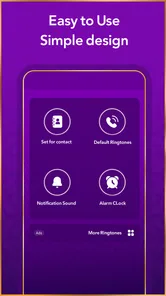
First things first, what immediately caught my attention was the app's user-friendly interface. Navigating through Islamic Ringtones 2025 is as smooth as a breeze on a cool summer evening. The app's design is clean, straightforward, and doesn’t bombard you with unnecessary ads, which is a huge plus in my book.
A Diverse Collection
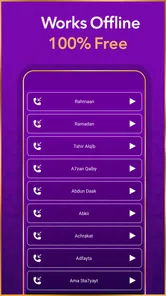
The diversity of ringtones available in the app is truly impressive. You’ll find everything from soulful Nasheeds to calming Quran recitations. Each tone is beautifully crafted and resonates with a sense of peace and spirituality. It’s like carrying a little piece of serenity in your pocket.
For those who love to customize, the app also lets you set these ringtones for specific contacts or notifications, which is a neat feature. Imagine assigning a soothing Quran recitation for your morning alarm—waking up wouldn’t feel like such a chore anymore.
Ease of Use
Downloading and setting up your favorite ringtones is straightforward. The app guides you through the process with easy-to-follow steps, ensuring even the least tech-savvy among us can get their favorite tones set up in no time. Plus, the app’s lightweight nature means it won’t hog your phone’s storage space, leaving room for all those selfies and videos we love to hoard.
One of the standout features is the ability to preview each ringtone before you download it. This means you can listen and make sure it’s the right fit for you, saving you from downloading something you might not end up using.
Connection to Culture and Faith
What I love the most about this app is how it beautifully merges technology with cultural and religious elements. It’s not just about having a different ringtone—it’s about staying connected to one’s faith and traditions in a modern world. For many, this app is more than just a utility; it’s a reminder of their beliefs and values, seamlessly integrated into their daily lives.
In conclusion, if you’re on the lookout for an app that offers more than just the usual beeps and buzzes, Islamic Ringtones 2025 is definitely worth checking out. It’s a harmonious blend of spirituality and technology, and it’s sure to bring a sense of calm and positivity to your everyday routine. So why not give it a try and let your phone ring with a purpose?
Where this kind of app fits
I see the strongest use case as a quick, focused search for a culturally meaningful alert, not as a replacement for a full audio service. Someone who wants one recognizable call tone or a different sound for a family contact may prefer this direct approach to browsing a general ringtone catalog. By contrast, if I wanted to build playlists, organize a personal music collection, or edit audio, I’d choose a dedicated music or editing app instead; those tools serve a different purpose.
A realistic routine might be to preview a few options at home, choose a short sound for calls, and keep quieter or more neutral alerts for work and public transport. I’d avoid assigning a long or solemn passage to a notification that can be interrupted repeatedly. The trade-off is simple: a distinctive sound can make a phone feel more personal, but it also makes each incoming alert more noticeable to everyone nearby.
Small checks that prevent annoying surprises
Before settling on a tone, I’d check how it behaves as an actual alert rather than judging it only through a preview. A sound that feels calm when played once may become distracting when repeated, or may be too subtle to notice in a noisy place. Testing it with the phone at the volume I normally use is more useful than choosing the most striking option in the list.
I’d also think about whether one sound belongs on calls, notifications, or alarms. A tone that works well when I can answer a call may feel unsuitable for a short message alert, while an alarm needs to be clear enough to wake me without becoming unpleasant. Keeping different purposes in mind makes the app’s customization more useful and helps avoid turning a meaningful sound into background noise.
Making a deliberate choice in everyday settings
One practical approach is to choose a tone at home, then leave it in place for a day before deciding it belongs in your routine. That gives you a chance to hear it during an ordinary call, notice whether it feels too prominent, and see whether it remains pleasant after repeated use. If you share a room or regularly take calls around colleagues, try the sound with headphones during selection, then check the phone’s speaker behavior privately before using it in public.
Contact-specific choices can also be useful when only a small number of callers need a distinctive sound. I’d keep the assignment limited rather than giving every person a different religious tone: fewer distinctions are easier to remember, and they reduce the chance of hearing a meaningful recording in a situation where it feels out of place. For other alerts, I’d favor brief, neutral sounds that are easy to recognize without drawing attention.
How it compares with familiar alternatives
Compared with the default tones already on a phone, this app is more relevant when I specifically want Islamic-themed audio rather than a generic chime. Compared with a broad ringtone catalog, its appeal is the focused subject matter; the trade-off is that someone seeking many unrelated genres or extensive sound customization may find a general-purpose option more useful. A music player is another different alternative: it is better for listening to tracks intentionally, but it is not the same tool as choosing an alert.
That distinction matters because a ringtone is heard in short, repeated bursts, while a song is usually played by choice. I wouldn’t select an excerpt just because I enjoy it as a complete piece; I’d consider whether a brief interruption suits the sound and whether it remains recognizable at a lower volume. For longer listening, I’d use a service designed for music playback and keep this app’s role to phone personalization.
Who may want another option
This app is a sensible fit if I want Islamic-themed tones and value being able to listen before committing. It is less suited to someone looking for a broad sound-design toolkit, an offline music player, or fine-grained audio editing. I’d also skip setting religious audio as a public alert if I’d feel uncomfortable with it playing unexpectedly around strangers; a private or neutral tone can be the better choice in that situation.
For a first try, I’d choose one sound rather than changing several settings at once. If it doesn’t appear where expected, I’d check whether I selected a ringtone, notification, or alarm option in Android and confirm the corresponding system setting. Device menus can differ, so checking the phone’s own sound controls is a sensible way to understand what changed before repeating the setup.
A cautious verdict
My cautious verdict is that the app offers a focused way to personalize familiar phone alerts, with previews and contact-level choices making the selection process more deliberate. I’d still review permission prompts, test the sound in its intended setting, and use Android’s own controls to confirm which alert it changes. If that limited, practical role matches what you want, it’s worth exploring; if you need music management or detailed control over audio files, a different category of app will serve you better.
Islamic Ringtones 2026 Frequently Asked Questions
What devices and permissions should I check before downloading Islamic Ringtones 2025?
Before downloading, check that your device runs Android 8.0 or later, which is the stated minimum operating system requirement. Also consider whether you are comfortable granting the permissions needed to save audio or change sound settings, since ringtone apps may need access to relevant device features. Reviewing permission prompts during installation helps you understand what the app is asking to use.
Who develops Islamic Ringtones 2025, and what kind of app is it?
Islamic Ringtones 2025 is developed by KellyApps and is listed among library and demo apps. Its focus is Islamic audio for phone sounds, with MP3 ringtones, Islamic songs, and nasheed highlighted in its store description. This makes it a specialized choice for users seeking faith-themed audio rather than a general music player or broad ringtone editor.
What should I know about Islamic Ringtones 2025 before downloading it?
Islamic Ringtones 2025 is an app for people looking for Islamic audio to use as phone tones. Its store summary highlights MP3 ringtones and Islamic songs with nasheed, while the short description presents it simply as Islamic Ringtones. It is listed in the Libraries & Demo category and is suitable for everyone.
What features does Islamic Ringtones 2025 offer?
Islamic Ringtones 2025 offers a wide selection of high-quality Islamic ringtones, including Adhan, Nasheed, and Quranic verses. The app allows users to easily set these ringtones for calls, notifications, and alarms. It also includes a user-friendly interface with the ability to create playlists and favorites, making it easy to access your preferred ringtones.
Is Islamic Ringtones 2025 free to use?
Yes, Islamic Ringtones 2025 is available for free download and usage. However, it may include optional in-app purchases or ads to support the developers. Users can enjoy a vast library of ringtones without any cost, but additional features or an ad-free experience might require a purchase.
Pros
- Wide variety of ringtones available.
- Easy to navigate user interface.
- High-quality sound clips.
- Regularly updated with new content.
- Compatible with most devices.
Cons
- Contains ads that can be intrusive.
- Limited customization options.
- Some ringtones require internet.
- Occasional app crashes reported.
- Not all content is free.










