IRS2Go
- 19.43K
- 4.0
- Installs
- 10.00M
- Price
- Free

Screenshots


Analysis by Reviewed
I’m usually cautious about giving tax tasks space on my phone year-round, but IRS2Go makes a practical case for staying installed: its value is tied to a few moments when official information is more useful than another general finance app. It is a free finance app from the Internal Revenue Service, and its straightforward approach is more appealing when I need to check a tax matter than when I want an all-purpose money dashboard.
Useful during the first week, not a tax-filing replacement
When I first open a government tax app, I want to know whether it can save me a trip through a confusing website or a phone call. IRS2Go is designed for quick tasks such as checking a refund and making a payment. That focus is welcome, but it is worth setting expectations: I would treat it as a companion for specific IRS interactions, not as a place to prepare and file a complete return or manage every part of my finances.
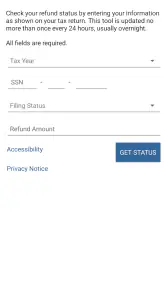
For a simple real-life example, imagine I have already filed and want to check whether my refund has moved along while I’m away from home. The app gives me a direct route to that check, without turning the moment into a larger tax project. I should have the requested identifying and filing details ready, including the exact expected refund amount; guessing or searching through old paperwork at the last minute makes a quick check less convenient.
Recurring value depends on your tax routine
The app’s month-to-month usefulness is naturally uneven. During tax season, refund tracking, payments, and brief tax guidance can make it worth opening. Outside that period, someone with no IRS task may have little reason to return to it. That is not necessarily a flaw: I would rather keep a focused tool for the occasions it helps than expect it to become a daily budgeting habit.
It makes the most sense for people who already handle their tax return elsewhere but want a convenient way to follow an IRS matter afterward. If I need bookkeeping, a running view of spending, or help comparing financial products, a broader finance app is a better fit. If I need to prepare a complicated return, dedicated tax-preparation software or professional advice is more appropriate; a small official utility cannot replace that work.
How it fits beside other tax options
Compared with returning to the IRS website, a phone app can be handy for a quick check when I’m not at a computer. Compared with calling, it may avoid waiting just to look up routine information. But those alternatives still matter: a website is often easier for reading detailed material or handling a longer task, while a call may be necessary when a personal issue needs explanation rather than a standard status check.
One useful habit is to keep tax records somewhere organized before opening the app, rather than treating it as a document cabinet. That small bit of preparation makes a refund check or payment less frustrating and avoids mixing a quick status lookup with a search through scattered files. I would also pause before entering sensitive details on a shared or public device, even when using an official service; convenience should not replace basic care with personal information.
More From Our News Desk

Weather by Xiaomi Review: Clear at a Glance, Less Clear Up Close

X Under Pressure: Can It Recover When Posting Goes Wrong?

Clash of Clans Is Won Between the Battles

Android Auto Makes the Case for Quieter Car Software

MobiOffice: Transforming Mobile Productivity with Seamless Integration

EA SPORTS FC™ Mobile Soccer: Redefining Mobile Sports Gaming
Maintenance and reasons it may fade from view
There is little reason to build a daily routine around IRS2Go. I’d keep it updated and open it when a refund, payment, or tax question gives me a reason, rather than checking repeatedly without new information to act on. That approach keeps the app useful without adding another notification-driven habit to my phone.
The main source of fatigue is that tax needs can be stressful, while the app’s narrow purpose means it may sit unused for long stretches. Its plain design also favors function over the kind of guided, all-in-one experience some people expect from commercial tax services. If I want someone to walk me through filing from start to finish, I would choose a filing service instead; if my need is a straightforward IRS task, the focused approach is a sensible trade-off.
Getting Started with IRS2Go
Once you’ve downloaded IRS2Go, you’ll find it’s got a pretty straightforward interface. No bells and whistles here, just plain, functional design. You can access a range of features from checking your refund status to making tax payments. The app doesn’t try to dazzle you with unnecessary frills, and honestly, that’s refreshing when dealing with something as serious as taxes.
Check Your Refund Status
One of the standout features of the app is the ability to check your refund status. After filing your taxes, the waiting game begins, and we all know how nerve-wracking that can be. With IRS2Go, you can easily track your refund. All you need is your Social Security Number, filing status, and the exact amount of your expected refund. It’s quick and saves you the hassle of navigating the IRS website or calling them up.
Make Tax Payments with Ease
Another handy feature is the ability to make tax payments directly through the app. It supports multiple payment options, including direct debit from your bank account, credit card payments, and even IRS Direct Pay. This means no more writing checks or worrying about postage. The app securely handles your payment information, giving you peace of mind.
Access Tax Tips
Now, who couldn’t use a little extra help during tax time? The app offers tax tips to help you better understand the process and maybe even save a buck or two. These tips are updated regularly, so you’re always getting the most current advice. It’s like having a mini tax advisor in your pocket.
Security and Privacy
When it comes to handling sensitive information, security is paramount. IRS2Go uses industry-standard security protocols to protect your data. It’s reassuring to know that your information is safe, especially when dealing with something as critical as taxes.
Overall, IRS2Go is a solid app that simplifies the tax process. It’s not flashy, but it’s functional and reliable, which is exactly what you need when dealing with taxes. Whether you’re checking your refund status or making a payment, it’s all at your fingertips. So next tax season, instead of dreading the process, let IRS2Go take some of the weight off your shoulders.
Where the app earns its place
The strongest reason I’d keep it installed is not that it replaces every tax tool, but that it puts a few recurring IRS errands within reach on a phone. Someone who files with a preparer or separate software can still benefit afterward: checking a refund, making a payment, or reading a tax tip are different jobs from building a return. Keeping those jobs distinct helps prevent the common mistake of assuming a government utility is also a filing service.
That distinction is useful in a household where one person handles the return and another wants to check progress or make a payment. Before sharing a phone or asking someone else to complete a task, I’d be deliberate about who enters the required personal and filing information. The practical advantage is quick access; the trade-off is that the app is for the person who can provide the right details and understands what action they are taking.
A calmer payment workflow
For a payment, I would decide on the amount and payment method before opening the app, then carefully review the details shown before submitting. The app’s payment options can reduce the friction of mailing a check, but tapping through a payment screen is not a substitute for checking that the amount and destination are right. I’d save any confirmation or reference information presented after the transaction with my other tax records, rather than relying on memory when I need to revisit it later.
This is also where the official app can be more useful than a general finance dashboard. A budgeting app may show balances and spending, but it is not the place I’d expect to handle an IRS payment. Conversely, IRS2Go is not where I’d track household cash flow. Each tool has a narrower job, and using the right one reduces the temptation to treat a convenient screen as a complete financial record.
When information is enough—and when it isn’t
The tax tips are best treated as quick orientation, not individualized advice. I might use them to clarify a general point or identify a question worth researching, then move to fuller IRS material or a qualified professional if the answer depends on my circumstances. This is especially important when a tax situation involves several moving parts: a short tip can point me in a useful direction, but it cannot evaluate a whole return in the way a dedicated preparer can.
Likewise, a refund status check is a status check, not a promise about when money will arrive or an explanation of every delay. I would use it when there is a meaningful reason to check, then avoid refreshing repeatedly in the hope that the underlying process will move faster. That small expectation-setting step makes the tool less stressful and keeps it from becoming another source of needless phone checking.
Who should choose another tool
I would skip IRS2Go as a primary choice if I wanted to assemble tax forms, calculate deductions, compare filing approaches, or receive step-by-step help preparing a return. A tax-preparation product is built for that longer workflow. I’d also choose a regular finance app for recurring budgets and spending categories, since the IRS tool is not designed to become a daily money-management hub.
On the other hand, people who value an official route for a limited number of tax tasks may find its narrow scope reassuring. The app is from the Internal Revenue Service, has an Everyone age rating, and is free. It has a 4.0 average from around 74 thousand ratings, with over 10 million installs. Those figures suggest broad use, though I would still judge it by whether its specific tasks match my own routine rather than treating popularity as proof that it suits every taxpayer.
Small habits that make it more useful
I’d keep the app available but not make it a daily ritual. A sensible pattern is to organize the documents and figures I need first, open the app for the actual task, and then record the result alongside my tax paperwork. That sequence is more reliable than using the phone as a last-minute filing cabinet, especially when I’m away from home and tempted to search through messages or photos for a number.
It is also worth checking that the app remains current before an important task. The current version is 5.6.7, and it supports devices running Android 7.0 or later. Updates are ordinary maintenance, but I would not wait until a deadline or urgent payment to discover that an older device needs attention. If the app does not work well on a particular device, the IRS website remains a sensible alternative for a longer session.
Long-term verdict: useful in bursts
IRS2Go’s lasting value comes from being a practical, official companion for occasional tax errands, not from offering a reason to open it every week. It was released on January 18, 2011, and its core appeal remains easy to understand: when I need a straightforward IRS interaction, I can start on my phone instead of reaching immediately for a computer or phone call. When I need complex filing help, personal interpretation, or broad financial tracking, I should switch to a tool designed for that work.
For me, that is a fair bargain. The app earns space during the tax season and whenever a payment or refund check comes up, while requiring little attention in quieter months. Its focused design can feel limited if I expect a guided tax office in my pocket, but it is sensible if I want quick access to selected official tasks. I’d recommend it to someone who understands that boundary and wants an uncomplicated mobile option; anyone seeking a complete return-preparation experience should start elsewhere.
IRS2Go Frequently Asked Questions
Is IRS2Go suitable for someone who has never used a tax app before?
IRS2Go is the Internal Revenue Service’s official mobile app, intended to make selected tax-related services accessible from a phone or tablet. First-time users can explore its options for checking a refund, making a payment, and finding tax assistance. It is still worth having the relevant tax information ready before using a feature, and remembering that the app does not replace a full tax-preparation service.
Which devices and operating systems can run IRS2Go?
IRS2Go is available for Android and iOS devices. On Android, the minimum requirement is Android 7.0, so check your device’s operating system before downloading. The app is free and published by the Internal Revenue Service. When searching in your device’s app store, confirm that the publisher is the IRS so you install the official app rather than a similarly named third-party product.
Who publishes IRS2Go, and is it the official IRS app?
IRS2Go is published by the Internal Revenue Service and is its official mobile application. It is a finance app for people who want to access tax-related services from a mobile device. The app is free, and its store age rating is Everyone. If you are looking for the IRS’s own app rather than a third-party tax product, IRS2Go is the official option.
Can I download IRS2Go on my phone?
IRS2Go is available for Android and iOS, so you can look for it in the app store used by your device. The Android version requires Android 7.0 or later. The app is free to download, and it is intended for users who want to access IRS services on a phone or tablet. Check that you are selecting the official app published by the Internal Revenue Service.
What is IRS2Go?
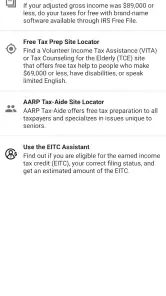
IRS2Go is the official mobile application of the Internal Revenue Service (IRS) that allows users to access various tax-related services. It provides features like checking your refund status, making tax payments, and accessing free tax help. The app is available for both Android and iOS platforms, making it a convenient tool for taxpayers on the go.
Pros
- Simple and intuitive interface.
- Real-time refund status updates.
- Secure and encrypted data transmission.
- Free to use without ads.
- Quick access to tax records and payments.
Cons
- Limited features compared to desktop version.
- Requires internet connection for updates.
- No in-app tax filing option.
- Occasional server downtime issues.
- Limited customer support within the app.
- Category
- Finance
- Version
- 5.6.7











