IPTV Pro
- 155.00
- 4.6
- Installs
- 100.00K
- Price
- $3.99

Screenshots
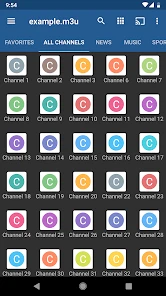
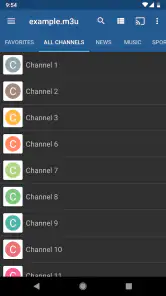
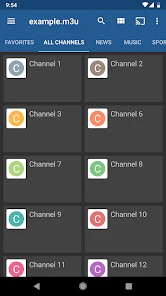
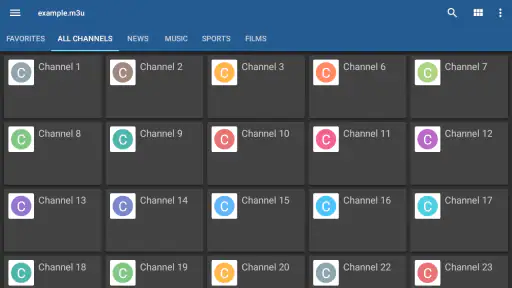
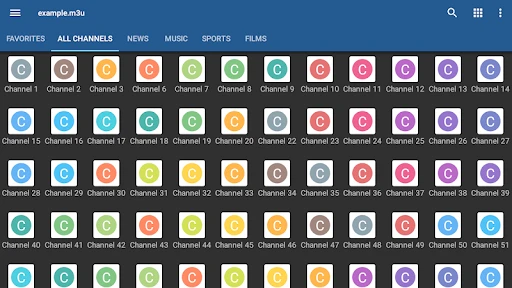
Analysis by Reviewed
When I use an IPTV player, the make-or-break step is getting my own channel playlist into it. IPTV Pro is built around that practical job: it lets an Android device play IPTV streams, while the channels themselves come from a playlist I provide. That distinction matters. It is a player, not a ready-made television package, so the experience depends on having a playlist I am entitled to use and knowing how to load it.
A player that depends on your playlist
Once a playlist is loaded, the appeal is having channels gathered in one place rather than switching between separate broadcaster apps. The main benefit is convenience, not a promise of a particular selection: what appears in the app depends on the playlist. I would treat this as a useful viewing hub for people who already have IPTV access, not as a shortcut to finding channels or subscriptions.
That setup also shapes the first-use experience. If a provider has given you a playlist and clear instructions, adding it should feel manageable. If you are new to IPTV and do not know what playlist information you need, the process can be a hurdle. I would ask the provider for the correct details before paying for a player; installing an IPTV app alone does not supply channels.
Getting Started with IPTV Pro
First things first, setting up IPTV Pro is a breeze. Once you've downloaded the app, you'll need to load a playlist, which can be a bit daunting if you're not tech-savvy. But don’t worry! There are plenty of resources online to guide you through this process. The app supports various playlist formats, so chances are, you're covered no matter what kind of list you have.
Features that Shine
What really makes IPTV Pro stand out are the features tailored for the ultimate viewing experience. You get to enjoy live streaming of TV shows, sports events, and even movies in HD quality without a hitch. The app's electronic program guide (EPG) is like having a TV guide in your pocket, helping you keep track of your favorite shows and ensuring you never miss an episode.
For everyday use, I would start with a small, familiar set of channels rather than loading a long list and trying to organize everything at once. That makes it easier to see whether the playlist works and whether the guide information is useful. An EPG is only as helpful as the schedule information available for your channels, so I would not assume every entry will have a complete guide. If the guide looks sparse, the channel stream may still be usable; the two are not the same thing.
Another cool feature is the ability to record live TV. It’s like having a DVR on your phone! You can record your favorite shows and watch them at your convenience. Plus, the app supports Chromecast, so you can project your shows onto the big screen and watch them with family and friends.
More From Our News Desk

Clash of Clans Is Won Between the Battles

Android Auto Makes the Case for Quieter Car Software

MobiOffice: Transforming Mobile Productivity with Seamless Integration

EA SPORTS FC™ Mobile Soccer: Redefining Mobile Sports Gaming

How Microsoft OneDrive Became a Mobile Productivity Giant

How Google Translate Breaks Language Barriers Effortlessly
Those options are most useful when they fit the way you already watch. For example, I might use a phone for a quick news check, then cast a longer program to a television when I have time to sit down. Before relying on recording, I would test it with a short, unimportant program and confirm there is enough device storage. A recording is only a practical backup if the stream is stable and the device has room; it is not a substitute for checking that a live channel actually plays.
Making playlist setup less frustrating
One useful way to approach a new playlist is to treat the first session as a check rather than a full evening of viewing. I would confirm that the channels I care about appear, open a few different entries, and see whether the schedule lines up with what is actually on. This separates three common issues: a playlist that has not loaded correctly, a stream that is unavailable, and guide details that are missing or out of date. Knowing which one you are facing makes it easier to ask your provider a precise question instead of starting the setup over.
If the provider offers more than one way to supply a playlist, I would keep the instructions somewhere accessible before switching devices or reinstalling the app. The practical trade-off is that a player organized around user-supplied streams gives you control over what you add, but setup knowledge lives partly outside the app. That is less convenient than signing into a service with a ready-to-watch catalog. For someone who uses IPTV regularly, however, keeping the provider details and a short list of preferred channels handy can make repeat setup much less of a chore.
Why You Might Love It
If you’re someone who loves having the world’s entertainment at your fingertips, then IPTV Pro is a dream come true. It's particularly handy for expats or anyone living abroad who misses their local TV channels. With this app, you can easily access channels from your home country, making it feel like you're right back in your living room, no matter where you are in the world.
A realistic use is checking a home-country news channel during breakfast, then returning to the same organized list later for a match or a familiar program. That convenience is strongest when your provider’s stream works well on your current connection. If playback stutters, I would first check another channel in the same playlist and compare on a different network before blaming the player; the source and connection both affect the result.
For a busy household, the same arrangement can be useful in a quieter way: one person can check a live channel on an Android phone while another uses the television, then cast a longer program when the main screen becomes free. I would still treat that as a convenience rather than a guaranteed multi-room setup, since each stream depends on the playlist and connection being available at the time. If a particular event matters, test the exact channel in advance instead of discovering a playlist problem when everyone is ready to watch.
Additionally, the app's interface is pretty intuitive. Even if you're not the most tech-savvy person, navigating through the app feels quite natural. You can customize your channels and organize them to your liking, which is a neat touch for those who like things just so.
Organization pays off most when a playlist is large. I would put frequently watched channels where they are easy to reach and leave less-used entries out of the way, rather than repeatedly scrolling through the full list. This is a small workflow choice, but it turns the app from a channel dump into a more personal remote control. If you only watch a couple of services that each have their own polished apps, though, opening those directly may be simpler.
How it compares, and where it fits
Compared with broadcaster apps, IPTV Pro is better suited to bringing a user’s IPTV playlist together than to discovering a single broadcaster’s on-demand library. Compared with a traditional TV box, it puts viewing on an Android device and can work with casting, but it depends on the playlist and device setup rather than arriving as a complete channel service. I would choose it when flexibility and one place for existing streams matter more than built-in content discovery.
The app is from developer Alexander Sofronov, sits in the video-player and editing category, and costs $3.99. Its Everyone age classification makes it broadly suitable as an app, but the content available through a playlist can vary. It has a 4.6 average from around 9,000 ratings and over 100,000 installs, which suggests a well-used option, though those figures do not guarantee that a particular playlist or stream will work smoothly for you.
There is also a practical difference between this kind of player and a subscription service: with IPTV Pro, your viewing choices are assembled through the playlist rather than browsed from a catalog built into the app. That suits people who already know which channels they want and value a single place to open them. If you prefer recommendations, searchable box sets, or a service that explains what is included before you start, a mainstream streaming app will feel more complete. The two approaches solve different problems, so I would choose based on whether I need a player for existing streams or a source of new programs.
Trade-offs before you settle on it
The biggest limitation is the same feature that gives the app flexibility: you bring the playlist. That means setup and channel availability are not as effortless as opening a mainstream streaming service with its own catalog. I would skip IPTV Pro if you expect it to provide channels automatically, want a curated on-demand library, or do not want to troubleshoot playlist details with a provider.
It is also worth separating the app’s playback tools from the quality of the service behind them. A guide can help you decide what to watch, but it cannot fix missing schedule data; casting can move viewing to a larger screen, but it cannot improve a weak stream. For a household relying on live television, testing a few important channels at the times you normally watch is more useful than judging the setup from one quick launch.
Recording deserves the same cautious approach. I would not make it the only plan for an important program until I had tried a short recording and played it back successfully. The stream, available storage, and the way the device is being used all affect whether this is convenient in practice. If you mainly want to save shows for later, an on-demand service with a clear library may be a better match than relying on a live stream and a recording workflow.
Cost, expectations, and the right kind of viewer
At $3.99, the app is a paid player rather than a source of television programming. I would decide whether that cost makes sense only after confirming that I have a legitimate playlist and can use it on Android. That order matters: otherwise, it is easy to mistake payment for the app as payment for a channel package. The app has been available since July 15, 2012, and its broad Everyone classification applies to the app itself, not as a guarantee about everything a playlist may carry.
The strongest fit is someone who already receives IPTV details from a provider, watches live channels often enough to appreciate one organized list, and is comfortable doing a little setup. It may also suit a traveler who wants familiar channels on an Android device, provided the streams are available on the network they are using. I would not recommend it as a first stop for someone simply looking for free television, a guided entertainment catalog, or a service that takes care of channel access and account support in one place.
A sensible first test is straightforward: load the playlist, choose a few channels you actually watch, check whether the EPG helps, and try casting only after playback is stable on the device. If those basics work, then spend time organizing the rest. If they do not, identify whether the issue is the playlist, provider, connection, or guide before deciding that the app itself is the problem. That small bit of diagnosis can save a lot of aimless tapping.
Final Thoughts
All in all, IPTV Pro is a fantastic app for anyone looking to expand their entertainment horizons. It's like having a personal TV station right in your pocket. Whether you're into live sports, the latest TV shows, or simply want to catch up on the news from back home, this app has got you covered.
So, if you’re tired of conventional TV and want to explore a world of content, give IPTV Pro a shot. It might just become your go-to app for all things entertainment!
My recommendation is to try it when you already have a legitimate playlist and want a focused way to watch those streams on Android. Start with a few channels, check whether the guide is populated, and test casting or recording before depending on either for a big event. If you would rather have a service that supplies and curates its own programs, a conventional streaming or broadcaster app is likely the easier fit.
IPTV Pro Frequently Asked Questions
Which devices can I use IPTV Pro on?
IPTV Pro is an Android app in the Video Players & Editors category, designed for watching IPTV on an Android device. Before downloading, check that your device runs Android and that you are choosing the correct app for it. The app is developed by Alexander Sofronov, and its age rating is Everyone.
What is IPTV Pro and how does it work?
IPTV Pro is an advanced streaming application that allows users to watch live TV channels, movies, and other video content through internet protocol television (IPTV) on their Android or iOS devices. Users need to have an active internet connection and import a playlist of IPTV links to start streaming content directly from various sources worldwide.
Do I need a separate IPTV subscription or playlist to watch content?
Yes. IPTV Pro is a player for IPTV content, so you need an internet connection and a playlist or service that provides the channels and videos you want to watch. The app itself does not supply a catalog of programming. Make sure you have access details or a compatible playlist ready before downloading, and use a provider that is authorized to distribute its content.
Is IPTV Pro a free application?
IPTV Pro is a paid application, priced at $3.99. The listing also identifies a free version called IPTV, while the Pro version is presented as offering additional features. Consider whether those extras suit your needs before purchasing; the app has a 4.6 average from around 9,000 ratings, but individual experiences can vary.
What features does IPTV Pro offer?
IPTV Pro offers a range of features including ad-free viewing, support for a variety of video formats, a customizable interface, EPG (Electronic Program Guide) support, parental controls, and multi-playlist capability. These features enhance the user experience by providing more control over how content is viewed and managed.
Pros
- High-quality streaming with minimal buffering.
- Supports a wide range of video formats.
- User-friendly interface and easy navigation.
- Allows recording of live TV shows.
- Customizable channel lists.
Cons
- Requires a stable internet connection.
- No built-in EPG guide available.
- Limited customer support options.
- Subscription needed for premium features.
- Ads in the free version can be intrusive.
- Category
- Video Players & Editors
- Version
- Varies with device












