

IPTV Player - Smart TV & Live
- 0.00
- 0.0
- Installs
- 100.00K
- Price
- Free

Screenshots

Analysis by Reviewed
I look at an IPTV player through the small practical steps that shape an ordinary viewing session: getting a playlist ready, finding a familiar channel, and deciding whether the controls feel manageable on the device at hand. IPTV Player - Smart TV & Live is aimed at people who already have an IPTV playlist or service and want a player for it, rather than a place to discover or subscribe to channels. That distinction matters: the app may simplify access to a playlist, but it cannot make an unreliable stream reliable or supply the content itself.
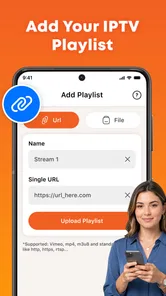
In my view, its strongest promise is a focused one. It supports M3U playlists and Xtream access, giving viewers two familiar ways to connect a service. That makes it worth considering if your main goal is watching live television from an existing setup on Android. It is less compelling if you expect a full entertainment hub, built-in channels, or a viewing experience whose details are clearly explained before you install it.
Following the interface without extra guesswork
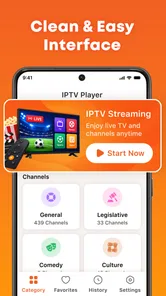
The app belongs to the video player and editor category, though its practical purpose is much narrower than editing: it is a player for live IPTV. Nikita Infotech is the developer, and the app is free. Its focus can be an advantage for someone who wants a straightforward route from playlist to playback, without the wider menus found in media centers that handle local files, music, and many other sources.
That focus also puts more weight on the setup flow. Adding an M3U playlist and using Xtream credentials are different tasks, so it helps to know which connection details your provider gave you before you begin. I would keep those details handy and enter them carefully, especially if you are using a phone keyboard. A small typo in a long playlist address or login detail can look like a playback problem when the real issue is the initial connection.
The name IPTV Player - Smart TV & Live suggests a television-oriented use, but I would not assume that every screen or remote-control arrangement is equally convenient. On a phone, navigation can be familiar because you tap directly. On a television, the quality of the experience depends on how well menus respond to a remote and how easy it is to move between items. If you plan to use it mostly on a TV, test that basic navigation early rather than waiting until you have organized a large playlist.
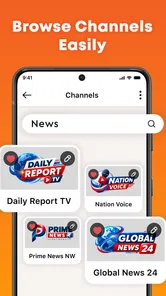
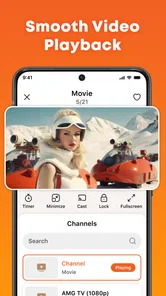
For readability, the most useful practical habit is to keep the playlist manageable. If a provider supplies a very large channel collection, finding one item among many can become the real obstacle, regardless of how quickly the player opens. I would start with the channels I actually watch and learn the app’s browsing behavior before relying on it for a busy evening. This is a simple way to tell whether its organization suits you without committing your whole routine to it.
Small setup choices that make a difference
One non-obvious trade-off with playlist players is that convenience depends partly on the source. If your provider refreshes its channel list or changes access details, the player may need to reconnect or have the playlist updated. That is not a flaw unique to this app; it is part of relying on an IPTV source. I would make a note of where the playlist came from and keep the current connection information somewhere safe, rather than treating the player as the owner of that content.
More From Our News Desk

 Instagram
Instagram’s Power Comes From Its Place in Your Phone
A close look at how Instagram turns Meta’s reach, recommendation systems and everyday camera habits into durable platform power—and what that costs users.

 Gmail
GmailGmail in a Busy Inbox: Who Benefits Most?
From first account to crowded workday, Gmail earns its place through dependable search and flexible sorting—but its best fit depends on how much inbox maintenance you can tolerate.

 Prime Video
Switching to Prime Video: What Changes in Your Viewing Routine
Prime Video can make a compelling second home for streaming, but switching means learning a different catalog, rental layer, and route from browsing to playback.

 Universal TV Remote Control
Universal TV Remote Control Works Best as a Reliable Backup
A phone remote earns its place through quick setup and reliable habits. Here is how to get more from Universal TV Remote Control—and where its limits show.

 Weather - By Xiaomi
Weather by Xiaomi Review: Clear at a Glance, Less Clear Up Close
Xiaomi’s weather app makes everyday forecasts quick to scan, but its calm surface can leave useful details and recovery paths harder to find than they should be.

 X
XX Under Pressure: Can It Recover When Posting Goes Wrong?
A resilience-focused review of X, examining setup, mistaken posts, interruptions, weak connections, and the gaps that matter when recovery needs to be dependable.
Latest News



It is also sensible to try one familiar channel immediately after setup. That quick check separates three possible issues: the app’s connection setup, the provider’s service, and the particular stream. If one channel works but another does not, repeatedly entering credentials is unlikely to help. This kind of basic troubleshooting saves time and is especially useful for anyone who is less comfortable adjusting app settings.
Choosing a sensible first test
I would make that initial trial deliberately small: enter the connection method your provider actually uses, open one channel you know well, then leave and return to it once. This checks more than whether video appears. It gives you a feel for whether the route back to a channel is easy to remember, which matters for a viewer who does not want to navigate a long list every time. If that everyday loop feels awkward on your device, a bigger playlist is unlikely to improve the experience.
Compared with a provider’s own viewing app, a dedicated IPTV player can be useful when you already have connection details and want a separate place to use them. The provider’s app may still be preferable if it guides account setup more clearly or organizes its own channels in a way you already know. Compared with a broad media center, this app’s narrower live-TV role may mean less unrelated navigation, but it is not the obvious choice for someone who wants local movies, music, and IPTV gathered together. I would choose by the routine I want, not by the assumption that one kind of player is universally easier.
Motor, sensory, and everyday viewing needs
People use live TV in very different ways. Some sit close to a large screen and operate a remote; others hold a phone, share a room, or listen while doing something else. A player that accepts existing playlists may suit these varied routines, but that alone does not establish that it offers particular accessibility controls. I would avoid assuming that text size, contrast, captions, audio description, or voice navigation work in a specific way without checking them on the device you intend to use.
For someone with limited dexterity, the key question is how much repeated input setup requires. Entering a long M3U address on a television can be awkward, while using a phone keyboard may be easier. If you have a choice, prepare the connection details before opening the setup screen and avoid switching between several apps while typing. That reduces the chance of losing your place or making a mistake. A person who finds small touch targets difficult should also test the actual controls, rather than judging ease from the app’s name or category.
Sensory comfort is equally personal. Live video can change quickly in brightness and sound level, and a crowded channel list can be tiring to scan. I would first use the device’s own display and sound settings to create a comfortable baseline, then check whether the app’s playback and browsing suit that setup. If you rely on captions or other support for understanding dialogue, verify the behavior with the specific channel you watch; a player cannot guarantee that the stream itself includes those options.
There is a useful distinction between operating the player and understanding a program. The app can provide a route to a stream, but accessibility in the program also depends on the broadcaster and IPTV provider. That means a viewer who needs consistent captions or an audio-described feed should confirm those features at the source before making this their everyday option. The player may be perfectly usable while a particular channel remains unsuitable.
When it fits into a real routine
Picture a household that already has an IPTV subscription and wants to watch a familiar live channel while preparing dinner. One person can set up the playlist in advance, confirm that a known channel opens, and leave the device ready for another household member. That can make the app practical for a shared routine, especially when the second viewer does not need to change providers or learn a broad media library. The important step is testing the whole handoff: not just whether the stream plays, but whether the next person can find it again.
It can also be useful for someone who travels between rooms with a phone and wants access to the same IPTV source, provided their service and connection support that use. In that situation, I would check playback on the actual network and device before depending on it away from home. A stream that works in one setting may behave differently elsewhere because live viewing relies on both the provider and the connection. This is why I see the app as a convenient player, not a guarantee of uninterrupted television in every context.
For an older relative or a viewer who prefers minimal interaction, I would set up the playlist together and leave a short, plain-language note explaining which connection to use and how to reach a familiar channel. That small bit of preparation may matter more than exploring every menu. If the app’s layout proves confusing on the intended screen, a provider’s own app or a player already familiar to that viewer could be the kinder choice.
Different rooms, different trade-offs
A phone can make the first setup less cumbersome because typing connection details is often easier than entering them with a television remote. But that convenience does not automatically make a phone the best screen for regular viewing: a viewer may prefer a larger display, or may find holding and tapping a phone tiring. I would separate the setup device from the viewing device in my decision, then test the arrangement I actually expect to use rather than assuming one screen has to serve every purpose.
For shared use, it helps to agree on who will maintain the playlist if the provider changes its connection details. Otherwise, a person who simply wants to watch may be left facing a confusing failure without knowing whether the app, the channel, or the account needs attention. This is a small household workflow issue, but it can determine whether a focused player feels pleasantly simple or becomes a recurring source of support requests.
Where the experience may still create barriers
The clearest limitation is that this is not a complete TV service. You need an IPTV source and the information required to connect to it. Someone looking for free channels supplied by the app, a simple sign-up that bundles content, or recommendations for what to watch should look elsewhere. The free price does not mean the channels or provider access are included; those are separate parts of the arrangement.
Another friction point is diagnosis. If playback fails, a viewer may not immediately know whether the playlist was entered incorrectly, the provider is unavailable, or the network is having trouble. People comfortable with IPTV terminology can usually investigate those possibilities, but a first-time user may prefer an app that explains setup and errors in more guided language. Before settling on this one, I would test it with a small, familiar part of the playlist and see whether the basic path feels understandable.
Its current version is 1.4, and the app has over 100,000 installs. Those details offer context for its presence in the Android app market, but they do not tell me whether its controls will suit a particular person or television. It is rated for Everyone, which describes its content classification rather than guaranteeing that every interface choice works for every age or ability. The minimum operating system is Android 10, so anyone using an older device should check compatibility before planning around it.
The app was released on August 24, 2026. That is useful context when comparing it with long-established players, but I would make the decision on fit rather than age alone. If you depend on a specific accessibility feature, confirm it in practice. If your viewing depends on a particular provider, test that connection. And if you need a polished, guided experience for a family member, do not assume a basic IPTV workflow will automatically be the easiest one for them.
Questions worth settling before relying on it
Does the app include channels? No: I would treat it as a way to play a source you already have, not as a channel subscription or discovery service. Can it connect through different common IPTV arrangements? Its M3U and Xtream support gives users those two routes, but the right one depends on what their provider supplies. If you are unsure, ask the provider which connection details to use before attempting setup; guessing between methods can create needless confusion.
Will it work for a particular channel or accessibility need? I would verify that with the actual provider and stream, because successful connection does not guarantee that every channel plays or that a program includes captions. Is it a good choice for a television? It may be, but I would test remote navigation on the intended device rather than rely on the product name. These are practical checks, not reasons to dismiss the app: they help identify whether its narrow role matches your particular setup.
Who I would recommend it to
I would put IPTV Player - Smart TV & Live on the shortlist for an Android user who already has M3U or Xtream access, knows which source they want to watch, and values a dedicated live-TV player over a general media library. Its free entry point makes it reasonable to try, and the two connection methods give it relevance to people whose providers use either approach. The best candidate is someone willing to handle a little setup and evaluate the actual viewing experience on their own device.
I would skip it if you want content included, dislike entering connection details, or need reliable accessibility behavior without testing. A provider’s official app may be a better match when it offers clearer account support or channel-specific features. A more established media center may suit someone who wants to combine IPTV with local video and other sources. Neither alternative is automatically better; the right choice depends on whether you value a narrow live-TV workflow or a broader, more guided environment.
My inclusive verdict is cautiously positive. The app’s focused approach can reduce clutter for a viewer who already knows how IPTV works, while the need for playlist credentials and the uncertainty of individual streams can add barriers for others. I would try it with one familiar channel, check navigation using the device and controls you actually plan to use, and verify any essential captioning or sensory needs at the source. If that first test feels clear and comfortable, it may become a useful part of your routine. If it does not, choosing a player with a more suitable interface is a practical decision, not a failure to make this one work.
IPTV Player - Smart TV & Live Frequently Asked Questions
What is IPTV Player - Smart TV & Live, and how does it work?
IPTV Player - Smart TV & Live is a media player designed to play television streams supplied by the user or a compatible IPTV provider. It does not necessarily include TV channels, films, or subscriptions of its own. To watch content, you generally need to add a supported playlist or account details from a service you are authorized to use, then browse and play the available streams.
Does IPTV Player - Smart TV & Live provide free channels or a subscription?
Do not assume that installing the app gives you access to live TV. IPTV players typically provide playback features rather than licensed channel packages, and the availability of any built-in content, trial, or paid plan can vary by version and region. Check the app listing and its in-app purchase details before paying, and confirm that your IPTV provider has permission to distribute the channels you plan to watch.
What do I need before using IPTV Player - Smart TV & Live?
You will need a reliable internet connection and a compatible source of IPTV content, such as a playlist or login supplied by a provider. The exact setup options and supported playlist formats depend on the app version, so check the instructions from both the app and your provider. Never share account credentials with unofficial services, and use only streams you are legally entitled to access.
Can I use IPTV Player - Smart TV & Live on a television or cast content to another screen?
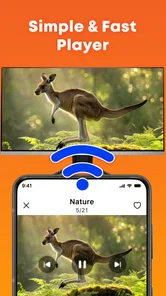
The app’s compatibility with smart TVs, streaming devices, casting, and external displays depends on the platform and the features available in the version you download. A mobile app may not install directly on every television, even if the TV runs Android. Before downloading, review the store listing for supported devices and casting options, and check whether your TV or streaming device supports the required playback formats.
Is IPTV Player - Smart TV & Live safe, and why might a stream fail to play?
Download the app from an official app store and review its developer information, permissions, privacy disclosures, and recent user feedback. Playback problems can result from a weak connection, an expired or incorrectly entered playlist, provider-side outages, unsupported formats, or regional restrictions. The player cannot guarantee that every stream will work, so contact your IPTV provider for account or channel issues and avoid suspicious playlists or unofficial downloads.
Pros
- Supports common IPTV playlists
- including M3U and M3U8 formats.
- Lets you organize channels into groups for easier browsing.
- Includes an electronic program guide when playlist data is available.
- Offers a TV-friendly interface suited to larger screens.
- Can play streams from your own playlist without requiring a cable box.
Cons
- Does not provide TV channels or subscriptions; you must supply a playlist.
- Stream quality and reliability depend on your IPTV provider and internet connection.
- Some playlists may not load correctly if their format or links are unsupported.
- EPG information may be missing or outdated for some channels.
- Availability of features and playback options may vary by device or app version.











