

IPTV Player - Smart Stream M3U
- 0.00
- 0.0
- Installs
- 10.00K
- Price
- Free

Screenshots
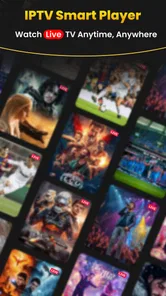
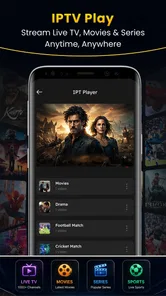
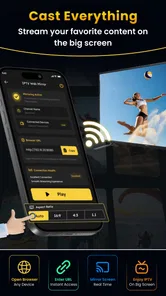
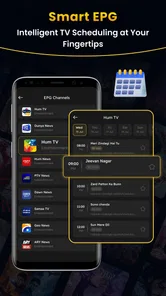
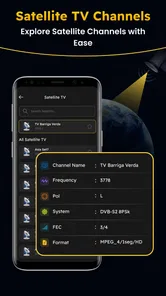
Analysis by Reviewed
I judge an IPTV player less by how many buttons it puts on screen and more by how well it fits the way people actually watch: with a playlist they already have, on a device they already use. IPTV Player - Smart Stream M3U is aimed at that straightforward setup. It is a free media-player app from ZAM Apps Studio in the Libraries & Demo category, designed to play user-provided M3U playlists and streaming URLs. That distinction matters: it is a way to access compatible sources, not a service that supplies channels or subscriptions.
What the free download does—and what it costs
The app is listed as free, so trying it does not require an upfront purchase. There are also in-app purchases priced from $1.99 to $19.99 per item. I would treat those as a reason to check the purchase details in the app before spending, rather than assume that every useful playback function is included or that a particular payment unlocks a specific feature. The free label tells you the entry price; it does not, by itself, settle what paid items provide.
That is a useful distinction for anyone comparing players. If you already have a playlist and simply want to see whether this app handles your source comfortably, the no-cost starting point makes it easy to evaluate. If you are considering a purchase, first confirm what the item covers and whether it addresses a problem you have actually encountered. Paying on speculation is hard to justify when the app’s core purpose can be tested with your own compatible source.
The app is marked for Everyone and has reached over 10,000 installs. It was released on October 3, 2026, and the current version is 1.0.3, with Android 7.0 listed as the minimum operating-system requirement. Those details make it easier to judge basic fit: it is intended for a broad audience, and older Android devices may still meet the stated requirement. The install figure is a sign of adoption, not a guarantee that every playlist or device combination will work equally well.
Value comes from the source you bring
The main value proposition is practical rather than content-based. If you already receive an M3U playlist from a legitimate provider, or have a compatible streaming URL, a dedicated player can give that material a place to run without asking you to replace your source. That can be more useful than installing a full television service whose channel selection, account system, or subscription does not match what you already use.
There is an important boundary here: the player’s usefulness depends on the playlist or URL being valid, accessible, and compatible. A blank or incomplete library is not necessarily a fault in the player; the source itself may be unavailable, incorrectly formatted, or no longer active. I recommend testing with a source you know works elsewhere, so a playback problem does not turn into guesswork about which part of the setup is responsible.
For a household that keeps a provider-issued playlist separately, this kind of arrangement can be convenient. You can use the player as the playback layer while leaving the source and any related account details with the provider. That separation also means the app should not be mistaken for a channel directory. If you expect to install it and immediately browse a ready-made selection, this is the wrong expectation to bring.
More From Our News Desk

 Gmail
GmailGmail in a Busy Inbox: Who Benefits Most?
From first account to crowded workday, Gmail earns its place through dependable search and flexible sorting—but its best fit depends on how much inbox maintenance you can tolerate.

 Prime Video
Switching to Prime Video: What Changes in Your Viewing Routine
Prime Video can make a compelling second home for streaming, but switching means learning a different catalog, rental layer, and route from browsing to playback.

 Universal TV Remote Control
Universal TV Remote Control Works Best as a Reliable Backup
A phone remote earns its place through quick setup and reliable habits. Here is how to get more from Universal TV Remote Control—and where its limits show.

 Weather - By Xiaomi
Weather by Xiaomi Review: Clear at a Glance, Less Clear Up Close
Xiaomi’s weather app makes everyday forecasts quick to scan, but its calm surface can leave useful details and recovery paths harder to find than they should be.

 X
XX Under Pressure: Can It Recover When Posting Goes Wrong?
A resilience-focused review of X, examining setup, mistaken posts, interruptions, weak connections, and the gaps that matter when recovery needs to be dependable.

 Clash of Clans
Clash of Clans Is Won Between the Battles
Its raids are quick; its community is a long-term project of coordination, teaching, rivalry, and shared responsibility—with all the friction that entails.
Latest News



A sensible setup workflow
I would start by checking the playlist before entering it: make sure the file or URL is current, copied completely, and obtained from a source you are entitled to use. Then test a small, familiar selection rather than judging the app from a long list all at once. This is a simple but useful troubleshooting habit: if one known channel plays and another does not, you have a better clue that the issue may lie with the individual stream rather than the whole app.
For a URL, keep a clean copy somewhere you can reach again before switching between devices or reinstalling an app. Long addresses are easy to mistype, and a missing character can look like a player failure. For a playlist file, retain the original separately so you can compare it with any edited version. These are not special features of this app; they are practical ways to avoid losing the source that makes an IPTV player useful in the first place.
There is also a trade-off in relying on user-provided material. If a provider changes an address or reorganizes a playlist, the playback experience can change without an app update. I would keep track of who supplied the source and how to request a fresh version. That is especially helpful when the app is used by more than one person at home, because it prevents repeated troubleshooting of an outdated playlist.
Where it fits among other options
Compared with a conventional streaming app, IPTV Player - Smart Stream M3U is a more open-ended tool: it is built around sources the user supplies rather than a catalog that the app itself presents. That flexibility is valuable if your viewing setup already revolves around an M3U list or direct stream URL. It is less convenient if you want one account, a polished on-demand library, and support handled by a single content provider.
Compared with a general-purpose video player, an IPTV-focused app is a more natural place to try playlist-based live streams. The trade-off is that an ordinary video player may be simpler for a single local file, while this app’s specific appeal depends on having IPTV-style material to load. I would not install it just to play occasional downloaded clips; a standard media player is likely the more direct choice for that job.
Likewise, a provider’s own app may be better if you want that provider to manage sign-in, channel discovery, and support in one place. A separate player makes more sense when you already have a compatible source and want a playback option that is not tied to a single content catalog. The right choice is therefore less about which app has the longest feature list and more about whether your content arrives as a playlist or as a managed service.
Everyday use and the small points that matter
A realistic use case is settling in after work and opening a playlist supplied by a legitimate television provider, rather than searching across several service apps for the same live channel. In that situation, the player’s job is focused: take the source you have and make it available for playback. I find that appealing for someone who values control over where their stream comes from, but it also puts more responsibility on the user to keep the playlist current.
For shared household use, decide who will maintain the source before treating the app as a set-and-forget television setup. If one person receives playlist updates, keeping that person responsible for replacing an expired list can save everyone else from repeatedly trying the same dead stream. This small bit of organization is more important with a user-supplied player than with a subscription app that refreshes its own catalog behind the scenes.
Another useful test is to try the app on the device and network where you actually plan to watch. A stream that works on a phone over one connection may behave differently on another device or network. That is not a claim that this app has a particular network limitation; it is simply why I would avoid judging an IPTV setup from a single successful test in a different environment. Your source, device, and connection all contribute to the final result.
How I would judge a first test
I would separate setup success from viewing success. First, see whether the playlist can be supplied in the format you have; then test a channel you recognize and leave it playing long enough to decide whether it is suitable for an ordinary viewing session. If the source loads but playback fails, try a second known stream before changing settings or replacing the playlist. That keeps a one-off source problem from sending you down the wrong troubleshooting path.
For anyone who watches in short bursts, a useful test is to close the app and return later, then check whether getting back to the intended content is straightforward. I would also try the channels you care about most rather than treating a long playlist as proof that every entry matters. A list can contain outdated or rarely used items, so judging the experience by its size may exaggerate its practical value.
If you plan to use a URL rather than a file, be careful about where you store it. A playlist address may be tied to your provider or account, so I would avoid casually sharing it in a household chat or leaving it in a public note. Keeping a private, accurate copy makes recovery easier while reducing the chance that someone edits or forwards the wrong address. The sensible workflow is simple: preserve the original, make changes only when needed, and test after each change.
Who should choose it—and who should pass
I would consider this app if I already had a reliable M3U playlist or streaming URL, wanted a dedicated place to try it, and was comfortable handling the source myself. It may also suit someone who prefers separating the playback app from the provider that supplies the content. The free starting point is helpful for that kind of trial, while the listed purchases are worth considering only after checking their exact value inside the app.
I would skip it if I expected channels to be included, wanted an easy first-time setup without obtaining a playlist, or needed a provider to manage content and account support end to end. It is also not the first option I would choose for ordinary local video playback. In those cases, a subscription service, provider app, or general media player is better matched to the task than a playlist-based IPTV tool.
Because the app is at version 1.0.3, I would approach it as a relatively early version and test the specific workflow I care about before building a complicated setup around it. That does not mean it will be unreliable; it means I would verify the essentials first: can I add my source, does a known stream play, and is the viewing experience acceptable on my device? Those checks tell you more than assumptions based on a version number alone.
It is also a poor fit for someone who wants a managed television experience without any responsibility for content access. A player that relies on a source you bring will not take the place of provider support when an account expires or a stream is withdrawn. If you are helping a less technical family member, consider who will maintain the playlist and explain what to do when a channel stops working. If no one wants that small ongoing task, the provider’s own app is likely the calmer choice.
On the other hand, someone who already knows where their playlist comes from may appreciate having a separate playback option instead of being locked into one provider’s interface. That can be useful when comparing sources or keeping viewing habits organized, as long as the source is legitimate and the user understands that the app is not the supplier. The distinction is easy to miss at first, but it is the deciding factor in whether this app feels purposeful or empty.
My verdict on the value
My overall view is that IPTV Player - Smart Stream M3U is worth trying when you already bring the content and want a focused Android player for it. The free entry price lowers the risk of testing that fit, but the in-app purchase range makes it sensible to inspect paid items before deciding whether they add enough value for your needs. I would not treat the app as a replacement for a television provider or as a source of channels.
The key question is whether you already have a dependable playlist or URL. If you do, this app has a clear, practical role: it gives your existing source a dedicated playback option. If you do not, its central advantage disappears, and a service that supplies content or a provider’s own app will likely be a more satisfying place to start. For the right user, the free trial path is reasonable; for everyone else, the smartest choice may be to skip it rather than buy features in search of content it is not meant to provide.
IPTV Player - Smart Stream M3U Frequently Asked Questions
What is IPTV Player - Smart Stream M3U, and what does it do?
IPTV Player - Smart Stream M3U is a media player designed to open IPTV playlists, commonly supplied as M3U or M3U8 files or links. It can help organize and play compatible live-TV streams, and may also support other playlist content depending on the app version. It is a player rather than a source of channels, so users generally need to provide their own playlist and verify that they have permission to access its content.
Does IPTV Player - Smart Stream M3U include channels or subscriptions?
Do not assume that installing the app provides access to television channels, films, or a paid IPTV subscription. A playlist player typically needs a playlist URL or file from a separate provider, and availability, pricing, and channel selection depend on that provider. Before adding a playlist, check its terms and legitimacy, and avoid links from untrusted sources. The app itself may not be able to resolve missing or unavailable streams.
How do I add an M3U playlist to the app?
The usual process is to obtain an M3U or M3U8 playlist from a provider, then use the app’s playlist or add-source option to enter its URL or import the file. Menu labels and supported input methods can vary by version, so follow the instructions shown in the app. Keep playlist links private if they contain account details, and contact the provider—not the player developer—if a valid playlist stops working.
What do I need for smooth IPTV playback, and what can I do if a stream buffers?
Playback quality depends on several factors, including the stream’s stability, your internet connection, device performance, and the video format. A reliable Wi-Fi or wired connection can help, while a weak network or an overloaded provider may cause buffering or failed playback. Try another available stream, restart the app and router, and check whether the playlist works in the provider’s recommended player. Not every stream is compatible with every device.
Is IPTV Player - Smart Stream M3U safe, and what should I check before downloading?
Download the app only from an official app store or another trusted distribution source, and review its current permissions, privacy disclosures, developer details, and recent user feedback before installing. Be cautious with playlists and links from unknown providers, since they can lead to unreliable or inappropriate content. App features and platform support may change over time, so confirm the listing for your Android or iOS device and use content you are authorized to access.
Pros
- Supports M3U playlists
- making it compatible with many IPTV providers.
- Simple playback controls are easy to use on phones and tablets.
- Can bring live TV channels together in one convenient app.
- Useful for viewers who want to organize their own streaming sources.
- A player-focused option for users who already have an IPTV subscription.
Cons
- Does not provide TV channels or subscriptions; you must supply a playlist.
- Playlist quality and channel availability depend on your IPTV provider.
- Some streams may buffer or fail because of network or source issues.
- M3U playlists can require manual setup and troubleshooting.
- Use of unofficial streams may raise copyright or regional availability concerns.










