iPhone Keyboard
- 278.00
- 4.4
- Installs
- 5.00M
- Price
- Free
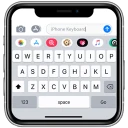
Screenshots
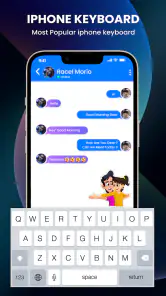
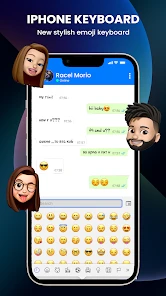
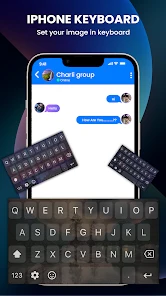
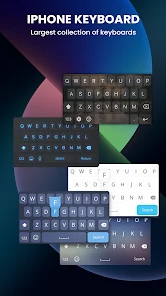
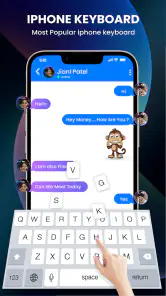
Analysis by Reviewed
I judge a keyboard app by a simple test: can I set it up without guesswork, and does it make ordinary typing easier rather than adding another thing to manage? iPhone Keyboard is an Android personalization app from Keyboard i, intended to give an Android device an iPhone-like keyboard appearance. That can be appealing if you like that familiar look, but it is worth separating the visual idea from the typing habits and settings Android already uses.
Where setup can feel confusing
The first hurdle is understanding what the app is meant to change. Installing a keyboard-style personalization app is not always the same as immediately replacing the keyboard you see in every text box. If the appearance does not change after installation, I would first check the device’s keyboard settings and confirm which keyboard is currently selected. On Android, the active input method is controlled through system settings, so opening the app alone may not complete the switch.
That distinction matters if you are trying to get the iPhone look for a quick message. A keyboard can be installed yet not active, and a text field may continue to show your previous choice. I recommend testing in a basic notes or messaging field after setup, then checking the selected keyboard again if the old layout remains. This is a sensible first check before reinstalling anything.
Checks that make the first try smoother
Before judging the typing feel, take a moment to finish the app’s setup steps and make sure Android recognizes it as the chosen keyboard. The app is free, rated for Everyone, and its current version is 1.3.5; it is listed for Android 7.0 and later. Those details make it accessible to a broad range of Android users, though the way keyboard settings are arranged can differ between phone makers.
For a fair test, try the same few tasks you normally do: type a short message, enter a search, and correct a small typo. This helps you distinguish the keyboard’s appearance from the behavior of the app where you are typing. If the keyboard does not appear in one particular app, test a second text field before assuming the installation has failed.
What it feels like in daily use
The first thing you'll notice about the iPhone Keyboard is its sleek, minimalist design. Apple is known for its clean aesthetics, and the keyboard is no exception. The keys are well-spaced, and the layout is intuitive enough that even a first-time user can get the hang of it in no time. But don't let its simplicity fool you; it's packed with features that make typing not just a necessity but a pleasure.
Features That Shine
One of the standout features is the predictive text and autocorrect. It's like having a little genie in your phone, ready to grant your typing wishes. The keyboard learns from your typing habits and suggests words that you might want to use next. And let's not forget about the emoji keyboard—because sometimes, a picture is worth a thousand words, right?
More From Our News Desk

Weather by Xiaomi Review: Clear at a Glance, Less Clear Up Close

X Under Pressure: Can It Recover When Posting Goes Wrong?

Clash of Clans Is Won Between the Battles

Android Auto Makes the Case for Quieter Car Software

MobiOffice: Transforming Mobile Productivity with Seamless Integration

EA SPORTS FC™ Mobile Soccer: Redefining Mobile Sports Gaming
Another neat feature is the swipe-to-type option, which allows you to glide your finger from letter to letter without lifting it. It's a game-changer for those quick text messages or when you're in a hurry. And if you're bilingual, the keyboard supports multiple languages, seamlessly switching between them without missing a beat.
Customization: Make It Yours
Customization options are somewhat limited compared to some third-party keyboards, but what it lacks in flexibility, it makes up for in reliability and security. You can change the keyboard color and add some text shortcuts, but don't expect a wide range of themes or fonts here. But hey, isn't that part of the charm? The iPhone Keyboard offers a consistent experience across all apps, so you know exactly what you're getting every time you tap away.
The Typing Experience: Smooth and Responsive
Typing on the iPhone Keyboard feels like gliding on ice. The keys are incredibly responsive, and the haptic feedback gives you that satisfying clicky feel without the noise. It's perfect for both quick texts and longer emails, making it versatile enough for any kind of user.
The keyboard's smart features, like the ability to recognize and correct typos, make it a reliable tool for both casual and professional use. It's like having a personal assistant who's always got your back, ensuring your messages are clear and error-free.
Using it for real routines
A practical use is giving an Android phone a more iPhone-like appearance without changing the device itself. For example, if you prefer that visual style and spend much of the day replying to short messages, you can try it in your usual chat apps and see whether the layout feels natural. I would also test it with longer writing before settling on it: a keyboard that feels comfortable for a quick reply may not be the one I want for a work email or a long note.
One useful habit is to keep a short comparison period rather than switching permanently on the first day. Try your familiar keyboard for one task and this one for another, paying attention to missed taps, corrections you have to undo, and how quickly you can reach punctuation. That small check tells you more than appearance alone. If you often type names, addresses, or specialized terms, review autocorrected text before sending; automatic correction can be helpful, but your own vocabulary may not match what the keyboard expects.
Choosing between keyboard options
Compared with the keyboard already on an Android phone, this app’s clearest appeal is its iPhone-inspired presentation. The default keyboard may be the better choice if you already like its layout, rely on familiar system shortcuts, or want to avoid changing input methods. Other third-party keyboards can be a stronger fit for someone whose main priority is extensive visual customization or a particular typing workflow. I would choose this app when the iPhone-like style is the point, not simply because I assume every alternative will type better.
Keyboard changes also affect muscle memory. If you frequently move between phones, a familiar-looking layout may make the transition feel easier, but the exact placement and behavior still deserve a quick check before relying on it. I would avoid switching right before an important message or deadline; give yourself a little time to learn where things are and to notice whether corrections suit your writing.
When a problem may be elsewhere
If typing feels delayed or a key seems unresponsive, check whether the same issue happens in more than one app. A single text field may behave differently from another because of the app or the device, so testing elsewhere can narrow down the cause. If the keyboard disappears, return to Android’s input settings and verify the active selection. Restarting the app or device can be a reasonable general troubleshooting step when a setting seems not to take effect, but I would not treat every typing hiccup as proof that the keyboard itself is faulty.
Privacy is also a fair consideration with any replacement keyboard, since a keyboard handles what you type. I would read the app’s own setup and privacy information and make a deliberate choice before entering sensitive details. If you would rather keep the default keyboard for password fields or private work, you can use a different input method there when the device allows it. This is a practical boundary, not a reason to assume the app is unsafe.
Who should try it, and who should pass
With a 4.4 average from around 39,000 ratings and over 5 million installs, it has attracted a substantial audience, but popularity does not tell me whether it fits a particular person’s habits. I can see it suiting someone who specifically wants an iPhone-like keyboard on Android and is comfortable checking system settings to activate it. I would suggest skipping it if you are already satisfied with your phone’s default keyboard, want deep theme controls, or do not want to change how you type just for a visual difference.
The app is free, which makes trying it a low-commitment way to see whether the style works for you. Still, “free” does not mean setup is effortless or that every person will prefer the typing feel. Keyboard i’s app is best judged by a few ordinary tasks on your own device, not by the promise of a familiar appearance alone.
A useful test before making it your default
I would give the keyboard a small, deliberate trial rather than evaluating it by the first glance. Use it for a routine that combines different kinds of input: reply to a message, search for a place, then write a few sentences in a notes app. The point is not to measure speed with a stopwatch, but to notice whether the layout stays comfortable as the task changes. A keyboard that looks familiar can still feel different when you need punctuation, switch languages, or correct a word.
For example, imagine answering a message while walking between errands, then typing an address into a search field once you arrive. In that sort of everyday use, a missed tap or an autocorrected name matters more than a polished appearance. I’d pause long enough to proofread names and numbers before sending, especially while learning the keyboard’s behavior. If those small checks become second nature and the style makes you enjoy using your phone more, that is a meaningful benefit; if they feel like extra work, the default keyboard may suit you better.
Small workflow choices that can help
One practical way to reduce friction is to change only one thing at a time. First confirm that the new input method is selected; then judge its layout in a familiar app, and only after that decide whether to adjust any available personalization settings. This makes it easier to tell whether a problem comes from activation, the app you are typing in, or simply a layout you do not prefer. If you change several settings at once, it becomes harder to identify what improved or made typing less comfortable.
It is also worth thinking about the kind of text you enter most. Short conversational replies may put a premium on quick access to emoji and common words, while work notes often demand careful punctuation and names that autocorrect may not recognize. I would keep an eye on corrections for a few days and learn when to accept or undo them. That is not a special trick so much as a sensible way to avoid letting a helpful suggestion quietly change the meaning of a message.
Comfort, consistency, and expectations
A keyboard is one of the most frequently used parts of a phone, so even a modest visual change can affect how the device feels. The iPhone-inspired look may be the main reason to try this app, but I would treat familiarity as a starting point rather than a guarantee that every detail matches what you remember from an iPhone. Android’s settings and the apps around the keyboard remain part of the experience, and a particular phone can present controls differently from another.
That also makes the app a more natural fit for someone who enjoys personalizing a device than for someone seeking a major productivity upgrade. If your current keyboard already handles your languages, shortcuts, and everyday typing well, switching may offer little beyond appearance. If you value the visual change enough to accept a brief adjustment period, the trade-off can make sense. I would keep the alternative keyboard available until the new layout has proved comfortable in the situations that matter to you.
Final Thoughts: A Reliable Companion
In the world of apps and gadgets, the iPhone Keyboard might seem like just another tool, but it's one you use every day. Its reliability, coupled with its intuitive design and smart features, makes it a staple in the iPhone experience. While it may not offer the flashy customization options of some third-party keyboards, its seamless performance and security are worth the trade-off.
So, if you're on the fence about sticking with your default keyboard or exploring other options, give the iPhone Keyboard a chance. It's like that trusty old friend who's always there when you need them, making sure your typing game is always on point.
For Android users who want this particular visual style, the simplest recommendation I can make is to try it calmly and keep your expectations focused. It is a free personalization app from Keyboard i, released on December 19, 2021, and its age rating is Everyone. Its appeal is narrow in a useful way: it offers an iPhone-inspired keyboard experience rather than asking you to replace the rest of your phone or adopt a whole new workflow.
My verdict is positive for someone curious about the look and willing to test the input method in their own routine. The app has reached a 4.4 average across about 39,000 ratings, and it has more than 5 million installs, but those figures are background, not a promise that its layout will suit your hands. Keep your existing keyboard as a fallback while you check messages, searches, and longer writing. If the appearance matters to you and the corrections feel manageable, it is an easy option to keep; if you need extensive customization, dependable specialist vocabulary, or no change to your established typing habits, your current keyboard or another third-party choice is likely the wiser fit.
iPhone Keyboard Frequently Asked Questions
Will iPhone Keyboard work with my Android phone?
iPhone Keyboard is designed for Android devices and requires Android 7.0 or later. Before downloading, check your phone’s operating system version and make sure you are comfortable replacing or changing the keyboard you use for typing. The app aims to give an Android device an iPhone-inspired keyboard appearance; it does not turn the phone itself into an iPhone.
Does installing iPhone Keyboard change Android into iOS?
No. iPhone Keyboard is a personalization app focused on making the keyboard on an Android device resemble an iPhone keyboard. It does not change Android into iOS or replace the phone’s operating system. If you want an iPhone-like touch while keeping your Android phone, the keyboard’s visual style is the main reason to consider trying it.
Is iPhone Keyboard free to download, and what is its age rating?
iPhone Keyboard is a free personalization app for Android, so you can try its iPhone-inspired look without paying to download it. It is rated Everyone, making it suitable for a broad audience. Before installing, check that your device meets the app’s Android requirements and consider whether its keyboard appearance and features match what you want from a replacement keyboard.
What is iPhone Keyboard, and what does it do on an Android device?
iPhone Keyboard is an Android app that changes the look and feel of your device’s keyboard to resemble an iPhone keyboard. It is intended for people who like the iPhone style but use an Android phone. The app’s focus is personalization, so its main appeal is giving everyday typing a different appearance rather than changing the phone’s operating system.
What are the key features of the iPhone Keyboard app?
The iPhone Keyboard app offers a range of features designed to enhance typing efficiency and user experience. Key features include predictive text, customizable themes, and multi-language support. Additionally, users benefit from gesture typing, which allows for faster input, and an array of emojis and GIFs to enrich communication. These features collectively make the app a robust choice for iPhone users.
Pros
- Highly responsive touch interface
- Customizable themes and layouts
- Built-in emoji support
- Predictive text feature
- Supports multiple languages
Cons
- Limited third-party app integration
- Occasional autocorrect errors
- No swipe typing feature
- Requires frequent updates
- Limited customization options
- Category
- Personalization
- Version
- 1.3.5











