iPhone Control Center iOS 16
- 209.00
- 4.0
- Installs
- 5.00M
- Price
- Free
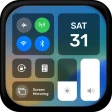
Screenshots
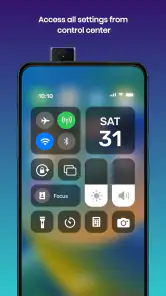
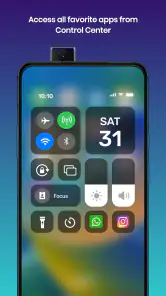
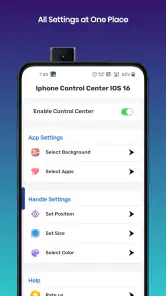
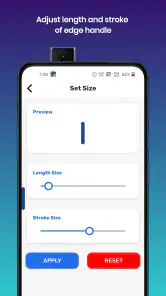
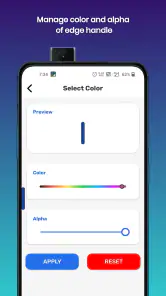
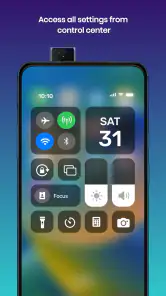
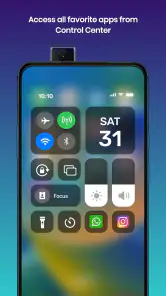
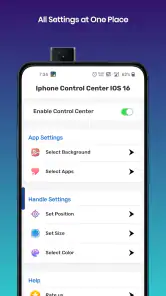
Analysis by Reviewed
Before installing, I’d set one expectation clearly: this is an Android personalization app that offers an iPhone-inspired control panel, not Apple’s Control Center or a replacement for Android’s settings. That distinction matters because the app’s short name, iPhone Control Center iOS 16, can make it sound like an iOS feature. I see its purpose as giving familiar actions a different, potentially more convenient entry point.
What the panel is meant to do
The practical idea is to gather everyday controls—such as volume, screenshots, and network settings—in a panel you can call up when you need them. It is most appealing if you like the iPhone-style presentation and want to try that approach on an Android phone. It is less compelling if your only goal is to find a control that your phone’s built-in quick settings already put within easy reach.
I wouldn’t install it expecting to transform the whole device. Think of it as an optional layer for common actions: the phone still runs Android, and the app’s look does not make its controls behave exactly like Apple’s. Keeping that in mind makes it easier to judge the app by a useful standard: does this route save me a step in my own routine?
Start with a small, practical setup
After installing, take a moment to look through the panel and identify the actions you actually use. Resist the urge to treat every shortcut as essential. A compact set you recognize is easier to use quickly, especially when you’re still learning where things are. The app is currently at version 1.9 and supports Android 6.0 or later, so it is aimed at a broad range of Android devices, even though its short description presents an iPhone-style control center.
That distinction is worth keeping in mind: this is an Android personalization app inspired by an iPhone control panel, not Apple’s built-in iOS feature. If you want Apple’s exact system behavior or native integration, an Android app cannot provide that. If your goal is simply to reach familiar controls in a different-looking panel, the concept makes more sense.
Make your first shortcut count
For a first test, choose one action you often need—changing volume or checking a network setting, for example—and try reaching it through the panel instead of opening the usual settings route. That small trial tells you whether the access feels natural on your device. I’d test it at a calm moment rather than while walking or in a hurry, then adjust your habits only if the shortcut genuinely saves effort.
A useful everyday case is settling down to watch a video: you may want to adjust sound and check your connection without digging through several screens. Another is taking a screenshot while following instructions, where a quick control can reduce the fiddling between the content and the action. These are modest wins, but they are the kind of repeated tasks that make a shortcut panel worthwhile.
More From Our News Desk

Clash of Clans Is Won Between the Battles

Android Auto Makes the Case for Quieter Car Software

MobiOffice: Transforming Mobile Productivity with Seamless Integration

EA SPORTS FC™ Mobile Soccer: Redefining Mobile Sports Gaming

How Microsoft OneDrive Became a Mobile Productivity Giant

How Google Translate Breaks Language Barriers Effortlessly
Getting to Know the Control Center
First off, let’s talk about what the Control Center actually is. It’s a neat little hub that gives you quick access to a bunch of functions on your iPhone. From adjusting brightness and volume to turning on the flashlight or managing your Wi-Fi settings, it’s all there at your fingertips. And the best part? You don’t even have to unlock your phone to use it!
What’s New in iOS 16?
With the latest update, iOS 16, Apple has taken the Control Center up a notch. There are a few subtle but impactful changes that make it even more user-friendly. The interface is sleeker, with a more refined design that just feels more cohesive. Everything is organized in a way that makes sense, so you’re not left fumbling around trying to find what you need.
One of my favorite new features is the ability to customize your Control Center even more. Want to add quick access to your favorite app or a specific setting? No problem! You can personalize it to suit your needs, which is a huge win for those of us who like things just so.
Using It Like a Pro
Alright, let’s dive into some of the cool tricks you can do with the iPhone Control Center iOS 16. Besides the usual suspects, like toggling airplane mode or adjusting the volume, you can now do things like screen recording with just a tap. This is super handy if you’re trying to show someone how to do something on their phone or just want to save a quick video for later.
Another great feature is the focus modes. You can switch between different modes like Do Not Disturb or Work Focus with ease, helping you stay on task without getting distracted by notifications. Plus, the new sound recognition option is a game-changer for those who have hearing difficulties or just need an extra alert for specific sounds.
What a typical day might look like
Imagine you’re following a recipe on your Android phone with messy hands and want to raise the volume so you can hear a timer or instruction clearly. A shortcut panel can make that small adjustment feel more direct than leaving the page to find a setting. Later, if you need to capture a useful screen while reading directions, the screenshot option is another natural moment to test. The value is not that either task is impossible otherwise; it is whether the panel makes the repeated route easier to remember.
I’d use this kind of panel for brief, familiar actions, not as a substitute for careful setup. If I’m changing a network option that affects how the phone connects, I’d pause long enough to check the result rather than tapping quickly and assuming it worked. That habit is especially useful when the same-looking shortcut leads into Android settings that may be arranged differently from one device to another.
How it compares, and where it fits
On Android, your phone’s built-in quick settings are the closest everyday alternative. They usually suit people who want controls that are native to the device and already familiar; this app is more interesting if you specifically prefer an iPhone-inspired panel. I’d compare the two by trying the same routine in each, such as adjusting sound and checking connectivity, rather than judging only by appearance. A different look is useful only if the route feels easier in practice.
It’s a good fit for someone who enjoys personalizing their Android interface and wants common controls gathered in one place. It’s less suitable if you rely on exact iOS behavior, want every shortcut to work identically across phone brands, or already reach Android’s quick settings without thinking. The app has an average rating of 4.0 from around 40,000 ratings and over 5 million installs, which suggests broad use, but those figures don’t tell me whether its layout will feel right on your particular device.
Useful ways to decide whether to keep it
Rather than deciding from the appearance alone, I’d give the panel a short, practical trial. Pick two actions you already perform often, use the panel for them over the next few days, and notice whether you reach them more comfortably. If you find yourself opening the regular settings anyway, or pausing to remember where a control is, that is a sign the built-in route may be the better fit for you.
There is also a trade-off between a familiar visual style and a familiar Android workflow. Someone switching from an iPhone may appreciate a panel that feels closer to what they know, while an Android user who values manufacturer-specific shortcuts may prefer the native controls. Neither preference is automatically better; the important question is whether the panel’s actions match what you actually need, rather than simply whether its design looks appealing.
For a first-time user wondering whether this works on every Android phone, the sensible answer is to check the operating-system requirement and then test the actions on your own device. The app supports Android 6.0 or later, but manufacturer interfaces can still differ. If you want a control to behave exactly as it does on a particular iPhone, this is not the right way to get that result; if you want an alternate route to common Android actions, it is worth trying.
Small checks that prevent frustration
If a control seems to behave differently from the equivalent iPhone feature, first remember that the app runs on Android and that phone settings can vary by manufacturer. Try a single shortcut at a time and compare its result with the relevant system setting. This makes it easier to tell whether the panel is a convenient route or whether the underlying action is better handled directly by your phone.
For screenshots or any action you plan to use in a hurry, practise once before you need it. That simple rehearsal helps you learn the panel’s placement and avoids tapping around while distracted. I’d also keep the most frequent actions easy to spot instead of building a busy layout; quick access loses its value when you have to search through choices.
The app is free, and its 4.0 average comes from around 40,000 ratings, alongside 209 written reviews. Those numbers can help set expectations, but I’d still make the decision based on whether the panel suits your device and routine. Its release date is March 20, 2023, and the Everyone content rating makes it broadly appropriate for general audiences.
My recommendation for a first try
If you decide to try it, make the first session deliberately simple: open the panel, choose one familiar action, and check that the result on your phone is what you expected. Then test another action you use regularly, such as checking connectivity. This gives you a practical answer to the main questions—whether it is usable on your device, whether the controls feel convenient, and whether you prefer it to the native panel—without changing your whole routine at once.
All Themes 2022 is the developer, and the app sits in the personalization space rather than serving as a full settings tool. That is a helpful way to frame the choice. Install it for an alternative presentation and quicker access to familiar controls, not because you need iOS itself on Android. If native integration, exact Apple behavior, or a device-specific quick-settings setup matters most to you, your phone’s own options are the more sensible place to start.
Final Thoughts
In conclusion, the iPhone Control Center iOS 16 is a small change with a big impact. It’s all about making your life easier and your interactions with your phone more efficient. Whether you’re a tech newbie or a seasoned pro, there’s something here for everyone. So go ahead, give it a try, and see how it can enhance your iPhone experience. You might just wonder how you ever lived without it!
iPhone Control Center iOS 16 Frequently Asked Questions
Is iPhone Control Center iOS 16 available for Android, or is it only for iPhone?
Despite its iPhone-focused name, iPhone Control Center iOS 16 is an Android app, not an iOS system update or an app for installing Apple’s built-in Control Center on an iPhone. It requires Android 6.0 or later. If you are looking for a personalization app that brings a Control Center-style set of quick options to an Android device, check that your device meets this requirement before downloading.
Who develops iPhone Control Center iOS 16, and what is its age rating?
The app is developed by All Themes 2022 and is rated Everyone, so its content rating is suitable for a general audience. It belongs to the Personalization category and is designed around quick options such as volume, screenshots, and network settings. These details can help you decide whether its purpose and audience fit what you are looking for before you install it.
Is iPhone Control Center iOS 16 free to download?
Yes, iPhone Control Center iOS 16 is free to download. It is a personalization app for Android, rather than an iPhone system feature, so make sure you are looking for an Android download before proceeding. Its quick-option focus may suit someone who wants a Control Center-style experience, but the name should not be taken as a promise that it changes Apple’s built-in controls.
Is iPhone Control Center iOS 16 an app or a built-in iPhone feature?
iPhone Control Center iOS 16 is an app in the Personalization category, rather than the built-in Control Center feature described in Apple’s iPhone settings. It is designed around quick options such as volume, screenshots, and network settings. Before downloading, keep in mind that installing an app with this name does not itself replace or change the Control Center built into iOS.
What does the iPhone Control Center iOS 16 app offer?
The app is presented as a way to use quick options, including volume, screenshots, and network settings. Its purpose is to offer a Control Center-style experience for personalization. If you are looking for a specific feature, consider whether these quick options match what you want before installing; the app’s name alone should not be taken to mean that every iPhone system control is included.
Pros
- Intuitive interface design
- Customizable quick access
- Seamless device connectivity
- Efficient battery management
- Enhanced privacy features
Cons
- Limited third-party app integration
- Occasional lag on older devices
- Not all features customizable
- Requires constant updates
- Some features hidden in menus
- Category
- Personalization
- Version
- 1.9











