Invoice2go: Easy Invoice Maker
- 5.66K
- 4.5
- Installs
- 1.00M
- Price
- Free

Screenshots
Analysis by Reviewed
When a household includes a self-employed person, a side business, or a family member who handles bookings, invoices can become a shared practical concern even when the work itself is one person’s responsibility. I find Invoice2go: Easy Invoice Maker most useful as a dedicated business tool: it brings routine billing tasks together, while still making it important to keep a clear boundary between the business account and everyone else’s personal use of a phone or tablet.
A business tool on a shared device
Imagine a contractor finishing a job while another person at home is using the same device for everyday tasks. An invoice app can make it easier to prepare a bill while the details are fresh, rather than relying on a handwritten note that might be misplaced. But an invoice contains client and payment information, so sharing a device should not mean sharing access casually. I would keep the business account under the owner’s control and avoid treating the app as a household ledger or a general-purpose family organizer.
That distinction matters because the app is built for business workflows, not coordinating household chores or dividing personal expenses. If several people help with a small operation, decide who is responsible for preparing invoices, checking payment status, and following up. A simple agreed routine can prevent duplicate bills or confusion about whether a client has already been contacted. I would also make sure anyone using the device knows when they are in the business app and avoids changing client or invoice details without permission.
Making setup work for a small business
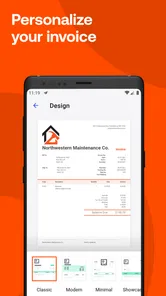
Getting started is most useful when I treat setup as part of the billing process rather than a quick formality. Before sending anything, I would check that the business details and invoice style are consistent with how I want clients to recognize my work. A clean template can make a small operation look more organized, but the design is only helpful if the service description, contact details, and amount are accurate. Taking a few minutes to establish a reliable starting point can prevent repeated corrections later.
The app is aimed at people who need to bill for work, not at every kind of business administration. That distinction helps set expectations: it can make creating and tracking invoices less scattered, while a business with complicated stock, payroll, or accounting needs may still need separate tools. I would decide what I want it to handle before moving existing records into a new workflow. For someone who sends a modest number of bills, starting with a few current clients and checking the process from creation through follow-up is a sensible way to see whether it fits.
The First Impression
Right off the bat, Invoice2go impresses with its clean and intuitive interface. You know how some apps just feel like you need a degree to navigate? This isn’t one of them. Setting up is a breeze. Within minutes, I had my business details plugged in and was ready to go. The app offers a straightforward dashboard that keeps everything at your fingertips, from invoices to client lists, without overwhelming you with too many options.
Features that Stand Out
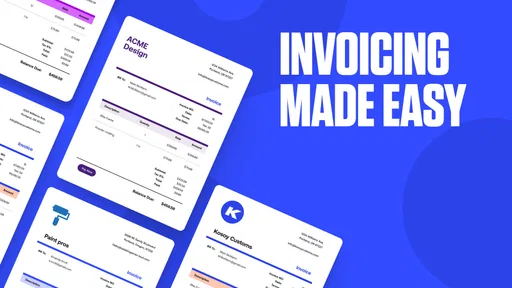
When it comes to features, Invoice2go: Easy Invoice Maker doesn’t skimp. One of my favorites is the customization option. You can tailor your invoices to reflect your brand’s personality with easy-to-use templates. It’s like having a graphic designer in your pocket. The app also offers a handy feature to track expenses – just snap a picture of your receipt, and it’s logged. This is a game-changer for anyone tired of sifting through piles of paper at tax time.
More From Our News Desk

Weather by Xiaomi Review: Clear at a Glance, Less Clear Up Close

X Under Pressure: Can It Recover When Posting Goes Wrong?

Clash of Clans Is Won Between the Battles

Android Auto Makes the Case for Quieter Car Software

MobiOffice: Transforming Mobile Productivity with Seamless Integration

EA SPORTS FC™ Mobile Soccer: Redefining Mobile Sports Gaming
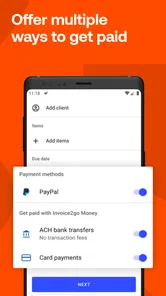
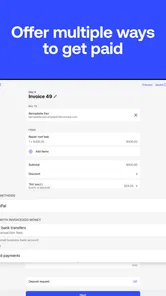
Another feature worth mentioning is the app’s ability to send automatic payment reminders. Let’s be honest; nobody likes chasing clients for payments. With this feature, the app gently nudges clients with a friendly reminder, so you don’t have to. Plus, it supports multiple payment options, making it easier for clients to pay up on time.
Keeping jobs, clients, and cash flow in view
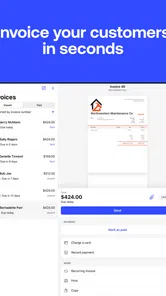
A practical workflow is to create the invoice soon after a job, then use the client list and recent-invoice access to check what has already been sent before billing for repeat work. For example, a freelance repairer could finish several small visits in a week, duplicate a previous invoice for a returning customer, and adjust the service details rather than rebuilding the document from scratch. That shortcut saves typing, but it also creates a reason to review every line before sending: a copied invoice can carry forward an old description or amount if you overlook it.
Receipt capture can help keep expense records closer to the purchase, but a photo is not a substitute for reviewing the entry later. I would take the picture while the receipt is still readable, then make a regular check that the recorded expense matches the actual business purchase. This is especially useful for someone who works on the move and tends to collect paper receipts in a vehicle or work bag. If you need complex bookkeeping, detailed inventory, or a coordinated accounting system, an invoicing app may not replace the specialist software you rely on.
Turning reminders into a useful routine
Automatic reminders are convenient, but I would treat them as part of a considered follow-up routine rather than letting them stand in for judgment. A client may have raised a question about a bill, or a payment may need a personal conversation; in those cases, an automated nudge can feel out of place. Before relying on reminders, I would make sure the invoice is correct and decide how I want to handle exceptions. The time-saving benefit is strongest when the ordinary cases can proceed with little intervention and unusual cases still receive personal attention.
For a small service business, the most practical habit is to close out each job in one pass: check the client, describe the work clearly, review the amount, send the invoice, and make a note of any follow-up needed. That reduces the temptation to reconstruct details days later. If I’m working from a shared household device, I would also avoid leaving an unfinished invoice open for someone else to encounter. A short pause to confirm that the right customer and work are selected is more valuable than rushing through a familiar screen.
When a dedicated invoicing app is the better fit
Compared with building invoices in a spreadsheet or document template, Invoice2go puts client records, repeat invoices, reminders, and payment choices into a more focused workflow. That can suit a freelancer or small service business that wants to spend less time formatting bills and keeping track of follow-ups. A spreadsheet may still be preferable if you need complete control over calculations and reporting, while a broader accounting package can be a better choice if invoicing is only one part of a complicated set of financial tasks.
The choice also depends on how you work with clients. If every project has unusual milestones, negotiated terms, or detailed supporting records, a simple invoice workflow may not be enough on its own. If the work is repeatable and the main burden is preparing a clear bill and remembering to follow up, the focused approach makes more sense. I would compare tools by testing a typical job from start to finish, including a repeat customer and a correction, rather than choosing based on a long feature list.
Cost, version, and who should control access
The app is free to install, with in-app purchases ranging from $0.99 to $399.99 per item, so I would check the available options against the features your business actually needs before committing to a paid choice. Invoice2go, LLC develops it, and its business focus is clear. It has a 4.6 average from around 31,000 ratings and more than 1 million installs. The current version is 11.167.0, and the app is rated for Everyone; that age label is not a reason to let a child handle real client records or payment-related work. Adults should decide who can use the account and keep business access separate from casual shared-device use.
Because the purchase options vary widely, I would not assume that every useful capability comes with the free install. First identify the tasks that matter to your business—such as presenting invoices in your preferred style or managing reminders—then inspect the available choices and decide whether the cost makes sense for the time saved. A person who sends only occasional bills may be better served by a basic document workflow, while a busy freelancer who regularly follows up with clients may value a dedicated tool more.
Coordination without blurring account boundaries
In a family-run operation, coordination does not require everyone to handle the account. One person can own the actual invoice and payment records while another helps gather job details, such as the date of a visit or the materials used. I would agree on a simple handoff: collect the information in a separate note, then have the account owner check it before creating or editing a bill. That preserves the convenience of family help without turning a shared device into an unclear shared account.
This approach is especially useful when the person doing the work is not the person who handles admin. A contractor might finish a job while a partner records the customer’s preferred contact details or flags that a follow-up is needed. The key is to pass along facts, not assume that a helper should send or alter an invoice. Clear responsibility also makes it easier to spot whether a bill is still a draft, has been sent, or needs a conversation before it goes out.
Ease of Use
One of the biggest selling points for Invoice2go is its ease of use. Whether you’re tech-savvy or a complete novice, navigating through the app feels seamless. The menus are logical, and everything is where you’d expect it to be. I particularly appreciate the quick access to recent invoices and the ability to duplicate past invoices for repeat clients. It’s all about saving time, and this app gets it right.
That quick access is most helpful when it shortens a real task, not when it encourages sending without checking. I would use a past invoice as a starting point for a returning client, then compare the current work against it line by line. The same care applies to expenses: capturing a receipt promptly reduces the chance of losing it, but periodic review is what makes the record useful. These small checks are easy to build into a routine and help offset the risk of relying too heavily on shortcuts.
Who will get the most from it
I see the clearest fit for a freelancer, tradesperson, or small service provider who needs to bill clients regularly and prefers managing that work from a phone. It is also useful for someone whose business admin happens between appointments: a quick invoice after a completed job can be easier than waiting until a pile of paperwork builds up. People who send the same kinds of bills to repeat customers may particularly appreciate having client details and prior invoices close at hand.
I would be more cautious if several people need to edit financial records at the same time, or if the business depends on detailed accounts beyond invoicing and basic expense capture. A larger operation may need a more comprehensive accounting system, while someone with only rare billing needs could find a spreadsheet or document template sufficient. The right choice is less about how many functions an app lists and more about whether it supports the exact path from completed work to a correct, paid invoice.
Final Thoughts
Wrapping it up, Invoice2go: Easy Invoice Maker is a solid choice for freelancers, small business owners, or anyone who needs to streamline their invoicing process. It’s like having an assistant who never sleeps, always ready to take the cumbersome task of invoicing off your plate. Sure, there are other apps out there, but the combination of its user-friendly interface, customizable features, and robust functionality makes it stand out.
So, if you’re looking to ditch the spreadsheets and simplify your invoicing with the help of modern technology, give Invoice2go a whirl. It might just be the tool you didn’t know you needed!
My household verdict is that this works best when one person owns the billing workflow and others coordinate around it without sharing responsibility blindly. A sole trader who wants quick, presentable invoices and a manageable way to follow up should find the focused approach appealing. Someone who mainly needs shared family budgeting, or who expects several household members to collaborate inside one account, should look elsewhere. Keep the business details under the right person’s control, review copied invoices and captured expenses, and the app is a practical choice for everyday billing rather than a replacement for every business or household finance tool.
Invoice2go: Easy Invoice Maker Frequently Asked Questions
Can Invoice2go help me manage more than invoices?
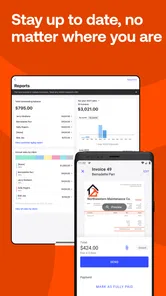
Yes. Invoice2go is presented as an all-in-one tool for running a business, bringing invoicing together with payments, reporting, and other business tasks. That broader scope may be useful if you want to handle several parts of your workflow from one mobile app. Consider which parts of your day-to-day operations you want to manage before downloading.
Will Invoice2go work for a freelancer or contractor who is often away from a desk?
Invoice2go is designed for business use on mobile devices, which can suit freelancers and contractors who need to handle invoices while away from a desk. You can create, send, and track invoices on the go, and the app also brings together payments and reporting. Its usefulness will depend on whether those tools match the way you manage your clients and work.
Who develops Invoice2go, and is it available for my device?
Invoice2go is a business app developed by Invoice2go, LLC. It is available for mobile devices running Android or iOS, so you can work on invoices while away from your desk. Before downloading, check that your device meets the app’s minimum operating-system requirement, which is Android or iOS 7.0. Its Everyone content rating also makes it suitable for a general audience.
Is Invoice2go free to download, and are there extra costs?
Invoice2go is free to download, but some features or services may require an in-app purchase. Purchases range from $0.99 to $399.99 per item, so review the options shown in the app before choosing one and consider which tools your business actually needs. You can start by exploring the free download, then decide whether any paid features are worthwhile for your invoicing workflow.
What is Invoice2go, and how does it work?
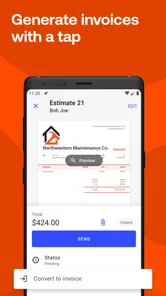
Invoice2go is an easy-to-use invoice maker designed for small business owners, freelancers, and contractors. The app allows users to create, send, and track professional invoices from their mobile devices. It offers features like customizable templates, expense tracking, and client management. Users can also accept payments online, making it a comprehensive tool for managing business finances on the go.
Pros
- User-friendly interface for quick navigation.
- Offers customizable invoice templates.
- Supports multiple currencies for global business.
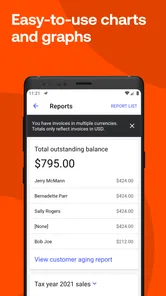
- Includes expense tracking and reporting.
- Syncs across devices for seamless access.
Cons
- Limited features in free version.
- Occasional syncing issues with cloud.
- Customer support can be slow.
- Subscription can be pricey for small users.
- Limited third-party app integrations.











