Invoice Maker Tofu & Receipts
- 77.00
- 4.4
- Installs
- 1.00M
- Price
- Free
Screenshots
Analysis by Reviewed
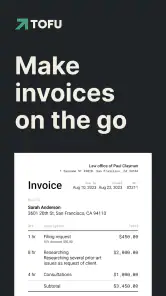
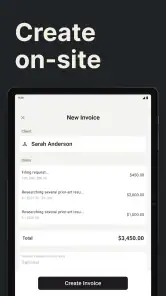
For a small business, the hardest part of invoicing is often not the arithmetic; it is getting a clear, presentable bill out while the details of a job are still fresh. That is the practical problem I focus on with Invoice Maker Tofu & Receipts. Its invoice builder puts the essential steps together—client information, line items and taxes—so I can turn a completed task into a document without first opening a full accounting suite.
A focused tool for getting invoices out
Tofu is a free business app from GetPaid Inc. It has an average rating of 4.4 from around 4,000 ratings and more than a million installs, which gives it a sizeable audience among people looking for a lightweight way to handle billing. It is rated for Everyone, and version 1.2.13 runs on Android 6.0 or later. Optional in-app purchases range from $2.99 to $99.99 per item, so I would check what is included before relying on any paid capability.
The value of a dedicated invoice maker is its narrow focus. A spreadsheet can calculate totals, but I still have to format it, keep the layout consistent and prepare a client-ready copy. A broad accounting platform can connect billing to other parts of a business, but that may be more setup than a solo worker needs. Tofu’s appeal is the shorter route from job details to an invoice, especially when I am working from a phone.
From job notes to a client-ready document
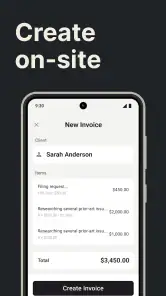
In a realistic workday, I might finish a repair, design task or consultation, then create an invoice before I leave the site or move on to the next client. I would enter the customer’s details, break the work into understandable items, apply tax where appropriate and review the result before sending or saving it. That final pause matters: clear item descriptions and correct customer details make an invoice easier to understand and reduce avoidable follow-up.
Templates help keep the outward-facing document presentable, while the ability to tailor them gives a small operator room to make the paperwork feel consistent with their business. My practical tip is to settle on one layout and use it regularly rather than changing the design for every job. Consistency makes invoices easier for clients to recognize, and it leaves me with fewer presentation decisions when I am busy.
The app also supports duplicating an earlier invoice and setting up recurring invoices. Those options are useful in different ways: duplication can save retyping for repeat clients or similar jobs, while recurring billing suits work that is genuinely regular. I would still check every copied line and date before sending; a shortcut is only helpful if last month’s details do not accidentally carry over.
Where receipts fit into the routine
Receipt organization addresses the other side of day-to-day business paperwork. Photographing paper receipts and sorting them into categories can make it easier to retrieve a business lunch, travel cost or supply purchase later. I would capture each receipt close to the purchase rather than letting a pile accumulate, then use categories and search to find a specific record when reviewing expenses.
More From Our News Desk

Clash of Clans Is Won Between the Battles

Android Auto Makes the Case for Quieter Car Software

MobiOffice: Transforming Mobile Productivity with Seamless Integration

EA SPORTS FC™ Mobile Soccer: Redefining Mobile Sports Gaming

How Microsoft OneDrive Became a Mobile Productivity Giant

How Google Translate Breaks Language Barriers Effortlessly
This is a practical filing aid, not a substitute for careful bookkeeping. A photo is most useful when the receipt is legible and the category reflects how I will later review the expense. For tax preparation, I would keep the original documents and follow the record-keeping rules that apply to my situation instead of assuming that an app alone settles those responsibilities.
Limits, fit and my verdict
Tofu is most appealing if I am a freelancer, independent tradesperson or small operator who mainly needs to prepare invoices and keep everyday receipts together. Someone who sends occasional bills may appreciate avoiding a spreadsheet template, while a person with repeat work can benefit from reusing invoice details. The workflow is especially convenient when paperwork has to happen between appointments rather than at a desk.
I would look elsewhere if I needed a connected accounting system with a comprehensive view of business finances, or if several people needed to coordinate a formal billing process. A spreadsheet may be enough for a very occasional invoice; established accounting software may be a better fit when reporting and broader financial management matter more than speed. The right choice depends on whether quick document creation or a larger financial picture is the main need.
Tofu has a 4.4 average and 77 written reviews, and its release date is December 19, 2023. Those figures offer context, but they do not tell me whether its workflow suits a particular business. I would test a sample invoice, inspect the available template and export choices, and confirm which features require a purchase before moving important records into it. That small trial helps answer the practical questions: can I make a document that looks right, save or send it in the way I need, and keep the receipt trail organized without extra work?
For a straightforward mobile invoicing routine, I find the app’s central strength convincing: it brings the basic steps of preparing a bill into one focused workflow. Its usefulness depends on how far my needs go beyond that. If I want less friction around routine invoices and receipts, it is worth considering; if I need deeper accounting or team controls, I would choose a more comprehensive tool.
Getting Started with Invoice Maker Tofu & Receipts
First off, installing the app was a breeze. A quick download from the App Store, and I was ready to dive in. The user interface is so intuitive; even if you’re not a tech wizard, you’ll find your way around without breaking a sweat. The home screen is clean and clutter-free, which is a huge plus in my book.
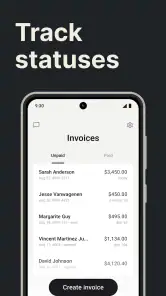
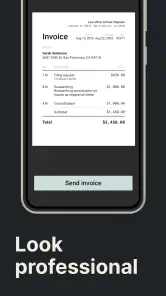
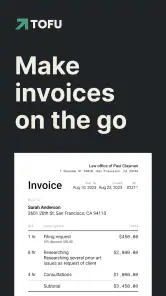
Once inside, the app greeted me with a neat dashboard. You can easily access all the key features without having to play hide and seek. I was immediately drawn to the invoice creation tool. It’s super straightforward—just enter the client details, itemize the services or products, add taxes if needed, and boom! You’ve got yourself a professional-looking invoice.
Features That Stand Out
What really caught my eye is the templates feature. Invoice Maker Tofu & Receipts offers a variety of sleek, customizable templates that make your invoices look top-notch. You can tweak them to fit your brand perfectly, which is fantastic for small business owners looking to make an impression.
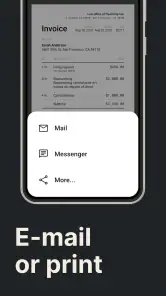
Another perk is the easy export options. Whether you want to send an invoice via email or save it as a PDF for your records, it’s all just a tap away. And speaking of taps, the app is brimming with handy shortcuts and features that simplify the whole process. Need to duplicate a previous invoice? Done. Want to set up recurring invoices? No problem. It’s like the app is one step ahead, anticipating what you need.
Managing Receipts Like a Pro
Now, let’s talk receipts. Keeping track of them can be a nightmare, right? Not anymore. The app makes organizing receipts a piece of cake. Just snap a photo of your paper receipts, and they’re instantly digitized and stored neatly within the app. It’s a lifesaver when you’re trying to track expenses or prepare for tax season.
The app also allows you to categorize receipts, making it easier to find what you need when you need it. Whether it’s business lunches, travel expenses, or office supplies, everything is just a few taps away. Plus, the search function is incredibly efficient, so you won’t be wasting time sifting through endless digital piles.
Security and Integration
In today’s digital age, security is a big deal, and the developers of Invoice Maker Tofu & Receipts get that. Your data is securely stored, and you can set up passcodes or use biometric authentication to keep prying eyes away. It’s reassuring to know that your financial information is in safe hands.
On top of that, the app integrates seamlessly with other tools you might be using. Whether it’s accounting software or cloud storage, you can sync everything up effortlessly. This kind of integration is a game-changer, allowing you to streamline your workflow and focus on what truly matters—growing your business.
Final Thoughts
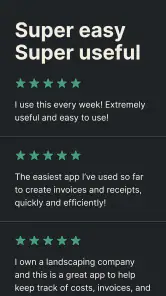
So, what’s the verdict? Is Invoice Maker Tofu & Receipts worth your time and attention? Absolutely. It’s a well-rounded app that simplifies the rather tedious task of managing invoices and receipts. Whether you’re a freelancer, small business owner, or just someone who likes to keep things organized, this app is a valuable tool to have in your arsenal.
If you’re ready to take control of your invoicing and receipt management, give this app a try. It’s like having a personal assistant right in your pocket, ensuring you never miss a beat. Go ahead, download it, and transform the way you handle invoices and receipts. You won’t regret it!
Invoice Maker Tofu & Receipts Frequently Asked Questions
Is Invoice Maker Tofu & Receipts free to download, and does it include paid features?
Invoice Maker Tofu & Receipts is free to download, so you can try the app without paying upfront. It also offers in-app purchases, with listed options ranging from $2.99 to $99.99 per item. Before buying anything, review the purchase details in the app and consider whether the available features suit the way you handle your business invoicing.
What kind of app is Invoice Maker Tofu & Receipts, and who develops it?
Invoice Maker Tofu & Receipts is a business app from GetPaid Inc. Its store summary describes it as an invoice and estimates maker for creating invoices and receipts, so its main focus is everyday business paperwork. The store short description is “Invoice Maker Tofu.” It may be worth considering if you want an app centered on preparing billing documents.
What features does Invoice Maker Tofu & Receipts offer?
Invoice Maker Tofu & Receipts provides a comprehensive suite of features including customizable invoice templates, automatic tax calculations, and seamless integration with various payment gateways. Users can also track expenses, manage client lists, and generate detailed financial reports, making it ideal for freelancers and small business owners.
Is Invoice Maker Tofu & Receipts suitable for small businesses?
Yes, Invoice Maker Tofu & Receipts is designed with small businesses in mind. Its user-friendly interface allows for easy invoice creation and expense tracking. The app's ability to manage client information and generate reports helps streamline business operations, making it highly suitable for small business needs.
Can I use Invoice Maker Tofu & Receipts offline?
Invoice Maker Tofu & Receipts requires an internet connection for certain features, such as syncing data across devices and accessing payment gateways. However, you can create and edit invoices offline, which will automatically update once you reconnect to the internet, ensuring uninterrupted access to essential functions.
Pros
- User-friendly interface for quick navigation.
- Customizable templates enhance branding.
- Supports multiple currencies for global use.
- Real-time sync across devices ensures accessibility.
- Automated reminders help manage due payments.
Cons
- Limited integration with third-party apps.
- Free version has restricted features.
- Occasional bugs in the mobile app.
- No offline mode available for editing.
- Customer support response can be slow.
- Category
- Business
- Version
- 1.2.13











