Invoice Maker - MobileBiz Pro
- 671.00
- 3.6
- Installs
- 10.00K
- Price
- Free

Screenshots
Analysis by Reviewed
When I tested Invoice Maker - MobileBiz Pro, the feature that shaped my opinion most was its ability to keep invoicing, estimates, sales orders, payment tracking, inventory work, and reports together while working offline. That sounds simple, but it changes the app’s value completely. I could treat it as a small business notebook that produces usable sales documents, rather than as a full accounting platform that happens to include invoices.
That distinction matters. If I were running a small service business, selling products at temporary locations, or working somewhere with unreliable internet, I would care less about a long list of advanced financial tools and more about being able to record a transaction at the right moment. MobileBiz Pro is built around that practical need. It is a free business app from Mobilebiz Systems, rated an average of 3.6 from around two thousand ratings, with over ten thousand installs. Those figures suggest a modest but established tool, not a dominant all-purpose accounting suite.
The app is suitable for Everyone, and its current version is 1.5.6. It supports devices running Android 8.0 or later. The basic download is free, although optional in-app purchases range from $0.99 to $149.99 per item. I would keep that purchase detail in mind before building a long-term workflow around it, especially if I needed more than the basic experience.
Why offline invoicing is the real selling point
I’d treat offline use as a chance to keep a transaction moving, not as a reason to skip checking the record later. Before relying on any mobile invoicing routine, I would test one complete sale from estimate through payment entry while disconnected, then review the saved details once I’m back online. That small rehearsal helps reveal whether the workflow suits the way I actually work.
A useful capability at the point of sale
The strongest idea here is not simply “make an invoice on a phone.” Many apps can do that. The more important capability is keeping the sales process moving when I am away from a desk or without a dependable connection. I can think through a typical job: I visit a customer, agree on work or products, prepare an estimate, turn that agreement into a sale, and later record the payment. An offline-first workflow is valuable because the transaction does not have to wait until I return to an office.
That is particularly helpful for tradespeople, market sellers, repair workers, independent consultants, and small shops that do not want to carry a laptop. A phone is already present during many customer conversations. Turning it into a place for estimates and invoices reduces the gap between agreeing to a sale and documenting it.
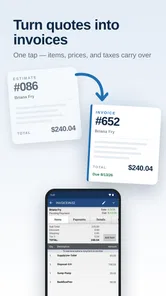
I also like the connection between the different document types. An estimate is useful before the customer commits. A sales order represents the next step when the sale is agreed but fulfillment or payment is still being handled. An invoice gives the transaction a more formal shape, while payment tracking helps me remember what has actually been settled. Keeping those stages in one app is more practical than writing an estimate in one tool, storing orders in a spreadsheet, and trying to reconcile payments somewhere else.
More From Our News Desk

Weather by Xiaomi Review: Clear at a Glance, Less Clear Up Close

X Under Pressure: Can It Recover When Posting Goes Wrong?

Clash of Clans Is Won Between the Battles

Android Auto Makes the Case for Quieter Car Software

MobiOffice: Transforming Mobile Productivity with Seamless Integration

EA SPORTS FC™ Mobile Soccer: Redefining Mobile Sports Gaming
The benefit is not that the app replaces every business system. It is that it gives a small operation one consistent place to capture the important events around a sale. That consistency can prevent a common problem: remembering the customer and the amount, but forgetting whether the figure was an estimate, an order, or a completed invoice.
How the workflow feels in practice
My preferred way to use an app like this would be to start with the customer conversation rather than with bookkeeping. I would prepare an estimate while discussing the job, review the line items before leaving, and use the same record as the basis for the next document when the customer approves. The advantage is less retyping and fewer opportunities to change an amount accidentally between stages.
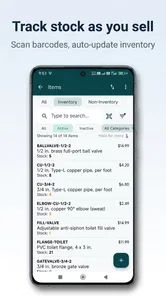
For product-based work, inventory tracking adds another useful layer. It encourages me to think about an invoice not only as money owed but also as a record of what left my stock. That is a meaningful difference from a basic notes app or a blank invoice template. If I sell several items during a busy day, having the sale and inventory movement associated with the same process should make later checking more manageable.
There is a practical habit I would recommend: update stock and payment information immediately after each transaction, not at the end of the week. Offline access makes this possible, but it also removes the excuse of needing to wait for a connection. Delayed entry is where small business records become unreliable. The app can support a disciplined workflow, but it cannot create that discipline by itself.
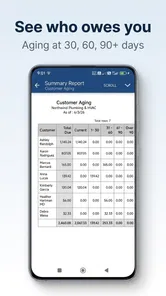
The reporting side is most useful after I have entered clean information consistently. Reports can help me spot unpaid invoices, review sales activity, or compare what was sold with what remains in inventory. I would not treat a report as automatically trustworthy simply because it looks organized. If I forget to record a cash payment or enter a product under the wrong item, the report will reflect that mistake. The real strength is having a central record to inspect, not having a magic accounting answer.
Offline work also changes how I would handle synchronization in my routine. I would enter transactions during the customer visit, then make a deliberate connection check later and confirm that my records are available where I expect them. I would avoid relying on the app as the only copy of critical financial information until I had tested my own backup and export habits. That is not a criticism of this particular tool; it is a sensible boundary for any mobile invoicing system.
A realistic day with the app
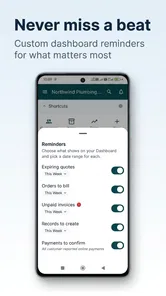
Imagine I repair household equipment and spend most of the day moving between customers. At the first visit, I inspect the problem and create an estimate with labor and replacement parts. The customer approves the work, so I use the sale information rather than starting from a blank page. I complete the repair, record the parts used, and issue an invoice. If the customer pays immediately, I mark that payment while the details are still fresh. If payment is postponed, the unpaid status remains part of my follow-up list.
Later, I can review the day’s activity and compare the parts used with the stock I expected to have. If I had written everything on paper, I might still complete the work, but I would spend more time transferring figures and checking whether every customer had been billed. If I had used a generic spreadsheet, I could create similar columns, but I would have to design and maintain the entire document flow myself.
This scenario shows the app’s best effect: it reduces the number of separate moments in which I have to remember what happened. The invoice is not an isolated document. It sits inside a chain that begins with an estimate and may continue through an order, payment, inventory change, and report.
Where it compares well with familiar alternatives
A paper pad is faster for a quick handwritten note, but it becomes awkward when I need to find an old invoice, identify unpaid work, or review product movement. A spreadsheet offers flexibility and can be customized heavily, but that flexibility comes with setup work. I would need to create formulas, document states, customer records, and a reliable way to avoid overwriting information.
Cloud accounting services usually provide broader financial management and collaboration features. They are the better choice for a growing company with an accountant, multiple users, complex tax needs, or a requirement for shared real-time records. Their trade-off is that they can feel excessive for a solo operator who mainly needs estimates, sales documents, payment tracking, and inventory in the field.
MobileBiz Pro sits closer to the practical middle. It is more structured than notes or a spreadsheet, while its offline emphasis makes it more convenient than a service that assumes constant connectivity. I would not choose it because I expected a complete replacement for professional accounting software. I would choose it because I wanted a focused mobile record of sales activity.
The trade-offs I noticed
The first limitation is the app’s age and modest scale. It was released on November 27, 2010, and its current version is 1.5.6. Longevity can be reassuring, but it can also mean that the interface or workflow may feel less polished than newer business apps. I would expect to spend some time learning where information belongs instead of assuming every screen will follow modern design conventions.
The average rating of 3.6 shows that the experience is not universally smooth. I would interpret that as a reason to test the exact workflow I need before depending on it for all customer records. Creating one estimate, converting it into the next sales document, recording a payment, checking inventory, and reviewing a report would give me a better answer than simply installing it and browsing the first screen.
The second trade-off is scope. The app covers several connected business tasks, but that does not automatically make it suitable for detailed accounting. A business that needs deep tax preparation, payroll, advanced financial statements, team permissions, or sophisticated customer relationship management should look at a broader platform. MobileBiz Pro makes more sense when the central problem is organizing sales transactions on a mobile device.
The third trade-off involves optional purchases. The app is free to start, which lowers the barrier for a small operator, but the in-app purchase range reaches from $0.99 to $149.99 per item. I would check which part of my intended workflow depends on a paid option before entering all my records. A free starting point is useful, but the total cost of a business tool should be judged by the features I actually need, not only by the download price.
There is also a human limitation that is easy to overlook: offline convenience can encourage people to postpone synchronization or review. I would create a routine for connecting, checking records, and preserving important documents. For a business, “it was entered on my phone” is not the same as “it is safely included in my records.” The app helps me capture information at the right time, but I still need a responsible process around it.
Who gets the most value
I see the best fit as a solo operator or very small business that sells services or products directly and wants one mobile workflow. A repair technician can use estimates and parts records. A market seller can track products and payments. A consultant can document agreed work and issue an invoice without returning to a desk. A small business owner who travels between locations may value offline access more than a large set of online collaboration tools.
The app is also useful for someone moving away from paper but not ready for a complex accounting subscription. Its structure can encourage better habits: separate estimates from invoices, record payments instead of relying on memory, and use inventory information when products are involved. Those are modest improvements, but they can have a real effect on a small operation where the owner handles sales, fulfillment, and administration alone.
I would be more cautious if several employees needed simultaneous access, if an accountant required a specialized reporting format, or if the business operated across complicated tax jurisdictions. In those situations, a dedicated accounting platform would probably justify its extra complexity. I would also skip this app if I only needed a one-time invoice; a simple template might be faster than learning a broader sales workflow.
Practical questions I would settle before relying on it
Can I use it without internet access? That is the central reason I would consider it, and the offline capability is especially relevant for field work and temporary selling locations. I would still test the complete process in airplane mode or another disconnected situation before using it with a real customer. The important test is not merely opening the app; it is creating the document, recording the payment, checking the inventory effect, and confirming the information remains available afterward.
Is it free? The app itself is free, but optional purchases are available, with individual items ranging from $0.99 to $149.99. I would treat the free installation as a chance to inspect the workflow, then identify the exact paid requirement before committing business records to it.
Will it suit an iPhone or iPad user? The version and minimum operating-system details point to the Android edition, which requires Android 8.0 or later. If I were choosing it for someone using Apple devices, I would verify platform availability directly before planning a shared workflow. I would not assume that an Android app’s experience carries over unchanged to another operating system.
Can it replace an accountant or full bookkeeping system? I would say no. It can organize the sales side of a small operation, including estimates, orders, invoices, payments, inventory, and reports. That is valuable, but it is not the same as handling every financial responsibility a business may have. I would use it as an operational sales tool and keep professional accounting requirements in view.
How should I test it? I would create a small sample customer, make an estimate, move through the sales process, enter a partial or completed payment if that matches my work, inspect the inventory record, and read the resulting report. I would then repeat the test while offline and check what happens after reconnecting. This reveals more about suitability than the store summary because it tests the exact chain that makes the app worthwhile.
My final view
After looking at the app through the lens of offline sales management, I think its appeal is clear. Its real advantage is capturing the whole transaction close to the customer, even when the internet is not part of the plan. Estimates, sales orders, invoices, payments, inventory, and reports become parts of one routine instead of scattered tasks.
That does not make it the right answer for every business. The middling average rating, older release history, possible cost of optional purchases, and narrower scope all deserve attention. I would not recommend it as a universal accounting replacement, and I would test my own document and reporting workflow before trusting it with important records.
For a small Android-based operation that wants a free starting point and needs to work away from the office, I would recommend giving Invoice Maker - MobileBiz Pro a careful trial. I would begin with a sample workflow, establish a regular review and backup habit, and only then move real customers into it. Used that way, it can be a practical bridge between handwritten sales notes and a much heavier business system.
Invoice Maker - MobileBiz Pro Frequently Asked Questions
Who is Invoice Maker - MobileBiz Pro best suited for?
Invoice Maker - MobileBiz Pro is a business app aimed at people who need to manage everyday sales documents on a mobile device. Freelancers, contractors, small businesses, and service providers may find it useful for keeping invoices, estimates, sales orders, and customer details together. Its offline tools can also suit work that takes you away from a desk, though it is worth checking that its features fit your particular workflow.
Is Invoice Maker - MobileBiz Pro free to download, and are there in-app purchases?
The app is free to download, with in-app purchases available for users who want additional paid options. Those purchases range from $0.99 to $149.99 per item, so the potential cost depends on what you choose to buy. Check the purchase details in the app before committing, particularly if you only need basic invoicing or are comparing it with other business tools.
What is Invoice Maker - MobileBiz Pro used for?
Invoice Maker - MobileBiz Pro is designed for freelancers, contractors, small businesses, and service providers who need to create and manage invoices from a mobile device. It can help you prepare professional-looking invoices, estimates, receipts, and customer records without relying on desktop accounting software. The app is especially useful when you need to issue an invoice while visiting a client or working away from the office.
Can I customize invoices and estimates in Invoice Maker - MobileBiz Pro?
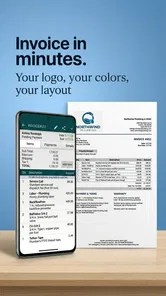
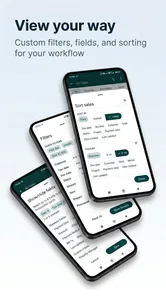
The app provides customization options intended to make invoices match your business identity and workflow. Depending on the version and device, you can typically add company information, contact details, logos, tax values, payment terms, notes, and item descriptions. Before downloading, users should check the current feature list because advanced branding, templates, or document customization may depend on the selected plan or in-app purchase.
Does Invoice Maker - MobileBiz Pro work offline?
Invoice Maker - MobileBiz Pro is built for mobile invoicing, so many core tasks, such as entering customer information, adding products or services, and preparing documents, may be available without a constant internet connection. However, features involving cloud synchronization, email delivery, backups, online payments, or account access can require connectivity. It is wise to test offline behavior and review the app’s current requirements before depending on it in remote locations.
Pros
- Creates professional invoices quickly from a phone or tablet.
- Supports estimates
- receipts
- expenses
- and customer records in one app.
- Customizable invoice templates help maintain consistent branding.
- Works offline
- making it useful for mobile work without reliable internet.
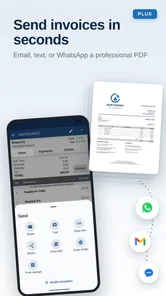
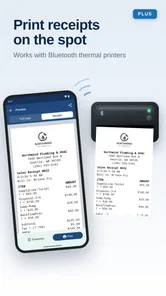
- PDF sharing and printing options simplify sending documents to clients.
Cons
- Advanced features may require a paid subscription or in-app purchase.
- The interface can feel crowded for users managing many invoices.
- Limited integrations may be an issue for businesses using other accounting tools.
- Manual data entry can become time-consuming for frequent transactions.
- Some features may vary between Android and iOS versions.











