Invoice Maker & Estimating App
- 489.00
- 3.4
- Installs
- 100.00K
- Price
- Free

Screenshots
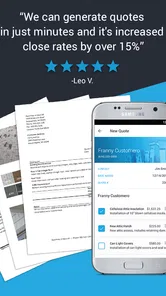
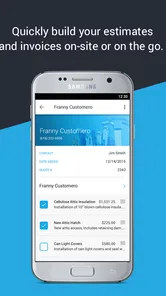
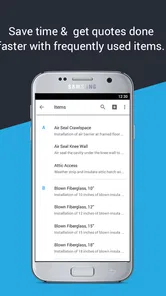
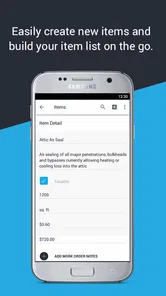


Analysis by Reviewed
When I picture the person who needs Invoice Maker & Estimating App, I do not picture a finance department. I picture a contractor finishing a job, standing beside a van, and realizing the customer needs an estimate or invoice before the day gets away from them. That is where this business app makes sense: it is built for quick paperwork on the move rather than for managing an entire company from a desk.
I spent time looking at it as a practical tool for small operators, and my impression is fairly clear. It can make the jump from completed work to a professional-looking document much less awkward, especially when the alternative is writing figures in a notebook and promising to send something later. At the same time, it is not a complete accounting system, and treating it like one would create frustration.
Developed by JobFLEX, the app is free to start, with optional in-app purchases ranging from $7.99 to $89.99 per item. It belongs in the business category, carries an Everyone age rating, and has reached over 100 thousand installs. Its average rating is 3.4, which feels consistent with an app that solves a very specific problem well for some users while leaving others wanting more control.
From a job-site note to a finished invoice
I find the most useful starting point is to capture the job details while they are still fresh, before a quick note turns into a vague invoice later. In this section, I look at how that information can become a clear customer document and why a deliberate review matters as much as speed. That naturally raises a second question: who should be able to use the work phone and handle those records?
Starting with the work in front of you
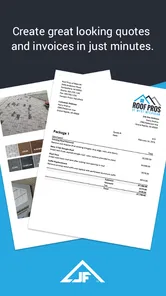
The most useful way to approach this app is to begin with the job, not with the document. Imagine a small painting business completing a hallway and two bedrooms. The owner needs to turn the agreed work, materials, and remaining balance into something the customer can understand. The app’s purpose is to help organize that information into an estimate or invoice without requiring a return to the office.
That focus is important because many alternatives begin with a broader accounting setup. They ask you to think about expenses, tax categories, bank connections, recurring billing, reports, or customer records before you can get a simple document out. Invoice Maker & Estimating App feels more direct. I would choose it when the immediate goal is to prepare paperwork, not when I am trying to build a complete financial history for a growing company.
Before creating anything, I would prepare the details that are easy to forget under pressure: the customer’s correct name, the work description, quantities, rates, and any terms I want visible. This small preparation makes a noticeable difference. A fast invoice is only useful if it is accurate, and correcting a vague description after sending it is more embarrassing than taking a minute to write a clear one.
More From Our News Desk

Weather by Xiaomi Review: Clear at a Glance, Less Clear Up Close

X Under Pressure: Can It Recover When Posting Goes Wrong?

Clash of Clans Is Won Between the Battles

Android Auto Makes the Case for Quieter Car Software

MobiOffice: Transforming Mobile Productivity with Seamless Integration

EA SPORTS FC™ Mobile Soccer: Redefining Mobile Sports Gaming
The real strength is reducing the gap between finishing work and documenting it. That matters for tradespeople who move between homes, small repair services that handle several short jobs, and independent professionals who do not want paperwork to consume their evening. The app is less compelling for a company that already has an office workflow and staff handling billing.
Building an estimate before the customer says yes
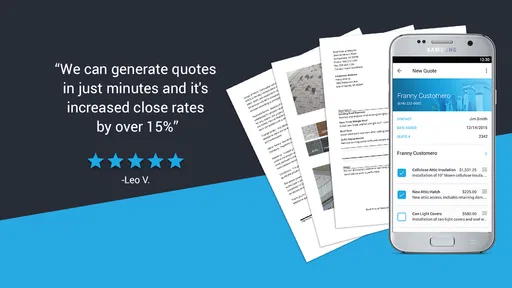
An estimate is often the first handoff between a business and a customer. I find the app most useful here when the job has a manageable number of parts: labor, materials, a call-out charge, or a few clearly defined tasks. Putting those items into a document gives the customer something more useful than a verbal total and gives the contractor a reference point when the work changes.
A practical workflow would be to create the estimate while discussing the job, review each line before presenting it, and keep the wording specific enough that both sides understand what is included. “Repair bathroom leak” is less helpful than describing the actual work and material allowance. The app cannot make an unclear agreement clear by itself; the quality of the result depends on what I enter.
I would also treat an estimate as a planning document rather than an automatic promise. If a customer adds work later, I would update the paperwork rather than quietly folding the extra amount into the final invoice. That habit protects the relationship and makes the eventual total easier to explain. The app supports the document-making part of that process, but the judgment about scope still belongs to the person doing the work.
For a contractor who regularly quotes similar jobs, the time saving can become more meaningful. Reusing a familiar structure is more practical than composing every document from a blank page. However, I would still review every item instead of assuming a previous estimate is safe to copy. Old rates, outdated descriptions, or a forgotten line can turn a convenient workflow into an expensive mistake.
Turning approved work into an invoice
Once the customer accepts the work, the next step is to move from expected charges to what is actually owed. This is where I would be careful with partial payments, changed quantities, and materials purchased during the job. A clean invoice should reflect the final agreement, not simply repeat the first estimate without checking it.
For a small job, the sequence can be straightforward: open the relevant document, adjust the line items, verify the total, and prepare the invoice for the customer. The advantage is not sophisticated bookkeeping; it is continuity. I can keep the language and structure close to the original estimate, which reduces the chance that the customer sees a confusingly different document.
That continuity is especially useful when a customer asks, “Why is this amount different from the quote?” I can compare the work described earlier with the final items and explain the change. If the difference comes from an additional repair or extra material, it should be visible rather than buried in a single unexplained total.
I would not rely on memory for this stage. If I am using the app after a long day, I would pause before finalizing and check the arithmetic, customer details, and payment expectation. The convenience of mobile invoicing can encourage rushed approval, and a professional document with one wrong figure is still a wrong document.
The handoff is where professionalism becomes visible
Creating the invoice is only half the job. The customer needs to receive it, understand it, and know what to do next. A document that looks organized can make a small business feel more dependable, particularly when the alternative is an informal message with a number and a vague request for payment.
I see the app as a useful bridge between hands-on work and customer communication. A contractor can finish the physical task, prepare the paperwork while the details are fresh, and hand the customer a clear record instead of postponing the conversation. That is a better workflow than waiting until several jobs have blurred together.
There is also a handoff inside the business. If a partner or office assistant later needs to understand what was charged, the invoice should stand on its own. Descriptions should be written for someone who was not present at the job. This is one of my main practical tips: do not use private shorthand merely because you know what it means. A short, plain-language line is more valuable than a cryptic code.
Another useful habit is separating the customer conversation from the document review. I would first agree on the work and price, then check the invoice as a separate step. Mixing those moments makes it easier to overlook a missing item or an accidental duplicate. The app can speed up both tasks, but it does not replace this simple quality check.
What the customer gets at the end
The desired outcome is not just an invoice on a phone. It is a record that tells the customer what was done, what it cost, and what balance remains. For a small service business, that clarity can reduce follow-up messages and make payment discussions less uncomfortable.
I would recommend the app most strongly to someone who sends a modest number of estimates and invoices and wants a mobile-first process. It is a good fit when the owner is also the person doing the work, speaking with the customer, and collecting the details. In that situation, a lightweight tool can be more useful than a large platform filled with functions that never get touched.
The free entry point also makes it easier to test the workflow before committing to a paid option. I would begin with a real but low-risk job, create the document carefully, and see whether the process fits the way I already work. The important question is not whether the app can produce paperwork in theory, but whether I can use it consistently without slowing down the job itself.
The current version is 8.3.3, and the app supports Android versions beginning with 4.1. That broad compatibility is helpful for people using an older work phone rather than their newest personal device. Still, I would judge the experience on the actual phone used at work, because entering detailed line items on a small or aging screen may feel very different from using a newer device.
Where the workflow starts to break
The biggest limitation is scope. This is an invoice and estimate tool, not something I would select as the central system for a business that needs deep accounting, inventory management, advanced project tracking, or detailed financial reporting. If I needed those areas connected in one place, I would look at a more comprehensive accounting service and accept the extra setup.
The rating of 3.4 from around one thousand ratings suggests that the experience is not universally smooth. I would interpret that as a reason to test the exact tasks I care about before relying on it for every customer. A tool can be perfectly adequate for simple documents and still become awkward when the job involves unusual billing arrangements or more complicated records.
The optional purchases are another point to consider. Since the app is free but offers items priced from $7.99 to $89.99, I would check what is included at the stage where my workflow begins to depend on it. That is particularly important for a sole trader who wants predictable costs. I would not assume that the free starting point will cover every long-term need.
There is also a human limitation that no app can solve: inconsistent source information. If a crew member sends incomplete notes, the person preparing the invoice may still need to call back and clarify the job. In a business with multiple workers, I would establish a simple handoff routine so the app receives complete descriptions, quantities, and customer details rather than becoming a place where missing information is discovered too late.
I would skip this app if my priority were automated bookkeeping across several sales channels, extensive customer history, or detailed collaboration between departments. I would also hesitate if I rarely work from a phone and already have a dependable desktop invoicing process. The mobile advantage matters most when mobility is the problem to solve.
My practical way of using it
For a one-person repair business, I would use a repeatable sequence. Before leaving the customer, I would confirm the work description and price. Immediately afterward, I would enter the estimate or invoice while the details were still fresh. I would read the document as if I were the customer, looking for confusing wording rather than only checking the total.
For jobs that change during the visit, I would record the added work in plain language before producing the final invoice. I would avoid combining several unrelated tasks into one broad line because that makes later questions harder to answer. This is a small workflow choice, but it makes the app more valuable as a communication tool rather than merely a number generator.
For recurring customers, I would keep the wording consistent while still checking the current job. Consistency helps people recognize the documents, but copying without review is risky. The best balance is a familiar structure with fresh details for every visit.
I would also decide in advance who owns the final check. If I am alone, that responsibility is mine. If another person prepares the document, the person closest to the job should verify the description and amount. This handoff prevents a common problem in small businesses: the invoice is technically prepared, but nobody confirms that it matches what happened on site.
Who should download it
My recommendation goes to contractors, tradespeople, mobile repair operators, and small-business owners who need estimates and invoices without sitting at a desk. It is especially suitable for a straightforward service workflow where speed, readable line items, and the ability to work from the job location matter more than a large collection of financial tools.
I would be more cautious for businesses with complicated taxes, many employees, large inventories, or strict accounting requirements. Those users may outgrow a focused invoice app quickly, even if the first documents are easy to create. In that case, a full accounting platform is likely the better long-term home, with this app offering less value than it does to a solo operator.
After using it as a workflow rather than judging it by the store summary alone, I see Invoice Maker & Estimating App as a practical middle ground. It can turn scattered job details into a customer-facing document and help a small business look organized at the moment it matters. Its limits become clear when the job moves beyond estimates and invoices into broader financial management.
For me, the decision is simple: if I needed mobile paperwork for ordinary contractor jobs, I would try the free version and test it on a real estimate before paying for anything. If the documents fit my process and the handoffs stay clear, it could remove a surprisingly annoying part of the workday. If I needed a complete business back office, I would choose a broader solution instead.
Invoice Maker & Estimating App Frequently Asked Questions
Can I use Invoice Maker & Estimating App on my device?
Invoice Maker & Estimating App is a business app from JobFLEX for contractors and small businesses working on the go. It supports Android devices running version 4.1 or later. The app is suitable for a broad audience, with an Everyone content rating, so its intended use is business document creation rather than age-restricted content.
Who develops Invoice Maker & Estimating App, and is it popular?
The app is developed by JobFLEX and has been available since August 9, 2015. It has more than 100,000 installs, with around 1,000 ratings and 489 written reviews. Those figures offer a sense of its reach, but they do not guarantee that its workflow will suit every business. Consider whether its invoicing and estimating tools match the way you handle customer work.
What is Invoice Maker & Estimating App used for?
Invoice Maker & Estimating App is designed for freelancers, contractors, small businesses, and independent professionals who need to create estimates, invoices, receipts, and payment records from a mobile device. During testing, its main benefit was the ability to prepare professional-looking documents without relying on complicated accounting software. It can be useful for tracking work, presenting prices to customers, and keeping basic sales information organized.
Can I create and customize invoices and estimates with the app?
Yes, the app generally lets you create invoices and estimates by entering customer details, products or services, quantities, prices, taxes, discounts, notes, and payment terms. You can usually add business information and adjust document details so they look more professional. However, the exact level of branding, template customization, logo support, and formatting may depend on the version of the app or the subscription plan available on your device.
Does Invoice Maker & Estimating App support sending invoices to customers?
The app is intended to make sharing documents convenient, allowing users to send or export invoices and estimates through common options such as email, messaging applications, or PDF files. This is particularly helpful when working away from an office. Before downloading, check whether features such as direct email delivery, cloud sharing, printing, or PDF export are included for free, since some advanced sharing tools may require payment.
Pros
- Create professional invoices quickly from your phone.
- Customizable templates help maintain a consistent business image.
- Estimates can be converted into invoices with minimal effort.
- Useful for freelancers and small businesses working on the go.
- Payment and invoice status tracking helps organize outstanding work.
Cons
- Some advanced features may require a paid subscription.
- Limited customization compared with full accounting software.
- Tax and currency tools may vary by region.
- Large invoice histories can become difficult to manage without filters.
- Requires careful data entry to avoid billing or calculation errors.











