Invoice Maker by Invoice Home
- 517.00
- 4.2
- Installs
- 1.00M
- Price
- Free
Screenshots

Analysis by Reviewed
I find invoice apps most useful when they make the routine parts of getting paid less of a distraction, rather than asking me to learn a whole accounting system. Invoice Maker by Invoice Home is aimed at that simpler task: putting together an invoice, sending it from a phone, and keeping basic client and item details close by. It is a business app from Invoice Home Inc., and its straightforward approach will appeal most to freelancers and small operators who want a presentable document without building a complicated workflow.
Readable screens, with a learning curve that stays modest
The first thing you'll notice when diving into Invoice Maker by Invoice Home is its clean and intuitive interface. You don't have to be a tech wizard to navigate through the app. Setting up was a breeze. You just download it, sign up, and boom, you’re ready to start invoicing. It almost feels like the app is holding your hand through the entire process, which is perfect for those of us who can get a bit lost in the details.
That uncomplicated flow matters when you are doing admin between appointments or after a long workday. The app is focused on invoices rather than presenting itself as a broad bookkeeping workspace, so I would go in expecting help with creating and sending documents, not a replacement for every business tool. If you want to track costs, reconcile accounts, or build detailed financial reports, a fuller accounting service is likely a better fit.
Using it for everyday invoicing
As an invoice maker in the business category, it has a useful middle ground between typing a document from scratch and adopting a full accounting platform. It is free to install, rated for Everyone, and has an average rating of 4.2 from around 7,100 ratings, with more than a million installs. It was released in 2017, and version 5.8.5 supports devices running Android 7.0 or later. The app also offers in-app purchases, so I would check which paid options matter to me before building a workflow around a particular customization.
Templates, saved details, and fewer repeated steps
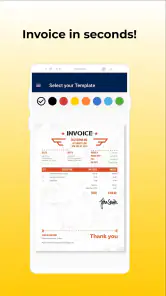
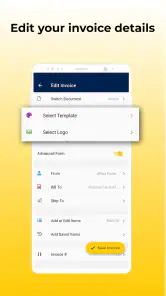
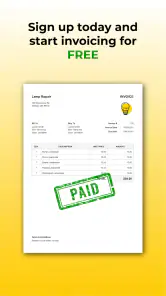
What really caught my attention were the customizable templates. The app offers over 100 templates, which means you can pick something that fits your brand like a glove. Whether you’re into something minimalistic or a bit more colorful, there’s something for everyone. Plus, you can add your own logo, which is a nice touch.
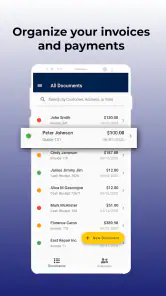
Another cool feature is the ability to create invoices in multiple currencies. If you're dealing with international clients, this is a game-changer. You can also save clients and items, making repeat invoicing a snap. No more scrambling to find details; everything is at your fingertips.
A practical way to use those saved entries is to treat them as a small, consistent catalogue: use the same item names and descriptions each time, then review quantities and prices before sending. That reduces typing and makes repeat invoices easier to compare, but it also means a saved entry can become stale. I would check a returning client’s details and the current work before reusing an old setup rather than assuming every field is still right.
More From Our News Desk

Clash of Clans Is Won Between the Battles

Android Auto Makes the Case for Quieter Car Software

MobiOffice: Transforming Mobile Productivity with Seamless Integration

EA SPORTS FC™ Mobile Soccer: Redefining Mobile Sports Gaming

How Microsoft OneDrive Became a Mobile Productivity Giant

How Google Translate Breaks Language Barriers Effortlessly
Motor and sensory considerations on a phone
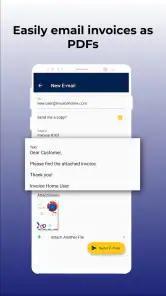
One of the things I appreciate most is how easy it is to use on the go. The app is available on both Android and iOS, so whether you’re an Apple aficionado or an Android advocate, you’re covered. You can even send invoices directly from your device, which is great for those last-minute jobs or when you’re away from your desk.
Phone-based invoicing can help when I have only one hand free or a short pause between tasks, but small touch targets and a compact screen can still make careful editing slower than using a larger display. I would draft the invoice when I have a moment to review it, rather than trying to proofread line items while walking or talking to a customer. If visual comfort or precise tapping is important for you, the phone’s own display and input settings may help, though the experience will depend on your device and preferences.
The app’s design is relatively approachable, but that alone does not tell me how well every person’s individual access needs are served. Anyone who relies on a particular screen reader, magnification setup, voice control, or other assistive technology should test the key steps—adding a client, editing a line, checking totals, and sending—before relying on it for time-sensitive work.
When and where it fits into a workday
Let’s not forget about the cloud storage feature. It means you can access your invoices from anywhere, anytime. No need to panic if your device decides to take a sudden vacation. Your data is safe and sound.
For example, imagine finishing a repair at a client’s home and wanting to send the bill before driving to the next job. A phone workflow can spare you from carrying paper notes back to a desk, and saved client or item information can cut down on re-entry. I would still pause somewhere safe, confirm the customer and work details, and inspect the finished invoice before sending; speed is helpful only if the document is accurate.
Cloud access is convenient for switching contexts, but I would not treat it as a substitute for keeping sensible records. If an invoice is important for tax preparation or a dispute, make sure you can find the final copy when you need it and keep your normal business record-keeping process in place. That distinction is especially useful for people who work across devices or share administrative tasks.
Security, support, and what to check first
With all this invoicing, security is definitely a concern. The app takes care of that with SSL encryption, ensuring your data is protected. If you ever run into a hiccup, their customer support is pretty responsive. They’ve got a help section that’s quite comprehensive, but if you’re stuck, you can reach out directly.
Before sending a real invoice, I would make one test document and inspect the PDF from the recipient’s point of view. Check that the business identity, item wording, currency, and contact details are readable and correct. That simple review is more valuable than choosing a template just because it looks attractive in the editor, especially when a client will view the file on a different screen or print it.
Where the trade-offs show up
While the app is mostly free to use, there are premium features that you might be tempted to try, such as removing the Invoice Home branding. It’s not a deal-breaker, but if you’re a stickler for customization, you might want to consider this. Also, while the templates are vast, some users might find them a bit too playful if they're looking for something entirely professional.
Those choices are worth thinking through before you settle on a look. A colorful design can make a small creative business feel personal, but a client in a formal industry may prefer a restrained document. Since paid items range from $6.99 to $9.00 each, I would decide whether branding changes are essential to my own client-facing image instead of paying simply because an option is available.
One minor hiccup is that while the app is user-friendly, it can sometimes take a bit longer to load certain features, especially if you’re using an older device. It’s not a major issue, but worth noting if you’re often pressed for time.
Compared with a spreadsheet or a document template, this app can save repetitive formatting and keep common client and item details handy. Compared with full accounting software, it is narrower and likely easier to approach when all I need is an invoice, but it should not be mistaken for comprehensive bookkeeping. If you issue only occasional bills and already have a reliable document template, switching may not save enough effort to justify another account and workflow.
Making the workflow more dependable
One useful habit is to separate the reusable parts of a bill from the details that change each time. A saved client and service can speed up drafting, but the work date, quantity, description, and agreed amount still deserve a fresh check. I would also keep item wording plain enough that a customer can understand exactly what was supplied without needing to ask me for clarification.
For a small business with repeat customers, that consistency can make the app more useful than a blank document: clients see familiar descriptions, and I spend less time rebuilding the same layout. The trade-off is that the convenience depends on maintaining those entries. When a service changes or a client’s contact information is updated, correcting the saved version early prevents an old detail from quietly reappearing on a later invoice.
Who is likely to get the most from it
I would recommend it to a solo service provider, independent contractor, or small shop that sends familiar kinds of invoices and values being able to work from a phone. It is especially practical when a job is complete away from the office and the client’s details or common services can be reused. It is less suitable for teams that need a tightly controlled approval process, or for businesses whose invoicing depends on complex accounting and reporting; those needs call for a broader system.
There are a few questions I would settle before making it my everyday tool. Can I make the document look professional enough for my clients? A test PDF will answer that better than browsing templates alone. Will the free setup cover my branding needs? Try the basic workflow first, then consider a paid option only if its specific change matters. And can I complete each step comfortably with my device or assistive setup? Testing a full invoice, rather than just opening the app, is the sensible way to find out.
Situations where another approach is better
If I were billing only once in a while, I would compare the time needed to set up this app with the effort of using a document I already know. A spreadsheet or word-processing template may be enough when each bill is unusual and I do not need saved client details. On the other hand, if the same services recur, a dedicated invoice workflow can reduce repeated formatting and make the final document easier to prepare consistently.
I would also look elsewhere if several people must review or approve each bill, or if an invoice needs to connect closely with inventory, expenses, payroll, or financial reports. Those requirements are not small add-ons to invoice creation; they shape the whole process. A broader accounting product may take more learning, but the extra structure can be worthwhile when a business needs records beyond what a focused mobile invoicing tool is meant to handle.
A considered choice for a focused task
Overall, Invoice Maker by Invoice Home is a solid choice for freelancers, small business owners, or anyone needing a straightforward invoicing solution. The blend of customization, ease of use, and accessibility makes it a go-to for anyone looking to streamline their invoicing process. Whether you’re a newbie or a seasoned pro, this app has got something for everyone. So, if you’re looking to keep your business dealings smooth and professional, give this app a whirl. It might just become your new best friend.
My inclusive verdict is more measured: the uncomplicated invoice-focused approach can reduce friction for many people, especially when quick phone access is useful, but ease of use is personal. I would try the complete process with the settings and input methods I actually depend on, and keep a desktop or accounting alternative available if reviewing long documents, handling complex records, or using assistive technology makes mobile work uncomfortable. For a simple, repeatable billing routine, it is worth trying; for broader financial administration, I would choose a tool built for that job.
Invoice Maker by Invoice Home Frequently Asked Questions
Is Invoice Maker by Invoice Home free to download, and are there in-app purchases?
Invoice Maker by Invoice Home is free to download, so you can try its invoice-making workflow without paying upfront. The app also offers in-app purchases, listed at $6.99 to $9.00 per item. Review the purchase details shown in the app before buying, so you know what an item includes and whether it suits the way you plan to use the app.
Who is Invoice Maker by Invoice Home designed for?
Invoice Maker by Invoice Home is a business app for people who need to prepare and send professional invoices. Its focus on PDF invoice templates may appeal to freelancers, small business owners, and others who bill customers directly. The app is rated for Everyone, and its store description highlights creating, sending, and getting paid through a streamlined invoicing process.
What features does Invoice Maker by Invoice Home offer?
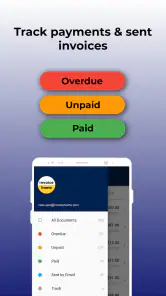
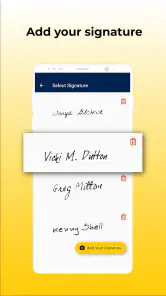
Invoice Maker by Invoice Home provides a comprehensive set of features including customizable invoice templates, automatic calculations, and multi-currency support. It also offers the ability to add logos, signatures, and detailed item descriptions to invoices. Additionally, users can generate estimates, track payments, and access reports to manage their business finances effectively.
Is Invoice Maker by Invoice Home user-friendly for beginners?
Yes, Invoice Maker is designed with a user-friendly interface that is accessible even to beginners. The app offers step-by-step guidance and intuitive navigation, making it easy to create professional invoices in just a few taps. The templates are also customizable, allowing users to tailor them to their specific business needs without any hassle.
Does Invoice Maker by Invoice Home support integration with other software?
Invoice Maker by Invoice Home supports integration with popular accounting software and platforms. This allows users to seamlessly sync their invoices and financial data across different systems, enhancing efficiency in managing their business operations. Check the app's settings or website for specific integration options and compatibility details.
Pros
- Easy-to-use interface for quick invoicing.
- Supports multiple currencies for global businesses.
- Customizable templates enhance brand identity.
- Offline access available for on-the-go invoicing.
- Secure cloud storage for all your invoices.
Cons
- Limited free features
- requires subscription.
- Customer support can be slow to respond.
- No integration with popular accounting software.
- Advanced features can be hard to find.
- Ads appear in free version
- disrupting workflow.
- Category
- Business
- Version
- 5.8.5











