

Invitation Homes
- 64.00
- 4.6
- Installs
- 50.00K
- Price
- Free

Screenshots


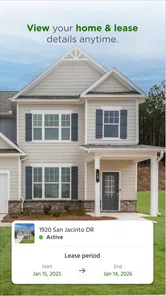
Analysis by Reviewed
Renting a home involves more than finding a property and paying each month. There are maintenance concerns, messages to answer, household details to keep track of, and moments when you need to know what happens next. Invitation Homes is designed for that ongoing relationship between residents and Invitation Homes, Inc, the company behind the app. After spending time with it, I see it as a practical house-and-home companion rather than a general rental-search tool.
That distinction matters. If you are looking for a new apartment across several landlords, this is not the kind of app I would start with. Its value appears after you are already connected with Invitation Homes and need a more direct way to manage the everyday side of renting. The store summary, “Rent smart. Get more.”, is brief, but the useful question is whether the app makes routine resident tasks easier. In my experience, its strongest appeal is having one place to begin when something needs attention at home.
From a household problem to a completed request
I like to begin with the household issue itself, because the app is most useful when a resident has a clear reason to open it rather than browsing without a task. In this section, I’ll focus on turning an observation into a well-framed request, including the small details that can make the next step easier for everyone involved.
Starting with the situation that needs attention
The most realistic way to use this app is to open it when a normal home issue interrupts your day. Imagine discovering a leaking faucet before work, noticing that an appliance is behaving strangely, or realizing that a small repair should not be left until it becomes a larger one. The app gives that situation a more organized starting point than searching through old emails or trying to remember which contact handles resident concerns.
I also found the app more useful when treated as part of a routine rather than an emergency-only tool. Checking the resident-facing information available to you, reviewing an existing request, or confirming that you are using the right channel can reduce the uncertainty that often comes with renting. That does not make a repair happen instantly, but it can make the first decision clearer: record the issue through the property-management relationship instead of improvising.
Before relying on it, I would make sure the account is connected to the correct Invitation Homes rental information. This is an important practical step because a housing app is only helpful when it recognizes the right resident context. If you are merely comparing homes or have no relationship with Invitation Homes, the experience is likely to feel limited rather than useful.
Moving through the app one task at a time
The best workflow is deliberately simple. I would open the app, identify the household matter, provide the information the app requests, and then review the resulting details before leaving the screen. That last check is easy to skip, but it is where many avoidable mistakes happen. A vague description can create another round of questions, while a clear explanation gives the handoff a better chance of starting smoothly.
More From Our News Desk

 Gmail
GmailGmail in a Busy Inbox: Who Benefits Most?
From first account to crowded workday, Gmail earns its place through dependable search and flexible sorting—but its best fit depends on how much inbox maintenance you can tolerate.

 Prime Video
Switching to Prime Video: What Changes in Your Viewing Routine
Prime Video can make a compelling second home for streaming, but switching means learning a different catalog, rental layer, and route from browsing to playback.

 Universal TV Remote Control
Universal TV Remote Control Works Best as a Reliable Backup
A phone remote earns its place through quick setup and reliable habits. Here is how to get more from Universal TV Remote Control—and where its limits show.

 Weather - By Xiaomi
Weather by Xiaomi Review: Clear at a Glance, Less Clear Up Close
Xiaomi’s weather app makes everyday forecasts quick to scan, but its calm surface can leave useful details and recovery paths harder to find than they should be.

 X
XX Under Pressure: Can It Recover When Posting Goes Wrong?
A resilience-focused review of X, examining setup, mistaken posts, interruptions, weak connections, and the gaps that matter when recovery needs to be dependable.

 Clash of Clans
Clash of Clans Is Won Between the Battles
Its raids are quick; its community is a long-term project of coordination, teaching, rivalry, and shared responsibility—with all the friction that entails.
Latest News



For a maintenance-related situation, I would describe what I observed rather than guessing at the cause. “Water appears under the sink after the tap runs” is more useful than deciding that a particular pipe has failed. I would also note when the issue began and whether it is getting worse. These small details are not flashy features, but they are a concrete way to improve the quality of the request before another person has to interpret it.
A second useful habit is separating urgent household risk from ordinary inconvenience. A mobile app can help you communicate a problem, but it should not replace sensible action when there is immediate danger. If water is spreading, an electrical problem looks unsafe, or the home cannot be used normally, I would take the appropriate immediate safety steps first and use the app as part of the follow-up rather than waiting for a screen to solve the situation.
That is one of the app’s trade-offs. It can organize the resident side of a process, but it cannot remove the real-world variables behind the process. Availability, property conditions, access arrangements, and the nature of the repair still affect what happens after submission. The app is most valuable when it helps you create a clean starting record, not when you expect it to replace human coordination.
Making the handoff easier for everyone involved
The handoff is where a resident app earns its place. Once you have entered the issue, the information has to move from your description to the people responsible for reviewing, scheduling, or resolving it. I like the idea of using a dedicated channel here because it reduces the chance that a request disappears in a personal inbox, an unreturned call, or a conversation that is difficult to retrace later.
Still, residents should not assume that submitting something means the entire job is finished. I would keep the wording precise, check any status or follow-up information shown in the app, and pay attention to messages that require a response. If a technician or property representative needs access, a missed reply can become the real source of delay. The app can support the handoff, but the resident remains part of it.
This is also a good place to use a simple documentation habit. Before sending a request, I would gather the relevant facts in one short note: what happened, where it happened, whether it is intermittent, and whether any temporary action has already been taken. That approach is especially helpful for problems that disappear before someone arrives. It gives the next person a clearer account than a single sentence such as “not working.”
Another practical insight is that the app should be treated as a shared reference point, not merely a button for contacting management. When several people live in the home, agreeing on who will submit and monitor a request avoids duplicate reports. One resident can create the record, while another can watch for the next instruction or appointment-related message. That small division of responsibility can prevent conflicting descriptions and unnecessary follow-up.
What the completed workflow feels like
The result I want from a housing-management app is not entertainment or a long list of extras. I want confidence that the issue was sent through the right route, that I can return to the relevant information, and that I understand my next responsibility. Invitation Homes works best when judged against that standard. Its role is to make the resident-to-property-management exchange more structured.
For an everyday example, picture a resident who notices a slow drain late in the evening. Instead of waiting until the problem becomes a blockage, they open the app, explain the location and symptoms, review the request, and then keep an eye on the follow-up. The outcome is not necessarily an immediate repair, but a better-organized start. If the issue worsens, the resident has already communicated the basic facts and can respond to the next step without reconstructing the whole story.
That workflow is particularly helpful for people who prefer written records and clear task boundaries. I often find that rental problems feel more stressful when I am unsure whether I contacted the right person. A dedicated resident experience can reduce that uncertainty. It also encourages earlier reporting, which is sensible for small issues that could become expensive or disruptive if ignored.
There is a broader benefit for households that are not naturally organized. A general notes app can store reminders, and email can preserve conversations, but neither is designed around the resident relationship. Invitation Homes has a narrower purpose, and that focus is its advantage. You are less likely to mix a home request with unrelated personal messages, provided the app offers the action or information you need for that particular situation.
Where the flow can break down
The app is not a magic shortcut around rental friction. A resident may still need to explain the issue again, wait for coordination, or respond to a request for more information. If you expect every task to be completed entirely inside the app, you may find the experience less satisfying. Property management involves people, homes, schedules, and access, so a digital front door cannot control every stage after the request is made.
There is also a learning curve for residents who only open the app when something goes wrong. The interface may feel less familiar at the exact moment they are already frustrated. My advice is to explore the available resident tools during a calm moment, confirm that your account is ready, and understand where you would look for an existing matter. That preparation is a more realistic advantage than assuming the app will explain everything during a stressful incident.
Another limitation is scope. Invitation Homes is not a universal home-maintenance marketplace, a comparison service for every rental provider, or a replacement for a landlord-independent budgeting system. If you rent from another company, live in a property managed through a different arrangement, or want broad housing discovery, another category of app will suit you better. This one makes sense because of its connection to Invitation Homes, not because it covers every housing need.
I would also avoid judging it solely by how fast a screen responds. The important outcome is whether the resident can communicate accurately and follow the next step. A polished interface cannot compensate for missing details from the user, and a small amount of care when entering a request can matter more than a visually impressive design. That is why my review is positive but measured: the app can improve the process without eliminating the responsibilities on either side.
Who will get the most from it
I would recommend Invitation Homes to residents who already deal with Invitation Homes and want a more focused way to manage the practical side of their home. It should appeal to people who prefer mobile communication, want to keep household tasks separate from personal email, or tend to forget where a previous request was sent. It is also a sensible fit for households that share responsibility for the property and need a common place to begin.
The app is less compelling for someone who is still searching for a rental, wants to compare unrelated landlords, or expects a full suite of independent home services. In those cases, a rental marketplace, a general maintenance service, or a personal organization app may be more appropriate. Choosing it makes sense when the Invitation Homes relationship is central to the task.
Its audience is broad in terms of age because the content rating is Everyone, but ease of use will still depend on how comfortable each resident is with mobile accounts and digital requests. I would not hand the entire process to a family member without first showing them where to start and what information to include. A short explanation can make the difference between a useful handoff and a vague report.
Practical details before installing
Invitation Homes is a free app in the House & Home category, developed by Invitation Homes, Inc. It has a 4.6 average from around 900 ratings, with more than 50 thousand installs, which suggests that it has reached a meaningful group of residents and interested users. The app was released on January 30, 2023, and the current version is 2.11.97.
On Android, it requires version 7.0 or later, so compatibility should be straightforward for many devices, including older phones that are still in everyday use. I appreciate that the technical requirement is not unusually demanding for a resident tool. The free price also removes one obvious barrier, although the real value depends on whether you are connected to the company’s rental services.
When I compare it with the usual alternatives, the difference is specialization. Email is flexible but can scatter conversations. Phone calls are direct but harder to review later. Notes apps are useful for reminders but do not create the same property-management starting point. General rental apps help with discovery, while this app is aimed at the resident stage after the housing relationship already exists.
That comparison also explains why I would not expect it to replace every other tool. I might still use a calendar for an appointment, a camera for documenting a visible issue, or a notes app for a private checklist. The strongest workflow combines those familiar tools with the dedicated resident channel instead of demanding that one app handle every part of home life.
My recommendation after following the full process
After looking at the journey from a household problem to a submitted request and then to the resident’s next action, I see Invitation Homes as a focused utility with a clear purpose. It is most helpful when it gives you a dependable starting point and keeps the communication tied to your rental relationship. The concrete advantage is not that it makes maintenance effortless; it is that it can make the first handoff more orderly.
I would install it if I were an Invitation Homes resident, especially if I wanted to stop relying on scattered messages whenever something needed attention. I would take a few minutes to sign in, learn the available resident options, and prepare a habit of writing specific descriptions. Those steps make the app more useful than simply opening it during a crisis and tapping through the first available action.
I would skip it if I were looking for homes from multiple providers or a broad collection of independent household services. For that audience, the app’s focused connection is a limitation rather than a benefit. But for the right resident, the main strength is a clearer path from “something is wrong at home” to “the right people have the information they need.”
Overall, I consider it a worthwhile free companion for Invitation Homes residents, with realistic expectations. It supports the workflow, improves organization, and can reduce uncertainty at the beginning of a housing issue. The final outcome still depends on communication, timing, and the property itself, but having a dedicated place to start is a meaningful improvement over guessing where to send the problem.
Invitation Homes Frequently Asked Questions
What devices can run the Invitation Homes app?
Invitation Homes is a House & Home app for Android, with a minimum operating-system requirement of version 7.0. Before downloading, check that your device meets this requirement and has enough available storage. The app is developed by Invitation Homes, Inc, and its features are intended to support people exploring or living in Invitation Homes properties.
Is Invitation Homes the right app for prospective renters or only current residents?
The app can be useful at different stages of renting: prospective residents may use it to explore homes and leasing information, while current residents can access account-related services. What you see depends on whether you are applying or already live in a home, as well as your location and account. Its short store description is simply “Invitation Homes,” while its summary is “Rent smart. Get more.”
What is Invitation Homes, and what can I do with the app?
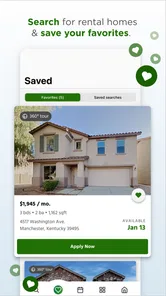
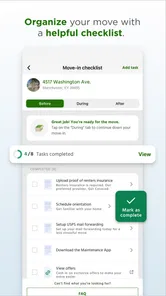
Invitation Homes is a rental housing service and resident app designed for people living in, or interested in renting, professionally managed single-family homes. Depending on your account and location, you can search available properties, review leasing information, submit maintenance requests, make rent payments, communicate with the management team, and access important documents. Features may vary by region and by whether you are an applicant or current resident.
Can I use Invitation Homes to search and apply for a rental property?
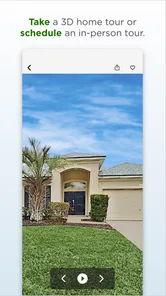
Yes, the Invitation Homes platform can help prospective residents browse available homes and begin the rental process. Property listings may include photographs, rent details, location information, amenities, pet policies, and leasing requirements. Before applying, review the qualification criteria carefully, since approval can depend on income, credit history, rental history, background checks, application fees, and other requirements that may vary by property.
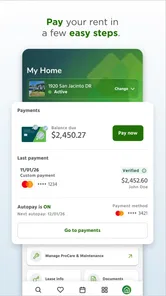
How do I pay rent through Invitation Homes?
Current residents may be able to use the app or online resident portal to view their balance, review payment information, and make rent payments electronically. Available methods can include bank transfers or card payments, depending on the account and local options. Check payment deadlines, processing times, convenience fees, and recurring-payment settings before confirming a transaction, because late or returned payments may result in additional charges.
Pros
- Browse available Invitation Homes rentals from your mobile device.
- Save favorite properties for easier comparison later.
- View property photos
- details
- and amenity information in one place.
- Contact the leasing team directly about homes you are interested in.
- Useful for managing your search while moving between locations.
Cons
- Availability and listings may vary significantly by location.
- Some app features may require an Invitation Homes account.
- Rental applications can involve additional fees and screening requirements.
- The app may not replace a full website for detailed leasing information.
- Response times from property teams can depend on local availability.







