invideo AI: Video Generator
- 2.88K
- 4.3
- Installs
- 5.00M
- Price
- Free

Screenshots
Analysis by Reviewed
I approach AI video tools with one practical question: do they help me get from an idea to a watchable clip without making the editing process harder? invideo AI: Video Generator is aimed at that shortcut, especially for people who would rather describe a result than build every cut by hand. It is a free video-making app from invideo INC, in the video players and editing category, and its appeal is less about replacing a full desktop editor than about making a first draft easier to start.
Getting oriented before you make a video
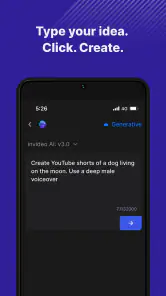
When I use a prompt-led editor, I find the first decisions often matter more than the later ones. Before asking the app to put a video together, I would jot down the one thing a viewer should remember, who the video is for, and where it will appear. A short brief gives the tool a narrower target and gives me a better way to judge the result. If the first version misses the point, I can revise the brief instead of randomly changing details.
This approach is useful when I have an idea but not yet a complete script. For example, a neighborhood shop owner might have a few notes about a seasonal display and want a quick social post. I would start with the product, the practical details customers need, and a clear next step, then review the generated scenes for accuracy. The app can help turn scattered notes into a draft, but the owner still needs to confirm that every claim and detail is correct.
I would not treat the first output as a finished deliverable. AI can make a video feel complete before its logic has been checked: a smooth transition or attractive stock image does not prove that the scene belongs there. A useful checkpoint is to ask, scene by scene, whether it adds information, sets a fitting mood, or helps the viewer follow the message. If it does none of those, I would remove or replace it.
Reading the interface and finding a way in
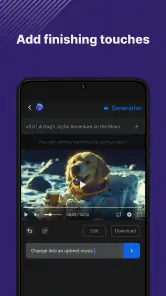
The first thing that caught my attention about the invideo AI: Video Generator is its simplicity. The interface is super user-friendly, which is perfect for someone like me who gets overwhelmed with too many buttons and options. You can easily navigate through the app without feeling like you're lost in a sea of features. It’s like the app designers knew exactly what we needed and delivered just that.
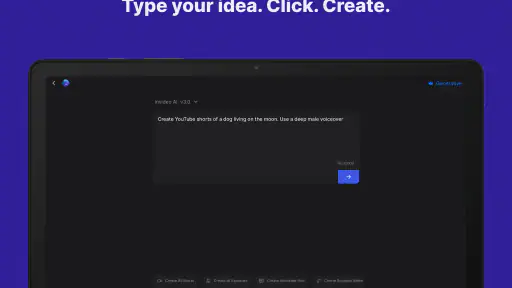
That uncluttered feeling matters when you are new to editing, but it also changes how I would plan a project. I would begin with a short, specific brief rather than a broad request: state the audience, the tone, the main point, and the intended destination. Then I would review the result as a draft, not treat the first output as finished. This gives me a clear way to spot whether the story is on track before spending time polishing details.
Making AI suggestions work for you
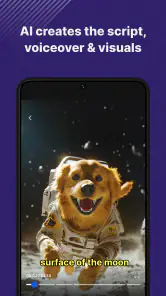
One of the standout features for me has to be the AI-powered editing tools. It’s not just about trimming clips or adding music; the AI actually analyzes your video content and suggests edits that could enhance your video. Talk about next-level editing! Also, the library of templates is vast and varied, catering to different themes and styles. Whether you’re creating a video for a birthday, a corporate event, or just a fun social media post, there’s something for everyone.
More From Our News Desk

Weather by Xiaomi Review: Clear at a Glance, Less Clear Up Close

X Under Pressure: Can It Recover When Posting Goes Wrong?

Clash of Clans Is Won Between the Battles

Android Auto Makes the Case for Quieter Car Software

MobiOffice: Transforming Mobile Productivity with Seamless Integration

EA SPORTS FC™ Mobile Soccer: Redefining Mobile Sports Gaming
The useful trade-off is that suggestions can speed up routine choices while still needing a human check for emphasis and context. For a small business owner making a quick product explainer, I would check that the visuals actually support each claim and that the pacing leaves room to read any on-screen text. For a personal event video, I would make sure the chosen mood feels right for the people in it rather than accepting a polished but impersonal result. AI can assemble; it cannot decide what matters most to your audience.
For a more dependable workflow, I would separate editorial checks from cosmetic ones. First, confirm names, dates, product details, and the order in which information appears. Only after that would I adjust the tone or decide whether a scene feels too slow. This prevents a common time-waster: polishing a sequence that later needs to be replaced because it tells the wrong story. It also makes feedback from a colleague more specific than “make it better.”
Assets, pacing, and a practical workflow
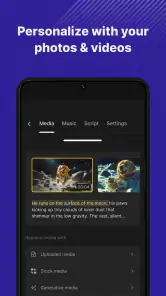
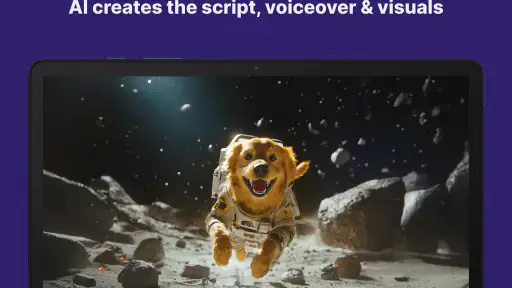
Moreover, the app provides a plethora of stock photos and videos, which is fantastic because, let’s face it, not all of us have the time to shoot our own footage. The quality of these stock options is top-notch, ensuring your final product looks professional.
Stock media is especially handy when you need a visual bridge between scenes or lack footage for an abstract point. I would avoid using it as decoration in every shot: too many generic images can make a video feel less personal, even when the editing is tidy. A stronger workflow is to use your own key images where authenticity matters, then let stock fill only the gaps. Before sharing, I would also watch the entire clip once with the sound off and once while listening without looking at the screen; those two passes can reveal different problems.
Those two review passes are practical for different reasons. Watching without sound helps me notice whether the order of scenes and any visible text make sense on their own. Listening without looking helps me catch narration that is hard to follow, abrupt changes in volume, or wording that feels awkward when spoken. If either pass exposes a problem, I would fix that before worrying about decorative choices. A video that works in both modes is also less dependent on one particular viewing situation.
A realistic use case is turning a few notes about a weekend craft market into a short announcement. I would define the essentials—what is being sold, where the event is, and what viewers should do—then check that the visuals and wording preserve those facts. That is a good fit for a guided tool because the job is compact and the goal is clear. It is less suitable for a sensitive story, a detailed tutorial, or a project where exact timing and frame-by-frame control are central.
For that market announcement, I would keep a simple source note beside the draft with the location, opening times, and the event’s main details. Then I could compare the finished video against it instead of trusting memory while editing. This is a small habit, but it matters when AI has rephrased a brief: an inviting line can accidentally become less precise. The same method works for a class reminder, a community notice, or a short introduction to a new service.
Sharing, teamwork, and everyday access
What really makes this app shine is how seamlessly it integrates with other platforms. You can directly share your creations to social media or download them in various formats. It’s like having a mini video production studio right in your pocket.
Speaking of integration, the collaboration feature is a game-changer for teams working remotely. You can invite team members to view and edit the video, making it a collaborative effort without the hassle of multiple email exchanges.
For a team, I would use that shared review stage to settle the message before anyone focuses on minor visual preferences. One person can check factual accuracy, another can judge whether the tone fits, and the creator can make the final call on pacing. That division is more useful than asking several people to edit at once without a clear purpose.
On a busy day, a creator might draft a short update between other tasks, ask a colleague to check the wording, and then make a final viewing pass before sharing. That is where a guided mobile workflow can feel more convenient than moving a small announcement through a full desktop editing setup. I would still save time for the last review rather than publishing immediately; a quick check for a mistaken detail or an ill-fitting scene is worth more than shaving off a minute.
The app is listed for users aged Teen and has an average rating of 4.3 from around 125,000 ratings, with more than five million installs. It is free to install, though in-app purchases range from $9.99 to $1,440 per item, so I would check the price shown for any paid option before committing to a regular workflow. The current version is 4.4.12 and it requires iOS 11 or later.
For someone deciding whether to spend time learning it, I would start with a single low-stakes project rather than planning an entire content schedule around it. That gives you a chance to see whether the prompt-led process suits your way of thinking and whether the editing steps fit your routine. If you only need an occasional birthday greeting or community update, the free starting point may be enough to explore the workflow; if you are considering paid options, check the specific purchase details before relying on them for ongoing work.
Where the shortcuts have limits
Ease of navigation does not automatically make every task accessible to every person. A simplified interface can reduce the number of choices to scan, but small controls, dense preview content, quick visual changes, or audio-led instructions may still create friction for some users. I would take breaks during longer editing sessions and use a calm, quiet setting when reviewing sound and timing. If precise control, keyboard-based editing, or specialist accessibility tools are essential to your process, a conventional editor with controls tailored to that workflow may be a better choice.
For people with motor or sensory needs, the practical question is whether the steps involved in creating and reviewing a video feel comfortable on their device. Someone who finds repeated fine adjustments tiring may prefer a guided starting point, while a person who depends on exact control over each cut may find that same guidance restrictive. I would test a short project and notice where effort builds up: writing the prompt, moving through the preview, changing a scene, or checking the final result. That experience is a better guide than assuming a simple-looking interface will suit everyone.
Viewing conditions matter, too. A clip made in a noisy room, on a small screen, or during a short break can be hard to assess properly. I would draft when convenient but reserve a separate moment for checking text, pacing, and sound in a setting where those details are easier to notice. If a viewer may watch without audio, clear visual wording matters; if the message depends on narration, I would make sure it remains understandable when heard on its own.
There is also a creative limit to consider: templates and AI-assisted assembly can make different projects feel alike if you rely on the default structure. I would change the opening, remove any scene that does not serve the message, and read captions or text carefully before publishing. Those small checks help preserve your own voice rather than letting a convenient starting point dictate the whole video.
Compared with a traditional timeline editor, this app is more appealing when speed and a guided start matter more than detailed manual control. Compared with editing entirely by hand, it can reduce the amount of assembly work, but it still asks you to make editorial decisions. I would choose it for social posts, simple announcements, and early drafts; I would choose a more hands-on editor for intricate sound design, exact shot timing, or a carefully art-directed piece.
That distinction is especially useful if you already have a preferred editing routine. A timeline editor gives me a more direct way to place every clip and tune the relationship between image, sound, and timing, but it also asks me to do more of the assembly myself. A prompt-driven tool is attractive when I need a starting structure quickly and can accept revising it afterward. Neither approach is automatically better: the right choice depends on whether the project’s main difficulty is getting started or controlling every detail.
I would skip this app when the video carries high-stakes information that needs careful, exact presentation, or when a distinctive visual style is central to the brief. In those situations, I would rather use a more controlled editor and build the sequence deliberately. I would also think twice if I am not comfortable checking AI-generated choices; convenience does not remove responsibility for the final wording, visuals, or tone. For everyday drafts and straightforward social content, however, that trade-off can be reasonable.
A grounded recommendation
In conclusion, invideo AI: Video Generator really does live up to its name. It’s a comprehensive tool that makes video editing not just accessible but genuinely enjoyable. Whether you’re a professional videographer or someone just looking to spice up their Instagram stories, this app offers something for everyone. The blend of simplicity, powerful features, and seamless sharing options make it a must-try for anyone looking to up their video creation game.
So, if you’ve been on the hunt for a video editing app that doesn’t require a degree in film production, give this one a shot. It might just be the tool you didn’t know you needed.
My more specific recommendation is to treat it as a drafting partner, not an automatic publisher. It is a sensible match for someone who wants help turning a brief into a first cut, values a less intimidating entry to video creation, and is willing to review the result with care. It is a weaker match for people who need full manual control, have a highly exacting production workflow, or want every visual decision to be made independently. That distinction makes it easier to decide whether its convenience is worth trying for your next small project.
invideo AI: Video Generator Frequently Asked Questions
Can I use InVideo AI: Video Generator to make videos for social media?
The app is designed for creating and editing videos with AI, which may suit people preparing video content for social platforms. Before starting a project, consider the format and style you want, then explore the available creation and editing options in the app. The result will depend on the content you provide and how you adjust the video.
What should I know about purchases before trying InVideo AI: Video Generator?
The app is free to download, but it includes in-app purchases. If you are considering a paid option, review its details in the app before completing a purchase and consider whether it matches your intended use. This is particularly useful if you are testing the app casually or expect to create videos regularly, since your needs can affect which options are worthwhile.
Can I create a video without editing experience in InVideo AI: Video Generator?
The app is intended to make video creation and editing with AI accessible, so it may be worth trying if you are new to editing. Start with a straightforward idea and explore the creation process before taking on a more involved project. AI assistance can help with parts of the workflow, while reviewing and adjusting the result remains useful for shaping a video to your preferences.
Is InVideo AI: Video Generator suitable for a family device?
InVideo AI: Video Generator has a Teen content rating, which is a useful consideration when choosing apps for a family device or a younger user. A parent or guardian can review the app and decide whether it fits the intended user. It is also sensible to consider the videos someone plans to create and share, as well as the app permissions requested on the device.
What devices should I check before downloading InVideo AI: Video Generator?
InVideo AI: Video Generator is an app for Android and iOS, so check that your device runs a compatible operating system before installing it. The minimum OS is version 11. The app is aimed at people who want to create and edit videos on a phone, with its store summary describing video creation and editing with AI.
Pros
- User-friendly interface
- Wide variety of templates
- Fast video rendering
- AI-driven features
- Supports multiple formats
Cons
- Limited free version
- Occasional glitches
- High subscription cost
- Requires internet connection
- Learning curve for beginners
- Category
- Video Players & Editors
- Version
- 4.4.12











