

Intellifi by Adtran®
- 19.00
- 4.2
- Installs
- 10.00K
- Price
- Free

Screenshots
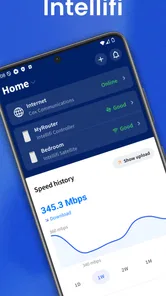
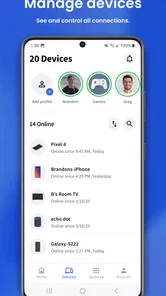
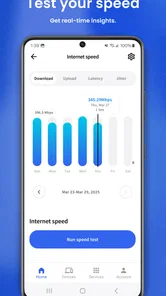
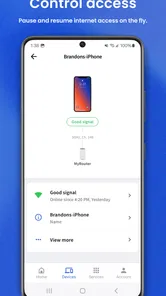
Analysis by Reviewed
Managing home Wi-Fi is one of those jobs I usually notice only when something goes wrong. A video pauses, a work call becomes unreliable, or a guest asks for the network password, and suddenly I am searching through router menus that were never designed for casual use. Intellifi by Adtran® takes a more approachable position: it is a House & Home app intended to help people work with their home Wi-Fi network from a mobile device.
I spent time looking at it as a practical decision rather than treating it like a technical showcase. The important question is not whether a Wi-Fi assistant sounds useful, but whether it suits the way you manage your connection. If your home network is built around compatible Adtran equipment or a service that supports this app, Intellifi can make routine network tasks feel less remote. If you already prefer a router’s full web interface, or your equipment is outside its intended ecosystem, the appeal is much smaller.
It is free to use, aimed at Everyone, and the Android release works from version 7.0 onward. The app comes from ADTRAN Holdings, Inc., and its current version is 6.29.0. Those details make it accessible to a broad range of Android users, although accessibility alone does not guarantee that it will control every router or home setup. Compatibility with the network hardware and service behind it is the first thing I would check before changing how I manage Wi-Fi.
What I would check before choosing a home Wi-Fi assistant
My first decision criterion is compatibility, not the number of buttons on the screen. A mobile network assistant is useful only when it can communicate with the equipment providing the connection. Intellifi makes the most sense as part of an Adtran-supported home Wi-Fi arrangement, rather than as a universal replacement for every router application. Before installing it, I would identify the router or managed Wi-Fi system in the home and confirm that it belongs to the supported setup.
The second criterion is the kind of control I actually need. Some people want a simple way to see the home network and handle everyday access. Others need advanced configuration, detailed diagnostics, custom routing rules, or specialist controls. A phone app is normally strongest at quick household actions, while a traditional router dashboard may still be better for deep technical work. I would choose Intellifi for convenience first, not because I expect it to replace every advanced administration tool.
The third criterion is who will use it. A technically confident owner may be comfortable opening a browser, finding a local address, and navigating several settings pages. In a family home, however, the person responsible for connectivity may not be the person who originally installed the router. A clearer mobile experience can reduce that gap. I see the app as especially relevant when Wi-Fi management needs to be understandable to more than one person in the household.
There is also a useful distinction between monitoring a connection and fixing a connection. An app can make network information easier to reach, but it cannot overcome a damaged cable, a failing access point, an outage from the internet provider, or poor placement of the hardware. I would use Intellifi to make the first checks more convenient, while keeping realistic expectations about what software can solve.
More From Our News Desk

 Gmail
GmailGmail in a Busy Inbox: Who Benefits Most?
From first account to crowded workday, Gmail earns its place through dependable search and flexible sorting—but its best fit depends on how much inbox maintenance you can tolerate.

 Prime Video
Switching to Prime Video: What Changes in Your Viewing Routine
Prime Video can make a compelling second home for streaming, but switching means learning a different catalog, rental layer, and route from browsing to playback.

 Universal TV Remote Control
Universal TV Remote Control Works Best as a Reliable Backup
A phone remote earns its place through quick setup and reliable habits. Here is how to get more from Universal TV Remote Control—and where its limits show.

 Weather - By Xiaomi
Weather by Xiaomi Review: Clear at a Glance, Less Clear Up Close
Xiaomi’s weather app makes everyday forecasts quick to scan, but its calm surface can leave useful details and recovery paths harder to find than they should be.

 X
XX Under Pressure: Can It Recover When Posting Goes Wrong?
A resilience-focused review of X, examining setup, mistaken posts, interruptions, weak connections, and the gaps that matter when recovery needs to be dependable.

 Clash of Clans
Clash of Clans Is Won Between the Battles
Its raids are quick; its community is a long-term project of coordination, teaching, rivalry, and shared responsibility—with all the friction that entails.
Latest News



How I would use it during an ordinary day
Imagine a family home where a child is studying in one room, someone else is streaming in the living room, and a guest arrives with a phone that needs Wi-Fi. The person managing the network does not want to walk to the router or remember which browser page opens its settings. A mobile assistant is valuable in that moment because it puts the network conversation closer to the person asking for help.
My practical workflow would be simple: open the app when a connection issue appears, inspect what it shows about the home network, handle the available household task, and then test the affected device again. That sequence is more useful than randomly restarting everything. It also encourages a better habit: change one thing at a time and check whether the problem actually improved before making another adjustment.
A less obvious benefit is shared responsibility. If one family member is always the only person who knows the Wi-Fi details, every small problem becomes their interruption. A mobile tool can make routine management less dependent on that one person, provided the household agrees on who should have access and how changes are communicated. I would avoid casually handing control to everyone, though; simple access can still lead to accidental changes.
Another practical tip is to use the app as a first-response tool, not as a permanent distraction. When the connection feels slow, I would check the immediate situation and write down what changed before touching settings. This makes it easier to separate a single-device problem from a wider home-network problem. It also prevents the common mistake of repeatedly changing network options without knowing which change helped.
Where Intellifi is most convincing
The strongest case for Intellifi is the gap between a household’s need for control and the complexity of conventional router administration. Router interfaces often expose technical language that makes sense to installers but not to everyone living in the home. A dedicated mobile experience can be more inviting because it starts from the user’s device rather than from a networking concept such as an address, port, or configuration page.
I also like the idea of having a network assistant available where the problem is being reported. If a family member calls from upstairs to say that Wi-Fi is unreliable, I can investigate from the phone in my hand instead of treating the router as a piece of equipment that must be physically approached. That does not guarantee a solution, but it shortens the path from complaint to useful information.
The app’s positioning by ADTRAN Holdings, Inc. is important here. It is not just a generic network scanner presented as a universal answer; its value is tied to the home Wi-Fi environment it is designed to support. That can be a strength because a focused app may feel more coherent inside its intended ecosystem. The trade-off is that the experience is less compelling for someone who wants one application to manage unrelated networking brands.
Its free price also lowers the risk of trying it when the home setup is compatible. I would still distinguish between “free to install” and “free to make any network work.” The app does not remove the need for suitable hardware or service. What the price does provide is an inexpensive way to test whether mobile management improves the daily experience before considering a more involved change.
The public response gives it a 4.2 average from around 144 ratings, with 19 written reviews. I would treat that as a useful sign of interest rather than a guarantee that every household will have the same experience. Ratings can tell me that people are finding value, but compatibility and the specific network arrangement remain more important than a single average.
Small workflows that make the app more useful
One workflow I would recommend is checking the network before changing the phone itself. People often jump straight to forgetting and rejoining Wi-Fi on a device, even when the real issue affects several rooms. Starting with the home-network view can prevent unnecessary changes to saved passwords and device settings. If only one device is affected, then troubleshooting that device becomes a more sensible next step.
A second workflow is to use the app during a controlled test rather than at the most frustrating moment. For example, I would check the network when the household is quiet, note what appears normal, and then check again when the problem occurs. This creates a basic comparison without pretending to be a formal diagnostic measurement. It can reveal whether the issue is tied to a particular room, time, or device pattern.
A third is to keep the app and the network’s physical reality connected. If the mobile view looks normal but a room remains unreliable, I would inspect placement, walls, nearby electronics, and the distance from the access point before repeatedly tapping through software options. The app is most helpful when it narrows the possibilities; it is not a substitute for understanding the home’s layout.
I would also make sure the person using the app knows which change they are making and why. That sounds obvious, but household networking becomes confusing when several people alter settings independently. A short note in a family chat can be enough: who changed something, what was changed, and whether the connection improved. This is a simple way to turn a mobile assistant into a shared troubleshooting tool instead of another source of uncertainty.
Where a different kind of tool may fit better
Intellifi is not automatically the right choice for a networking enthusiast. If I need granular controls, extensive logs, unusual network layouts, or settings intended for professional administration, I would look first at the router’s own advanced interface. A manufacturer’s full dashboard may expose options that a household-focused mobile assistant intentionally keeps out of the way.
I would also hesitate if my home uses equipment from several unrelated brands. In that situation, a general network utility may be more useful for observing connected devices or testing reachability across the whole setup. A brand-specific assistant can be easier to use within its own environment, but it may not provide a single view of everything in a mixed network.
There is another case where the app may not be the best answer: when the main problem is the internet service rather than the home Wi-Fi. If the provider’s connection is down, the router has no outside link, or the line is unstable, local management tools can only help identify the boundary of the problem. I would contact the provider or inspect the physical connection rather than expecting a mobile control app to repair an external fault.
People who rarely change anything about their network may also find limited value. If the router was installed correctly and the household never needs to check access, troubleshoot devices, or help guests, a dedicated assistant may not become part of the daily routine. In that case, the ordinary router setup and the phone’s Wi-Fi controls may be enough.
Privacy and access habits deserve a practical mention too. I would not install a network-management app on every family member’s phone without thinking about permissions and responsibility. Anyone who can manage the home network should understand that their actions can affect everyone else. The right choice is not only about features; it is also about whether the household can use the control responsibly.
What switching to it really involves
Trying Intellifi is relatively low-risk because it is free, but the real cost of switching is time and expectation. I would need to install it, identify the supported home network, sign in or complete whatever setup the environment requires, and learn where the useful information lives. Even a friendly app adds another place to look when something goes wrong.
I would not remove the existing router app immediately. Keeping the familiar option available during the trial gives me a fallback if a setting is easier to find there. It also lets me compare the two approaches honestly: which one reaches the needed information faster, which one is clearer to another household member, and whether Intellifi adds practical value instead of simply duplicating a tool already in use.
The Android requirements are modest enough for people using older devices, since the app supports Android 7.0 and later. That helps households with a mixture of newer and older phones. Still, I would keep the app updated when possible, especially for a network-management tool, because reliability matters more here than having the newest visual design.
The current release is 6.29.0, and the app was released on May 31, 2023. I mention those details because they help set expectations about the product’s place in a user’s setup: it is an established mobile application rather than something I would treat as an experimental one-day utility. Even so, the version number should not be mistaken for a promise that every feature or screen will behave identically across all supported network arrangements.
My suggested trial would last long enough to cover three situations: a normal day, a guest needing access, and a moment when one device or room behaves badly. During that period, I would judge whether the app reduces effort. If I still need to open the old router interface for every meaningful task, then the switch has not delivered enough benefit, even if the mobile app looks polished.
My recommendation for different households
I recommend Intellifi to people whose home Wi-Fi is part of the Adtran-supported environment and who want a more approachable way to stay involved in network management. It is particularly suitable for families, shared homes, and less technical users who need practical access without treating the router like a specialist device. The free entry point makes testing straightforward, and the Everyone age rating keeps it suitable for a broad household audience.
I would recommend it less strongly to advanced users who already rely on a detailed router dashboard, or to households built around several networking brands. Those users may gain more from a general diagnostic utility or the manufacturer’s complete administration tools. The same applies when the real issue is an internet-provider outage, weak hardware placement, or a physical fault; no mobile assistant should be sold as a cure for those problems.
Overall, I see Intellifi as a convenience layer with a clear purpose. It can make home Wi-Fi feel less intimidating, encourage more orderly troubleshooting, and put useful network management closer to the people who need it. Its success depends heavily on the equipment behind it, so I would verify that fit before making it the household’s main tool.
For the right home, the best reason to choose Intellifi is not extra complexity but less friction. I would install it, keep the existing management option available during the trial, and judge it by one honest question: when Wi-Fi needs attention, does this app help me understand and handle the situation faster? If the answer is yes, it earns a place on the phone. If not, the router’s standard controls or a broader networking tool may be the better choice.
With over 10 thousand installs, it has reached a meaningful group of Android users without feeling like an obscure experiment. That does not replace personal testing, but it supports my overall view: Intellifi is worth considering as a focused home Wi-Fi assistant, especially when convenience and shared household access matter more than advanced network engineering.
Intellifi by Adtran® Frequently Asked Questions
Is Intellifi by Adtran® free, and who can use it?
Intellifi by Adtran® is a free House & Home app developed by ADTRAN Holdings, Inc. Its content rating is Everyone, so it is suitable for a general audience. The app is intended for people whose home Wi‑Fi service and equipment are supported by their provider; downloading it alone does not make it compatible with an unsupported network.
What should I check before downloading Intellifi by Adtran® on my phone?
Check that your phone meets the app’s operating-system requirement and that your internet provider supports Intellifi with your home equipment. The app is available for devices running Android 7.0 or later. Confirming compatibility with your provider before installation can save time, since access and features depend on the provider’s setup as well as the gateway or router in use.
What is Intellifi by Adtran® used for?
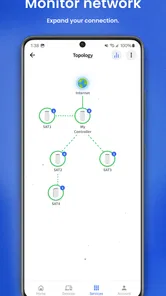
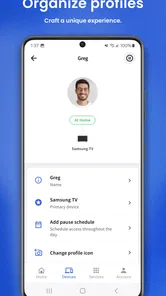
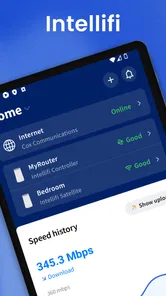
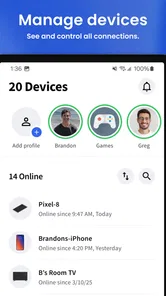
Intellifi by Adtran® is designed to help users manage and monitor compatible home Wi‑Fi networks. Depending on the supported equipment and service provider configuration, the app may provide access to network status, connected devices, Wi‑Fi settings, guest access, parental controls, diagnostics, and other management tools. Its exact features can vary by router model, firmware, and internet provider.
Is Intellifi by Adtran® compatible with every Wi‑Fi router?
No. Intellifi by Adtran® is generally intended for compatible ADTRAN® gateways, routers, and managed broadband services rather than every third-party Wi‑Fi device. Before downloading, users should confirm that their internet provider supports the application and that their specific equipment is included. Even with compatible hardware, some features may be unavailable if the provider has not enabled them on the account.
How do I sign in to Intellifi by Adtran®?
Sign-in details depend on how the application is deployed by your internet service provider. You may need an account created by the provider, credentials associated with your broadband subscription, or an activation code supplied with the equipment. If your login fails, checking the provider’s customer portal, confirming the registered email address, and contacting technical support are usually more effective than repeatedly reinstalling the app.
Pros
- Simple setup for compatible ADTRAN Wi‑Fi systems
- Clear view of connected devices and network status
- Useful tools for checking signal quality around your home
- Helps identify coverage gaps and potential connectivity issues
- Remote management can reduce the need for technical support
Cons
- Features depend heavily on having compatible ADTRAN hardware
- Some advanced options may be hidden behind administrator access
- Performance insights may vary with router model and firmware
- Requires a stable internet connection for remote management features
- The interface may feel limited compared with broader Wi‑Fi analyzer apps







