

InstaService: Home Services
- 32.00
- 4.5
- Installs
- 10.00K
- Price
- Free

Screenshots




Analysis by Reviewed
I found InstaService: Home Services most useful as a starting point when something around the house needs attention and I do not already have a trusted person to call. It is a free House & Home app from InstaService that brings repair, cleaning, plumbing, handyman work, and similar requests into one place. My impression is practical rather than flashy: its value depends less on entertainment and more on whether it helps you explain a job clearly and move from “I need help” to “someone is handling this.”
That makes it especially interesting from an accessibility point of view. A home-service app is not only used by people sitting comfortably at a desk. Someone may be trying to report a leak while moving between rooms, arranging help for an older relative, using a phone with one hand, or dealing with stress after a household problem. I looked at the experience through those everyday situations, paying attention to how easy it feels to read, navigate, describe a request, and use the app when your circumstances are less than ideal.
How the app feels to use in everyday situations
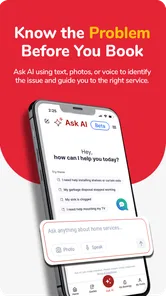
I find the app easiest to approach as a way to organize the first step, not as a substitute for deciding what a household problem needs. When I’m unsure how to describe a repair, I focus on what I can observe—the room, the symptom, and whether it is changing—then use that to shape a clear request. That practical starting point matters most when time is tight, which is why the next section looks at how a little preparation can make the process smoother.
Readability and navigation when you need help quickly
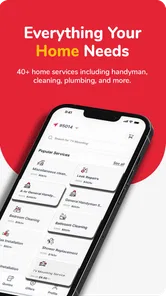
The clearest strength of this app is its focused purpose. You are not opening it to browse a large collection of unrelated content. You are there because a household task needs attention, and the service categories give that need a recognizable place. Plumbing, cleaning, repairs, and general handyman work are easier to understand than a vague “contact us” process, particularly for someone who is not familiar with trade terminology.
I also like the way the concept reduces the number of separate searches a person might otherwise make. Without an app like this, I would usually search the web, check local listings, read scattered reviews, send several messages, and then repeat the process when the first person is unavailable. InstaService: Home Services offers a more direct route. That does not guarantee that the first option will be the perfect one, but it can reduce the mental effort of deciding where to begin.
For readability, the most important practical tip is to use the app when you are calm enough to describe the problem in ordinary language. Instead of trying to identify an exact technical fault, I would write something like “water is collecting under the kitchen sink” and add the useful details around it. That approach is friendlier to people who may find trade vocabulary confusing, and it also gives a service provider a better starting point than a single-word request such as “plumber.”
The app is suitable for Everyone, which makes its general audience broad, but an age label should not be confused with a complete accessibility assessment. People differ in vision, dexterity, reading speed, hearing, and confidence with mobile forms. In my view, the interface is easiest for users who are comfortable reading standard phone text and tapping through ordinary app controls. Anyone who needs unusually large text, highly simplified navigation, or a very specific assistive setup should test the experience on their own device before relying on it during an urgent repair.
More From Our News Desk

 Gmail
GmailGmail in a Busy Inbox: Who Benefits Most?
From first account to crowded workday, Gmail earns its place through dependable search and flexible sorting—but its best fit depends on how much inbox maintenance you can tolerate.

 Prime Video
Switching to Prime Video: What Changes in Your Viewing Routine
Prime Video can make a compelling second home for streaming, but switching means learning a different catalog, rental layer, and route from browsing to playback.

 Universal TV Remote Control
Universal TV Remote Control Works Best as a Reliable Backup
A phone remote earns its place through quick setup and reliable habits. Here is how to get more from Universal TV Remote Control—and where its limits show.

 Weather - By Xiaomi
Weather by Xiaomi Review: Clear at a Glance, Less Clear Up Close
Xiaomi’s weather app makes everyday forecasts quick to scan, but its calm surface can leave useful details and recovery paths harder to find than they should be.

 X
XX Under Pressure: Can It Recover When Posting Goes Wrong?
A resilience-focused review of X, examining setup, mistaken posts, interruptions, weak connections, and the gaps that matter when recovery needs to be dependable.

 Clash of Clans
Clash of Clans Is Won Between the Battles
Its raids are quick; its community is a long-term project of coordination, teaching, rivalry, and shared responsibility—with all the friction that entails.
Latest News



One useful workflow is to prepare the information before starting a request. Note the room, the visible symptom, when it began, and whether the issue is getting worse. If the app gives you a place to explain the job, that short preparation can prevent back-and-forth messages later. It is a small step, but it matters for users who find repeated typing tiring or who need extra time to organize information.
Motor and sensory considerations
Home-service requests often happen in awkward conditions. You may be holding a flashlight, standing beside a washing machine, or trying to keep a child away from a spill. In those moments, a phone interface that requires precise tapping or long typing can become frustrating. My recommendation is to treat the app as a planning tool rather than something to operate while dealing with an immediate hazard. Move away from water, exposed wiring, broken glass, or anything unstable before entering details.
For users with limited hand movement, the main trade-off is convenience versus input effort. A centralized service app can save the physical effort of visiting several websites or making multiple calls, but the request still needs enough information to be useful. A short, structured note prepared in advance is easier than composing a long explanation under pressure. If another person is helping, they can read the description aloud, confirm the address and room, and check that the selected service matches the actual problem.
For users with low vision, I would make the phone’s own text-size and display settings part of the setup. The app benefits from a larger, clearer device configuration if the controls remain usable at that size. I would also avoid relying on color alone to understand the status of a request or the difference between categories. When a task matters, read every label and confirmation rather than assuming that a visual highlight tells the whole story.
People with hearing loss may prefer the app-based route to a phone-first alternative because written details can be easier to manage than a voice conversation. That is a genuine advantage of having a digital request channel. At the same time, the full experience may still involve communication with a service provider, so I would state communication preferences early and keep important details in writing where possible. The app can help start the process, but it should not be treated as a substitute for confirming how the appointment will be arranged.
Sensory overload is another consideration. A home emergency already creates noise, urgency, and visual clutter. The best way to use this app in that situation is to reduce the task to a few decisions: choose the closest matching service, describe the visible issue, provide the relevant location, and review the request before sending it. I would not try to write a perfect technical diagnosis. Clear and simple is more useful than detailed but uncertain.
Situational access for families, renters, and caregivers
The app makes sense for people who manage a home but do not personally perform repairs. Renters can use it as a way to understand the type of help they need, although they should check their rental responsibilities before arranging paid work. A landlord or building manager may need to approve a repair, and an urgent issue may require a different contact route. InstaService can be helpful for identifying the service category, but it should not replace those local arrangements.
Caregivers are another strong use case. If an older family member struggles with describing a problem or navigating a phone, a relative can prepare the request with them. I would keep the homeowner involved in decisions about access, timing, and the scope of work. A simple shared note containing the issue, the room, preferred communication method, and any mobility considerations can make the handoff smoother without asking the person receiving help to repeat everything.
Consider a realistic example: a parent notices that a bathroom tap is dripping while preparing for work. They do not know whether the issue requires a plumber or a general repair person, and they cannot spend an hour comparing unrelated listings. With InstaService, they can begin with the closest category, describe the dripping tap, mention whether water is reaching the cabinet, and organize the request before leaving for work. If the problem is minor, the description may be enough for the provider to understand the job. If it is more serious, the written details help the parent explain why the request needs attention.
Another useful situation is preparing a request for a relative who has difficulty using small touch controls. I would gather the details first, use the phone’s accessibility settings, and complete the process together rather than taking over silently. This preserves the person’s ability to approve what is being requested. It also reduces the risk of selecting a service that sounds similar but does not match the real need.
For people who are not fluent in technical English, the app’s category-based approach may be less intimidating than searching for a specialist from scratch. Still, I would use plain descriptions and, when possible, include familiar names for objects in the home. “The toilet keeps running after flushing” is more useful than guessing at a part name. If a family member can review the request, that extra check is worthwhile.
What it does better than the usual alternatives
The usual alternative is a general web search. That approach can produce many choices, but it also places the burden on the user to judge which result is relevant, current, and suitable. InstaService has a narrower purpose, which is its main convenience. It gives a person a home-services starting point instead of making them build a shortlist from unrelated pages.
Calling a local contact can be faster when you already know exactly who you trust. A phone call is also better for explaining a complicated situation in real time, especially when the issue changes while you are speaking. I would choose a known local professional first for a serious problem or a repair covered by an existing agreement. I would choose InstaService when I need help finding a suitable category or when I want to organize the request digitally.
Neighborhood recommendations can offer valuable personal context that an app cannot replace. Friends and neighbors may know who arrives reliably, who understands a particular building, or who has worked well with someone needing extra assistance. The advantage of InstaService is convenience and centralization, not guaranteed personal familiarity. My strongest approach would be to combine the two: use personal recommendations when available, and keep the app as an additional route when the usual contact is unavailable.
The app is also different from a full household-management system. I would not expect it to replace a calendar, a maintenance log, or a folder containing warranties and invoices. Those tools remain useful for tracking recurring problems and documenting work. InstaService is better viewed as the point where a new service need begins, not as the complete record of everything that has happened in a home.
Remaining barriers and sensible precautions
The biggest limitation is that an app can simplify the request without removing the uncertainty that comes afterward. A person still needs to understand what service is being requested, communicate access details, and decide whether the work is appropriate. That may be difficult for users who need a fully guided process, a human interpreter, or extensive support before making a decision.
I would also avoid using any home-service platform as the only response to an immediate danger. A burst pipe, suspected gas problem, electrical hazard, or situation threatening someone’s safety deserves the appropriate emergency or utility contact first. The app may be useful for follow-up work once the immediate risk is controlled, but convenience should never delay urgent help.
Before arranging a visit, prepare questions that protect your time and comfort. Ask what the provider needs to know, whether someone else should be present, and how the work area should be prepared. If you have mobility, sensory, or communication needs, explain them early and in direct language. For example, say that you need written instructions, extra time to reach the door, or a clear explanation before work begins. That is more effective than hoping a provider will infer your needs from a short category selection.
Privacy and household safety deserve attention too. Only share information needed to identify the job and arrange access. Avoid placing sensitive personal details in a repair description. If you are arranging service for another person, confirm that they are comfortable with the information being shared and with the planned visit. These habits are not unique to InstaService, but the app’s convenience should not encourage rushed decisions.
Users who depend on screen readers, switch access, voice control, or other specialized tools should try the complete path they need: opening the app, choosing a service, entering the description, reviewing it, and confirming the request. A single accessible screen does not guarantee that every step will work equally well. If the process becomes difficult, a trusted person can assist, but the user should still have a way to verify the final details.
Version, availability, and who should choose it
InstaService is currently at version 1.1.2 and works on Android devices running version 7.0 or later. That makes it available to people using older compatible Android phones, which is useful for households that do not upgrade devices frequently. I would still keep the operating system updated where possible, particularly when the phone is used to manage addresses, appointments, or access to the home.
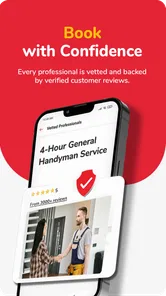
The app has passed the early discovery stage without becoming a massive, impersonal platform. It has over ten thousand installs, an average rating of 4.5 from around a hundred ratings, and thirty-two written reviews. Those figures suggest that other users have found enough value to rate it positively, but I would still read recent comments before trusting it for a particularly important job. A small service-focused app can be convenient, while the quality of the actual experience may depend heavily on the local coverage and the individual provider.
Since it is free, the main cost is not downloading it but the service you eventually arrange. I would never assume that “free app” means a repair or cleaning visit is free. Treat the app as a way to request or organize home help, and clarify the work and expected charge before approving anything. That distinction is important for anyone working with a strict household budget.
I would recommend it to people who want one straightforward place to begin with everyday home tasks, especially renters, busy households, caregivers, and anyone who dislikes searching through scattered listings. It is also a reasonable option for people who prefer written descriptions over making several phone calls. The best results will come from users who can review the request carefully and communicate any access needs directly.
I would skip it as my first choice if I already had a dependable specialist, needed emergency intervention, or required a highly personalized accessibility service that had to be confirmed in advance. In those cases, a trusted local contact, building manager, utility provider, or direct human support may be better. The app is not a replacement for judgment, and its convenience should not be mistaken for a guarantee that every situation will fit the same workflow.
My inclusive verdict
After using it as a home-service starting point, I see InstaService: Home Services as a practical tool with a clear everyday role. Its strongest inclusive quality is the way it can reduce the first barrier: figuring out what kind of help to seek. That matters when a person is stressed, unfamiliar with repair terms, supporting someone else, or simply short on time.
Its accessibility value is more situational than absolute. The app can make written requests and category selection easier than scattered web searches or repeated calls, but users with specific visual, motor, hearing, or cognitive needs should confirm that the complete request process works for them. Preparing details in advance, using device accessibility settings, involving a trusted helper when appropriate, and reviewing the final request are the most useful ways to make the experience more manageable.
My final recommendation is measured but positive: try it when you need a convenient route into ordinary home services and do not already have the right contact. Use it thoughtfully, keep urgent hazards out of the app workflow, and treat clear communication as part of the service request. For that audience, the app’s real strength is reducing the effort of getting started without pretending that every home problem has a one-tap solution.
InstaService: Home Services Frequently Asked Questions
What should I check before installing InstaService: Home Services?
InstaService: Home Services is a free app for finding and requesting help with household tasks, and it is rated for Everyone. Before installing, consider whether you need a local service marketplace and whether your device meets the app’s minimum operating-system requirement. The app is developed by InstaService and has a 4.5 average from around 105 ratings, which offers a quick sense of how users have rated it.
Which types of home services can I look for in InstaService?
The app’s summary highlights handyman work, repairs, cleaning, and plumbing, with other home services also potentially available nearby. The options you can actually request depend on local provider coverage, so the service menu may differ by location. If you are looking for a specific task, check the categories available for your area before relying on the app to arrange it.
What is InstaService: Home Services, and what can I use it for?
InstaService: Home Services is designed to help users find and request assistance for everyday household needs, such as cleaning, repairs, maintenance, moving, beauty, or other local services, depending on the providers available in their area. After entering your location and choosing a category, you can review service details, compare available professionals, request a booking, and communicate about the job through the app.
Is InstaService: Home Services available in every city or country?
Availability depends on the service providers and coverage supported in your location. When testing a home-service platform, the most important first step is entering your address or selecting your city to see which categories and professionals are actually available. Some services may operate only in specific neighborhoods, while appointment times, provider selection, and response speed can vary considerably between locations.
How do I book a service through the app?
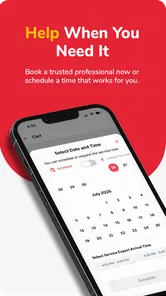
The usual booking process involves selecting a service category, describing what you need, adding your address, choosing a preferred date and time, and reviewing the provider or estimated cost before submitting the request. Some jobs may require additional details, photos, or a message to clarify the work. Make sure the appointment information is correct and read the final confirmation carefully before accepting.
Pros
- Easy way to request cleaners
- repairs
- and other home services
- Convenient booking from your phone without calling multiple providers
- Service categories help users find the right professional quickly
- Useful for comparing available services in one place
- Can save time when arranging routine household tasks
Cons
- Service availability may vary significantly by location
- Provider quality and reliability can differ between bookings
- Some services may include extra fees not obvious at first
- Response times can depend on individual professionals
- App usefulness is limited in areas with few listed providers







