Insta360
- 1.91K
- 3.3
- Installs
- 1.00M
- Price
- Free

Screenshots
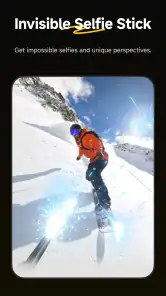
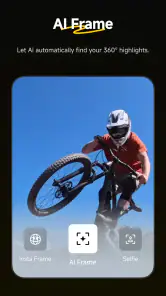
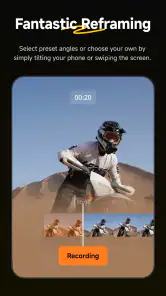
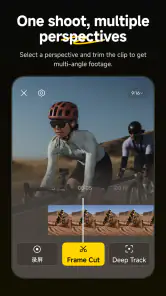
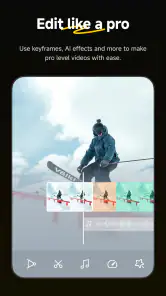
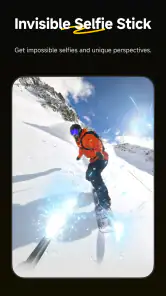
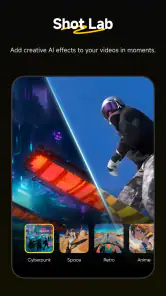
Analysis by Reviewed
I judge a camera companion by how much useful work it does between recording and sharing, not by how many effects it can put on a screen. Insta360 is most convincing when I have footage from the company’s cameras or handheld gimbals and want to shape it without moving straight to a desktop editor. It offers creative tools aimed at that material, but its focus is also its main boundary: I would not install it as my everyday editor for every clip on my phone.
That distinction matters before you invest time learning the workflow. If your videos come from Insta360 gear, the app can help you make more of the recording, especially when you want to choose a view after filming or give a short highlight a distinctive treatment. If you mainly trim ordinary phone footage, combine clips from different sources, or add routine titles, a general-purpose mobile editor is likely to feel more natural.
Where the camera-first workflow pays off
The appeal is not simply having editing tools on a phone. It is being able to make decisions about footage that was captured with Insta360 equipment, including material where the eventual framing may be chosen later. That can change how I approach recording: instead of trying to point at exactly the right detail every second, I can focus on capturing the moment and make the presentation choices during editing.
Consider a walk through a busy market. I might want to keep moving rather than stop to compose every small scene, then later select a few moments that tell the story: a stall, a passing crowd, a friend reacting to something, and the wider atmosphere. A camera-focused editing workflow is helpful here because I can decide which parts deserve attention after I have seen the complete recording. It is not a reason to film carelessly, though; a thoughtful route and a clear idea of what matters still make the edit better.
The app also makes more sense when a clip has a subject or movement worth emphasizing. A short recording of a dog running, a group setting off on a hike, or a family gathering can benefit from selecting a clear point of interest rather than leaving the whole scene equally prominent. I would use the editing stage to ask a simple question: what should a viewer notice first? That small choice often improves a clip more than adding another effect.
Tools that help, and how I would use them
Ever since I stumbled upon Insta360, my world of capturing moments has transformed dramatically. Now, if you're anything like me, always on the lookout for apps that can elevate your content game, then buckle up! This app is about to become your new best friend.
That enthusiasm needs one important qualification: this is an editing companion for Insta360 cameras and handheld gimbals, not a general-purpose video editor that can replace every tool on your phone. I would choose it when the footage comes from compatible Insta360 gear and I want to shape it in the same place I manage the camera workflow. If I were only trimming ordinary phone clips, a familiar editor would usually be the simpler choice.
More From Our News Desk

Clash of Clans Is Won Between the Battles

Android Auto Makes the Case for Quieter Car Software

MobiOffice: Transforming Mobile Productivity with Seamless Integration

EA SPORTS FC™ Mobile Soccer: Redefining Mobile Sports Gaming

How Microsoft OneDrive Became a Mobile Productivity Giant

How Google Translate Breaks Language Barriers Effortlessly
Why Insta360 is a Game-Changer
Let me paint a picture for you. Imagine having the ability to create those jaw-dropping 360-degree videos that have taken Instagram and TikTok by storm. That's exactly what Insta360 offers, and more. The app works seamlessly with Insta360 cameras, offering a plethora of features that can turn any mundane video into a cinematic masterpiece.
The practical advantage is the chance to make creative decisions after recording rather than trying to get every angle perfect in the moment. On a walk, for example, I could concentrate on keeping the camera moving safely and steadily, then choose how to present the captured scene while editing. That flexibility is useful for travel, outdoor activities, and family clips where it is hard to predict which moment will make the best final shot.
Features that Impress
First off, the app provides an intuitive interface. I mean, who wants to spend hours figuring out how to use an app, right? With Insta360, you dive straight into the action. I was particularly impressed by the "FlowState Stabilization" feature. It's like having a built-in gimbal, ensuring your footage is buttery smooth, even if your hands are shaking like a leaf in the wind.
For the best result, I would still treat stabilization as help rather than a substitute for careful filming. A steady walking pace and a deliberate camera path make editing easier, especially if the finished clip will be watched on a small screen. I would also review the full sequence before exporting: a smooth shot can still feel confusing if the framing changes too often or the key action happens at the edge.
Another standout feature is "Deep Track." Picture this: you're filming your hyperactive dog at the park. Normally, keeping the focus on your pet would be a nightmare, but not with this app. It locks onto your subject and keeps them perfectly framed. Absolute magic!
Subject tracking is most useful when the action is clear and the subject stays visible. If a person or pet disappears behind a tree or another passerby, I would check the framing rather than assuming the app made the right choice throughout. That quick review can save an otherwise strong clip from ending with the subject drifting out of view.
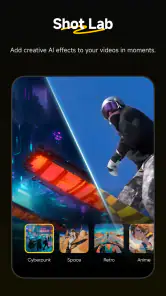
And let’s not forget the "Shot Lab." For those times you want to get creative, Shot Lab offers a variety of pre-set templates that can transform your clips into impressive mini-movies. It's perfect for those days when creativity is running low, but you still want to impress your followers.
Templates are a good starting point, not a guarantee that every clip will suit the same treatment. I would try one on a short section first and see whether its pacing fits the action; a dramatic effect can distract from a quiet family moment. For a trip recap, a template can help create a shareable highlight, while a longer recording may be better handled with a more selective edit.
A practical edit, from recording to share
For a realistic weekend workflow, I would first separate the moments I actually want to keep from the stretches that simply document getting from one place to another. Then I would edit a short highlight rather than trying to make a long recording entertaining from beginning to end. This is a useful discipline with immersive footage: the ability to explore a scene does not mean every possible view belongs in the final cut.
When a clip includes a moving subject, I would use tracking selectively and watch the result from start to finish. A tool can help maintain attention, but the most interesting subject is not always the one that should dominate every second. For example, a child running toward a group may be the focus at first, while the group’s reaction becomes the more meaningful ending. Reviewing the whole edit helps me notice that change and adjust the emphasis rather than letting one choice dictate the entire clip.
I would also keep a clean original recording until I am happy with the edited version. That gives me room to try a different framing or a less elaborate treatment without feeling that the first attempt has to be final. For travel footage, I might make one energetic short clip for sharing and keep a calmer version for personal viewing. The trade-off is extra selection and review time, but that is preferable to applying a template to everything and ending up with a string of edits that all feel alike.
Usability and Performance
In terms of usability, I found the app to be incredibly user-friendly. The learning curve? Practically non-existent. Even if you're new to video editing, the app guides you every step of the way. The performance is top-notch too; I experienced zero lag or crashes, which is a major win in my book.
My day-to-day workflow would be to connect the camera, pick a few worthwhile moments instead of editing every minute, try reframing or a tracking tool where it helps, and then watch the finished clip once before sharing. That last check matters: edits that look impressive while making them can feel too busy when played back in sequence. If storage or editing time is limited, choosing a handful of short highlights is more manageable than treating every recording as a project.
And yes, let’s talk about compatibility. Whether you’re on Android or iOS, Insta360 has got you covered. The app functions smoothly across platforms, which is a huge relief for someone like me who’s always switching devices.
Insta360 is free to install and is rated for Everyone, but some in-app purchases range from small optional items to higher-priced offerings. I would check the purchase screen carefully before confirming anything, especially if a feature prompts an upgrade. The app has reached over a million installs, and its 3.3 average from around 37,000 ratings suggests that experiences vary; I would approach it as a specialized companion, not assume it will suit every phone-editing habit.
What to expect from the trade-offs
The question I would ask before downloading is not just whether the app is free, but whether I have the right footage to make it useful. Its camera-oriented purpose is a real advantage for an Insta360 owner, yet it makes the app a poor substitute for a broad editor if my projects are built from assorted phone clips. I would also be prepared to spend time choosing and reviewing footage: creative flexibility is valuable, but it does not remove the work of deciding what belongs in a finished video.
There is a difference between a tool being approachable and every result being effortless. Stabilization can smooth movement, subject tracking can help keep an action in frame, and templates can give a clip a quick style, but each still benefits from a human check. I would not assume that a result is ready to share just because an effect looks impressive in the editing view. Watching it through once is the best way to catch abrupt framing changes, a lost subject, or a template whose rhythm does not suit the moment.
For someone deciding between this and a standard mobile editor, I would make the choice based on the source and goal. If I want to assemble unrelated clips, add simple text, or produce a conventional montage quickly, a general editor is the practical pick. If I have Insta360 footage and want to shape its view or use tools made for that camera workflow, this app has a clearer reason to be on my phone. Neither choice is universally better; the footage determines which one saves effort.
In a nutshell, if you're serious about stepping up your video content game, Insta360 is an app you can't afford to miss. It’s packed with features that cater to both amateurs and pros alike. Whether you're capturing a family vacation or shooting your next viral video, this app ensures your footage is nothing short of spectacular.
My recommendation is narrower but more useful: it is a strong option for people who already film with Insta360 cameras or handheld gimbals and want to turn those recordings into intentional clips. Insta360, the developer, has kept this free video-editing app focused on its own gear; the current version is 2.14.0, and it runs on Android 9 or later. The app first appeared on January 17, 2020, so it has had time to develop as a companion, though that does not make it the right fit for every editor.
Who I would recommend it to
I would put this app on the shortlist for Insta360 camera owners who regularly make travel, outdoor, family, or activity videos and want to edit near the source of the footage. It is particularly appealing if you enjoy revisiting a recording to decide how the scene should be presented, rather than committing to a single framing choice while filming. A beginner can start with a template or a straightforward short edit, while a more practiced creator can be more selective about tracking, movement, and pacing.
I would skip it if I do not own compatible Insta360 equipment, or if I mostly edit phone recordings that need routine cuts, captions, and combinations with clips from other sources. In that situation, a general-purpose editor is likely to provide a more direct path to the result I want. The same applies if I prefer to do detailed, long-form work on a larger screen; a phone-based companion is most compelling when convenience and camera-specific editing matter more than a broad project workflow.
The app is listed in the video editing category, and its current release is version 2.14.0. For Android users, the minimum operating system is Android 9; the app is also available for iOS. I would check that my device and camera workflow are suitable before planning a project around mobile editing. That is a small bit of preparation that can prevent a frustrating first session, especially when I am traveling and want to make a clip while the moment is still fresh.
So, what are you waiting for? Dive into the world of 360-degree video with Insta360 and watch your creativity soar. Trust me, once you start using it, you’ll wonder how you ever lived without it!
I would try it when I have compatible footage and a specific reason to reframe, track a moving subject, or use a ready-made creative treatment. If my needs are basic cuts, straightforward titles, or editing clips from several unrelated sources, I would reach for a general editor instead. For the right camera owner, though, this app can make the step from recording to a polished short video feel much more direct.
My final view is that Insta360 is a focused companion rather than a universal recommendation. Its best case is clear: I have footage made with Insta360 gear, I want to work through it on a phone, and I am willing to review the choices before sharing. In that situation, the camera-oriented tools can make the edit feel more purposeful. If that does not describe how I shoot, I would save the space and use an editor built for the footage I actually make.
Insta360 Frequently Asked Questions
What kind of app is Insta360, and who makes it?
Insta360 is a video editing app made by Insta360, designed as a full editing room to accompany the company’s cameras and handheld gimbals. It is most relevant if you already use, or are considering, Insta360 equipment and want a place to work with its footage. The app is free to download, with optional in-app purchases.
What Android version do I need to run Insta360?
On Android, Insta360 requires Android 9 or later. Before downloading, check the operating system version on your phone or tablet, particularly if the device is older. The app is also available for iOS, but its iOS requirements can differ. Meeting the minimum system requirement is a useful first check before deciding whether the app fits your device.
Is Insta360 mainly for editing existing footage, or can it also control a camera while recording?
Insta360 is described as a full editing room to accompany Insta360 cameras and handheld gimbals, so it is intended to support both capturing and working with footage. The app can be used to control camera settings and preview shots, as well as edit content. Its usefulness before downloading depends on whether you have compatible Insta360 equipment for the camera-related features.
What is Insta360 and how does it work?
Insta360 is a versatile camera app designed to capture 360-degree photos and videos, providing an immersive viewing experience. Users can control the camera's settings, preview shots, and edit footage directly within the app. The app offers various modes, such as time-lapse and slow motion, and supports live streaming, making it ideal for capturing dynamic content with ease.
What devices are compatible with Insta360?
Insta360 is compatible with a range of Android and iOS devices. However, to ensure optimal performance, it's recommended to use the app with the latest smartphones that support high processing power and advanced graphics capabilities. Users should check the app's compatibility list on the official Insta360 website or app store page to confirm if their device is supported. The app requires Android 9 or later.
Pros
- High-quality 360-degree video capture.
- User-friendly interface for easy editing.
- Supports live streaming directly from app.
- Wide range of creative effects and filters.
- Regular updates with new features.
Cons
- Requires a compatible Insta360 camera device.
- Large video files consume significant storage.
- Battery drains quickly with prolonged use.
- Occasional app crashes during intensive tasks.
- Limited customer support responsiveness.
- Category
- Video Players & Editors
- Version
- 2.14.0











